
Learn the Web Audio API by Making Sound
Foundations of Web Audio Programming
From a Click to a Tone, a Filter and a Beat
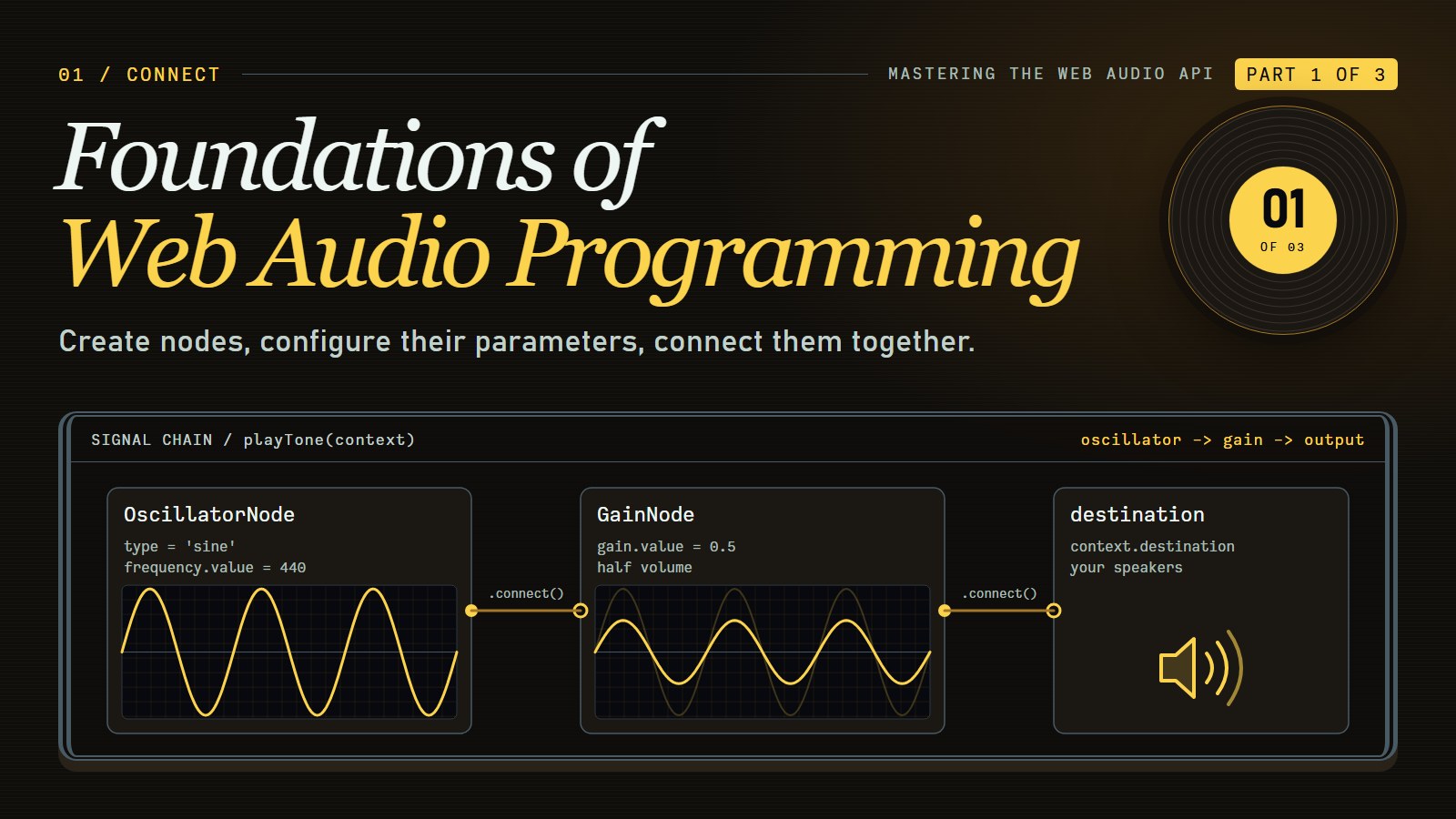
By the end of this post you will play a note from a key press on a page you built yourself, and you will know what each line between the key and your speakers is doing. Along the way we make a tone, filter it, play a file, and schedule a drum pattern.
Introduction to Web Audio: Beyond the Simple Play Button#
Adding sound to a website used to mean dropping in an <audio> tag and hoping for the best. That tag plays a file. The Web Audio API lets your code make sound, change it while it plays, and time it precisely. It is a browser feature, not a library.
Why care about programmatic audio? Sound gives immediate feedback, and it can carry information that visuals alone cannot. If you are building games, educational tools, music apps, or data visualizations, the Web Audio API gives you fine control over what the user hears.
The Audio Building Blocks: Understanding the Node-Based Architecture#
At the heart of the Web Audio API is a paradigm that might feel familiar if you've worked with graphics processing: the audio routing graph. Think of it as a series of specialized audio components (nodes) connected together like building blocks, each performing specific functions on the audio signal as it flows through.
The graph lets you:
-
Construct complex audio processing chains with minimal code
-
Process audio in real-time with high performance
-
Create dynamic, responsive audio that adapts to user input
-
Build whole audio applications directly in the browser
Each node in this graph serves a specific purpose—generating sound, applying effects, analyzing audio data, or routing signals to different destinations. By connecting these nodes in various configurations, you can build anything from a simple tone generator to a full-featured digital audio workstation.
Meet the AudioContext: Your Gateway to Web Audio#
Before we can create any sound, we need to establish our audio environment through an AudioContext—the foundation upon which all Web Audio applications are built.
// One context for the whole page. Keep it in a variable the rest of your code can reach.
let audioContext = null;

document.getElementById('startButton').addEventListener('click', () => {
    // Safari before 14.1 (2021) only had the prefixed name; current browsers do not need the fallback
    const Ctx = window.AudioContext || window.webkitAudioContext;
    if (!audioContext) audioContext = new Ctx();

    // A context made before a gesture can start out "suspended"; resume() wakes it
    if (audioContext.state === 'suspended') audioContext.resume();

    playTone(audioContext); // the function from the next section
});
The AudioContext creates audio nodes, runs the audio processing, and keeps the clock (audioContext.currentTime, in seconds) that makes precise timing possible. It's your audio environment's command center.
There is a catch. Browsers do not let a page make sound until the reader has interacted with it (a click, a tap, a key press), and the exact rules differ a little between browsers. A context made before that can start out suspended, which is why we check audioContext.state. As of October 2026, MDN's advice is still to create or resume the context from inside a user gesture. So the context is created inside a click handler, stored in audioContext so every later function can use it, and handed to playTone(audioContext) below. That is how the pieces in this post connect on a real page: one button, one context, many functions that take it as a parameter.
Your First Sound: Creating Audio from Scratch#
Let's put theory into practice by creating the simplest possible sound—a pure tone. Two words first:
- Frequency is how fast the sound wave repeats, measured in hertz (Hz), repeats per second. Higher frequency sounds higher in pitch. 440 Hz is the note A above middle C, called A4, the pitch orchestras tune to.
- Waveform is the shape of one repeat. A sine wave is the smoothest shape and sounds pure and soft. A sawtooth ramps up and drops sharply, and sounds bright and buzzy.
function playTone(context) {
    // Create an oscillator (sound generator)
    const oscillator = context.createOscillator();

    // Set the frequency (in Hz) and waveform type
    oscillator.frequency.value = 440; // A4 note
    oscillator.type = 'sine'; // Pure sine wave

    // Create a gain node for volume control
    const gainNode = context.createGain();
    gainNode.gain.value = 0.5; // Half volume

    // Connect the nodes: oscillator -> gain -> output
    oscillator.connect(gainNode);
    gainNode.connect(context.destination);

    // Start the oscillator and stop it after 1 second
    oscillator.start();
    oscillator.stop(context.currentTime + 1);
}
This simple example demonstrates the core workflow of Web Audio: create nodes, configure their parameters, connect them together, and then trigger audio events with precise timing.
Two details are worth slowing down for.
connect wires one node's output into the next node's input. Sound flows along the wires from the oscillator, through the gain node, to context.destination, which stands for your speakers or headphones. A node that is not connected, directly or through others, to the destination makes no audible sound.
gain.value is a plain multiplier, not decibels. 1 passes the signal at full scale, 0.5 halves its amplitude, 0 is silence. Why send the oscillator through a gain node at all? An oscillator has no volume control of its own; it always produces a full-strength wave. The gain node is the volume knob you place after it, and it is also where you will later fade a note in and out. Full scale is loud, so when you experiment, stay at or below 0.5 and keep your device volume low.
Predict, then change#
Here is the whole chain on one page: a button, a context, and the tone from above, one second long. Press Run, then Play, and listen. Before each change below, say what you expect to hear, then edit the js tab, press Run again, and check.
---html
<button id="play">Play one second</button>
---js
let audioContext = null;

function playTone(context) {
  const oscillator = context.createOscillator();
  oscillator.frequency.value = 440; // change me
  oscillator.type = 'sine';

  const gainNode = context.createGain();
  gainNode.gain.value = 0.5; // change me

  oscillator.connect(gainNode);
  gainNode.connect(context.destination);
  oscillator.start();
  oscillator.stop(context.currentTime + 1);
}

document.getElementById('play').addEventListener('click', () => {
  const Ctx = window.AudioContext || window.webkitAudioContext;
  if (!audioContext) audioContext = new Ctx();
  if (audioContext.state === 'suspended') audioContext.resume();
  playTone(audioContext);
});
- Set the gain to
0.1. You should hear the same pitch, much quieter. - Put the gain back to
0.5, then change440to220. Half the frequency is one octave lower, so the note drops and sounds deeper. - Change
220to880. Double the frequency is an octave above A4, so the note is higher and thinner.
An octave is the jump between a note and the note with double its frequency. They sound like "the same note" at two heights. If you hear nothing, check that the tab is not muted and that you pressed Play after Run.
---html
<div class="container">
	<h1>Web Audio API - Basic Oscillator</h1>
	<p>This example demonstrates how to create sound using an oscillator node in the Web Audio API. Click "Start Sound" to begin, then experiment with the frequency and waveform type.</p>

	<div>
		<button id="startButton">Start Sound</button>
		<button id="stopButton" disabled>Stop Sound</button>
	</div>

	<div class="controls">
		<div class="control-group">
			<label for="frequency">Frequency (Hz)</label>
			<input type="range" id="frequency" min="20" max="2000" value="440" step="1">
			<div class="value-display">Current: <span id="frequencyValue">440 Hz</span></div>
		</div>

		<div class="control-group">
			<label>Waveform Type</label>
			<div class="waveform-buttons">
				<button class="waveform-btn active" data-waveform="sine">Sine</button>
				<button class="waveform-btn" data-waveform="square">Square</button>
				<button class="waveform-btn" data-waveform="sawtooth">Sawtooth</button>
				<button class="waveform-btn" data-waveform="triangle">Triangle</button>
			</div>
		</div>
	</div>
</div>
---css
:root {
	--bg-color: #f7f9fc;
	--container-bg: white;
	--text-color: #333;
	--heading-color: #2a5885;
	--button-bg: #4c84c3;
	--button-hover: #3a6da0;
	--button-active: #2a5885;
	--button-disabled: #cccccc;
	--secondary-text: #666;
	--border-color: #ddd;
	--shadow: rgba(0, 0, 0, 0.1);
}

@media (prefers-color-scheme: dark) {
	:root {
		--bg-color: #121212;
		--container-bg: #1e1e1e;
		--text-color: #e0e0e0;
		--heading-color: #64b5f6;
		--button-bg: #2a5885;
		--button-hover: #3a6da0;
		--button-active: #4c84c3;
		--button-disabled: #444444;
		--secondary-text: #aaaaaa;
		--border-color: #444;
		--shadow: rgba(0, 0, 0, 0.3);
	}
}

body {
	font-family: "Segoe UI", Tahoma, Geneva, Verdana, sans-serif;
	max-width: 800px;
	margin: 0 auto;
	padding: 20px;
	background-color: var(--bg-color);
	color: var(--text-color);
	transition: background-color 0.3s, color 0.3s;
}
.container {
	background-color: var(--container-bg);
	border-radius: 8px;
	padding: 20px;
	box-shadow: 0 2px 10px var(--shadow);
	transition: background-color 0.3s;
}
h1 {
	color: var(--heading-color);
	margin-top: 0;
}
button {
	background-color: var(--button-bg);
	color: white;
	border: none;
	padding: 10px 15px;
	border-radius: 4px;
	cursor: pointer;
	font-size: 16px;
	margin-right: 10px;
	margin-bottom: 10px;
	transition: background-color 0.2s;
}
button:hover {
	background-color: var(--button-hover);
}
button:disabled {
	background-color: var(--button-disabled);
	cursor: not-allowed;
}
.controls {
	margin: 20px 0;
	display: flex;
	flex-wrap: wrap;
	gap: 20px;
}
.control-group {
	margin-bottom: 15px;
	flex: 1;
	min-width: 200px;
}
label {
	display: block;
	margin-bottom: 5px;
	font-weight: bold;
}
input[type="range"] {
	width: 100%;
	accent-color: var(--button-bg);
}
.value-display {
	font-size: 14px;
	color: var(--secondary-text);
	margin-top: 5px;
}
.waveform-buttons {
	display: flex;
	flex-wrap: wrap;
	gap: 10px;
}
.waveform-buttons button {
	flex: 1;
	min-width: 80px;
}
.active {
	background-color: var(--button-active);
}
---js
// Audio context and nodes
let audioContext;
let oscillator;
let gainNode;
let isPlaying = false;

// DOM Elements
const startButton = document.getElementById("startButton");
const stopButton = document.getElementById("stopButton");
const frequencySlider = document.getElementById("frequency");
const frequencyValueDisplay = document.getElementById("frequencyValue");
const waveformButtons = document.querySelectorAll(".waveform-btn");

// Current settings
let currentWaveform = "sine";

// Initialize audio context on user interaction
startButton.addEventListener("click", () => {
  if (!audioContext) {
    // Create audio context
    audioContext = new (window.AudioContext || window.webkitAudioContext)();

    // Create gain node
    gainNode = audioContext.createGain();
    gainNode.gain.value = 0.5; // Set volume to 50%
    gainNode.connect(audioContext.destination);
  }

  if (!isPlaying) {
    startSound();
  }
});

stopButton.addEventListener("click", stopSound);

// Start sound
function startSound() {
  // Create oscillator
  oscillator = audioContext.createOscillator();
  oscillator.type = currentWaveform;
  oscillator.frequency.value = frequencySlider.value;

  // Connect oscillator to gain node
  oscillator.connect(gainNode);

  // Start oscillator
  oscillator.start();
  isPlaying = true;

  // Update UI
  startButton.disabled = true;
  stopButton.disabled = false;
}

// Stop sound
function stopSound() {
  if (oscillator) {
    oscillator.stop();
    oscillator.disconnect();
    oscillator = null;
  }

  isPlaying = false;

  // Update UI
  startButton.disabled = false;
  stopButton.disabled = true;
}

// Update frequency when slider is moved
frequencySlider.addEventListener("input", () => {
  const newFrequency = frequencySlider.value;
  frequencyValueDisplay.textContent = `${newFrequency} Hz`;

  if (oscillator) {
    oscillator.frequency.value = newFrequency;
  }
});

// Handle waveform button clicks
waveformButtons.forEach(button => {
  button.addEventListener("click", () => {
    // Update active button state
    waveformButtons.forEach(btn => btn.classList.remove("active"));
    button.classList.add("active");

    // Get selected waveform
    currentWaveform = button.dataset.waveform;

    // Update oscillator waveform if playing
    if (oscillator) {
      oscillator.type = currentWaveform;
    }
  });
});
Beyond Simple Tones: Loading and Playing Audio Files#
While generating tones is fun, most applications need to work with pre-recorded audio. The steps are: download the file's bytes, decode them (turn an MP3 or WAV into raw sound samples the API can play), then play the decoded result through a buffer source node. The function below takes the context from earlier and a url you supply, for example '/sounds/click.mp3' for a file on your own site (the file must come from your site or a server that allows cross-origin requests):
async function playAudioFile(context, url) {
    try {
        // Fetch the audio file
        const response = await fetch(url);
        const arrayBuffer = await response.arrayBuffer();

        // Decode the audio data
        const audioBuffer = await context.decodeAudioData(arrayBuffer);

        // Create a buffer source node
        const source = context.createBufferSource();
        source.buffer = audioBuffer;

        // Connect to destination and play
        source.connect(context.destination);
        source.start();

        return source; // Return for later reference
    } catch (error) {
        console.error('Error loading audio:', error);
    }
}
fetch(url) downloads the file, arrayBuffer() hands you its raw bytes, and context.decodeAudioData(...) turns those bytes into an AudioBuffer (the decoded sound, held in memory). The Promise-based form means each step waits for the one before it without freezing the page. A buffer source node plays once; to play the sound again, create a new source from the same audioBuffer.
---html
<div class="container">
	<h1>Web Audio API - Audio Visualizer</h1>
	<p>Choose an audio source to visualize. This demonstrates real-time audio analysis using the AnalyserNode.</p>

	<div class="controls">
		<button id="micButton">Use Microphone</button>
		<div class="volume-control">
			<label for="volume-slider">Volume:</label>
			<input type="range" id="volume-slider" min="0" max="1" step="0.01" value="0.5">
		</div>
	</div>

	<div class="file-container">
		<label for="audio-file">Or choose an audio file:</label>
		<input type="file" id="audio-file" accept="audio/*">
	</div>

	<div class="mic-instructions" id="mic-status"></div>

	<div class="visualizer-container">
		<canvas id="visualizer-canvas"></canvas>
		<div class="vis-options">
			<div class="vis-type active" data-type="frequency">Frequency Spectrum</div>
			<div class="vis-type" data-type="waveform">Waveform</div>
			<div class="vis-type" data-type="circular">Circular</div>
		</div>
	</div>
</div>
---css
:root {
	--bg-color: #f7f9fc;
	--container-bg: white;
	--text-color: #333;
	--heading-color: #2a5885;
	--button-bg: #4c84c3;
	--button-hover: #3a6da0;
	--button-active: #4c84c3;
	--button-disabled: #cccccc;
	--secondary-text: #666;
	--border-color: #ddd;
	--canvas-bg: #000;
	--vis-type-bg: transparent;
	--vis-type-active-bg: #4c84c3;
	--vis-type-active-border: #3a6da0;
	--shadow: rgba(0, 0, 0, 0.1);
}

@media (prefers-color-scheme: dark) {
	:root {
		--bg-color: #121212;
		--container-bg: #1e1e1e;
		--text-color: #e0e0e0;
		--heading-color: #64b5f6;
		--button-bg: #2a5885;
		--button-hover: #3a6da0;
		--button-active: #4c84c3;
		--button-disabled: #444444;
		--secondary-text: #aaaaaa;
		--border-color: #444;
		--canvas-bg: #000;
		--vis-type-bg: #333333;
		--vis-type-active-bg: #4c84c3;
		--vis-type-active-border: #64b5f6;
		--shadow: rgba(0, 0, 0, 0.3);
	}
}

body {
	font-family: "Segoe UI", Tahoma, Geneva, Verdana, sans-serif;
	max-width: 800px;
	margin: 0 auto;
	padding: 20px;
	background-color: var(--bg-color);
	color: var(--text-color);
	transition: background-color 0.3s, color 0.3s;
}
.container {
	background-color: var(--container-bg);
	border-radius: 8px;
	padding: 20px;
	box-shadow: 0 2px 10px var(--shadow);
	transition: background-color 0.3s;
}
h1 {
	color: var(--heading-color);
	margin-top: 0;
}
.controls {
	margin: 20px 0;
	display: flex;
	flex-wrap: wrap;
	gap: 15px;
	align-items: center;
}
button {
	background-color: var(--button-bg);
	color: white;
	border: none;
	padding: 10px 15px;
	border-radius: 4px;
	cursor: pointer;
	font-size: 16px;
	transition: background-color 0.2s;
}
button:hover {
	background-color: var(--button-hover);
}
button:disabled {
	background-color: var(--button-disabled);
	cursor: not-allowed;
}
.visualizer-container {
	margin-top: 20px;
}
#visualizer-canvas {
	width: 100%;
	height: 200px;
	background-color: var(--canvas-bg);
	border-radius: 4px;
}
.vis-options {
	margin-top: 10px;
	display: flex;
	gap: 10px;
}
.vis-type {
	padding: 5px 10px;
	border: 1px solid var(--border-color);
	border-radius: 4px;
	cursor: pointer;
	font-size: 14px;
	background-color: var(--vis-type-bg);
	transition: background-color 0.2s, color 0.2s, border-color 0.2s;
}
.vis-type.active {
	background-color: var(--vis-type-active-bg);
	color: white;
	border-color: var(--vis-type-active-border);
}
input[type="file"] {
	margin-top: 10px;
	color: var(--text-color);
}
.file-container {
	margin-top: 20px;
}
.mic-instructions {
	font-size: 14px;
	color: var(--secondary-text);
	margin-top: 5px;
}
.volume-control {
	display: flex;
	align-items: center;
	gap: 10px;
}
#volume-slider {
	width: 150px;
	accent-color: var(--button-bg);
}
/* Style file input for better dark mode compatibility */
input[type="file"]::-webkit-file-upload-button {
	background-color: var(--button-bg);
	color: white;
	border: none;
	padding: 8px 12px;
	border-radius: 4px;
	cursor: pointer;
	font-size: 14px;
	transition: background-color 0.2s;
}
input[type="file"]::-webkit-file-upload-button:hover {
	background-color: var(--button-hover);
}
---js
// Audio context and nodes
let audioContext;
let audioSource;
let analyser;
let gainNode;
let animationId;
let isPlaying = false;
let visualizationType = "frequency";

// DOM Elements
const micButton = document.getElementById("micButton");
const audioFileInput = document.getElementById("audio-file");
const micStatus = document.getElementById("mic-status");
const visualizerCanvas = document.getElementById("visualizer-canvas");
const visualizerTypes = document.querySelectorAll(".vis-type");
const volumeSlider = document.getElementById("volume-slider");

// Canvas context
const canvasCtx = visualizerCanvas.getContext("2d");

// Fix canvas resolution
function setupCanvas() {
  // Set display size (css pixels)
  const width = visualizerCanvas.clientWidth;
  const height = visualizerCanvas.clientHeight;

  // Set actual size in memory (scaled to account for extra pixel density)
  const scale = window.devicePixelRatio;
  visualizerCanvas.width = width * scale;
  visualizerCanvas.height = height * scale;

  // Normalize coordinate system to use css pixels
  canvasCtx.scale(scale, scale);

  return { width, height };
}

const canvasDimensions = setupCanvas();

// Initialize audio context when needed
function initAudio() {
  if (!audioContext) {
    audioContext = new (window.AudioContext || window.webkitAudioContext)();

    // Create analyser node
    analyser = audioContext.createAnalyser();
    analyser.fftSize = 2048;

    // Create gain node for volume control
    gainNode = audioContext.createGain();
    gainNode.gain.value = volumeSlider.value;

    // Connect gain to analyser
    gainNode.connect(analyser);

    // Connect analyser to destination
    analyser.connect(audioContext.destination);
  }
}

// Start microphone input
async function startMicrophone() {
  initAudio();

  try {
    // Stop any current audio
    stopAudio();

    // Get microphone access
    const stream = await navigator.mediaDevices.getUserMedia({ audio: true });

    // Create media stream source
    audioSource = audioContext.createMediaStreamSource(stream);

    // Connect to gain node
    audioSource.connect(gainNode);

    // Update status
    micStatus.textContent =
    "Microphone is active. Speak or make sounds to see visualization.";
    micButton.textContent = "Stop Microphone";

    // Start visualization
    isPlaying = true;
    startVisualization();
  } catch (err) {
    console.error("Error accessing microphone:", err);
    micStatus.textContent =
    "Error accessing microphone. Please make sure you have a microphone and have granted permission.";
  }
}

// Handle audio file selection
function handleAudioFile(event) {
  const file = event.target.files[0];

  if (file) {
    initAudio();

    // Stop any current audio
    stopAudio();

    // Create a file reader to read the audio file
    const reader = new FileReader();

    reader.onload = function (e) {
      // Decode the audio data
      audioContext.
      decodeAudioData(e.target.result).
      then(buffer => {
        // Create buffer source
        audioSource = audioContext.createBufferSource();
        audioSource.buffer = buffer;

        // Connect to gain node
        audioSource.connect(gainNode);

        // Start playing
        audioSource.start(0);
        isPlaying = true;

        // Update status
        micStatus.textContent = `Playing: ${file.name}`;
        micButton.textContent = "Use Microphone";

        // Start visualization
        startVisualization();

        // Handle when audio finishes playing
        audioSource.onended = function () {
          isPlaying = false;
          cancelAnimationFrame(animationId);
          micStatus.textContent = "Audio playback finished.";
        };
      }).
      catch(err => {
        console.error("Error decoding audio file:", err);
        micStatus.textContent =
        "Error decoding audio file. Please try a different file format.";
      });
    };

    reader.onerror = function (err) {
      console.error("Error reading file:", err);
      micStatus.textContent = "Error reading file.";
    };

    // Read the file as an array buffer
    reader.readAsArrayBuffer(file);
  }
}

// Stop audio playback and input
function stopAudio() {
  if (audioSource) {
    if (audioSource.stop) {
      audioSource.stop();
    }
    if (audioSource.mediaStream) {
      audioSource.mediaStream.getTracks().forEach(track => track.stop());
    }
    audioSource.disconnect();
    audioSource = null;
  }

  isPlaying = false;
  cancelAnimationFrame(animationId);
  micStatus.textContent = "";
  micButton.textContent = "Use Microphone";
}

// Start visualization loop
function startVisualization() {
  // Set up analyzer based on current settings
  if (visualizationType === "frequency" || visualizationType === "circular") {
    analyser.fftSize = 2048;
  } else {
    analyser.fftSize = 2048;
  }

  // Draw based on visualization type
  animationId = requestAnimationFrame(drawVisualization);
}

// Draw visualization based on selected type
function drawVisualization() {
  if (!isPlaying) return;

  switch (visualizationType) {
    case "frequency":
      drawFrequencyVisualization();
      break;
    case "waveform":
      drawWaveformVisualization();
      break;
    case "circular":
      drawCircularVisualization();
      break;}


  animationId = requestAnimationFrame(drawVisualization);
}

// Draw frequency spectrum visualization
function drawFrequencyVisualization() {
  const bufferLength = analyser.frequencyBinCount;
  const dataArray = new Uint8Array(bufferLength);

  analyser.getByteFrequencyData(dataArray);

  const width = canvasDimensions.width;
  const height = canvasDimensions.height;

  // Clear canvas
  canvasCtx.fillStyle = "rgb(0, 0, 0)";
  canvasCtx.fillRect(0, 0, width, height);

  // Draw frequency bars
  const barWidth = width / bufferLength * 2.5;
  let x = 0;

  for (let i = 0; i < bufferLength; i++) {
    const barHeight = dataArray[i] / 255 * height;

    // Create gradient color based on frequency
    const hue = i / bufferLength * 360;
    canvasCtx.fillStyle = `hsl(${hue}, 100%, 50%)`;

    canvasCtx.fillRect(x, height - barHeight, barWidth, barHeight);

    x += barWidth + 1;
  }
}

// Draw waveform visualization
function drawWaveformVisualization() {
  const bufferLength = analyser.fftSize;
  const dataArray = new Uint8Array(bufferLength);

  analyser.getByteTimeDomainData(dataArray);

  const width = canvasDimensions.width;
  const height = canvasDimensions.height;

  // Clear canvas
  canvasCtx.fillStyle = "rgb(0, 0, 0)";
  canvasCtx.fillRect(0, 0, width, height);

  // Draw waveform
  canvasCtx.lineWidth = 2;
  canvasCtx.strokeStyle = "rgb(0, 255, 0)";
  canvasCtx.beginPath();

  const sliceWidth = width / bufferLength;
  let x = 0;

  for (let i = 0; i < bufferLength; i++) {
    const v = dataArray[i] / 128.0;
    const y = v * height / 2;

    if (i === 0) {
      canvasCtx.moveTo(x, y);
    } else {
      canvasCtx.lineTo(x, y);
    }

    x += sliceWidth;
  }

  canvasCtx.lineTo(width, height / 2);
  canvasCtx.stroke();
}

// Draw circular visualization
function drawCircularVisualization() {
  const bufferLength = analyser.frequencyBinCount;
  const dataArray = new Uint8Array(bufferLength);

  analyser.getByteFrequencyData(dataArray);

  const width = canvasDimensions.width;
  const height = canvasDimensions.height;
  const centerX = width / 2;
  const centerY = height / 2;
  const radius = Math.min(width, height) / 3;

  // Clear canvas
  canvasCtx.fillStyle = "rgb(0, 0, 0)";
  canvasCtx.fillRect(0, 0, width, height);

  // Draw circular bars
  for (let i = 0; i < bufferLength; i++) {
    // Use only every nth value for smoother visualization
    if (i % 4 !== 0) continue;

    const barHeight = dataArray[i] / 255 * radius;
    const angle = i / bufferLength * Math.PI * 2;

    const x1 = centerX + Math.cos(angle) * radius;
    const y1 = centerY + Math.sin(angle) * radius;
    const x2 = centerX + Math.cos(angle) * (radius + barHeight);
    const y2 = centerY + Math.sin(angle) * (radius + barHeight);

    // Create gradient color based on frequency
    const hue = i / bufferLength * 360;
    canvasCtx.strokeStyle = `hsl(${hue}, 100%, 50%)`;
    canvasCtx.lineWidth = 2;

    canvasCtx.beginPath();
    canvasCtx.moveTo(x1, y1);
    canvasCtx.lineTo(x2, y2);
    canvasCtx.stroke();
  }
}

// Event listeners
micButton.addEventListener("click", () => {
  if (audioSource && audioSource.mediaStream) {
    stopAudio();
  } else {
    startMicrophone();
  }
});

audioFileInput.addEventListener("change", handleAudioFile);

// Visualization type selection
visualizerTypes.forEach(visType => {
  visType.addEventListener("click", () => {
    visualizerTypes.forEach(el => el.classList.remove("active"));
    visType.classList.add("active");
    visualizationType = visType.dataset.type;
  });
});

// Volume control
volumeSlider.addEventListener("input", () => {
  if (gainNode) {
    gainNode.gain.value = volumeSlider.value;
  }
});

// Handle window resize
window.addEventListener("resize", () => {
  Object.assign(canvasDimensions, setupCanvas());
});
Shaping Your Sound: Essential Audio Processing#
Now that we can generate and play sounds, let's explore how to shape and manipulate them. The Web Audio API provides several essential processing nodes that you'll use in almost every project:
-
GainNode: Controls volume
-
StereoPannerNode: Positions sound in the stereo field
-
DelayNode: Creates echo and delay effects
-
BiquadFilterNode: Applies EQ and filtering (highpass, lowpass, etc.)
-
DynamicsCompressorNode: Controls dynamic range
Here's a simple example that creates a filter sweep effect—a common technique in electronic music:
function createFilterSweep(context, audioNode) {
    // Create a filter node
    const filter = context.createBiquadFilter();
    filter.type = 'lowpass';
    filter.frequency.value = 300; // Start with a low frequency

    // Connect our audio through the filter
    audioNode.connect(filter);
    filter.connect(context.destination);

    // Schedule a smooth frequency sweep
    // Start at 300Hz and go to 10000Hz over 2 seconds
    filter.frequency.exponentialRampToValueAtTime(
        10000,
        context.currentTime + 2
    );

    return filter;
}
This example shows two ideas:
-
Audio signal routing through a processing node
-
Parameter automation over time with precise scheduling
A low-pass filter lets low frequencies through and cuts the high ones; frequency is the cutoff, the point where the cutting starts. The path is now sources into filter into speakers: oscillator, then filter, then (through a gain) your output. Try it before reading on. Press Start, then drag the cutoff up and down. A sawtooth is rich in high overtones, so you can hear the filter remove them.
A sawtooth wave plays through a low-pass filter. With the cutoff at 6000 Hz nearly all of its overtones get through, and the note sounds bright and buzzy, like a cheap alarm. Drag the cutoff down toward 100 Hz and the high overtones are cut away, until what remains is the deep, rounded core of the note: muffled and mellow, like hearing music through a wall.
The signal path is oscillator, low-pass filter, analyser (which only draws the trace), gain, output. The output gain is set very low, but keep your device volume low as well, and stop the sound when you are done. Nothing plays until the reader starts it.
The slider moves filter.frequency, the same parameter the code above ramps from 300 Hz to 10000 Hz. Run that code on a sawtooth and you would hear the note start dull and open up into brightness over two seconds: a filter sweep.
The playground that follows uses a noise source. It is quiet by default (gain 0.1), but turn your volume down first and raise it slowly.
---html
<div class="container">
	<h1>Web Audio API - Filter Playground</h1>
	<p>This example demonstrates how to use BiquadFilterNode to process audio. Load a noise source and experiment with different filter types and settings.</p>

	<div>
		<button id="startButton">Start Noise</button>
		<button id="stopButton" disabled>Stop</button>
	</div>

	<div class="controls">
		<div class="control-group">
			<label>Filter Type</label>
			<div class="filter-buttons">
				<button class="filter-btn active" data-filter="lowpass">Lowpass</button>
				<button class="filter-btn" data-filter="highpass">Highpass</button>
				<button class="filter-btn" data-filter="bandpass">Bandpass</button>
				<button class="filter-btn" data-filter="notch">Notch</button>
			</div>
		</div>

		<div class="control-group">
			<label for="frequency">Frequency (Hz)</label>
			<input type="range" id="frequency" min="20" max="20000" value="1000" step="1">
			<div class="value-display">Current: <span id="frequencyValue">1000 Hz</span></div>
		</div>

		<div class="control-group">
			<label for="q">Resonance (Q)</label>
			<input type="range" id="q" min="0.1" max="20" value="1" step="0.1">
			<div class="value-display">Current: <span id="qValue">1</span></div>
		</div>
	</div>

	<canvas id="visualizer" width="760" height="200"></canvas>
</div>
---css
:root {
	--bg-color: #f7f9fc;
	--container-bg: white;
	--text-color: #333;
	--heading-color: #2a5885;
	--button-bg: #4c84c3;
	--button-hover: #3a6da0;
	--button-active: #2a5885;
	--button-disabled: #cccccc;
	--secondary-text: #666;
	--border-color: #ddd;
	--canvas-bg: #000;
	--frequency-bg: #f5f7fa;
	--shadow: rgba(0, 0, 0, 0.1);
}

@media (prefers-color-scheme: dark) {
	:root {
		--bg-color: #121212;
		--container-bg: #1e1e1e;
		--text-color: #e0e0e0;
		--heading-color: #64b5f6;
		--button-bg: #2a5885;
		--button-hover: #3a6da0;
		--button-active: #4c84c3;
		--button-disabled: #444444;
		--secondary-text: #aaaaaa;
		--border-color: #444;
		--canvas-bg: #000;
		--frequency-bg: #2a2a2a;
		--shadow: rgba(0, 0, 0, 0.3);
	}
}

body {
	font-family: "Segoe UI", Tahoma, Geneva, Verdana, sans-serif;
	max-width: 800px;
	margin: 0 auto;
	padding: 20px;
	background-color: var(--bg-color);
	color: var(--text-color);
	transition: background-color 0.3s, color 0.3s;
}
.container {
	background-color: var(--container-bg);
	border-radius: 8px;
	padding: 20px;
	box-shadow: 0 2px 10px var(--shadow);
	transition: background-color 0.3s;
}
h1 {
	color: var(--heading-color);
	margin-top: 0;
}
button {
	background-color: var(--button-bg);
	color: white;
	border: none;
	padding: 10px 15px;
	border-radius: 4px;
	cursor: pointer;
	font-size: 16px;
	margin-right: 10px;
	margin-bottom: 10px;
	transition: background-color 0.2s;
}
button:hover {
	background-color: var(--button-hover);
}
button:disabled {
	background-color: var(--button-disabled);
	cursor: not-allowed;
}
.controls {
	margin: 20px 0;
	display: flex;
	flex-wrap: wrap;
	gap: 20px;
}
.control-group {
	margin-bottom: 15px;
	flex: 1;
	min-width: 200px;
}
label {
	display: block;
	margin-bottom: 5px;
	font-weight: bold;
}
input[type="range"] {
	width: 100%;
	accent-color: var(--button-bg);
}
.value-display {
	font-size: 14px;
	color: var(--secondary-text);
	margin-top: 5px;
}
.filter-buttons {
	display: flex;
	flex-wrap: wrap;
	gap: 10px;
}
.filter-buttons button {
	flex: 1;
	min-width: 100px;
}
.active {
	background-color: var(--button-active);
}
.frequency-response {
	margin-top: 20px;
	height: 200px;
	background-color: var(--frequency-bg);
	border: 1px solid var(--border-color);
	border-radius: 4px;
}
---js
// Audio context and nodes
let audioContext;
let noiseSource;
let filterNode;
let analyser;
let isPlaying = false;

// DOM Elements
const startButton = document.getElementById("startButton");
const stopButton = document.getElementById("stopButton");
const frequencySlider = document.getElementById("frequency");
const frequencyValueDisplay = document.getElementById("frequencyValue");
const qSlider = document.getElementById("q");
const qValueDisplay = document.getElementById("qValue");
const filterButtons = document.querySelectorAll(".filter-btn");
const canvas = document.getElementById("visualizer");
const canvasCtx = canvas.getContext("2d");

// Current settings
let currentFilterType = "lowpass";

// Initialize audio context on user interaction
startButton.addEventListener("click", () => {
  if (!audioContext) {
    // Create audio context
    audioContext = new (window.AudioContext || window.webkitAudioContext)();

    // Create analyser node for visualization
    analyser = audioContext.createAnalyser();
    analyser.fftSize = 2048;
    analyser.connect(audioContext.destination);

    // Create filter node
    filterNode = audioContext.createBiquadFilter();
    filterNode.type = currentFilterType;
    filterNode.frequency.value = frequencySlider.value;
    filterNode.Q.value = qSlider.value;
    filterNode.connect(analyser);
  }

  if (!isPlaying) {
    startNoise();
    startVisualization();
  }
});

stopButton.addEventListener("click", stopNoise);

// Generate and start white noise
function startNoise() {
  // Create audio buffer for noise
  const bufferSize = 2 * audioContext.sampleRate;
  const noiseBuffer = audioContext.createBuffer(
  1,
  bufferSize,
  audioContext.sampleRate);

  const output = noiseBuffer.getChannelData(0);

  // Fill buffer with white noise
  for (let i = 0; i < bufferSize; i++) {
    output[i] = Math.random() * 2 - 1;
  }

  // Create buffer source
  noiseSource = audioContext.createBufferSource();
  noiseSource.buffer = noiseBuffer;
  noiseSource.loop = true;

  // Create gain node to control volume
  const gainNode = audioContext.createGain();
  gainNode.gain.value = 0.1; // Lower volume as noise can be loud

  // Connect nodes: noise -> gain -> filter -> output
  noiseSource.connect(gainNode);
  gainNode.connect(filterNode);

  // Start noise
  noiseSource.start();
  isPlaying = true;

  // Update UI
  startButton.disabled = true;
  stopButton.disabled = false;
}

// Stop noise
function stopNoise() {
  if (noiseSource) {
    noiseSource.stop();
    noiseSource.disconnect();
    noiseSource = null;
  }

  isPlaying = false;
  cancelAnimationFrame(animationId);

  // Update UI
  startButton.disabled = false;
  stopButton.disabled = true;
}

// Update filter frequency when slider is moved
frequencySlider.addEventListener("input", () => {
  const newFrequency = frequencySlider.value;
  frequencyValueDisplay.textContent = `${newFrequency} Hz`;

  if (filterNode) {
    filterNode.frequency.value = newFrequency;
  }
});

// Update filter Q when slider is moved
qSlider.addEventListener("input", () => {
  const newQ = qSlider.value;
  qValueDisplay.textContent = newQ;

  if (filterNode) {
    filterNode.Q.value = newQ;
  }
});

// Handle filter button clicks
filterButtons.forEach(button => {
  button.addEventListener("click", () => {
    // Update active button state
    filterButtons.forEach(btn => btn.classList.remove("active"));
    button.classList.add("active");

    // Get selected filter type
    currentFilterType = button.dataset.filter;

    // Update filter type if playing
    if (filterNode) {
      filterNode.type = currentFilterType;
    }
  });
});

// Visualization code
let animationId;

function startVisualization() {
  // Set up the visualization
  analyser.fftSize = 2048;
  const bufferLength = analyser.frequencyBinCount;
  const dataArray = new Uint8Array(bufferLength);

  canvasCtx.clearRect(0, 0, canvas.width, canvas.height);

  function draw() {
    animationId = requestAnimationFrame(draw);

    analyser.getByteFrequencyData(dataArray);

    canvasCtx.fillStyle = "#f5f7fa";
    canvasCtx.fillRect(0, 0, canvas.width, canvas.height);

    const barWidth = canvas.width / bufferLength * 2.5;
    let x = 0;

    for (let i = 0; i < bufferLength; i++) {
      const barHeight = dataArray[i] / 2;

      canvasCtx.fillStyle = `rgb(${Math.floor(barHeight + 100)}, ${Math.floor(
      50)
      }, ${Math.floor(150)})`;
      canvasCtx.fillRect(x, canvas.height - barHeight, barWidth, barHeight);

      x += barWidth + 1;
    }
  }

  draw();
}
Building a Step Sequencer with the Web Audio API#
A step sequencer is a grid of on/off boxes, one column per beat, that plays a drum pattern in a loop. It looks like a toy and hides a real timing problem.
The problem: JavaScript timers such as setTimeout can be late by a few milliseconds whenever the page is busy, and your ear notices lateness in a beat. The audio clock, audioContext.currentTime, is accurate. The usual fix is a lookahead scheduler: a timer wakes up often, looks at the audio clock, and schedules every beat that falls in the next short window, giving each its exact start time. The timer can be a little late and the music still lands on time. Here is the idea in a few lines, before you meet it inside the sequencer:
const tempo = 120;                 // beats per minute
const secondsPerBeat = 60 / tempo; // 0.5 s per beat at 120 BPM
const lookahead = 25;              // how often the timer wakes up, in milliseconds
const scheduleAhead = 0.1;         // how far ahead of the clock we schedule, in seconds
let nextBeatTime = 0;

function scheduler() {
    // Schedule every beat that starts before (now + 0.1 s)
    while (nextBeatTime < audioContext.currentTime + scheduleAhead) {
        playClick(nextBeatTime);          // starts exactly at that audio-clock time
        nextBeatTime += secondsPerBeat;
    }
}

function startSequence() {
    nextBeatTime = audioContext.currentTime;
    setInterval(scheduler, lookahead);
}
The two numbers are different jobs. lookahead (25 ms) is how often the timer checks. scheduleAhead (0.1 s) is how far into the future each check schedules. The window is longer than the check interval, so even if one check is late, the next beats are already queued. The sequencer below uses this same loop (scheduler(), nextStepTime) with drum sounds. Turn your volume down first: the kick drum plays at gain 1 (full scale), the loudest sound in this post. Try the default pattern first, then turn a few boxes on and off and listen to how the groove changes.
One more thing about timers. Browsers throttle them in background tabs. Chrome documents that a page which has made sound in the last 30 seconds gets only minimal throttling, so a sequencer that is playing keeps its timer. A silent page in a hidden tab does not (checked against Chrome's documentation in October 2026). If the beat matters, keep the tab visible.
---html
<div class="container">
	<h1>Web Audio API - Step Sequencer</h1>
	<p>Click on the grid cells to create a drum pattern, then press Play to hear your beat. This demonstrates precise audio scheduling using the Web Audio API.</p>

	<div class="controls">
		<button id="playButton">Play</button>
		<button id="stopButton" disabled>Stop</button>

		<label for="tempo">Tempo:</label>
		<input type="range" id="tempo" min="60" max="180" value="120" step="1">
		<div class="tempo-display"><span id="tempoValue">120</span> BPM</div>
	</div>

	<div id="sequencer">
		<div class="track">
			<div class="track-label">Kick</div>
			<div class="steps" id="kick-track">
				<!-- Steps will be added via JavaScript -->
			</div>
		</div>
		<div class="track">
			<div class="track-label">Snare</div>
			<div class="steps" id="snare-track">
				<!-- Steps will be added via JavaScript -->
			</div>
		</div>
		<div class="track">
			<div class="track-label">Hi-hat</div>
			<div class="steps" id="hihat-track">
				<!-- Steps will be added via JavaScript -->
			</div>
		</div>
	</div>

	<div class="credit">
		Note: For simplicity, this example uses synthesized drum sounds rather than audio samples.
	</div>
</div>
---css
:root {
	--bg-color: #f7f9fc;
	--container-bg: white;
	--text-color: #333;
	--heading-color: #2a5885;
	--button-bg: #4c84c3;
	--button-hover: #3a6da0;
	--button-active: #4c84c3;
	--button-disabled: #cccccc;
	--secondary-text: #666;
	--border-color: #ddd;
	--track-bg: #f5f7fa;
	--step-bg: white;
	--step-active: #4c84c3;
	--step-border-active: #3a6da0;
	--step-current: #ff9800;
	--shadow: rgba(0, 0, 0, 0.1);
}

@media (prefers-color-scheme: dark) {
	:root {
		--bg-color: #121212;
		--container-bg: #1e1e1e;
		--text-color: #e0e0e0;
		--heading-color: #64b5f6;
		--button-bg: #2a5885;
		--button-hover: #3a6da0;
		--button-active: #4c84c3;
		--button-disabled: #444444;
		--secondary-text: #aaaaaa;
		--border-color: #444;
		--track-bg: #2a2a2a;
		--step-bg: #333333;
		--step-active: #4c84c3;
		--step-border-active: #64b5f6;
		--step-current: #ff9800;
		--shadow: rgba(0, 0, 0, 0.3);
	}
}

body {
	font-family: "Segoe UI", Tahoma, Geneva, Verdana, sans-serif;
	max-width: 800px;
	margin: 0 auto;
	padding: 20px;
	background-color: var(--bg-color);
	color: var(--text-color);
	transition: background-color 0.3s, color 0.3s;
}
.container {
	background-color: var(--container-bg);
	border-radius: 8px;
	padding: 20px;
	box-shadow: 0 2px 10px var(--shadow);
	transition: background-color 0.3s;
}
h1 {
	color: var(--heading-color);
	margin-top: 0;
}
.controls {
	margin: 20px 0;
	display: flex;
	align-items: center;
	gap: 15px;
	flex-wrap: wrap;
}
button {
	background-color: var(--button-bg);
	color: white;
	border: none;
	padding: 10px 15px;
	border-radius: 4px;
	cursor: pointer;
	font-size: 16px;
	transition: background-color 0.2s;
}
button:hover {
	background-color: var(--button-hover);
}
button:disabled {
	background-color: var(--button-disabled);
	cursor: not-allowed;
}
label {
	font-weight: bold;
}
.tempo-display {
	font-size: 14px;
	color: var(--secondary-text);
	min-width: 70px;
}
#sequencer {
	border: 1px solid var(--border-color);
	border-radius: 4px;
	margin-top: 20px;
}
.track {
	display: flex;
	align-items: center;
	margin-bottom: 10px;
	padding: 10px;
	background-color: var(--track-bg);
	border-radius: 4px;
	transition: background-color 0.3s;
}
.track-label {
	width: 80px;
	font-weight: bold;
}
.steps {
	display: flex;
	flex-grow: 1;
	gap: 5px;
}
.step {
	width: 40px;
	height: 40px;
	border: 2px solid var(--border-color);
	border-radius: 4px;
	background-color: var(--step-bg);
	cursor: pointer;
	transition: background-color 0.2s, border-color 0.2s;
}
.step.active {
	background-color: var(--step-active);
	border-color: var(--step-border-active);
}
.step.current {
	box-shadow: 0 0 0 2px var(--step-current);
}
.credit {
	font-size: 12px;
	color: var(--secondary-text);
	margin-top: 20px;
}
input[type="range"] {
	accent-color: var(--button-bg);
}
---js
// Audio context and nodes
let audioContext;
let isPlaying = false;
let currentStep = 0;
let stepCount = 8;

// Pattern state
let patterns = {
  kick: Array(stepCount).fill(false),
  snare: Array(stepCount).fill(false),
  hihat: Array(stepCount).fill(false) };


// Timing variables
let tempo = 120; // BPM
let nextStepTime = 0;
let scheduleAheadTime = 0.1; // How far ahead to schedule audio (seconds)
let lookahead = 25; // How frequently to call scheduling function (milliseconds)
let timerID = null;

// DOM Elements
const playButton = document.getElementById("playButton");
const stopButton = document.getElementById("stopButton");
const tempoSlider = document.getElementById("tempo");
const tempoValueDisplay = document.getElementById("tempoValue");
const kickTrackEl = document.getElementById("kick-track");
const snareTrackEl = document.getElementById("snare-track");
const hihatTrackEl = document.getElementById("hihat-track");

// Create step buttons
function createSequencerUI() {
  for (let i = 0; i < stepCount; i++) {
    // Create kick step
    const kickStep = document.createElement("div");
    kickStep.classList.add("step");
    kickStep.dataset.step = i;
    kickStep.addEventListener("click", () => toggleStep("kick", i, kickStep));
    kickTrackEl.appendChild(kickStep);

    // Create snare step
    const snareStep = document.createElement("div");
    snareStep.classList.add("step");
    snareStep.dataset.step = i;
    snareStep.addEventListener("click", () => toggleStep("snare", i, snareStep));
    snareTrackEl.appendChild(snareStep);

    // Create hihat step
    const hihatStep = document.createElement("div");
    hihatStep.classList.add("step");
    hihatStep.dataset.step = i;
    hihatStep.addEventListener("click", () => toggleStep("hihat", i, hihatStep));
    hihatTrackEl.appendChild(hihatStep);
  }
}

// Toggle step on/off
function toggleStep(track, step, element) {
  patterns[track][step] = !patterns[track][step];
  element.classList.toggle("active", patterns[track][step]);
}

// Initialize UI
createSequencerUI();

// Initialize audio context on user interaction
playButton.addEventListener("click", () => {
  if (!audioContext) {
    audioContext = new (window.AudioContext || window.webkitAudioContext)();
  }

  if (!isPlaying) {
    startSequencer();
  }
});

stopButton.addEventListener("click", stopSequencer);

// Update tempo when slider is moved
tempoSlider.addEventListener("input", () => {
  tempo = tempoSlider.value;
  tempoValueDisplay.textContent = tempo;
});

// Start the sequencer
function startSequencer() {
  isPlaying = true;
  currentStep = 0;
  nextStepTime = audioContext.currentTime;

  // Schedule the first note and start the timer
  scheduler();
  timerID = setInterval(scheduler, lookahead);

  // Update UI
  playButton.disabled = true;
  stopButton.disabled = false;
}

// Stop the sequencer
function stopSequencer() {
  isPlaying = false;
  clearInterval(timerID);

  // Clear current step indicators
  document.querySelectorAll(".step").forEach(el => {
    el.classList.remove("current");
  });

  // Update UI
  playButton.disabled = false;
  stopButton.disabled = true;
}

// The scheduler function - called regularly to schedule audio events
function scheduler() {
  // Schedule notes until we reach our lookahead boundary
  while (nextStepTime < audioContext.currentTime + scheduleAheadTime) {
    scheduleNote(currentStep, nextStepTime);
    nextNote();
  }
}

// Calculate timing for the next note
function nextNote() {
  // Calculate beat length based on tempo
  const secondsPerBeat = 60.0 / tempo;

  // Add beat length to last beat time
  nextStepTime += 0.25 * secondsPerBeat; // 16th notes (4 steps per beat)

  // Advance step counter and wrap to beginning if needed
  currentStep = (currentStep + 1) % stepCount;
}

// Schedule a note to play at the specified time
function scheduleNote(step, time) {
  // Update the UI to show current step
  const current = step;

  // Schedule the UI update using setTimeout
  const updateUI = () => {
    // Remove 'current' class from all steps
    document.querySelectorAll(".step").forEach(el => {
      el.classList.remove("current");
    });

    // Add 'current' class to current steps
    document.querySelectorAll(`.step[data-step="${current}"]`).forEach(el => {
      el.classList.add("current");
    });
  };

  // Schedule UI update
  setTimeout(updateUI, (time - audioContext.currentTime) * 1000);

  // Play sounds if step is active
  if (patterns.kick[step]) playKick(time);
  if (patterns.snare[step]) playSnare(time);
  if (patterns.hihat[step]) playHihat(time);
}

// Synthesize a kick drum sound
function playKick(time) {
  // Create oscillator and gain nodes
  const osc = audioContext.createOscillator();
  const gain = audioContext.createGain();

  // Set up kick sound
  osc.frequency.value = 150;
  gain.gain.value = 1;

  // Connect nodes
  osc.connect(gain);
  gain.connect(audioContext.destination);

  // Schedule sound
  osc.start(time);

  // Pitch envelope
  osc.frequency.exponentialRampToValueAtTime(0.01, time + 0.3);

  // Volume envelope
  gain.gain.exponentialRampToValueAtTime(0.01, time + 0.3);

  // Stop oscillator
  osc.stop(time + 0.3);
}

// Synthesize a snare drum sound
function playSnare(time) {
  // Noise component (body of the snare)
  const bufferSize = audioContext.sampleRate * 0.2; // 200ms buffer
  const buffer = audioContext.createBuffer(
  1,
  bufferSize,
  audioContext.sampleRate);

  const output = buffer.getChannelData(0);

  // Fill buffer with white noise
  for (let i = 0; i < bufferSize; i++) {
    output[i] = Math.random() * 2 - 1;
  }

  // Create noise source
  const noise = audioContext.createBufferSource();
  noise.buffer = buffer;

  // Create a bandpass filter
  const filter = audioContext.createBiquadFilter();
  filter.type = "bandpass";
  filter.frequency.value = 1000;
  filter.Q.value = 1.5;

  // Create gain node
  const gain = audioContext.createGain();
  gain.gain.value = 0.5;

  // Connect nodes: noise -> filter -> gain -> output
  noise.connect(filter);
  filter.connect(gain);
  gain.connect(audioContext.destination);

  // Volume envelope
  gain.gain.setValueAtTime(0.5, time);
  gain.gain.exponentialRampToValueAtTime(0.01, time + 0.2);

  // Play noise
  noise.start(time);
  noise.stop(time + 0.2);

  // Add some tone for snare character
  const osc = audioContext.createOscillator();
  osc.type = "triangle";
  osc.frequency.value = 250;

  const oscGain = audioContext.createGain();
  oscGain.gain.value = 0.2;

  osc.connect(oscGain);
  oscGain.connect(audioContext.destination);

  osc.start(time);
  oscGain.gain.exponentialRampToValueAtTime(0.01, time + 0.1);
  osc.stop(time + 0.1);
}

// Synthesize a hi-hat sound
function playHihat(time) {
  // Create a white noise source
  const bufferSize = audioContext.sampleRate * 0.1; // 100ms buffer
  const buffer = audioContext.createBuffer(
  1,
  bufferSize,
  audioContext.sampleRate);

  const output = buffer.getChannelData(0);

  // Fill buffer with white noise
  for (let i = 0; i < bufferSize; i++) {
    output[i] = Math.random() * 2 - 1;
  }

  // Create noise source
  const noise = audioContext.createBufferSource();
  noise.buffer = buffer;

  // Create a highpass filter to shape the sound
  const filter = audioContext.createBiquadFilter();
  filter.type = "highpass";
  filter.frequency.value = 7000;

  // Create gain node
  const gain = audioContext.createGain();
  gain.gain.value = 0.2;

  // Connect nodes: noise -> filter -> gain -> output
  noise.connect(filter);
  filter.connect(gain);
  gain.connect(audioContext.destination);

  // Volume envelope - very short for hi-hat
  gain.gain.setValueAtTime(0.2, time);
  gain.gain.exponentialRampToValueAtTime(0.01, time + 0.05);

  // Play noise
  noise.start(time);
  noise.stop(time + 0.05);
}
Bringing It All Together: A Simple Synthesizer#
Let us combine what we have so far into a small synthesizer you play from the keyboard. Press a key, hear a note.
The one piece of math is turning a key into a frequency. Music is built from semitones, the steps between neighboring keys on a piano (including the black ones). There are 12 semitones in an octave, and each octave doubles the frequency, so each semitone multiplies it by the 12th root of 2 (about 1.0595). Starting from A4 = 440 Hz, a key that is n semitones away has frequency 440 * 2^(n / 12). In the code, index is the position in ['C', 'C#', ..., 'B'], and A sits at index 9, so index - 9 is the distance from A in semitones. The (octave - 4) part adds one doubling per octave above the fourth.
function createSynth(context) {
    const keyboard = document.getElementById('keyboard');
    const octave = 4;
    const notes = ['C', 'C#', 'D', 'D#', 'E', 'F', 'F#', 'G', 'G#', 'A', 'A#', 'B'];

    // Create note elements and add event listeners
    notes.forEach((note, index) => {
        const noteElement = document.createElement('div');
        noteElement.className = 'key';
        noteElement.textContent = note;
        noteElement.dataset.note = note;
        noteElement.dataset.index = index;

        noteElement.addEventListener('mousedown', () => {
            // Calculate frequency for this note in this octave
            const frequency = 440 * Math.pow(2, (index - 9) / 12 + (octave - 4));
            playNote(context, frequency);
        });

        keyboard.appendChild(noteElement);
    });
}

function playNote(context, frequency) {
    // Create oscillator and gain node
    const oscillator = context.createOscillator();
    oscillator.type = 'triangle';
    oscillator.frequency.value = frequency;

    const gainNode = context.createGain();
    gainNode.gain.value = 0;

    // Connect the audio path
    oscillator.connect(gainNode);
    gainNode.connect(context.destination);

    // Start the oscillator
    oscillator.start();

    // Apply an ADSR envelope for a more natural sound
    // Attack
    gainNode.gain.linearRampToValueAtTime(0.8, context.currentTime + 0.1);
    // Decay + Sustain
    gainNode.gain.linearRampToValueAtTime(0.4, context.currentTime + 0.3);
    // Release
    setTimeout(() => {
        gainNode.gain.linearRampToValueAtTime(0, context.currentTime + 0.5);
        // Stop the oscillator after the release
        setTimeout(() => oscillator.stop(), 500);
    }, 1000);

    return { oscillator, gainNode };
}
This simple synthesizer demonstrates the core principles of creating interactive audio: responding to user input, generating sound with precise frequency control, and shaping the sound with envelopes for a more natural feel.
---html
<div class="container">
	<h1>Web Audio API - Simple Synthesizer</h1>
	<p>Click or tap the keys to play. You can also use your computer keyboard (keys A-K for the white keys, W-U for the black keys).</p>

	<div class="controls">
		<div class="control-group">
			<h3>Oscillator</h3>
			<label>Waveform Type</label>
			<div class="waveform-buttons">
				<button class="waveform-btn active" data-waveform="sine">Sine</button>
				<button class="waveform-btn" data-waveform="square">Square</button>
				<button class="waveform-btn" data-waveform="sawtooth">Saw</button>
				<button class="waveform-btn" data-waveform="triangle">Triangle</button>
			</div>
		</div>

		<div class="control-group">
			<h3>ADSR Envelope</h3>
			<label for="attack">Attack</label>
			<input type="range" id="attack" min="0.01" max="1" step="0.01" value="0.1">
			<div class="value-display">Value: <span id="attack-value">0.1</span>s</div>

			<label for="decay">Decay</label>
			<input type="range" id="decay" min="0.01" max="1" step="0.01" value="0.2">
			<div class="value-display">Value: <span id="decay-value">0.2</span>s</div>

			<label for="sustain">Sustain</label>
			<input type="range" id="sustain" min="0" max="1" step="0.01" value="0.6">
			<div class="value-display">Value: <span id="sustain-value">0.6</span></div>

			<label for="release">Release</label>
			<input type="range" id="release" min="0.01" max="2" step="0.01" value="0.5">
			<div class="value-display">Value: <span id="release-value">0.5</span>s</div>
		</div>

		<div class="control-group">
			<h3>Filter</h3>
			<label for="filter-freq">Cutoff Frequency</label>
			<input type="range" id="filter-freq" min="50" max="15000" step="1" value="5000">
			<div class="value-display">Value: <span id="filter-freq-value">5000</span>Hz</div>

			<label for="filter-q">Resonance (Q)</label>
			<input type="range" id="filter-q" min="0.1" max="20" step="0.1" value="1">
			<div class="value-display">Value: <span id="filter-q-value">1</span></div>
		</div>
	</div>

	<div class="keyboard" id="keyboard">
		<!-- Keys will be added via JavaScript -->
	</div>

	<div class="touch-instructions">
		Tip: On mobile, tap and hold keys to sustain notes.
	</div>
</div>
---css
:root {
	--bg-color: #f7f9fc;
	--container-bg: white;
	--text-color: #333;
	--heading-color: #2a5885;
	--button-bg: #4c84c3;
	--button-hover: #3a6da0;
	--button-active: #2a5885;
	--secondary-text: #666;
	--border-color: #ccc;
	--key-white: white;
	--key-black: #333;
	--key-white-pressed: #4c84c3;
	--key-black-pressed: #2a5885;
	--shadow: rgba(0, 0, 0, 0.1);
}

@media (prefers-color-scheme: dark) {
	:root {
		--bg-color: #121212;
		--container-bg: #1e1e1e;
		--text-color: #e0e0e0;
		--heading-color: #64b5f6;
		--button-bg: #2a5885;
		--button-hover: #3a6da0;
		--button-active: #4c84c3;
		--secondary-text: #aaaaaa;
		--border-color: #444;
		--key-white: #e0e0e0;
		--key-black: #333;
		--key-white-pressed: #4c84c3;
		--key-black-pressed: #64b5f6;
		--shadow: rgba(0, 0, 0, 0.3);
	}
}

body {
	font-family: "Segoe UI", Tahoma, Geneva, Verdana, sans-serif;
	max-width: 800px;
	margin: 0 auto;
	padding: 20px;
	background-color: var(--bg-color);
	color: var(--text-color);
	transition: background-color 0.3s, color 0.3s;
}
.container {
	background-color: var(--container-bg);
	border-radius: 8px;
	padding: 20px;
	box-shadow: 0 2px 10px var(--shadow);
	transition: background-color 0.3s;
}
h1 {
	color: var(--heading-color);
	margin-top: 0;
}
.controls {
	margin: 20px 0;
	display: grid;
	grid-template-columns: repeat(auto-fit, minmax(200px, 1fr));
	gap: 20px;
}
.control-group {
	margin-bottom: 15px;
}
.control-group h3 {
	margin-top: 0;
	margin-bottom: 10px;
	color: var(--heading-color);
}
label {
	display: block;
	margin-bottom: 5px;
	font-weight: bold;
}
input[type="range"] {
	width: 100%;
	accent-color: var(--button-bg);
}
.value-display {
	font-size: 14px;
	color: var(--secondary-text);
	margin-top: 5px;
}
.waveform-buttons {
	display: flex;
	flex-wrap: wrap;
	gap: 10px;
}
.waveform-buttons button {
	flex: 1;
	min-width: 80px;
}
button {
	background-color: var(--button-bg);
	color: white;
	border: none;
	padding: 10px 15px;
	border-radius: 4px;
	cursor: pointer;
	font-size: 16px;
	transition: background-color 0.2s;
}
button:hover {
	background-color: var(--button-hover);
}
button.active {
	background-color: var(--button-active);
}
.keyboard {
	display: flex;
	position: relative;
	margin-top: 30px;
	height: 150px;
}
.key {
	flex: 1;
	border: 1px solid var(--border-color);
	border-radius: 0 0 5px 5px;
	background-color: var(--key-white);
	margin-right: 2px;
	position: relative;
	cursor: pointer;
	box-shadow: 0 2px 5px var(--shadow);
	transition: background-color 0.2s;
}
.key.black {
	background-color: var(--key-black);
	position: absolute;
	width: 6%;
	height: 60%;
	z-index: 2;
	border-radius: 0 0 3px 3px;
}
.key.pressed {
	background-color: var(--key-white-pressed);
}
.key.black.pressed {
	background-color: var(--key-black-pressed);
}
.key-label {
	position: absolute;
	bottom: 10px;
	left: 0;
	right: 0;
	text-align: center;
	font-size: 14px;
	color: var(--secondary-text);
}
.black .key-label {
	color: white;
}
.touch-instructions {
	margin-top: 15px;
	font-size: 14px;
	color: var(--secondary-text);
}
---js
// Audio context and nodes
let audioContext;
let activeOscillators = {};
let activeGainNodes = {};
let filterNode;

// Synth settings
let synthSettings = {
  waveform: "sine",
  attack: 0.1,
  decay: 0.2,
  sustain: 0.6,
  release: 0.5,
  filterFreq: 5000,
  filterQ: 1 };


// DOM Elements
const keyboard = document.getElementById("keyboard");
const waveformButtons = document.querySelectorAll(".waveform-btn");
const attackSlider = document.getElementById("attack");
const decaySlider = document.getElementById("decay");
const sustainSlider = document.getElementById("sustain");
const releaseSlider = document.getElementById("release");
const filterFreqSlider = document.getElementById("filter-freq");
const filterQSlider = document.getElementById("filter-q");

const attackValue = document.getElementById("attack-value");
const decayValue = document.getElementById("decay-value");
const sustainValue = document.getElementById("sustain-value");
const releaseValue = document.getElementById("release-value");
const filterFreqValue = document.getElementById("filter-freq-value");
const filterQValue = document.getElementById("filter-q-value");

// Keyboard notes and layout
const octave = 4;
const notes = [
{ note: "C", isBlack: false, key: "A", offset: 0 },
{ note: "C#", isBlack: true, key: "W", offset: 0.8 },
{ note: "D", isBlack: false, key: "S", offset: 1 },
{ note: "D#", isBlack: true, key: "E", offset: 1.8 },
{ note: "E", isBlack: false, key: "D", offset: 2 },
{ note: "F", isBlack: false, key: "F", offset: 3 },
{ note: "F#", isBlack: true, key: "T", offset: 3.8 },
{ note: "G", isBlack: false, key: "G", offset: 4 },
{ note: "G#", isBlack: true, key: "Y", offset: 4.8 },
{ note: "A", isBlack: false, key: "H", offset: 5 },
{ note: "A#", isBlack: true, key: "U", offset: 5.8 },
{ note: "B", isBlack: false, key: "J", offset: 6 },
{ note: "C5", isBlack: false, key: "K", offset: 7 }];


// MIDI note frequencies
function getNoteFrequency(note, octave) {
  const noteIndex = [
  "C",
  "C#",
  "D",
  "D#",
  "E",
  "F",
  "F#",
  "G",
  "G#",
  "A",
  "A#",
  "B"].
  indexOf(note);
  if (noteIndex === -1) {
    if (note === "C5") return 523.25; // C5 special case
    return 440; // Default to A4
  }
  // A4 is 69th key on piano, frequency 440Hz
  const midiNote = 12 * (octave + 1) + noteIndex;
  return 440 * Math.pow(2, (midiNote - 69) / 12);
}

// Initialize audio context
function initAudio() {
  if (!audioContext) {
    audioContext = new (window.AudioContext || window.webkitAudioContext)();

    // Create filter node
    filterNode = audioContext.createBiquadFilter();
    filterNode.type = "lowpass";
    filterNode.frequency.value = synthSettings.filterFreq;
    filterNode.Q.value = synthSettings.filterQ;
    filterNode.connect(audioContext.destination);
  }
}

// Create keyboard UI
function createKeyboard() {
  notes.forEach((noteInfo, index) => {
    const { note, isBlack, key, offset } = noteInfo;

    // Create key element
    const keyElement = document.createElement("div");
    keyElement.classList.add("key");
    if (isBlack) keyElement.classList.add("black");
    keyElement.dataset.note = note;
    keyElement.dataset.octave = note === "C5" ? 5 : octave;

    // Position black keys
    if (isBlack) {
      keyElement.style.left = `${offset * 14}%`;
    }

    // Add computer keyboard key label
    const keyLabel = document.createElement("div");
    keyLabel.classList.add("key-label");
    keyLabel.textContent = key;
    keyElement.appendChild(keyLabel);

    // Add event listeners for mouse/touch interaction
    keyElement.addEventListener("mousedown", () => playNote(note, octave));
    keyElement.addEventListener("mouseup", () => stopNote(note, octave));
    keyElement.addEventListener("mouseleave", () => stopNote(note, octave));

    // Touch events for mobile
    keyElement.addEventListener("touchstart", e => {
      e.preventDefault();
      playNote(note, octave);
    });
    keyElement.addEventListener("touchend", e => {
      e.preventDefault();
      stopNote(note, octave);
    });

    // Add to keyboard
    keyboard.appendChild(keyElement);
  });
}

// Play a note
function playNote(note, octave) {
  initAudio();

  // Ensure the note is properly formatted
  let noteOctave = octave;
  if (note === "C5") {
    note = "C";
    noteOctave = 5;
  }

  const noteKey = `${note}-${noteOctave}`;

  // Don't create duplicate oscillators for the same note
  if (activeOscillators[noteKey]) {
    return;
  }

  // Get frequency for this note
  const frequency = getNoteFrequency(note, noteOctave);

  // Create oscillator
  const oscillator = audioContext.createOscillator();
  oscillator.type = synthSettings.waveform;
  oscillator.frequency.value = frequency;

  // Create gain node for envelope
  const gainNode = audioContext.createGain();
  gainNode.gain.value = 0;

  // Connect oscillator to gain node to filter to output
  oscillator.connect(gainNode);
  gainNode.connect(filterNode);

  // Store active nodes
  activeOscillators[noteKey] = oscillator;
  activeGainNodes[noteKey] = gainNode;

  // Start the oscillator
  oscillator.start();

  // Apply envelope - Attack stage
  const now = audioContext.currentTime;
  gainNode.gain.setValueAtTime(0, now);
  gainNode.gain.linearRampToValueAtTime(1, now + synthSettings.attack);

  // Decay and sustain stage
  gainNode.gain.linearRampToValueAtTime(
  synthSettings.sustain,
  now + synthSettings.attack + synthSettings.decay);


  // Update UI to show pressed key
  const keyElement = document.querySelector(
  `.key[data-note="${note}"][data-octave="${noteOctave}"]`);

  if (keyElement) {
    keyElement.classList.add("pressed");
  }
}

// Stop a note
function stopNote(note, octave) {
  // Ensure the note is properly formatted
  let noteOctave = octave;
  if (note === "C5") {
    note = "C";
    noteOctave = 5;
  }

  const noteKey = `${note}-${noteOctave}`;

  // Only process if this note is active
  if (!activeOscillators[noteKey]) {
    return;
  }

  // Get the gain node for this note
  const gainNode = activeGainNodes[noteKey];
  const oscillator = activeOscillators[noteKey];

  // Apply release stage of envelope
  const now = audioContext.currentTime;
  gainNode.gain.setValueAtTime(gainNode.gain.value, now);
  gainNode.gain.linearRampToValueAtTime(0, now + synthSettings.release);

  // Stop the oscillator after release
  oscillator.stop(now + synthSettings.release + 0.01);

  // Remove from active notes after release
  setTimeout(() => {
    delete activeOscillators[noteKey];
    delete activeGainNodes[noteKey];
  }, synthSettings.release * 1000 + 20);

  // Update UI to show released key
  const keyElement = document.querySelector(
  `.key[data-note="${note}"][data-octave="${noteOctave}"]`);

  if (keyElement) {
    keyElement.classList.remove("pressed");
  }
}

// Handle waveform button clicks
waveformButtons.forEach(button => {
  button.addEventListener("click", () => {
    // Remove active class from all buttons
    waveformButtons.forEach(btn => btn.classList.remove("active"));

    // Add active class to clicked button
    button.classList.add("active");

    // Update synth settings
    synthSettings.waveform = button.dataset.waveform;
  });
});

// Handle ADSR envelope controls
attackSlider.addEventListener("input", () => {
  synthSettings.attack = parseFloat(attackSlider.value);
  attackValue.textContent = attackSlider.value;
});

decaySlider.addEventListener("input", () => {
  synthSettings.decay = parseFloat(decaySlider.value);
  decayValue.textContent = decaySlider.value;
});

sustainSlider.addEventListener("input", () => {
  synthSettings.sustain = parseFloat(sustainSlider.value);
  sustainValue.textContent = sustainSlider.value;
});

releaseSlider.addEventListener("input", () => {
  synthSettings.release = parseFloat(releaseSlider.value);
  releaseValue.textContent = releaseSlider.value;
});

// Handle filter controls
filterFreqSlider.addEventListener("input", () => {
  synthSettings.filterFreq = parseFloat(filterFreqSlider.value);
  filterFreqValue.textContent = filterFreqSlider.value;

  if (filterNode) {
    filterNode.frequency.value = synthSettings.filterFreq;
  }
});

filterQSlider.addEventListener("input", () => {
  synthSettings.filterQ = parseFloat(filterQSlider.value);
  filterQValue.textContent = filterQSlider.value;

  if (filterNode) {
    filterNode.Q.value = synthSettings.filterQ;
  }
});

// Handle computer keyboard events
document.addEventListener("keydown", e => {
  // Prevent key repeat
  if (e.repeat) return;

  // Find note corresponding to pressed key
  const noteInfo = notes.find(
  noteInfo => noteInfo.key.toLowerCase() === e.key.toLowerCase());

  if (noteInfo) {
    // Get the note and its octave
    const { note, isBlack } = noteInfo;
    const noteOctave = note === "C5" ? 5 : octave;

    // Play the note
    playNote(note, noteOctave);
  }
});

document.addEventListener("keyup", e => {
  // Find note corresponding to released key
  const noteInfo = notes.find(
  noteInfo => noteInfo.key.toLowerCase() === e.key.toLowerCase());

  if (noteInfo) {
    // Get the note and its octave
    const { note, isBlack } = noteInfo;
    const noteOctave = note === "C5" ? 5 : octave;

    // Stop the note
    stopNote(note, noteOctave);
  }
});

// Initialize the keyboard
createKeyboard();
Where Do We Go From Here?#
You can now make a tone, shape it with gain and a filter, play a decoded file, and schedule beats against the audio clock.
Every sound so far came from an oscillator or a file. What if we write the numbers ourselves?
Challenge: Two Oscillators, One Gain, One Pan#
A full multi-track player (loading files, per-track pan, sync, waveform display) is too big for this post. Here is a smaller challenge that uses the same ideas. You will hear two notes, each in a different ear, so wear headphones if you can.
Your task: play two oscillators, A4 (440 Hz) and E5 (about 660 Hz, a fifth higher), through one shared gain node. Send the 440 Hz tone through its own StereoPannerNode set to hard left (-1) and the 660 Hz tone through one set to hard right (1). A StereoPannerNode has a pan parameter from -1 (left) to 1 (right). It's a starter with the wires missing:
---html
<button id="play">Play two seconds</button>
---js
let audioContext = null;

function makeTone(context, frequency) {
  const osc = context.createOscillator();
  osc.frequency.value = frequency;
  return osc;
}

function playTwoTones(context) {
  const master = context.createGain();
  master.gain.value = 0.2;           // quiet: two tones add together
  master.connect(context.destination);

  const low = makeTone(context, 440);
  const high = makeTone(context, 660);

  // TODO: create a StereoPanner for each tone (context.createStereoPanner())
  // TODO: set low's panner .pan.value to -1 and high's to 1
  // TODO: connect each tone -> its panner -> master
  // For now, both go straight to master so you can hear the starting point:
  low.connect(master);
  high.connect(master);

  low.start();
  high.start();
  low.stop(context.currentTime + 2);
  high.stop(context.currentTime + 2);
}

document.getElementById('play').addEventListener('click', () => {
  const Ctx = window.AudioContext || window.webkitAudioContext;
  if (!audioContext) audioContext = new Ctx();
  if (audioContext.state === 'suspended') audioContext.resume();
  playTwoTones(audioContext);
});
What you should hear: at first both notes come from the middle, blended into one two-note chord. When the TODOs are done, the lower note plays only in your left ear and the higher note only in your right. Take one headphone off and one note disappears.
Comments require JavaScript.