
JavaScript Evolution: From Scripting Language to Modern Development Platform
Iterator Helpers
Lazy Data Processing in ES2025 (ES16), and What Is Still Only a Proposal
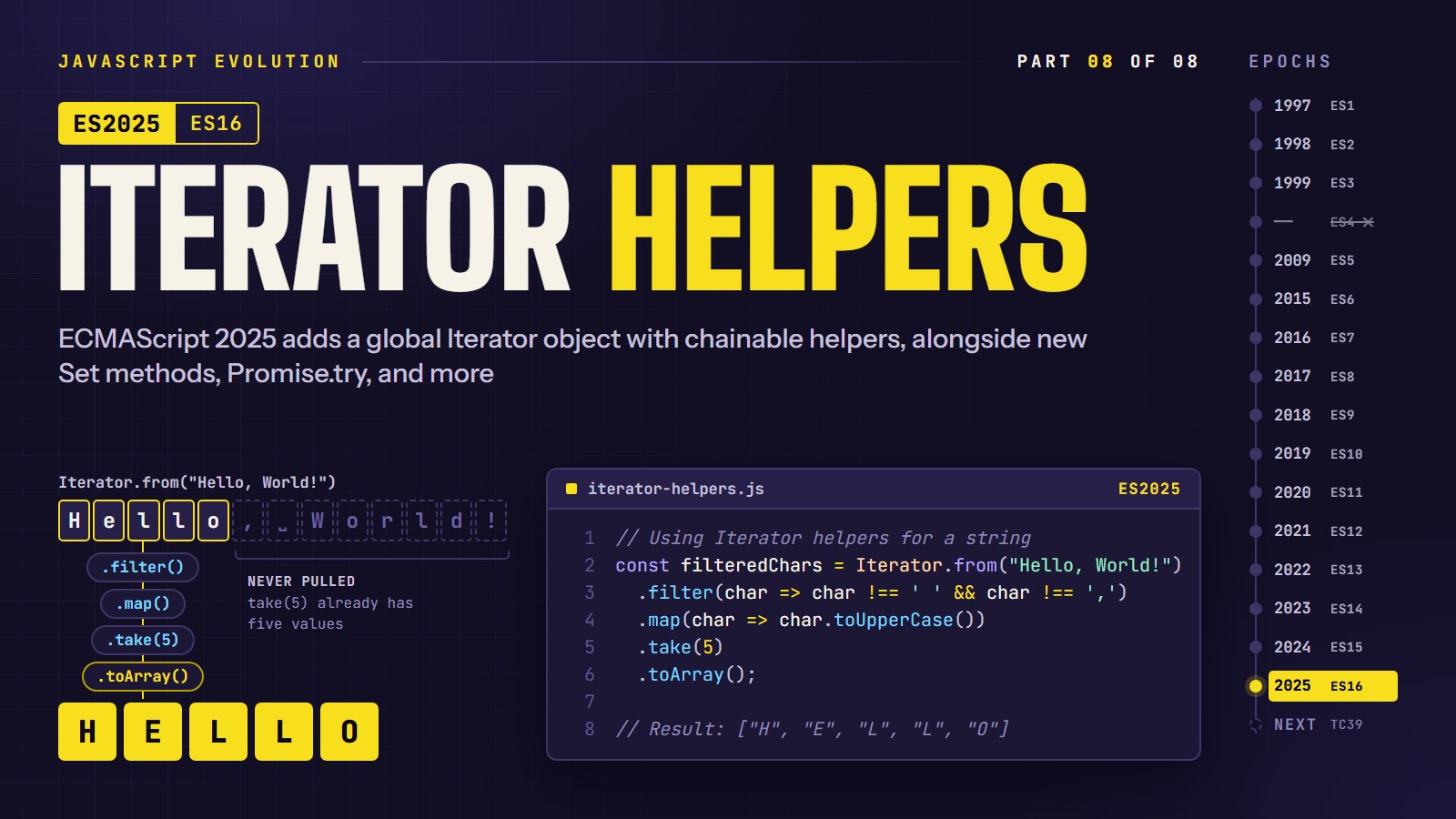
Take the first three multiples of 7 from the counting numbers 1, 2, 3, and so on, forever. With an array you cannot even start, because an array of "all the numbers" never finishes being built. With iterator helpers, a new built-in in ECMAScript 2025 (ES16), it is one short chain that finishes instantly. That idea, processing values one at a time and stopping early, is the main lesson here.
In this article, we are going to build that chain. Then we will look at the other ES2025 additions, and finish with the ideas that are still only proposals.
Each feature below carries a note on whether it runs today. We ran the snippets in Node 22.12: iterator helpers and the new Set methods work there, while Promise.try, RegExp.escape, Float16Array, regex modifiers and Temporal do not.
That was the state when we wrote this. As of October 2026, MDN's compatibility data says Promise.try arrived in Node 23, RegExp.escape and Float16Array in Node 24, and Temporal in Node 26. In browsers, Promise.try is in Chrome 128, Firefox 134 and Safari 18.2, and RegExp.escape is in Chrome 136, Firefox 134 and Safari 18.2. We did not re-run the snippets in those versions, so use the check below on the environment you target.
What runs where#
Run this in your own console or Node to see what your environment supports:
const has = (fn) => {
  try {
    return Boolean(fn());
  } catch {
    return false;
  }
};
const checks = {
  "Iterator helpers":
    has(() => Iterator.prototype.take),
  "New Set methods": has(() => Set.prototype.union),
  "Promise.try": has(() => Promise.try),
  "RegExp.escape": has(() => RegExp.escape),
  "Float16Array": has(() => Float16Array),
  "Temporal": has(() => Temporal),
  "RegExp modifiers": has(() => new RegExp("(?i:a)")),
};
console.log(checks);
// Node 22.12: Iterator helpers true, New Set methods true, every other entry false
| Feature | Status as of October 2026 | Node 22.12 (tested) |
|---|---|---|
Iterator helpers, new Set methods | In ES2025 | Works |
Promise.try, Float16Array, regex modifiers | In ES2025 | Not available |
RegExp.escape | In ES2025 | Not available |
| JSON modules, import attributes | In ES2025; Baseline "newly available" since April 2025 | Not tested here |
| Temporal | Stage 4 since March 2026; listed for ES2027 | Not available |
| Pipeline operator | Still Stage 2 | Not available |
| Records and Tuples | Withdrawn; the proposal repository was archived in April 2025 | Not available |
| Pattern matching | Still Stage 1 | Not available |
"Stage" is the proposal ladder from 1 (an idea) to 4 (finished, goes into the next yearly edition). We checked the statuses against the TC39 proposals repository in October 2026. They will move again, so check the list before you rely on one.
ES2025 (ES16) Features#
These reached Stage 4 and are part of the 2025 edition, according to the TC39 finished-proposals list.
1. Sync Iterator Helpers#
ES2025 introduces a new global Iterator object with methods for working with iterators more effectively. These helpers provide functional-style operations that were previously cumbersome to implement manually.
// Using Iterator helpers for a string
const filteredChars = Iterator.from("Hello, World!")
  .filter(char => char !== ' ' && char !== ',')
  .map(char => char.toUpperCase())
  .take(5)
  .toArray();

// Result: ["H", "E", "L", "L", "O"]
The helpers (map, filter, take, drop, flatMap, toArray, and a few more) live on iterators, and Iterator.from(...) turns anything iterable into one. They are lazy: each value moves through the whole chain before the next one is requested, and take(5) stops asking after five results. Array methods are eager: filter finishes the whole array before map begins.
That difference matters most when the source never ends. Here is a generator that counts forever:
function* naturals() {
  let n = 1;
  while (true) yield n++;
}

// The array way never finishes. Spreading an endless generator tries to build an array of every number:
// [...naturals()].filter(n => n % 7 === 0).slice(0, 3);   // runs until memory runs out, do not try

// The iterator way finishes, because take(3) stops pulling after three matches:
const firstThree = Iterator.from(naturals())
  .filter(n => n % 7 === 0)
  .take(3)
  .toArray();
console.log(firstThree); // [7, 14, 21]
In Node 22.12 the second version prints [7, 14, 21], and the generator only produced the numbers 1 to 21 to get there. Generator objects also have these methods directly, so naturals().filter(...) works without Iterator.from.
---html
<pre id="out">Press Run.</pre>
---js
function* naturals() {
  let n = 1;
  while (true) yield n++;
}

const out = document.getElementById("out");
if (typeof Iterator === "undefined" || !Iterator.prototype.take) {
  out.textContent = "This browser has no iterator helpers yet.";
} else {
  const result = Iterator.from(naturals())
    .filter((n) => true /* TODO: keep only even numbers */)
    .map((n) => n /* TODO: square it */)
    .take(4)
    .toArray();
  // Expected: [4, 16, 36, 64]
  out.textContent = JSON.stringify(result);
}
---html
<h1>Sync Iterator Helpers in ES2025</h1>

  <div class="container">
    <h2>Introduction to Iterator Helpers</h2>
    <p>Iterator Helpers introduce a unified API for working with iterable objects in JavaScript. They provide functional-style operations like map, filter, and reduce directly on iterators.</p>

    <div class="tabs">
      <div class="tab active" data-tab="before">Before ES2025</div>
      <div class="tab" data-tab="after">With Iterator Helpers</div>
    </div>

    <div class="tab-content active" id="before">
      <p>Before ES2025, working with iterables often required converting them to arrays or writing custom iterator logic:</p>
      <pre>// Convert iterable to array, process, then potentially convert back
function processCharacters(text) {
  return [...text]
    .filter(char => char.match(/[a-z]/i))
    .map(char => char.toUpperCase())
    .join('');
}

// Or write verbose custom iterator code
function* filterMap(iterable, filterFn, mapFn) {
  for (const item of iterable) {
    if (filterFn(item)) {
      yield mapFn(item);
    }
  }
}

const result = [...filterMap(
  "Hello, World!",
  char => char.match(/[a-z]/i),
  char => char.toUpperCase()
)];</pre>
    </div>

    <div class="tab-content" id="after">
      <p>With ES2025 Iterator Helpers, the code becomes more elegant and efficient:</p>
      <pre>// Using Iterator helpers
function processCharacters(text) {
  return Iterator.from(text)
    .filter(char => char.match(/[a-z]/i))
    .map(char => char.toUpperCase())
    .toArray()
    .join('');
}

// No need for custom generator functions or array conversions
const result = Iterator.from("Hello, World!")
  .filter(char => char.match(/[a-z]/i))
  .map(char => char.toUpperCase())
  .toArray();</pre>
    </div>
  </div>

  <div class="container">
    <h2>Try Iterator Helpers</h2>
    <p>Enter some text and apply iterator operations to see how they transform your data:</p>

    <div>
      <textarea id="inputText" rows="3" cols="40">Hello, World! 123 ABC</textarea>
    </div>

    <div>
      <button id="runIterator">Run Iterator Pipeline</button>
      <button id="resetPipeline">Reset Pipeline</button>
    </div>

    <div class="result">
      <h3>Build Your Pipeline:</h3>
      <div id="pipeline">
        <!-- Pipeline steps will be added here -->
      </div>

      <div style="margin-top: 20px">
        <select id="operationSelect">
          <option value="map">map</option>
          <option value="filter">filter</option>
          <option value="take">take</option>
          <option value="drop">drop</option>
          <option value="flatMap">flatMap</option>
        </select>
        <input type="text" id="operationArg" placeholder="Function or value...">
        <button id="addOperation">Add Operation</button>
      </div>
    </div>

    <div class="visualizer">
      <h3>Iterator Pipeline Visualization:</h3>
      <div id="visualizerContainer"></div>
    </div>
  </div>

  <div class="container">
    <h2>Iterator Helpers Reference</h2>
    <table>
      <thead>
        <tr>
          <th>Method</th>
          <th>Description</th>
          <th>Example</th>
        </tr>
      </thead>
      <tbody>
        <tr>
          <td><code>Iterator.from(iterable)</code></td>
          <td>Creates an Iterator from an iterable object</td>
          <td><code>Iterator.from("abc")</code></td>
        </tr>
        <tr>
          <td><code>map(callback)</code></td>
          <td>Transforms each value using the callback</td>
          <td><code>iterator.map(x => x * 2)</code></td>
        </tr>
        <tr>
          <td><code>filter(predicate)</code></td>
          <td>Includes only values for which predicate returns true</td>
          <td><code>iterator.filter(x => x > 5)</code></td>
        </tr>
        <tr>
          <td><code>take(limit)</code></td>
          <td>Takes only the first n values</td>
          <td><code>iterator.take(3)</code></td>
        </tr>
        <tr>
          <td><code>drop(count)</code></td>
          <td>Skips the first n values</td>
          <td><code>iterator.drop(2)</code></td>
        </tr>
        <tr>
          <td><code>flatMap(callback)</code></td>
          <td>Maps each value and flattens the result</td>
          <td><code>iterator.flatMap(x => [x, x*2])</code></td>
        </tr>
        <tr>
          <td><code>reduce(reducer, initialValue)</code></td>
          <td>Reduces the iterator to a single value</td>
          <td><code>iterator.reduce((a, b) => a + b, 0)</code></td>
        </tr>
        <tr>
          <td><code>toArray()</code></td>
          <td>Collects all values into an array</td>
          <td><code>iterator.toArray()</code></td>
        </tr>
        <tr>
          <td><code>forEach(callback)</code></td>
          <td>Executes callback for each value</td>
          <td><code>iterator.forEach(console.log)</code></td>
        </tr>
        <tr>
          <td><code>some(predicate)</code></td>
          <td>Tests if any value satisfies the predicate</td>
          <td><code>iterator.some(x => x % 2 === 0)</code></td>
        </tr>
        <tr>
          <td><code>every(predicate)</code></td>
          <td>Tests if all values satisfy the predicate</td>
          <td><code>iterator.every(x => x > 0)</code></td>
        </tr>
        <tr>
          <td><code>find(predicate)</code></td>
          <td>Finds the first value that satisfies the predicate</td>
          <td><code>iterator.find(x => x.id === 42)</code></td>
        </tr>
      </tbody>
    </table>
  </div>
---css
:root {
      --bg-color: #f8f9fa;
      --text-color: #212529;
      --primary-color: #0d6efd;
      --secondary-color: #6c757d;
      --success-color: #198754;
      --danger-color: #dc3545;
      --warning-color: #ffc107;
      --info-color: #0dcaf0;
      --border-color: #dee2e6;
      --code-bg: #f5f5f5;
    }

    @media (prefers-color-scheme: dark) {
      :root {
        --bg-color: #212529;
        --text-color: #f8f9fa;
        --primary-color: #0d6efd;
        --secondary-color: #adb5bd;
        --success-color: #20c997;
        --danger-color: #dc3545;
        --warning-color: #ffc107;
        --info-color: #0dcaf0;
        --border-color: #495057;
        --code-bg: #2b3035;
      }
    }

    body {
      font-family: -apple-system, BlinkMacSystemFont, "Segoe UI", Roboto, "Helvetica Neue", Arial, sans-serif;
      line-height: 1.5;
      color: var(--text-color);
      background-color: var(--bg-color);
      max-width: 800px;
      margin: 0 auto;
      padding: 20px;
    }

    h1, h2, h3 {
      color: var(--primary-color);
    }

    pre, code {
      font-family: SFMono-Regular, Menlo, Monaco, Consolas, "Liberation Mono", "Courier New", monospace;
      background-color: var(--code-bg);
      border-radius: 4px;
      padding: 2px 4px;
    }

    pre {
      padding: 15px;
      overflow-x: auto;
    }

    input, button, select, textarea {
      font: inherit;
      padding: 8px 12px;
      border: 1px solid var(--border-color);
      border-radius: 4px;
      background-color: var(--bg-color);
      color: var(--text-color);
      margin-right: 8px;
      margin-bottom: 8px;
    }

    button {
      cursor: pointer;
      background-color: var(--primary-color);
      color: white;
      border: none;
    }

    .result {
      margin-top: 20px;
      padding: 15px;
      border: 1px solid var(--border-color);
      border-radius: 4px;
    }

    .container {
      margin-bottom: 30px;
    }

    .tabs {
      display: flex;
      margin-bottom: 15px;
      border-bottom: 1px solid var(--border-color);
    }

    .tab {
      padding: 10px 15px;
      cursor: pointer;
      border: 1px solid transparent;
      border-bottom: none;
      margin-right: 5px;
      border-radius: 4px 4px 0 0;
    }

    .tab.active {
      background-color: var(--code-bg);
      border-color: var(--border-color);
    }

    .tab-content {
      display: none;
    }

    .tab-content.active {
      display: block;
    }

    .visualizer {
      margin-top: 20px;
      padding: 15px;
      border: 1px solid var(--border-color);
      border-radius: 4px;
      overflow-x: auto;
    }

    .pipeline-step {
      margin-bottom: 15px;
      padding: 10px;
      border: 1px solid var(--border-color);
      border-radius: 4px;
    }

    .sample-value {
      display: inline-block;
      margin: 5px;
      padding: 5px 10px;
      border-radius: 4px;
      background-color: var(--primary-color);
      color: white;
    }

    .flow-arrow {
      text-align: center;
      margin: 10px 0;
      font-size: 24px;
      color: var(--secondary-color);
    }

    table {
      width: 100%;
      border-collapse: collapse;
    }

    th, td {
      padding: 8px 12px;
      text-align: left;
      border-bottom: 1px solid var(--border-color);
    }

    th {
      background-color: var(--code-bg);
    }

    .tag {
      display: inline-block;
      padding: 2px 8px;
      margin: 2px;
      border-radius: 12px;
      font-size: 0.85em;
    }

    .tag-map {
      background-color: rgba(13, 110, 253, 0.2);
      color: var(--primary-color);
    }

    .tag-filter {
      background-color: rgba(25, 135, 84, 0.2);
      color: var(--success-color);
    }

    .tag-take {
      background-color: rgba(13, 202, 240, 0.2);
      color: var(--info-color);
    }

    .tag-drop {
      background-color: rgba(255, 193, 7, 0.2);
      color: var(--warning-color);
    }

    .tag-flatMap {
      background-color: rgba(220, 53, 69, 0.2);
      color: var(--danger-color);
    }
---js
// Polyfill for Iterator (since it's not available yet)
if (typeof Iterator === 'undefined') {
  // Simple implementation of Iterator.from
  class IteratorHelper {
    constructor(iterator) {
      this.iterator = iterator;
    }

    static from(iterable) {
      // If it's already an iterator helper, just return it
      if (iterable instanceof IteratorHelper) {
        return iterable;
      }

      // Get the iterator from the iterable
      const iterator = typeof iterable[Symbol.iterator] === 'function' ?
      iterable[Symbol.iterator]() :
      iterable;

      return new IteratorHelper(iterator);
    }

    next() {
      return this.iterator.next();
    }

    [Symbol.iterator]() {
      return this;
    }

    map(callback) {
      const self = this;
      const iterator = {
        next() {
          const { done, value } = self.iterator.next();
          return {
            done,
            value: done ? undefined : callback(value) };

        },
        [Symbol.iterator]() {
          return this;
        } };

      return new IteratorHelper(iterator);
    }

    filter(predicate) {
      const self = this;
      const iterator = {
        next() {
          while (true) {
            const { done, value } = self.iterator.next();
            if (done) {
              return { done, value: undefined };
            }
            if (predicate(value)) {
              return { done, value };
            }
          }
        },
        [Symbol.iterator]() {
          return this;
        } };

      return new IteratorHelper(iterator);
    }

    take(limit) {
      const self = this;
      let taken = 0;
      const iterator = {
        next() {
          if (taken >= limit) {
            return { done: true, value: undefined };
          }
          const { done, value } = self.iterator.next();
          if (!done) taken++;
          return { done, value };
        },
        [Symbol.iterator]() {
          return this;
        } };

      return new IteratorHelper(iterator);
    }

    drop(count) {
      const self = this;
      let dropped = 0;
      const iterator = {
        next() {
          while (dropped < count) {
            const { done } = self.iterator.next();
            if (done) {
              return { done: true, value: undefined };
            }
            dropped++;
          }
          return self.iterator.next();
        },
        [Symbol.iterator]() {
          return this;
        } };

      return new IteratorHelper(iterator);
    }

    flatMap(callback) {
      const self = this;
      let currentIterator = null;

      const iterator = {
        next() {
          while (true) {
            // If we have a current iterator, get the next value from it
            if (currentIterator) {
              const { done, value } = currentIterator.next();
              if (!done) {
                return { done: false, value };
              }
              currentIterator = null;
            }

            // Get the next value from the source iterator
            const { done, value } = self.iterator.next();
            if (done) {
              return { done: true, value: undefined };
            }

            // Apply the callback and get an iterator from the result
            const result = callback(value);
            const iterable = Array.isArray(result) ? result : [result];
            currentIterator = iterable[Symbol.iterator]();
          }
        },
        [Symbol.iterator]() {
          return this;
        } };


      return new IteratorHelper(iterator);
    }

    reduce(reducer, initialValue) {
      let accumulator = initialValue;
      let first = true;

      for (const value of this) {
        if (first && arguments.length < 2) {
          accumulator = value;
          first = false;
        } else {
          accumulator = reducer(accumulator, value);
        }
      }

      if (first && arguments.length < 2) {
        throw new TypeError('Reduce of empty iterator with no initial value');
      }

      return accumulator;
    }

    toArray() {
      return [...this];
    }

    forEach(callback) {
      for (const value of this) {
        callback(value);
      }
    }

    some(predicate) {
      for (const value of this) {
        if (predicate(value)) {
          return true;
        }
      }
      return false;
    }

    every(predicate) {
      for (const value of this) {
        if (!predicate(value)) {
          return false;
        }
      }
      return true;
    }

    find(predicate) {
      for (const value of this) {
        if (predicate(value)) {
          return value;
        }
      }
      return undefined;
    }}


  // Create global Iterator object
  window.Iterator = IteratorHelper;
}

// Tab switching
document.querySelectorAll('.tab').forEach(tab => {
  tab.addEventListener('click', () => {
    document.querySelectorAll('.tab').forEach(t => t.classList.remove('active'));
    document.querySelectorAll('.tab-content').forEach(c => c.classList.remove('active'));

    const tabId = tab.getAttribute('data-tab');
    tab.classList.add('active');
    document.getElementById(tabId).classList.add('active');
  });
});

// Pipeline management
const pipeline = {
  steps: [],

  addStep(operation, arg) {
    this.steps.push({ operation, arg });
    this.renderPipeline();
  },

  reset() {
    this.steps = [];
    this.renderPipeline();
  },

  renderPipeline() {
    const container = document.getElementById('pipeline');
    container.innerHTML = '';

    if (this.steps.length === 0) {
      const placeholder = document.createElement('div');
      placeholder.className = 'pipeline-step';
      placeholder.innerHTML = '<em>No operations added yet. Start building your pipeline!</em>';
      container.appendChild(placeholder);
      return;
    }

    this.steps.forEach((step, index) => {
      const stepEl = document.createElement('div');
      stepEl.className = 'pipeline-step';

      // Create a tag for the operation type
      const tag = document.createElement('span');
      tag.className = `tag tag-${step.operation}`;
      tag.textContent = step.operation;

      // Create the step description
      let description;
      switch (step.operation) {
        case 'map':
          description = `Transform each value: <code>${step.arg}</code>`;
          break;
        case 'filter':
          description = `Keep only values where: <code>${step.arg}</code>`;
          break;
        case 'take':
          description = `Take only the first ${step.arg} values`;
          break;
        case 'drop':
          description = `Skip the first ${step.arg} values`;
          break;
        case 'flatMap':
          description = `Map each value and flatten results: <code>${step.arg}</code>`;
          break;
        default:
          description = `${step.operation}(${step.arg})`;}


      // Create a remove button
      const removeBtn = document.createElement('button');
      removeBtn.textContent = 'Remove';
      removeBtn.style.marginLeft = '10px';
      removeBtn.style.backgroundColor = 'var(--danger-color)';
      removeBtn.addEventListener('click', () => {
        this.steps.splice(index, 1);
        this.renderPipeline();
      });

      stepEl.appendChild(tag);
      stepEl.innerHTML += ` ${description} `;
      stepEl.appendChild(removeBtn);

      container.appendChild(stepEl);

      // Add an arrow if this isn't the last step
      if (index < this.steps.length - 1) {
        const arrow = document.createElement('div');
        arrow.className = 'flow-arrow';
        arrow.innerHTML = '↓';
        container.appendChild(arrow);
      }
    });
  },

  execute(input) {
    try {
      // Start with the input as an iterator
      let iterator = Iterator.from(input);

      // Apply each step of the pipeline
      const intermediateResults = [input.split('')];

      this.steps.forEach(step => {
        switch (step.operation) {
          case 'map':
            // Create a function from the string
            const mapFn = new Function('x', `return ${step.arg}`);
            iterator = iterator.map(mapFn);
            break;
          case 'filter':
            const filterFn = new Function('x', `return ${step.arg}`);
            iterator = iterator.filter(filterFn);
            break;
          case 'take':
            iterator = iterator.take(parseInt(step.arg));
            break;
          case 'drop':
            iterator = iterator.drop(parseInt(step.arg));
            break;
          case 'flatMap':
            const flatMapFn = new Function('x', `return ${step.arg}`);
            iterator = iterator.flatMap(flatMapFn);
            break;}


        // Capture intermediate result (convert to array to see current state)
        const current = [...Iterator.from(iterator)];
        intermediateResults.push(current);

        // Create a new iterator from the current state
        iterator = Iterator.from(current);
      });

      // Visualize the pipeline
      this.visualizePipeline(intermediateResults);

      return iterator.toArray();
    } catch (error) {
      console.error('Error executing pipeline:', error);
      this.showError(error);
      return [];
    }
  },

  visualizePipeline(results) {
    const container = document.getElementById('visualizerContainer');
    container.innerHTML = '';

    if (results.length <= 1) {
      container.innerHTML = '<em>No transformation applied yet.</em>';
      return;
    }

    // Add initial input
    const initialStep = document.createElement('div');
    initialStep.className = 'pipeline-step';
    initialStep.innerHTML = '<strong>Input:</strong>';
    container.appendChild(initialStep);

    const initialValues = document.createElement('div');
    results[0].forEach(value => {
      const valueSpan = document.createElement('span');
      valueSpan.className = 'sample-value';
      valueSpan.textContent = value === ' ' ? '␣' : value;
      initialValues.appendChild(valueSpan);
    });
    initialStep.appendChild(initialValues);

    // Add each transformation step
    this.steps.forEach((step, index) => {
      // Add arrow
      const arrow = document.createElement('div');
      arrow.className = 'flow-arrow';
      arrow.innerHTML = '↓';
      container.appendChild(arrow);

      // Add step description
      const stepEl = document.createElement('div');
      stepEl.className = 'pipeline-step';

      const tag = document.createElement('span');
      tag.className = `tag tag-${step.operation}`;
      tag.textContent = step.operation;

      stepEl.appendChild(tag);
      stepEl.innerHTML += ` <strong>${step.operation === 'map' ? 'Transformed:' :
      step.operation === 'filter' ? 'Filtered:' :
      step.operation === 'take' ? 'Taken:' :
      step.operation === 'drop' ? 'Dropped:' :
      step.operation === 'flatMap' ? 'Flat Mapped:' :
      'Result:'}</strong>`;

      const stepValues = document.createElement('div');
      results[index + 1].forEach(value => {
        const valueSpan = document.createElement('span');
        valueSpan.className = 'sample-value';
        valueSpan.textContent = value === ' ' ? '␣' : value;
        stepValues.appendChild(valueSpan);
      });
      stepEl.appendChild(stepValues);

      container.appendChild(stepEl);
    });
  },

  showError(error) {
    const container = document.getElementById('visualizerContainer');
    container.innerHTML = `<div style="color: var(--danger-color); padding: 10px; border: 1px solid var(--danger-color); border-radius: 4px;">
          <strong>Error executing pipeline:</strong><br>
          ${error.message}
        </div>`;
  } };


// Initialize event listeners
document.getElementById('addOperation').addEventListener('click', () => {
  const operation = document.getElementById('operationSelect').value;
  const arg = document.getElementById('operationArg').value;

  if (!arg) {
    alert('Please provide an argument for the operation');
    return;
  }

  pipeline.addStep(operation, arg);
});

document.getElementById('runIterator').addEventListener('click', () => {
  const input = document.getElementById('inputText').value;
  pipeline.execute(input);
});

document.getElementById('resetPipeline').addEventListener('click', () => {
  pipeline.reset();
  document.getElementById('visualizerContainer').innerHTML = '';
});

// Initialize with example values for the operations
document.getElementById('operationSelect').addEventListener('change', function () {
  const operation = this.value;
  const argInput = document.getElementById('operationArg');

  switch (operation) {
    case 'map':
      argInput.value = 'x.toUpperCase()';
      argInput.placeholder = 'Function, e.g., x => x.toUpperCase()';
      break;
    case 'filter':
      argInput.value = 'x.match(/[a-z]/i)';
      argInput.placeholder = 'Predicate, e.g., x => x > 5';
      break;
    case 'take':
      argInput.value = '5';
      argInput.placeholder = 'Number of items to take';
      break;
    case 'drop':
      argInput.value = '3';
      argInput.placeholder = 'Number of items to drop';
      break;
    case 'flatMap':
      argInput.value = '[x, x]';
      argInput.placeholder = 'Function returning iterable, e.g., x => [x, x]';
      break;}

});

// Initialize the UI
document.getElementById('operationSelect').dispatchEvent(new Event('change'));
pipeline.renderPipeline();
This addition brings JavaScript closer to the functional programming paradigm for sequence operations, making code more expressive and often more readable.
2. RegExp.escape Method#
One of the most anticipated additions is the RegExp.escape() method, which creates a version of a string that's safe to use within regular expressions. This solves a long-standing pain point where special characters in strings needed careful escaping to be used in pattern matching.
// Current workaround (incomplete)
function escapeRegExp(string) {
  return string.replace(/[.*+?^${}()|[\]\\]/g, '\\$&');
}

// With ES2025
const pattern = new RegExp(RegExp.escape('(1+2)*3'));
---html
<h1>RegExp.escape in ES2025</h1>

  <div class="container">
    <h2>Problem: Special characters in regex patterns</h2>
    <p>Enter a string with special characters like <code>.*+?^${}()|[\]\\</code> and see how RegExp.escape will handle it:</p>

    <div>
      <input type="text" id="userInput" value="Hello (world). How are you?" placeholder="Enter text with special chars">
      <button id="testButton">Test Regular Expression</button>
    </div>

    <div class="result" id="resultWithout">
      <h3>Without RegExp.escape:</h3>
      <pre id="withoutEscape"></pre>
    </div>

    <div class="result" id="resultWith">
      <h3>With RegExp.escape (ES2025):</h3>
      <pre id="withEscape"></pre>
    </div>
  </div>

  <div class="container">
    <h2>Real-world example: Search and replace</h2>
    <p>Type some text below, then enter a search term with special characters to replace:</p>

    <textarea id="sampleText" rows="4" style="width: 100%">The price is $19.99 and the discount is 25% if you use the code (SUMMER2025).</textarea>
    <div style="margin-top: 10px">
      <input type="text" id="searchTerm" value="$19.99" placeholder="Search for...">
      <input type="text" id="replaceTerm" value="$24.99" placeholder="Replace with...">
      <button id="replaceButton">Replace</button>
    </div>

    <div class="result" id="replaceResult">
      <h3>Result:</h3>
      <p id="replaceOutput"></p>
    </div>
  </div>
---css
:root {
      --bg-color: #f8f9fa;
      --text-color: #212529;
      --primary-color: #0d6efd;
      --secondary-color: #6c757d;
      --success-color: #198754;
      --border-color: #dee2e6;
      --code-bg: #f5f5f5;
    }

    @media (prefers-color-scheme: dark) {
      :root {
        --bg-color: #212529;
        --text-color: #f8f9fa;
        --primary-color: #0d6efd;
        --secondary-color: #adb5bd;
        --success-color: #20c997;
        --border-color: #495057;
        --code-bg: #2b3035;
      }
    }

    body {
      font-family: -apple-system, BlinkMacSystemFont, "Segoe UI", Roboto, "Helvetica Neue", Arial, sans-serif;
      line-height: 1.5;
      color: var(--text-color);
      background-color: var(--bg-color);
      max-width: 800px;
      margin: 0 auto;
      padding: 20px;
    }

    h1, h2 {
      color: var(--primary-color);
    }

    pre, code {
      font-family: SFMono-Regular, Menlo, Monaco, Consolas, "Liberation Mono", "Courier New", monospace;
      background-color: var(--code-bg);
      border-radius: 4px;
      padding: 2px 4px;
    }

    pre {
      padding: 15px;
      overflow-x: auto;
    }

    input, button {
      font: inherit;
      padding: 8px 12px;
      border: 1px solid var(--border-color);
      border-radius: 4px;
      background-color: var(--bg-color);
      color: var(--text-color);
    }

    button {
      cursor: pointer;
      background-color: var(--primary-color);
      color: white;
      border: none;
    }

    .result {
      margin-top: 20px;
      padding: 15px;
      border: 1px solid var(--border-color);
      border-radius: 4px;
    }

    .success {
      color: var(--success-color);
    }

    .container {
      margin-bottom: 30px;
    }
---js
// Polyfill for RegExp.escape (since it's not available yet)
if (!RegExp.escape) {
  RegExp.escape = function (string) {
    return string.replace(/[.*+?^${}()|[\]\\]/g, '\\$&');
  };
}

document.getElementById('testButton').addEventListener('click', function () {
  const userInput = document.getElementById('userInput').value;

  // Without escape
  try {
    const withoutEscape = new RegExp(userInput);
    document.getElementById('withoutEscape').textContent = `Raw pattern: ${withoutEscape.source}\n\nThis might not work as expected with special characters!`;
  } catch (error) {
    document.getElementById('withoutEscape').textContent = `Error: ${error.message}`;
  }

  // With escape
  try {
    const withEscape = new RegExp(RegExp.escape(userInput));
    document.getElementById('withEscape').textContent = `Escaped pattern: ${withEscape.source}\n\nNow it will match the exact string, special characters and all!`;
  } catch (error) {
    document.getElementById('withEscape').textContent = `Error: ${error.message}`;
  }
});

document.getElementById('replaceButton').addEventListener('click', function () {
  const text = document.getElementById('sampleText').value;
  const search = document.getElementById('searchTerm').value;
  const replace = document.getElementById('replaceTerm').value;

  try {
    // Using ES2025 RegExp.escape for safe replacement
    const escaped = RegExp.escape(search);
    const regex = new RegExp(escaped, 'g');
    const result = text.replace(regex, replace);

    document.getElementById('replaceOutput').textContent = result;
    document.getElementById('replaceOutput').classList.add('success');
  } catch (error) {
    document.getElementById('replaceOutput').textContent = `Error: ${error.message}`;
    document.getElementById('replaceOutput').classList.remove('success');
  }
});

// Initialize the examples
document.getElementById('testButton').click();
document.getElementById('replaceButton').click();
This feature simplifies text replacement operations, search functionality, and any situation where user input might be incorporated into regular expressions.
3. Float16Array and Related Features#
The Float16Array addition brings 16-bit floating-point (half-precision) typed arrays to JavaScript, complementing the existing Float32Array and Float64Array. This comes with related functionality including:
-
Math.f16round()for rounding to the nearest float16 value -
DataView.prototype.getFloat16()andDataView.prototype.setFloat16()methods
// Creating a Float16Array
const float16Values = new Float16Array([1.0, 2.5, 3.7]);

// Using DataView with float16
const buffer = new ArrayBuffer(10);
const view = new DataView(buffer);
view.setFloat16(0, 3.14, true);
const value = view.getFloat16(0, true);
---html
<h1>Float16Array in ES2025</h1>

  <div class="container">
    <h2>Memory Efficiency Comparison</h2>
    <p>Compare memory usage between different floating-point array types:</p>

    <div>
      <label for="arraySize">Array size:</label>
      <select id="arraySize">
        <option value="1000">1,000</option>
        <option value="10000" selected>10,000</option>
        <option value="100000">100,000</option>
        <option value="1000000">1,000,000</option>
      </select>
      <button id="compareSizes">Compare</button>
    </div>

    <div class="result">
      <h3>Memory Usage Comparison:</h3>

      <div class="memory-usage">
        <div style="width: 100px">Float16Array:</div>
        <div class="memory-bar" id="float16Bar" style="flex-grow: 1; background-color: #20c997;"></div>
        <div class="memory-value" id="float16Size"></div>
      </div>

      <div class="memory-usage">
        <div style="width: 100px">Float32Array:</div>
        <div class="memory-bar" id="float32Bar" style="flex-grow: 1; background-color: #0dcaf0;"></div>
        <div class="memory-value" id="float32Size"></div>
      </div>

      <div class="memory-usage">
        <div style="width: 100px">Float64Array:</div>
        <div class="memory-bar" id="float64Bar" style="flex-grow: 1; background-color: #0d6efd;"></div>
        <div class="memory-value" id="float64Size"></div>
      </div>

      <p>Float16Array uses <span id="memoryRatio" class="highlight"></span> compared to Float32Array!</p>
    </div>
  </div>

  <div class="container">
    <h2>Precision Comparison</h2>
    <p>Enter a decimal number to see how it's represented in different precisions:</p>

    <div>
      <input type="number" id="floatInput" value="3.14159" step="0.00001">
      <button id="compareButton">Compare</button>
    </div>

    <div class="result">
      <table id="precisionTable">
        <thead>
          <tr>
            <th>Type</th>
            <th>Rounded Value</th>
            <th>Precision Loss</th>
            <th>Bytes Used</th>
          </tr>
        </thead>
        <tbody>
          <tr id="float16Row">
            <td>Float16 (half)</td>
            <td id="float16Value"></td>
            <td id="float16Loss"></td>
            <td>2 bytes</td>
          </tr>
          <tr id="float32Row">
            <td>Float32 (single)</td>
            <td id="float32Value"></td>
            <td id="float32Loss"></td>
            <td>4 bytes</td>
          </tr>
          <tr id="float64Row">
            <td>Float64 (double)</td>
            <td id="float64Value"></td>
            <td id="float64Loss"></td>
            <td>8 bytes</td>
          </tr>
        </tbody>
      </table>
    </div>
  </div>

  <div class="container">
    <h2>Example Use Cases</h2>

    <h3>Graphics and WebGPU</h3>
    <p>Float16Array is ideal for WebGPU applications where memory bandwidth is critical:</p>
    <pre>// Example: Creating a vertex buffer for WebGPU with Float16
const positions = new Float16Array([
  -0.5, -0.5, 0.0,  // Triangle vertex 1
   0.5, -0.5, 0.0,  // Triangle vertex 2
   0.0,  0.5, 0.0   // Triangle vertex 3
]);

// Half the memory of Float32Array while maintaining adequate precision
// for most graphics workloads!</pre>

    <h3>Machine Learning</h3>
    <p>Many ML models can use half-precision (float16) without significant accuracy loss:</p>
    <pre>// Example: Creating a neural network weight matrix
const inputSize = 784;  // 28x28 image
const hiddenSize = 128;
const outputSize = 10;  // 10 classes

// Weights for input->hidden layer (about 50% smaller than Float32)
const weights = new Float16Array(inputSize * hiddenSize);</pre>
  </div>
---css
:root {
      --bg-color: #f8f9fa;
      --text-color: #212529;
      --primary-color: #0d6efd;
      --secondary-color: #6c757d;
      --success-color: #198754;
      --border-color: #dee2e6;
      --code-bg: #f5f5f5;
      --highlight: #ffc107;
    }

    @media (prefers-color-scheme: dark) {
      :root {
        --bg-color: #212529;
        --text-color: #f8f9fa;
        --primary-color: #0d6efd;
        --secondary-color: #adb5bd;
        --success-color: #20c997;
        --border-color: #495057;
        --code-bg: #2b3035;
        --highlight: #ff9800;
      }
    }

    body {
      font-family: -apple-system, BlinkMacSystemFont, "Segoe UI", Roboto, "Helvetica Neue", Arial, sans-serif;
      line-height: 1.5;
      color: var(--text-color);
      background-color: var(--bg-color);
      max-width: 800px;
      margin: 0 auto;
      padding: 20px;
    }

    h1, h2, h3 {
      color: var(--primary-color);
    }

    pre, code {
      font-family: SFMono-Regular, Menlo, Monaco, Consolas, "Liberation Mono", "Courier New", monospace;
      background-color: var(--code-bg);
      border-radius: 4px;
      padding: 2px 4px;
    }

    pre {
      padding: 15px;
      overflow-x: auto;
    }

    input, button, select {
      font: inherit;
      padding: 8px 12px;
      border: 1px solid var(--border-color);
      border-radius: 4px;
      background-color: var(--bg-color);
      color: var(--text-color);
    }

    button {
      cursor: pointer;
      background-color: var(--primary-color);
      color: white;
      border: none;
    }

    .result {
      margin-top: 20px;
      padding: 15px;
      border: 1px solid var(--border-color);
      border-radius: 4px;
    }

    .container {
      margin-bottom: 30px;
    }

    .memory-usage {
      display: flex;
      align-items: center;
      margin-bottom: 10px;
    }

    .memory-bar {
      height: 20px;
      margin-left: 10px;
      border-radius: 4px;
      overflow: hidden;
    }

    .memory-segment {
      height: 100%;
      float: left;
      position: relative;
    }

    .memory-value {
      margin-left: 10px;
      font-weight: bold;
    }

    table {
      width: 100%;
      border-collapse: collapse;
      margin: 20px 0;
    }

    th, td {
      border: 1px solid var(--border-color);
      padding: 8px 12px;
      text-align: left;
    }

    th {
      background-color: var(--code-bg);
    }

    .highlight {
      color: var(--highlight);
      font-weight: bold;
    }
---js
// Polyfill for Math.f16round (since it's not available yet)
// This is an approximation of how f16round might work
if (!Math.f16round) {
  Math.f16round = function (value) {
    // This is a simplified approximation
    // Real implementation would follow IEEE 754 half-precision rules
    const buffer = new ArrayBuffer(4);
    const view = new DataView(buffer);
    view.setFloat32(0, value);

    // Extract the bits of the float32
    const bits = view.getUint32(0);

    // Truncate to simulate lower precision
    // This is not an accurate implementation, just for demonstration
    const sign = bits & 0x80000000;
    const exponent = (bits & 0x7F800000) >> 23;
    const fraction = bits & 0x007FFFFF;

    // Truncate fraction to 10 bits (from 23 bits)
    const truncatedFraction = fraction >> 13;

    // Adjust exponent bias (float32 has bias 127, float16 has bias 15)
    const adjustedExponent = Math.max(Math.min(exponent - 127 + 15, 31), 0);

    // Reconstruct as float32 for display (not actual float16 encoding)
    const newBits = sign | adjustedExponent << 23 | truncatedFraction << 13;
    view.setUint32(0, newBits);
    return view.getFloat32(0);
  };
}

// For demonstration purposes
class Float16ArrayDemo {
  constructor(length) {
    this.length = length;
    this.byteLength = length * 2;
  }

  static from(array) {
    const result = new Float16ArrayDemo(array.length);
    result.originalArray = array;
    return result;
  }}


// Comparison buttons
document.getElementById('compareSizes').addEventListener('click', function () {
  const size = parseInt(document.getElementById('arraySize').value);

  // Calculate memory usage (in bytes)
  const float16Size = size * 2;
  const float32Size = size * 4;
  const float64Size = size * 8;

  // Find the max for scaling the bars
  const maxSize = float64Size;

  // Update the bars
  document.getElementById('float16Bar').style.width = `${float16Size / maxSize * 100}%`;
  document.getElementById('float32Bar').style.width = `${float32Size / maxSize * 100}%`;
  document.getElementById('float64Bar').style.width = `${float64Size / maxSize * 100}%`;

  // Update the text
  document.getElementById('float16Size').textContent = `${(float16Size / 1024).toFixed(2)} KB`;
  document.getElementById('float32Size').textContent = `${(float32Size / 1024).toFixed(2)} KB`;
  document.getElementById('float64Size').textContent = `${(float64Size / 1024).toFixed(2)} KB`;

  // Memory ratio
  const ratio = float16Size / float32Size * 100;
  document.getElementById('memoryRatio').textContent = `${ratio.toFixed(0)}% of the memory`;
});

document.getElementById('compareButton').addEventListener('click', function () {
  const value = parseFloat(document.getElementById('floatInput').value);

  // Simulate different precisions
  const float16Value = Math.f16round(value);
  const float32Value = Math.fround(value);
  const float64Value = value;

  // Calculate precision loss
  const float16Loss = Math.abs((value - float16Value) / value * 100);
  const float32Loss = Math.abs((value - float32Value) / value * 100);
  const float64Loss = Math.abs((value - float64Value) / value * 100);

  // Update table
  document.getElementById('float16Value').textContent = float16Value.toString();
  document.getElementById('float32Value').textContent = float32Value.toString();
  document.getElementById('float64Value').textContent = float64Value.toString();

  document.getElementById('float16Loss').textContent = `${float16Loss.toFixed(6)}%`;
  document.getElementById('float32Loss').textContent = `${float32Loss.toFixed(6)}%`;
  document.getElementById('float64Loss').textContent = `${float64Loss.toFixed(6)}%`;

  // Highlight based on precision loss
  document.getElementById('float16Row').style.color = float16Loss > 0.01 ? 'var(--highlight)' : '';
  document.getElementById('float32Row').style.color = float32Loss > 0.01 ? 'var(--highlight)' : '';
  document.getElementById('float64Row').style.color = float64Loss > 0.01 ? 'var(--highlight)' : '';
});

// Initialize examples
document.getElementById('compareSizes').click();
document.getElementById('compareButton').click();
This feature is particularly valuable for graphics programming, machine learning, and applications working with WebGPU, where memory efficiency and bandwidth are critical considerations.
4. Promise.try Method#
The Promise.try method addresses a common pattern of wanting to wrap a function call (that might be either synchronous or asynchronous) in a Promise. It ensures consistent error handling regardless of whether the function throws synchronously or returns a Promise that rejects.
// Before ES2025
function doSomething() {
  return Promise.resolve().then(() => {
    // Might throw synchronously or return a Promise
    return processData();
  });
}

// With ES2025
function doSomething() {
  return Promise.try(() => processData());
}
---html
<h1>Promise.try in ES2025</h1>

  <div class="container">
    <h2>The Problem with Error Handling</h2>
    <p>One of the challenges with Promises is handling errors consistently regardless of whether a function throws synchronously or rejects asynchronously.</p>

    <div class="tabs">
      <div class="tab active" data-tab="traditional">Traditional Approach</div>
      <div class="tab" data-tab="promise-try">With Promise.try</div>
    </div>

    <div class="tab-content active" id="traditional">
      <p>Without Promise.try, you need to use Promise.resolve().then() to capture both synchronous and asynchronous errors:</p>
      <pre>function processData(data) {
  // This might throw synchronously or return a Promise that rejects
  return Promise.resolve().then(() => {
    // Validation (might throw)
    if (!data || typeof data !== 'object') {
      throw new Error('Invalid data format');
    }

    // Async operation
    return fetchAdditionalData(data.id);
  });
}</pre>

      <button id="runTraditional">Run Traditional Approach</button>
    </div>

    <div class="tab-content" id="promise-try">
      <p>With Promise.try, the code becomes cleaner and more intuitive:</p>
      <pre>function processData(data) {
  // This will handle both synchronous throws and async rejections
  return Promise.try(() => {
    // Validation (might throw)
    if (!data || typeof data !== 'object') {
      throw new Error('Invalid data format');
    }

    // Async operation
    return fetchAdditionalData(data.id);
  });
}</pre>

      <button id="runPromiseTry">Run Promise.try Approach</button>
    </div>

    <div>
      <select id="dataSelect">
        <option value="valid">Valid data</option>
        <option value="invalid">Invalid data (throws synchronously)</option>
        <option value="asyncError">Valid data, but fails asynchronously</option>
      </select>
    </div>

    <div class="log" id="logOutput"></div>
  </div>

  <div class="container">
    <h2>Real-World Example: Data Processing Pipeline</h2>
    <p>Consider a data processing pipeline that might have synchronous validation steps and asynchronous processing steps.</p>

    <div>
      <button id="runPipeline">Run Data Pipeline</button>
      <button id="clearLog">Clear Log</button>
    </div>

    <pre>// A data processing pipeline that could fail at many points
async function processPipeline(rawData) {
  try {
    // Step 1: Parse the input (might throw)
    const parsedData = await Promise.try(() => {
      log('Parsing data...');
      return JSON.parse(rawData);
    });

    // Step 2: Validate the data (might throw)
    await Promise.try(() => {
      log('Validating data...');
      if (!parsedData.items || !Array.isArray(parsedData.items)) {
        throw new Error('Invalid data structure: missing items array');
      }
    });

    // Step 3: Process each item (async)
    const results = await Promise.try(() => {
      log('Processing items...');
      return Promise.all(
        parsedData.items.map(item => processItem(item))
      );
    });

    // Step 4: Aggregate results (might throw)
    const summary = await Promise.try(() => {
      log('Generating summary...');
      if (results.length === 0) {
        throw new Error('No results to summarize');
      }
      return {
        total: results.length,
        successful: results.filter(r => r.success).length
      };
    });

    log(`Pipeline completed: ${summary.successful}/${summary.total} items processed`, 'success');
    return summary;
  } catch (error) {
    // All errors, sync or async, end up here
    log(`Pipeline failed: ${error.message}`, 'error');
    throw error;
  }
}</pre>

    <div class="log" id="pipelineLog"></div>
	</div>
---css
:root {
      --bg-color: #f8f9fa;
      --text-color: #212529;
      --primary-color: #0d6efd;
      --secondary-color: #6c757d;
      --success-color: #198754;
      --danger-color: #dc3545;
      --warning-color: #ffc107;
      --border-color: #dee2e6;
      --code-bg: #f5f5f5;
    }

    @media (prefers-color-scheme: dark) {
      :root {
        --bg-color: #212529;
        --text-color: #f8f9fa;
        --primary-color: #0d6efd;
        --secondary-color: #adb5bd;
        --success-color: #20c997;
        --danger-color: #dc3545;
        --warning-color: #ffc107;
        --border-color: #495057;
        --code-bg: #2b3035;
      }
    }

    body {
      font-family: -apple-system, BlinkMacSystemFont, "Segoe UI", Roboto, "Helvetica Neue", Arial, sans-serif;
      line-height: 1.5;
      color: var(--text-color);
      background-color: var(--bg-color);
      max-width: 800px;
      margin: 0 auto;
      padding: 20px;
    }

    h1, h2, h3 {
      color: var(--primary-color);
    }

    pre, code {
      font-family: SFMono-Regular, Menlo, Monaco, Consolas, "Liberation Mono", "Courier New", monospace;
      background-color: var(--code-bg);
      border-radius: 4px;
      padding: 2px 4px;
    }

    pre {
      padding: 15px;
      overflow-x: auto;
    }

    input, button, select {
      font: inherit;
      padding: 8px 12px;
      border: 1px solid var(--border-color);
      border-radius: 4px;
      background-color: var(--bg-color);
      color: var(--text-color);
      margin-right: 8px;
      margin-bottom: 8px;
    }

    button {
      cursor: pointer;
      background-color: var(--primary-color);
      color: white;
      border: none;
    }

    .result {
      margin-top: 20px;
      padding: 15px;
      border: 1px solid var(--border-color);
      border-radius: 4px;
    }

    .container {
      margin-bottom: 30px;
    }

    .log {
      margin-top: 20px;
      padding: 15px;
      border: 1px solid var(--border-color);
      border-radius: 4px;
      background-color: var(--code-bg);
      height: 200px;
      overflow-y: auto;
    }

    .log-entry {
      margin-bottom: 5px;
      padding: 5px;
      border-radius: 3px;
    }

    .log-info {
      background-color: rgba(13, 110, 253, 0.1);
    }

    .log-success {
      background-color: rgba(25, 135, 84, 0.1);
      color: var(--success-color);
    }

    .log-error {
      background-color: rgba(220, 53, 69, 0.1);
      color: var(--danger-color);
    }

    .tabs {
      display: flex;
      margin-bottom: 15px;
      border-bottom: 1px solid var(--border-color);
    }

    .tab {
      padding: 10px 15px;
      cursor: pointer;
      border: 1px solid transparent;
      border-bottom: none;
      margin-right: 5px;
      border-radius: 4px 4px 0 0;
    }

    .tab.active {
      background-color: var(--code-bg);
      border-color: var(--border-color);
    }

    .tab-content {
      display: none;
    }

    .tab-content.active {
      display: block;
    }
---js
// Polyfill for Promise.try
if (!Promise.try) {
  Promise.try = function (fn) {
    return Promise.resolve().then(fn);
  };
}

// Tab switching
document.querySelectorAll('.tab').forEach(tab => {
  tab.addEventListener('click', () => {
    document.querySelectorAll('.tab').forEach(t => t.classList.remove('active'));
    document.querySelectorAll('.tab-content').forEach(c => c.classList.remove('active'));

    const tabId = tab.getAttribute('data-tab');
    tab.classList.add('active');
    document.getElementById(tabId).classList.add('active');
  });
});

// Logging function
function log(message, type = 'info', logElement = 'logOutput') {
  const logContainer = document.getElementById(logElement);
  const entry = document.createElement('div');
  entry.className = `log-entry log-${type}`;
  entry.textContent = `[${new Date().toLocaleTimeString()}] ${message}`;
  logContainer.appendChild(entry);
  logContainer.scrollTop = logContainer.scrollHeight;
}

// Simulate API calls
function fetchAdditionalData(id) {
  return new Promise((resolve, reject) => {
    setTimeout(() => {
      if (id === 'fail') {
        reject(new Error('Failed to fetch additional data'));
      } else {
        resolve({ id, additionalInfo: 'Some data' });
      }
    }, 1000);
  });
}

// Process a single item
function processItem(item) {
  return new Promise((resolve, reject) => {
    setTimeout(() => {
      if (item.id === 'fail') {
        reject(new Error(`Failed to process item ${item.id}`));
      } else {
        resolve({ id: item.id, success: true });
      }
    }, 500 + Math.random() * 500);
  });
}

// Sample data
const getData = () => {
  const type = document.getElementById('dataSelect').value;

  switch (type) {
    case 'valid':
      return { id: 'valid', name: 'Valid Object' };
    case 'invalid':
      return 'Not an object';
    case 'asyncError':
      return { id: 'fail', name: 'Will Fail Async' };}

};

// Traditional approach
document.getElementById('runTraditional').addEventListener('click', () => {
  log('Running with traditional approach...');

  const data = getData();
  log(`Input data: ${JSON.stringify(data)}`);

  Promise.resolve().then(() => {
    if (!data || typeof data !== 'object') {
      throw new Error('Invalid data format');
    }

    log('Data passed validation, fetching more data...');
    return fetchAdditionalData(data.id);
  }).
  then(result => {
    log(`Success: ${JSON.stringify(result)}`, 'success');
  }).
  catch(error => {
    log(`Error: ${error.message}`, 'error');
  });
});

// Promise.try approach
document.getElementById('runPromiseTry').addEventListener('click', () => {
  log('Running with Promise.try approach...');

  const data = getData();
  log(`Input data: ${JSON.stringify(data)}`);

  Promise.try(() => {
    if (!data || typeof data !== 'object') {
      throw new Error('Invalid data format');
    }

    log('Data passed validation, fetching more data...');
    return fetchAdditionalData(data.id);
  }).
  then(result => {
    log(`Success: ${JSON.stringify(result)}`, 'success');
  }).
  catch(error => {
    log(`Error: ${error.message}`, 'error');
  });
});

// Run the pipeline
document.getElementById('runPipeline').addEventListener('click', () => {
  const sampleData = document.getElementById('dataSelect').value === 'invalid' ?
  '{"not-items": []}' :
  '{"items": [{"id": "item1"}, {"id": "item2"}, {"id": "fail"}, {"id": "item4"}]}';

  async function processPipeline(rawData) {
    try {
      // Step 1: Parse the input (might throw)
      const parsedData = await Promise.try(() => {
        log('Parsing data...', 'info', 'pipelineLog');
        return JSON.parse(rawData);
      });

      // Step 2: Validate the data (might throw)
      await Promise.try(() => {
        log('Validating data...', 'info', 'pipelineLog');
        if (!parsedData.items || !Array.isArray(parsedData.items)) {
          throw new Error('Invalid data structure: missing items array');
        }
      });

      // Step 3: Process each item (async)
      const results = await Promise.try(() => {
        log('Processing items...', 'info', 'pipelineLog');
        return Promise.all(
        parsedData.items.map(item => {
          log(`Processing item ${item.id}...`, 'info', 'pipelineLog');
          return processItem(item).catch(err => {
            log(`Item ${item.id} failed: ${err.message}`, 'error', 'pipelineLog');
            return { id: item.id, success: false };
          });
        }));

      });

      // Step 4: Aggregate results (might throw)
      const summary = await Promise.try(() => {
        log('Generating summary...', 'info', 'pipelineLog');
        if (results.length === 0) {
          throw new Error('No results to summarize');
        }
        return {
          total: results.length,
          successful: results.filter(r => r.success).length };

      });

      log(`Pipeline completed: ${summary.successful}/${summary.total} items processed`, 'success', 'pipelineLog');
      return summary;
    } catch (error) {
      // All errors, sync or async, end up here
      log(`Pipeline failed: ${error.message}`, 'error', 'pipelineLog');
      throw error;
    }
  }

  log(`Starting pipeline with data: ${sampleData}`, 'info', 'pipelineLog');
  processPipeline(sampleData);
});

// Clear log
document.getElementById('clearLog').addEventListener('click', () => {
  document.getElementById('logOutput').innerHTML = '';
  document.getElementById('pipelineLog').innerHTML = '';
});
This elegant solution simplifies error handling in Promise chains and makes async code easier to get right.
5. JSON Modules#
JSON Modules allow importing JSON files directly as modules using the standard ES module syntax, eliminating the need for separate fetch calls or build-time conversions.
// Importing JSON as a module
import config from './config.json' with { type: 'json' };

console.log(config.apiEndpoint);
---html
<h1>JSON Modules with Schema Validation</h1>


        <p>ES16 introduces the JSON Modules feature with schema validation, allowing you to directly import JSON files with type-safety guarantees. This example demonstrates importing a user configuration with schema validation.</p>

        <div class="code-container">
            <pre><code>// Import JSON with schema validation
import config from './config.json' assert {
  type: 'json',
  schema: {
    type: 'object',
    properties: {
      theme: { type: 'string', enum: ['light', 'dark', 'system'] },
      notifications: { type: 'boolean' },
      preferences: {
        type: 'object',
        properties: {
          fontSize: { type: 'number', minimum: 12, maximum: 24 },
          colorScheme: { type: 'string' }
        },
        required: ['fontSize']
      }
    },
    required: ['theme']
  }
};</code></pre>
        </div>

        <p>Benefits of JSON Modules with schema validation:</p>
        <ul>
            <li>Type safety at module load time</li>
            <li>Prevents runtime errors from malformed JSON</li>
            <li>Built-in schema validation without external libraries</li>
            <li>Better developer experience with early error detection</li>
        </ul>

        <div id="demo-section">
            <h3>Live Demo</h3>
            <p>Test the JSON validation by modifying the sample configuration:</p>

            <div class="code-container">
                <pre id="json-editor" contenteditable="true">{
  "theme": "system",
  "notifications": true,
  "preferences": {
    "fontSize": 16,
    "colorScheme": "purple"
  }
}</pre>
            </div>

            <button id="validate-btn">Validate JSON Schema</button>
            <div id="validation-result"></div>
        </div>
    </div>

    <div class="container">
        <h2>Dynamically Loaded User Settings</h2>
        <p>In ES16, you can use JSON modules with async imports to dynamically load configuration at runtime:</p>

        <div class="code-container">
            <pre><code>// Dynamic JSON module import with validation
async function loadUserSettings(userId) {
  try {
    const settings = await import(`./settings/${userId}.json`, {
      assert: {
        type: 'json',
        schema: userSettingsSchema
      }
    });

    return settings.default;
  } catch (error) {
    if (error.name === 'JSONModuleSchemaError') {
      console.error('Invalid settings format:', error.message);
      return getDefaultSettings();
    }
    console.error('Failed to load settings:', error);
    return getDefaultSettings();
  }
}</code></pre>
        </div>

        <button id="load-configs-btn">Load Sample Configurations</button>
        <div id="configs-container" class="data-container"></div>
    </div>
---css
:root {
            --bg-color: #f5f5f5;
            --text-color: #333;
            --code-bg: #e5e5e5;
            --card-bg: #fff;
            --border-color: #ddd;
            --highlight: #7e57c2;
            --success: #4caf50;
            --error: #f44336;
        }

        @media (prefers-color-scheme: dark) {
            :root {
                --bg-color: #1e1e1e;
                --text-color: #e0e0e0;
                --code-bg: #2d2d2d;
                --card-bg: #2c2c2c;
                --border-color: #444;
                --highlight: #bb86fc;
                --success: #81c784;
                --error: #e57373;
            }
        }

        body {
            font-family: 'Segoe UI', Tahoma, Geneva, Verdana, sans-serif;
            background-color: var(--bg-color);
            color: var(--text-color);
            line-height: 1.6;
            padding: 20px;
            max-width: 800px;
            margin: 0 auto;
            transition: all 0.3s ease;
        }

        h1 {
            color: var(--highlight);
            text-align: center;
            margin-bottom: 30px;
        }

        .feature-header {
            display: flex;
            align-items: center;
            gap: 10px;
            margin-bottom: 20px;
        }

        .feature-header h2 {
            margin: 0;
        }

        .tag {
            background-color: var(--highlight);
            color: white;
            padding: 3px 10px;
            border-radius: 12px;
            font-size: 0.8rem;
            font-weight: bold;
        }

        .container {
            background-color: var(--card-bg);
            border-radius: 8px;
            padding: 20px;
            box-shadow: 0 4px 8px rgba(0, 0, 0, 0.1);
            margin-bottom: 30px;
            border: 1px solid var(--border-color);
        }

        .code-container {
            background-color: var(--code-bg);
            border-radius: 6px;
            padding: 15px;
            margin: 15px 0;
            overflow-x: auto;
        }

        pre {
            margin: 0;
            font-family: 'Cascadia Code', 'Fira Code', Consolas, monospace;
        }

        .data-container {
            display: flex;
            flex-wrap: wrap;
            gap: 15px;
            margin-top: 20px;
        }

        .data-card {
            background-color: var(--code-bg);
            border-radius: 6px;
            padding: 15px;
            flex: 1 1 200px;
            min-width: 200px;
            border-left: 4px solid var(--highlight);
        }

        .data-card h3 {
            margin-top: 0;
            color: var(--highlight);
        }

        button {
            background-color: var(--highlight);
            color: white;
            border: none;
            padding: 10px 15px;
            border-radius: 4px;
            cursor: pointer;
            font-size: 1rem;
            transition: all 0.2s ease;
        }

        button:hover {
            opacity: 0.9;
            transform: translateY(-2px);
        }

        .validation-result {
            margin-top: 15px;
            padding: 10px;
            border-radius: 4px;
        }

        .valid {
            background-color: var(--success);
            color: white;
        }

        .invalid {
            background-color: var(--error);
            color: white;
        }
---js
// Schema for validation
const schema = {
  type: 'object',
  properties: {
    theme: { type: 'string', enum: ['light', 'dark', 'system'] },
    notifications: { type: 'boolean' },
    preferences: {
      type: 'object',
      properties: {
        fontSize: { type: 'number', minimum: 12, maximum: 24 },
        colorScheme: { type: 'string' } },

      required: ['fontSize'] } },


  required: ['theme'] };


// Simplified schema validator (in ES16 this would be built into the JSON module system)
function validateSchema(data, schema) {
  // Check type
  if (schema.type === 'object' && typeof data !== 'object') {
    return { valid: false, error: `Expected object, got ${typeof data}` };
  }

  if (schema.type === 'string' && typeof data !== 'string') {
    return { valid: false, error: `Expected string, got ${typeof data}` };
  }

  if (schema.type === 'number' && typeof data !== 'number') {
    return { valid: false, error: `Expected number, got ${typeof data}` };
  }

  if (schema.type === 'boolean' && typeof data !== 'boolean') {
    return { valid: false, error: `Expected boolean, got ${typeof data}` };
  }

  // Check required properties
  if (schema.required && Array.isArray(schema.required)) {
    for (const prop of schema.required) {
      if (!(prop in data)) {
        return { valid: false, error: `Missing required property: ${prop}` };
      }
    }
  }

  // Check enum values
  if (schema.enum && !schema.enum.includes(data)) {
    return { valid: false, error: `Value must be one of: ${schema.enum.join(', ')}` };
  }

  // Check min/max for numbers
  if (typeof data === 'number') {
    if (schema.minimum !== undefined && data < schema.minimum) {
      return { valid: false, error: `Value must be at least ${schema.minimum}` };
    }
    if (schema.maximum !== undefined && data > schema.maximum) {
      return { valid: false, error: `Value must be at most ${schema.maximum}` };
    }
  }

  // Check nested properties
  if (schema.properties && typeof data === 'object') {
    for (const [prop, propSchema] of Object.entries(schema.properties)) {
      if (prop in data) {
        const result = validateSchema(data[prop], propSchema);
        if (!result.valid) {
          return { valid: false, error: `Property '${prop}': ${result.error}` };
        }
      }
    }
  }

  return { valid: true };
}

// Sample configurations (in ES16 these would be loaded via JSON modules)
const sampleConfigs = [
{
  id: 'user1',
  data: {
    theme: 'dark',
    notifications: true,
    preferences: {
      fontSize: 18,
      colorScheme: 'purple' } } },


{
  id: 'user2',
  data: {
    theme: 'light',
    notifications: false,
    preferences: {
      fontSize: 14,
      colorScheme: 'blue' } } },


{
  id: 'user3',
  data: {
    theme: 'system',
    preferences: {
      fontSize: 16 } } }];


// DOM Elements
const validateBtn = document.getElementById('validate-btn');
const jsonEditor = document.getElementById('json-editor');
const validationResult = document.getElementById('validation-result');
const loadConfigsBtn = document.getElementById('load-configs-btn');
const configsContainer = document.getElementById('configs-container');

// Validate JSON button
validateBtn.addEventListener('click', () => {
  try {
    const jsonData = JSON.parse(jsonEditor.textContent);
    const result = validateSchema(jsonData, schema);

    if (result.valid) {
      validationResult.textContent = 'JSON is valid! In ES16, this would pass schema validation during import.';
      validationResult.className = 'validation-result valid';
    } else {
      validationResult.textContent = `Schema validation error: ${result.error}`;
      validationResult.className = 'validation-result invalid';
    }
  } catch (error) {
    validationResult.textContent = `Invalid JSON syntax: ${error.message}`;
    validationResult.className = 'validation-result invalid';
  }
});

// Load configs button
loadConfigsBtn.addEventListener('click', () => {
  configsContainer.innerHTML = '';

  sampleConfigs.forEach(config => {
    const card = document.createElement('div');
    card.className = 'data-card';

    const title = document.createElement('h3');
    title.textContent = `User: ${config.id}`;

    const validation = validateSchema(config.data, schema);
    const status = document.createElement('p');

    if (validation.valid) {
      status.textContent = '✓ Valid configuration';
      status.style.color = 'var(--success)';
    } else {
      status.textContent = `✗ Invalid: ${validation.error}`;
      status.style.color = 'var(--error)';
    }

    const details = document.createElement('pre');
    details.textContent = JSON.stringify(config.data, null, 2);

    card.appendChild(title);
    card.appendChild(status);
    card.appendChild(details);

    configsContainer.appendChild(card);
  });
});
This feature works in conjunction with the Import Attributes proposal (see next feature) and streamlines working with configuration files and data.
6. Import Attributes#
The Import Attributes proposal extends the import statement with a with clause that can specify additional information about the imported module. (An earlier version of the proposal used the keyword assert, which was replaced by with before it was standardized; you may still see assert in older code and articles.)
// Specifying module type with import attributes
import data from './data.json' with { type: 'json' };

// Dynamic imports take the same attributes
const settings = await import('./settings.json', { with: { type: 'json' } });
---html
<header>
<h1>Import Attributes in ES16 (2025)</h1>
<p>A developer-friendly way to import and work with different module types natively</p>
</header>
<main>
<p>ES16 enhances JavaScript's module system with <strong>Import Attributes</strong>, expanding beyond basic assertions to provide a standardized way to handle diverse module types. This feature brings type-safety and additional metadata to module imports.</p>
<div class="modules-grid">
<!-- JSON Module -->
<div class="module-card">
<div class="module-header">
<div class="module-icon json">JSON</div>
<h3>JSON Modules</h3>
</div>
<div class="module-content">
<p>Import JSON data with optional schema validation.</p>
<div class="code-container">
<pre><code>// Basic JSON import
import config from './config.json'
assert { type: 'json' };
// With schema validation (ES16)
import userSettings from './settings.json'
with {
type: 'json',
schema: {
type: 'object',
properties: {
theme: {
type: 'string',
enum: ['light', 'dark']
}
}
}
};</code></pre>
</div>
<p>Benefits: Type-safe configuration, prevents runtime errors from malformed data</p>
</div>
</div>
<!-- CSS Module -->
<div class="module-card">
<div class="module-header">
<div class="module-icon css">CSS</div>
<h3>CSS Modules</h3>
</div>
<div class="module-content">
<p>Import stylesheets directly with scoping options.</p>
<div class="code-container">
<pre><code>// Import CSS as module
import styles from './styles.css'
with {
type: 'css',
scope: 'local' // Scopes class names
};
// Apply styles to elements
element.classList.add(styles.container);
// Conditional theme loading
import darkTheme from './dark.css'
with {
type: 'css',
media: '(prefers-color-scheme: dark)'
};</code></pre>
</div>
<p>Benefits: Native CSS modules without build tools, conditional loading</p>
</div>
</div>
<!-- WebAssembly Module -->
<div class="module-card">
<div class="module-header">
<div class="module-icon wasm">WASM</div>
<h3>WebAssembly Modules</h3>
</div>
<div class="module-content">
<p>Import and initialize WebAssembly modules with custom options.</p>
<div class="code-container">
<pre><code>// Import Wasm with memory options
import * as wasmModule from './image-processing.wasm'
with {
type: 'webassembly',
memory: {
initial: 10, // 10 pages (640KB)
maximum: 100 // 100 pages (6.4MB)
}
};
// Use imported WASM functions
const result = wasmModule.processImage(imageData);
// Import with streaming instantiation
import * as physics from './physics-engine.wasm'
with {
type: 'webassembly',
streaming: true
};</code></pre>
</div>
<p>Benefits: Better memory control, streaming compilation for large modules</p>
</div>
</div>
<!-- Data Format Modules -->
<div class="module-card">
<div class="module-header">
<div class="module-icon csv">DATA</div>
<h3>Data Format Modules</h3>
</div>
<div class="module-content">
<p>Import various data formats with parsing options.</p>
<div class="code-container">
<pre><code>// CSV data with parsing options
import salesData from './quarterly-sales.csv'
with {
type: 'csv',
headers: true,
delimiter: ',',
types: {
revenue: 'number',
date: 'date'
}
};
// YAML configuration
import config from './app-config.yaml'
with {
type: 'yaml',
schema: 'strict'
};</code></pre>
</div>
<p>Benefits: Native parsing of common data formats without external libraries</p>
</div>
</div>
</div>
<div class="key-feature">
<div class="key-feature-header">
<h2>Key Differences in ES16</h2>
</div>
<div class="key-feature-content">
<p>ES16 transitions from <code>assert</code> to <code>with</code> for import attributes, providing a more expressive and extensible syntax:</p>
<div class="feature-card">
<h3>From Assert to With</h3>
<div class="code-container">
<pre><code>// ES2022-2024 syntax using assert
import data from './data.json' assert { type: 'json' };
// ES16 (2025) syntax using with
import data from './data.json' with { type: 'json' };
// ES16 allows richer metadata
import config from './config.json' with {
type: 'json',
schema: configSchema,
version: '2.0',
reload: 'live' // Live reload on changes
};</code></pre>
</div>
</div>
<h3>Comparing Assert vs With</h3>
<table class="feature-table">
<thead>
<tr>
<th>Feature</th>
<th>Assert (Pre-ES16)</th>
<th>With (ES16)</th>
</tr>
</thead>
<tbody>
<tr>
<td>Extensibility</td>
<td>Limited to type assertion</td>
<td>Supports arbitrary attributes</td>
</tr>
<tr>
<td>Dynamic values</td>
<td>Static strings only</td>
<td>Can use variables and expressions</td>
</tr>
<tr>
<td>Module types</td>
<td>JSON, CSS (basic)</td>
<td>JSON, CSS, WebAssembly, CSV, YAML, etc.</td>
</tr>
<tr>
<td>Validation</td>
<td>Type checking only</td>
<td>Schema validation, format options</td>
</tr>
<tr>
<td>Runtime control</td>
<td>Load-time only</td>
<td>Supports runtime options (caching, reload)</td>
</tr>
</tbody>
</table>
<div class="demo-section">
<h3>Dynamic Module Loading with Attributes</h3>
<p>ES16 makes it easy to dynamically load modules with specific attributes:</p>
<div class="code-container">
<pre><code>async function loadUserConfig(userId, configType) {
// Dynamic path and attributes based on runtime values
const config = await import(`./users/${userId}/config.${configType}`)
with {
type: configType,
version: getLatestVersion(userId),
cache: 'session'
};
return config.default;
}</code></pre>
</div>
<div class="tab-container">
<div class="tab active" data-tab="json">JSON Example</div>
<div class="tab" data-tab="css">CSS Example</div>
<div class="tab" data-tab="wasm">WebAssembly Example</div>
</div>
<div class="tab-content active" data-tab="json">
<p>Load a user configuration with schema validation:</p>
<button id="load-json-btn">Load User Config</button>
<div id="json-output" class="output-display"></div>
</div>
<div class="tab-content" data-tab="css">
<p>Load theme CSS based on user preference:</p>
<button id="load-css-btn">Apply Theme</button>
<div id="css-output" class="output-display"></div>
</div>
<div class="tab-content" data-tab="wasm">
<p>Load WebAssembly module for image processing:</p>
<button id="load-wasm-btn">Load WASM Module</button>
<div id="wasm-output" class="output-display"></div>
</div>
</div>
<details>
<summary>Browser Compatibility</summary>
<p>As of 2025, Import Attributes support varies across browsers:</p>
<ul>
<li>Chrome & Edge: Full support since version 123</li>
<li>Firefox: Full support since version 115</li>
<li>Safari: Partial support, full support coming in Safari 19</li>
</ul>
<p>For older browsers, transpilers and polyfills can provide backward compatibility.</p>
</details>
<details>
<summary>Specification Status</summary>
<p>The Import Attributes proposal completed Stage 4 in early 2025, replacing and extending the Import Assertions proposal. It's officially part of the ES16 specification.</p>
</details>
</div>
</div>
</main>
---css
:root {
--bg-color: #f8f9fa;
--text-color: #212529;
--code-bg: #f1f3f5;
--card-bg: #fff;
--border-color: #dee2e6;
--highlight: #7048e8;
--highlight-2: #4263eb;
--highlight-3: #0b7285;
--success: #37b24d;
--error: #f03e3e;
--warning: #f59f00;
--header-gradient: linear-gradient(135deg, #7048e8, #4263eb);
}
@media (prefers-color-scheme: dark) {
:root {
--bg-color: #212529;
--text-color: #f8f9fa;
--code-bg: #343a40;
--card-bg: #343a40;
--border-color: #495057;
--highlight: #845ef7;
--highlight-2: #748ffc;
--highlight-3: #22b8cf;
--success: #51cf66;
--error: #ff6b6b;
--warning: #fcc419;
--header-gradient: linear-gradient(135deg, #845ef7, #748ffc);
}
}
* {
box-sizing: border-box;
margin: 0;
padding: 0;
}
body {
font-family: 'Segoe UI', -apple-system, BlinkMacSystemFont, Roboto, Oxygen, Ubuntu, Cantarell, sans-serif;
background-color: var(--bg-color);
color: var(--text-color);
line-height: 1.6;
padding: 0;
margin: 0;
transition: all 0.3s ease;
}
header {
background: var(--header-gradient);
color: white;
padding: 2rem 0;
text-align: center;
margin-bottom: 2rem;
box-shadow: 0 4px 6px rgba(0, 0, 0, 0.1);
}
header h1 {
margin: 0;
font-size: 2.2rem;
font-weight: 700;
}
header p {
margin: 0.5rem 0 0;
opacity: 0.9;
font-size: 1.1rem;
max-width: 800px;
margin-left: auto;
margin-right: auto;
}
main {
max-width: 1100px;
margin: 0 auto;
padding: 0 1.5rem 3rem;
}
.modules-grid {
display: grid;
grid-template-columns: repeat(auto-fit, minmax(320px, 1fr));
gap: 1.5rem;
margin-bottom: 2rem;
}
.module-card {
background-color: var(--card-bg);
border-radius: 8px;
overflow: hidden;
box-shadow: 0 4px 6px rgba(0, 0, 0, 0.1);
transition: transform 0.3s ease, box-shadow 0.3s ease;
border: 1px solid var(--border-color);
}
.module-card:hover {
transform: translateY(-5px);
box-shadow: 0 8px 15px rgba(0, 0, 0, 0.1);
}
.module-header {
padding: 1rem;
border-bottom: 1px solid var(--border-color);
display: flex;
align-items: center;
gap: 0.75rem;
}
.module-icon {
width: 32px;
height: 32px;
display: flex;
align-items: center;
justify-content: center;
border-radius: 6px;
color: white;
font-weight: bold;
}
.module-icon.json {
background-color: var(--highlight);
}
.module-icon.css {
background-color: var(--highlight-2);
}
.module-icon.wasm {
background-color: var(--highlight-3);
}
.module-icon.csv {
background-color: var(--success);
}
.module-content {
padding: 1rem;
}
.code-container {
background-color: var(--code-bg);
border-radius: 6px;
padding: 1rem;
margin: 1rem 0;
overflow-x: auto;
}
pre {
margin: 0;
font-family: 'Cascadia Code', 'Fira Code', 'JetBrains Mono', Consolas, monospace;
font-size: 0.9rem;
}
code {
font-family: 'Cascadia Code', 'Fira Code', 'JetBrains Mono', Consolas, monospace;
font-size: 0.9em;
background-color: var(--code-bg);
padding: 0.2em 0.4em;
border-radius: 3px;
}
.key-feature {
margin-top: 2rem;
background-color: var(--card-bg);
border-radius: 8px;
overflow: hidden;
box-shadow: 0 4px 6px rgba(0, 0, 0, 0.1);
border: 1px solid var(--border-color);
}
.key-feature-header {
background: var(--header-gradient);
color: white;
padding: 1rem;
}
.key-feature-header h2 {
margin: 0;
font-size: 1.5rem;
}
.key-feature-content {
padding: 1.5rem;
}
.feature-table {
width: 100%;
border-collapse: collapse;
margin: 1rem 0;
table-layout: fixed;
}
.feature-table th,
.feature-table td {
padding: 0.75rem;
text-align: left;
border-bottom: 1px solid var(--border-color);
}
.feature-table th {
background-color: var(--code-bg);
}
.tag {
display: inline-block;
background-color: var(--highlight);
color: white;
padding: 0.25rem 0.5rem;
border-radius: 4px;
font-size: 0.8rem;
font-weight: 500;
margin-right: 0.5rem;
}
.demo-section {
margin-top: 2rem;
}
.tab-container {
display: flex;
border-bottom: 1px solid var(--border-color);
margin-bottom: 1rem;
}
.tab {
padding: 0.75rem 1.25rem;
cursor: pointer;
border-bottom: 2px solid transparent;
transition: all 0.2s ease;
}
.tab.active {
border-bottom: 2px solid var(--highlight);
color: var(--highlight);
font-weight: 500;
}
.tab-content {
display: none;
}
.tab-content.active {
display: block;
}
button {
background-color: var(--highlight);
color: white;
border: none;
padding: 0.5rem 1rem;
border-radius: 4px;
cursor: pointer;
font-size: 0.9rem;
transition: all 0.2s ease;
}
button:hover {
opacity: 0.9;
}
.feature-card {
background-color: var(--card-bg);
border-radius: 8px;
padding: 1.5rem;
margin-bottom: 1.5rem;
border-left: 4px solid var(--highlight);
}
.feature-card h3 {
margin-top: 0;
color: var(--highlight);
}
.loader {
width: 20px;
height: 20px;
border: 2px solid var(--highlight);
border-radius: 50%;
border-top-color: transparent;
animation: spin 1s linear infinite;
display: inline-block;
margin-right: 10px;
vertical-align: middle;
}
@keyframes spin {
to {
transform: rotate(360deg);
}
}
.output-display {
background-color: var(--code-bg);
border-radius: 6px;
padding: 1rem;
margin-top: 1rem;
min-height: 50px;
}
summary {
cursor: pointer;
padding: 0.75rem 0;
font-weight: 500;
}
details {
border-bottom: 1px solid var(--border-color);
padding-bottom: 0.5rem;
}
/* Animation for module card */
@keyframes fadeIn {
from {
opacity: 0;
transform: translateY(20px);
}
to {
opacity: 1;
transform: translateY(0);
}
}
.module-card {
animation: fadeIn 0.5s ease-out forwards;
}
.module-card:nth-child(2) {
animation-delay: 0.1s;
}
.module-card:nth-child(3) {
animation-delay: 0.2s;
}
.module-card:nth-child(4) {
animation-delay: 0.3s;
}
---js
// Tab functionality
document.querySelectorAll('.tab').forEach(tab => {
tab.addEventListener('click', () => {
// Remove active class from all tabs
document.querySelectorAll('.tab').forEach(t => {
t.classList.remove('active');
});
// Add active class to clicked tab
tab.classList.add('active');
// Hide all tab content
document.querySelectorAll('.tab-content').forEach(content => {
content.classList.remove('active');
});
// Show content for active tab
const tabId = tab.getAttribute('data-tab');
document.querySelector(`.tab-content[data-tab="${tabId}"]`).classList.add('active');
});
});
// JSON demo functionality
document.getElementById('load-json-btn').addEventListener('click', function () {
const output = document.getElementById('json-output');
output.innerHTML = '<span class="loader"></span> Loading user configuration...';
// Simulate loading delay
setTimeout(() => {
const userData = {
username: "dev_explorer",
theme: "dark",
preferences: {
fontSize: 16,
language: "en-US",
codeStyle: "monokai" },
features: ["beta", "experimental"] };
output.innerHTML = `
<p>✅ Successfully loaded user configuration with attributes:</p>
<pre>${JSON.stringify(userData, null, 2)}</pre>
<p><small>In ES16, this would be validated against your schema during import</small></p>
`;
}, 1200);
});
// CSS demo functionality
document.getElementById('load-css-btn').addEventListener('click', function () {
const output = document.getElementById('css-output');
output.innerHTML = '<span class="loader"></span> Loading and applying theme...';
// Simulate loading delay
setTimeout(() => {
const isDarkMode = window.matchMedia && window.matchMedia('(prefers-color-scheme: dark)').matches;
const themeName = isDarkMode ? "dark" : "light";
output.innerHTML = `
<p>✅ Applied "${themeName}" theme based on system preference</p>
<p>In ES16, this would be done using:</p>
<pre>import theme from './${themeName}.css' with {
type: 'css',
media: '(prefers-color-scheme: ${themeName})'
};</pre>
`;
}, 1200);
});
// WebAssembly demo functionality
document.getElementById('load-wasm-btn').addEventListener('click', function () {
const output = document.getElementById('wasm-output');
output.innerHTML = '<span class="loader"></span> Loading WebAssembly module...';
// Simulate loading delay
setTimeout(() => {
output.innerHTML = `
<p>✅ Loaded image processing WASM module with custom memory configuration</p>
<pre>// Image processing functions available:
- processImage(buffer, width, height)
- applyFilter(buffer, filterType)
- optimizeForDisplay(buffer, width, height)</pre>
<p><small>Memory allocation: 10 pages (640KB) with max 100 pages</small></p>
`;
}, 1500);
});
This extensible mechanism allows JavaScript runtimes to handle different types of modules appropriately and enables future module types beyond JavaScript and JSON.
7. RegExp Modifiers#
RegExp Modifiers allow enabling and disabling flags within specific parts of a regular expression. This brings granular control to pattern matching by changing behavior for subexpressions.
// Using an inline modifier group to enable case-insensitivity for part of a pattern
const pattern = /Foo(?i:bar)Baz/;
pattern.test('FoobarBaz');  // true
pattern.test('FooBarBaz');  // true
pattern.test('FOOBARBAZ');  // false - only "bar" is case-insensitive
---html
<h1>RegExp Modifiers in ES2025</h1>

  <div class="container">
    <h2>Introduction to RegExp Modifiers</h2>
    <p>ES2025 introduces inline modifiers for regular expressions, allowing you to enable or disable flags for specific parts of a pattern.</p>

    <div class="example-box">
      <div class="example-description">Traditional regular expressions apply flags to the entire pattern:</div>
      <pre>/pattern/flags</pre>

      <div class="example-description">With ES2025 modifiers, you can control flags at a granular level:</div>
      <pre>/before(?flags:pattern)after/</pre>

      <p>This allows you to:</p>
      <ul>
        <li>Enable case-insensitivity for only part of a pattern</li>
        <li>Turn off global or multiline mode for specific groups</li>
        <li>Enable or disable Unicode features within sections</li>
      </ul>
    </div>
  </div>

  <div class="container">
    <h2>Try RegExp Modifiers</h2>

    <div class="tabs">
      <div class="tab active" data-tab="case-sensitivity">Case Sensitivity</div>
      <div class="tab" data-tab="multiline">Multiline</div>
      <div class="tab" data-tab="combined">Combined Flags</div>
      <div class="tab" data-tab="custom">Custom Pattern</div>
    </div>

    <div class="tab-content active" id="case-sensitivity">
      <p>This example demonstrates using the <code>i</code> (case insensitive) flag for only part of a pattern.</p>

      <div>
        <h3>Pattern:</h3>
        <pre>/foo(?i:bar)baz/</pre>
        <p>This matches "foobarbaz" or "fooBarBaz" but not "FooBarbaz" - only the "bar" part is case-insensitive.</p>

        <textarea id="case-input" rows="5" style="width: 100%">
foobarbaz
fooBarBaz
FooBarbaz
foobARbaz
FOObarbaz
        </textarea>
        <button id="test-case">Test Case Sensitivity</button>

        <div class="result" id="case-result"></div>
      </div>
    </div>

    <div class="tab-content" id="multiline">
      <p>This example shows toggling the <code>m</code> (multiline) flag for specific parts of a pattern.</p>

      <div>
        <h3>Pattern:</h3>
        <pre>/^start(?-m:.*middle.*)end$/m</pre>
        <p>This matches lines that begin with "start" and end with "end", but the middle part must not have any line breaks.</p>

        <textarea id="multiline-input" rows="8" style="width: 100%">
start middle end
start
middle
end
start something middle something else end
start more
middle
end
        </textarea>
        <button id="test-multiline">Test Multiline</button>

        <div class="result" id="multiline-result"></div>
      </div>
    </div>

    <div class="tab-content" id="combined">
      <p>This example demonstrates combining multiple flags in different parts of a pattern.</p>

      <div>
        <h3>Pattern:</h3>
        <pre>/(?i:first)(?-i:Second)(?i:third)/</pre>
        <p>This matches case-insensitive "first", case-sensitive "Second", and case-insensitive "third".</p>

        <textarea id="combined-input" rows="5" style="width: 100%">
firstSecondthird
FIRSTSecondTHIRD
firstsecondthird
FIRSTsecondTHIRD
        </textarea>
        <button id="test-combined">Test Combined Flags</button>

        <div class="result" id="combined-result"></div>
      </div>
    </div>

    <div class="tab-content" id="custom">
      <p>Write your own pattern with modifiers and test it:</p>

      <div>
        <h3>Your Pattern:</h3>
        <input type="text" id="custom-pattern" value="/Abc(?i:def)Ghi/" style="width: 100%">

        <h3>Test Text:</h3>
        <textarea id="custom-input" rows="5" style="width: 100%">
AbcdefGhi
AbcDEFGhi
ABCdefGHI
        </textarea>
        <button id="test-custom">Test Custom Pattern</button>

        <div class="result" id="custom-result"></div>
      </div>
    </div>
  </div>

  <div class="container">
    <h2>Real-World Examples</h2>

    <div class="example-box">
      <h3>Example 1: Mixed Case Domain Validation</h3>
      <div class="example-description">Validate email addresses where the local part can be case-sensitive but the domain must be lowercase:</div>
      <pre>const emailPattern = /^[a-zA-Z0-9._%+-]+@(?-i:[a-z0-9.-]+\.[a-z]{2,})$/i;</pre>

      <input type="text" id="email-input" value="John.Doe@Example.com" style="width: 300px">
      <button id="validate-email">Validate Email</button>
      <div class="result" id="email-result"></div>
    </div>

    <div class="example-box">
      <h3>Example 2: Selective Unicode Pattern</h3>
      <div class="example-description">Match text that contains ASCII characters plus emoji in a specific section:</div>
      <pre>const pattern = /^[A-Za-z0-9]+ (?u:[\p{Emoji}]+) [A-Za-z0-9]+$/;</pre>

      <input type="text" id="unicode-input" value="Hello 😀🎉 World" style="width: 300px">
      <button id="test-unicode">Test Pattern</button>
      <div class="result" id="unicode-result"></div>
    </div>

    <div class="example-box">
      <h3>Example 3: Code Comment Parser</h3>
      <div class="example-description">Parse code with different rules for comments and string literals:</div>
      <pre>const codePattern = /(?m:\/\/[^\n]*)|(?s:\/\*.*?\*\/)|(?-s:"(?:\\.|[^"\\])*")/;</pre>

      <textarea id="code-input" rows="5" style="width: 100%">
function example() {
  // Single line comment
  const str = "This is a \"quoted\" string";
  /* Multi-line
     comment */
  return str;
}
      </textarea>
      <button id="parse-code">Parse Code</button>
      <div class="result" id="code-result"></div>
    </div>
  </div>
---css
:root {
      --bg-color: #f8f9fa;
      --text-color: #212529;
      --primary-color: #0d6efd;
      --secondary-color: #6c757d;
      --success-color: #198754;
      --danger-color: #dc3545;
      --warning-color: #ffc107;
      --border-color: #dee2e6;
      --code-bg: #f5f5f5;
    }

    @media (prefers-color-scheme: dark) {
      :root {
        --bg-color: #212529;
        --text-color: #f8f9fa;
        --primary-color: #0d6efd;
        --secondary-color: #adb5bd;
        --success-color: #20c997;
        --danger-color: #dc3545;
        --warning-color: #ffc107;
        --border-color: #495057;
        --code-bg: #2b3035;
      }
    }

    body {
      font-family: -apple-system, BlinkMacSystemFont, "Segoe UI", Roboto, "Helvetica Neue", Arial, sans-serif;
      line-height: 1.5;
      color: var(--text-color);
      background-color: var(--bg-color);
      max-width: 800px;
      margin: 0 auto;
      padding: 20px;
    }

    h1, h2, h3 {
      color: var(--primary-color);
    }

    pre, code {
      font-family: SFMono-Regular, Menlo, Monaco, Consolas, "Liberation Mono", "Courier New", monospace;
      background-color: var(--code-bg);
      border-radius: 4px;
      padding: 2px 4px;
    }

    pre {
      padding: 15px;
      overflow-x: auto;
    }

    input, button, textarea, select {
      font: inherit;
      padding: 8px 12px;
      border: 1px solid var(--border-color);
      border-radius: 4px;
      background-color: var(--bg-color);
      color: var(--text-color);
      margin-right: 8px;
      margin-bottom: 8px;
    }

    button {
      cursor: pointer;
      background-color: var(--primary-color);
      color: white;
      border: none;
    }

    .result {
      margin-top: 20px;
      padding: 15px;
      border: 1px solid var(--border-color);
      border-radius: 4px;
    }

    .container {
      margin-bottom: 30px;
    }

    .match {
      background-color: rgba(25, 135, 84, 0.3);
      border-radius: 2px;
      padding: 2px 0;
    }

    .tabs {
      display: flex;
      margin-bottom: 15px;
      border-bottom: 1px solid var(--border-color);
    }

    .tab {
      padding: 10px 15px;
      cursor: pointer;
      border: 1px solid transparent;
      border-bottom: none;
      margin-right: 5px;
      border-radius: 4px 4px 0 0;
    }

    .tab.active {
      background-color: var(--code-bg);
      border-color: var(--border-color);
    }

    .tab-content {
      display: none;
    }

    .tab-content.active {
      display: block;
    }

    .example-box {
      padding: 10px;
      margin-bottom: 15px;
      border: 1px solid var(--border-color);
      border-radius: 4px;
    }

    .example-description {
      margin-bottom: 10px;
      font-style: italic;
    }
---js
// Polyfill for RegExp modifiers (since they're not available yet)
// Note: This is a very simplified implementation for demonstration
function simulateRegExpWithModifiers(pattern, text) {
  // For case sensitivity example
  if (pattern === '/foo(?i:bar)baz/') {
    return text.match(/foo([bB][aA][rR])baz/);
  }

  // For multiline example
  if (pattern === '/^start(?-m:.*middle.*)end$/m') {
    // This is a simplification and not fully accurate
    return text.match(/^start.*middle.*end$/);
  }

  // For combined flags example
  if (pattern === '/(?i:first)(?-i:Second)(?i:third)/') {
    return text.match(/(?:[fF][iI][rR][sS][tT])(Second)(?:[tT][hH][iI][rR][dD])/);
  }

  // For custom pattern example - very simplified parsing
  if (pattern.includes('(?i:')) {
    const parts = pattern.split('(?i:');
    if (parts.length === 2) {
      const beforePart = parts[0].substring(1); // Remove leading /
      const afterParts = parts[1].split(')');
      const insensitivePart = afterParts[0];
      const endPart = afterParts[1].replace('/', ''); // Remove trailing /

      const regexParts = [
      beforePart,
      insensitivePart.split('').map((c) =>
      c.match(/[a-zA-Z]/) ?
      `[${c.toLowerCase()}${c.toUpperCase()}]` :
      c).
      join(''),
      endPart];


      const regexString = regexParts.join('');
      return text.match(new RegExp(regexString));
    }
  }

  // Default fallback
  return null;
}

// Helper function to highlight matches in text
function highlightMatches(text, matches) {
  if (!matches) return text;

  // Simple highlighting for demo purposes
  let highlighted = text;
  const matchText = matches[0];
  highlighted = highlighted.replace(matchText, `<span class="match">${matchText}</span>`);

  return highlighted;
}

// Tab switching
document.querySelectorAll('.tab').forEach(tab => {
  tab.addEventListener('click', () => {
    document.querySelectorAll('.tab').forEach(t => t.classList.remove('active'));
    document.querySelectorAll('.tab-content').forEach(c => c.classList.remove('active'));

    const tabId = tab.getAttribute('data-tab');
    tab.classList.add('active');
    document.getElementById(tabId).classList.add('active');
  });
});

// Case sensitivity example
document.getElementById('test-case').addEventListener('click', () => {
  const input = document.getElementById('case-input').value;
  const lines = input.trim().split('\n');
  const resultContainer = document.getElementById('case-result');

  resultContainer.innerHTML = '<h3>Results:</h3>';

  lines.forEach(line => {
    const trimmedLine = line.trim();
    if (!trimmedLine) return;

    const matches = simulateRegExpWithModifiers('/foo(?i:bar)baz/', trimmedLine);
    const isMatch = !!matches;

    const lineEl = document.createElement('div');
    lineEl.style.marginBottom = '10px';
    lineEl.style.padding = '5px';
    lineEl.style.borderLeft = `3px solid ${isMatch ? 'var(--success-color)' : 'var(--danger-color)'}`;

    lineEl.innerHTML = `
          <div><strong>${isMatch ? '✓ Match' : '✗ No match'}</strong>: ${highlightMatches(trimmedLine, matches)}</div>
        `;

    resultContainer.appendChild(lineEl);
  });
});

// Multiline example
document.getElementById('test-multiline').addEventListener('click', () => {
  const input = document.getElementById('multiline-input').value;
  const lines = input.split('\n');
  const resultContainer = document.getElementById('multiline-result');

  resultContainer.innerHTML = '<h3>Results:</h3>';

  // Test the entire input with the multiline pattern
  const matches = simulateRegExpWithModifiers('/^start(?-m:.*middle.*)end$/m', input);

  // Find which lines matched (simplified logic)
  const matchedIndexes = [];
  if (matches) {
    for (let i = 0; i < lines.length; i++) {
      if (lines[i].trim().startsWith('start') &&
      lines[i].trim().includes('middle') &&
      lines[i].trim().endsWith('end')) {
        matchedIndexes.push(i);
      }
    }
  }

  // Display each line with match status
  for (let i = 0; i < lines.length; i++) {
    const line = lines[i].trim();
    if (!line) continue;

    const isMatch = matchedIndexes.includes(i);

    const lineEl = document.createElement('div');
    lineEl.style.marginBottom = '5px';
    lineEl.style.padding = '5px';
    lineEl.style.borderLeft = `3px solid ${isMatch ? 'var(--success-color)' : 'var(--secondary-color)'}`;

    lineEl.textContent = line;

    resultContainer.appendChild(lineEl);
  }

  // Overall match status
const overallResult = document.createElement('div');
  overallResult.style.marginTop = '15px';
  overallResult.style.padding = '10px';
  overallResult.style.backgroundColor = matches ? 'rgba(25, 135, 84, 0.1)' : 'rgba(220, 53, 69, 0.1)';
  overallResult.style.color = matches ? 'var(--success-color)' : 'var(--danger-color)';
  overallResult.style.borderRadius = '4px';

  overallResult.innerHTML = `<strong>${matches ? 'Pattern matched' : 'No match found'}</strong>`;

  resultContainer.appendChild(overallResult);
});

// Combined flags example
document.getElementById('test-combined').addEventListener('click', () => {
  const input = document.getElementById('combined-input').value;
  const lines = input.trim().split('\n');
  const resultContainer = document.getElementById('combined-result');

  resultContainer.innerHTML = '<h3>Results:</h3>';

  lines.forEach(line => {
    const trimmedLine = line.trim();
    if (!trimmedLine) return;

    const matches = simulateRegExpWithModifiers('/(?i:first)(?-i:Second)(?i:third)/', trimmedLine);
    const isMatch = !!matches;

    const lineEl = document.createElement('div');
    lineEl.style.marginBottom = '10px';
    lineEl.style.padding = '5px';
    lineEl.style.borderLeft = `3px solid ${isMatch ? 'var(--success-color)' : 'var(--danger-color)'}`;

    lineEl.innerHTML = `
          <div><strong>${isMatch ? '✓ Match' : '✗ No match'}</strong>: ${highlightMatches(trimmedLine, matches)}</div>
        `;

    resultContainer.appendChild(lineEl);
  });
});

// Custom pattern example
document.getElementById('test-custom').addEventListener('click', () => {
  const pattern = document.getElementById('custom-pattern').value;
  const input = document.getElementById('custom-input').value;
  const lines = input.trim().split('\n');
  const resultContainer = document.getElementById('custom-result');

  resultContainer.innerHTML = '<h3>Results:</h3>';

  lines.forEach(line => {
    const trimmedLine = line.trim();
    if (!trimmedLine) return;

    const matches = simulateRegExpWithModifiers(pattern, trimmedLine);
    const isMatch = !!matches;

    const lineEl = document.createElement('div');
    lineEl.style.marginBottom = '10px';
    lineEl.style.padding = '5px';
    lineEl.style.borderLeft = `3px solid ${isMatch ? 'var(--success-color)' : 'var(--danger-color)'}`;

    lineEl.innerHTML = `
          <div><strong>${isMatch ? '✓ Match' : '✗ No match'}</strong>: ${highlightMatches(trimmedLine, matches)}</div>
        `;

    resultContainer.appendChild(lineEl);
  });

  // Show note about the polyfill limitations
  const note = document.createElement('div');
  note.style.marginTop = '15px';
  note.style.padding = '10px';
  note.style.backgroundColor = 'rgba(255, 193, 7, 0.1)';
  note.style.color = 'var(--warning-color)';
  note.style.borderRadius = '4px';

  note.innerHTML = `<strong>Note:</strong> This is a simplified simulation of how RegExp modifiers will work in ES2025. The actual implementation may differ.`;

  resultContainer.appendChild(note);
});

// Email validation example
document.getElementById('validate-email').addEventListener('click', () => {
  const email = document.getElementById('email-input').value;
  const resultContainer = document.getElementById('email-result');

  // Simplified validation logic for demonstration
  const localPart = email.split('@')[0];
  const domain = email.split('@')[1];

  const isValid = domain && domain === domain.toLowerCase();

  resultContainer.innerHTML = isValid ?
  `<div style="color: var(--success-color)"><strong>Valid Email</strong>: The local part (${localPart}) can be any case, and the domain (${domain}) is correctly lowercase.</div>` :
  `<div style="color: var(--danger-color)"><strong>Invalid Email</strong>: The domain part must be lowercase.</div>`;
});

// Unicode pattern example
document.getElementById('test-unicode').addEventListener('click', () => {
  const input = document.getElementById('unicode-input').value;
  const resultContainer = document.getElementById('unicode-result');

  // Simplified emoji detection
  const parts = input.split(' ');
  const isValid = parts.length >= 3 &&
  /^[A-Za-z0-9]+$/.test(parts[0]) &&
  /^[A-Za-z0-9]+$/.test(parts[parts.length - 1]) &&
  /\p{Emoji}/u.test(parts[1]);

  resultContainer.innerHTML = isValid ?
  `<div style="color: var(--success-color)"><strong>Valid Pattern</strong>: Text contains ASCII words with emoji between them.</div>` :
  `<div style="color: var(--danger-color)"><strong>Invalid Pattern</strong>: Text must follow the pattern: ASCII text, emoji, ASCII text.</div>`;
});

// Code parsing example
document.getElementById('parse-code').addEventListener('click', () => {
  const code = document.getElementById('code-input').value;
  const resultContainer = document.getElementById('code-result');

  resultContainer.innerHTML = '<h3>Parsed Code Elements:</h3>';

  // Find comments and strings (simplified)
  const singleLineComments = code.match(/\/\/[^\n]*/g) || [];
  const multiLineComments = code.match(/\/\*[\s\S]*?\*\//g) || [];
  const stringLiterals = code.match(/"(?:\\.|[^"\\])*"/g) || [];

  // Display results
  if (singleLineComments.length > 0) {
    const commentsEl = document.createElement('div');
    commentsEl.innerHTML = '<strong>Single-line comments:</strong>';

    const commentsList = document.createElement('ul');
    singleLineComments.forEach(comment => {
      const item = document.createElement('li');
      item.textContent = comment;
      commentsList.appendChild(item);
    });

    commentsEl.appendChild(commentsList);
    resultContainer.appendChild(commentsEl);
  }

  if (multiLineComments.length > 0) {
    const commentsEl = document.createElement('div');
    commentsEl.innerHTML = '<strong>Multi-line comments:</strong>';

    const commentsList = document.createElement('ul');
    multiLineComments.forEach(comment => {
      const item = document.createElement('li');
      item.textContent = comment;
      commentsList.appendChild(item);
    });

    commentsEl.appendChild(commentsList);
    resultContainer.appendChild(commentsEl);
  }

  if (stringLiterals.length > 0) {
    const stringsEl = document.createElement('div');
    stringsEl.innerHTML = '<strong>String literals:</strong>';

    const stringsList = document.createElement('ul');
    stringLiterals.forEach(str => {
      const item = document.createElement('li');
      item.textContent = str;
      stringsList.appendChild(item);
    });

    stringsEl.appendChild(stringsList);
    resultContainer.appendChild(stringsEl);
  }
});

// Initialize examples
document.getElementById('test-case').click();
This feature is particularly useful for complex pattern matching scenarios where different parts of the pattern require different matching rules.
8. New Set Methods#
ES2025 enhances the Set object with new methods for common operations, making Sets more powerful and easier to work with.
// Using new Set methods
const set1 = new Set([1, 2, 3]);
const set2 = new Set([3, 4, 5]);

// Intersection
const intersection = set1.intersection(set2); // Set(1) {3}

// Union
const union = set1.union(set2); // Set(5) {1, 2, 3, 4, 5}

// Difference
const difference = set1.difference(set2); // Set(2) {1, 2}

// Checking if one set is a subset of another
const isSubset = set1.isSubsetOf(new Set([1, 2, 3, 4])); // true
---html
<h1>New Set Methods in ES2025</h1>

  <div class="container">
    <h2>Introduction to New Set Methods</h2>
    <p>ES2025 adds powerful new methods to the <code>Set</code> prototype to perform common set operations without manual implementation:</p>

    <table>
      <thead>
        <tr>
          <th>Method</th>
          <th>Description</th>
          <th>Example</th>
        </tr>
      </thead>
      <tbody>
        <tr>
          <td><code>Set.prototype.union()</code></td>
          <td>Returns a new Set with elements from both sets</td>
          <td><code>setA.union(setB)</code></td>
        </tr>
        <tr>
          <td><code>Set.prototype.intersection()</code></td>
          <td>Returns a new Set with elements common to both sets</td>
          <td><code>setA.intersection(setB)</code></td>
        </tr>
        <tr>
          <td><code>Set.prototype.difference()</code></td>
          <td>Returns a new Set with elements in this set but not in the other</td>
          <td><code>setA.difference(setB)</code></td>
        </tr>
        <tr>
          <td><code>Set.prototype.symmetricDifference()</code></td>
          <td>Returns a new Set with elements in either set but not in both</td>
          <td><code>setA.symmetricDifference(setB)</code></td>
        </tr>
        <tr>
          <td><code>Set.prototype.isSubsetOf()</code></td>
          <td>Tests if all elements in this set are in the other set</td>
          <td><code>setA.isSubsetOf(setB)</code></td>
        </tr>
        <tr>
          <td><code>Set.prototype.isSupersetOf()</code></td>
          <td>Tests if all elements in the other set are in this set</td>
          <td><code>setA.isSupersetOf(setB)</code></td>
        </tr>
        <tr>
          <td><code>Set.prototype.isDisjointFrom()</code></td>
          <td>Tests if the sets have no elements in common</td>
          <td><code>setA.isDisjointFrom(setB)</code></td>
        </tr>
      </tbody>
    </table>
  </div>

  <div class="container">
    <h2>Try Set Operations</h2>
    <p>Create two sets and experiment with the new operations:</p>

    <div class="set-container">
      <div class="set-box">
        <h3 class="set-title">Set A</h3>
        <div id="setAItems"></div>
        <div style="margin-top: 10px;">
          <input type="text" id="addToSetA" placeholder="Add item...">
          <button id="addToSetABtn">Add</button>
          <button id="clearSetABtn">Clear</button>
        </div>
      </div>

      <div class="set-box">
        <h3 class="set-title">Set B</h3>
        <div id="setBItems"></div>
        <div style="margin-top: 10px;">
          <input type="text" id="addToSetB" placeholder="Add item...">
          <button id="addToSetBBtn">Add</button>
          <button id="clearSetBBtn">Clear</button>
        </div>
      </div>
    </div>

    <div>
      <div class="set-operation" data-operation="union">Union</div>
      <div class="set-operation" data-operation="intersection">Intersection</div>
      <div class="set-operation" data-operation="difference">Difference (A - B)</div>
      <div class="set-operation" data-operation="symmetricDifference">Symmetric Difference</div>
      <div class="set-operation" data-operation="isSubsetOf">Is A Subset Of B?</div>
      <div class="set-operation" data-operation="isSupersetOf">Is A Superset Of B?</div>
      <div class="set-operation" data-operation="isDisjointFrom">Are A and B Disjoint?</div>
    </div>

    <div class="visualization">
      <div class="venn-diagram">
        <div class="venn-circle venn-a" id="vennA">A</div>
        <div class="venn-circle venn-b" id="vennB">B</div>
        <div class="venn-highlight" id="vennHighlight" style="display: none;"></div>
        <div class="venn-labels">
          <div class="venn-label" style="top: 40px; left: 70px;">Set A</div>
          <div class="venn-label" style="top: 40px; right: 70px;">Set B</div>
        </div>
      </div>
    </div>

    <div class="result">
      <h3>Result:</h3>
      <div id="operationResult"></div>
    </div>
  </div>

  <div class="container">
    <h2>Before vs After Comparison</h2>
    <p>Let's compare how set operations were done before ES2025 and how they're done now:</p>

    <h3>Union (A ∪ B)</h3>
    <pre>// Before ES2025
function union(setA, setB) {
  const result = new Set(setA);
  for (const elem of setB) {
    result.add(elem);
  }
  return result;
}

// ES2025
const union = setA.union(setB);</pre>

    <h3>Intersection (A ∩ B)</h3>
    <pre>// Before ES2025
function intersection(setA, setB) {
  const result = new Set();
  for (const elem of setA) {
    if (setB.has(elem)) {
      result.add(elem);
    }
  }
  return result;
}

// ES2025
const intersection = setA.intersection(setB);</pre>

    <h3>Difference (A - B)</h3>
    <pre>// Before ES2025
function difference(setA, setB) {
  const result = new Set(setA);
  for (const elem of setB) {
    result.delete(elem);
  }
  return result;
}

// ES2025
const difference = setA.difference(setB);</pre>

    <h3>Subset Check</h3>
    <pre>// Before ES2025
function isSubset(setA, setB) {
  for (const elem of setA) {
    if (!setB.has(elem)) {
      return false;
    }
  }
  return true;
}

// ES2025
const isSubset = setA.isSubsetOf(setB);</pre>
  </div>

  <div class="container">
    <h2>Real-World Example: Tag Filtering</h2>
    <p>Consider a scenario where you have products with tags and need to filter them based on inclusion/exclusion criteria:</p>

    <pre>// Sample products with tags
const products = [
  { id: 1, name: "Laptop", tags: new Set(["electronics", "computer", "portable"]) },
  { id: 2, name: "Desktop", tags: new Set(["electronics", "computer", "stationary"]) },
  { id: 3, name: "Smartphone", tags: new Set(["electronics", "mobile", "portable"]) },
  { id: 4, name: "Headphones", tags: new Set(["electronics", "audio", "portable"]) },
  { id: 5, name: "Monitor", tags: new Set(["electronics", "computer", "display"]) }
];

// Filter products that have ALL required tags AND NONE of the excluded tags
function filterProducts(products, requiredTags, excludedTags) {
  return products.filter(product =>
    // Check if product has all required tags
    requiredTags.isSubsetOf(product.tags) &&
    // Check if product has no excluded tags
    product.tags.isDisjointFrom(excludedTags)
  );
}

// Find portable electronics that are not audio devices
const requiredTags = new Set(["electronics", "portable"]);
const excludedTags = new Set(["audio"]);
const filteredProducts = filterProducts(products, requiredTags, excludedTags);
// Returns laptop and smartphone, but not headphones</pre>
  </div>
---css
:root {
      --bg-color: #f8f9fa;
      --text-color: #212529;
      --primary-color: #0d6efd;
      --secondary-color: #6c757d;
      --success-color: #198754;
      --danger-color: #dc3545;
      --warning-color: #ffc107;
      --info-color: #0dcaf0;
      --border-color: #dee2e6;
      --code-bg: #f5f5f5;
    }

    @media (prefers-color-scheme: dark) {
      :root {
        --bg-color: #212529;
        --text-color: #f8f9fa;
        --primary-color: #0d6efd;
        --secondary-color: #adb5bd;
        --success-color: #20c997;
        --danger-color: #dc3545;
        --warning-color: #ffc107;
        --info-color: #0dcaf0;
        --border-color: #495057;
        --code-bg: #2b3035;
      }
    }

    body {
      font-family: -apple-system, BlinkMacSystemFont, "Segoe UI", Roboto, "Helvetica Neue", Arial, sans-serif;
      line-height: 1.5;
      color: var(--text-color);
      background-color: var(--bg-color);
      max-width: 800px;
      margin: 0 auto;
      padding: 20px;
    }

    h1, h2, h3 {
      color: var(--primary-color);
    }

    pre, code {
      font-family: SFMono-Regular, Menlo, Monaco, Consolas, "Liberation Mono", "Courier New", monospace;
      background-color: var(--code-bg);
      border-radius: 4px;
      padding: 2px 4px;
    }

    pre {
      padding: 15px;
      overflow-x: auto;
    }

    input, button, select, textarea {
      font: inherit;
      padding: 8px 12px;
      border: 1px solid var(--border-color);
      border-radius: 4px;
      background-color: var(--bg-color);
      color: var(--text-color);
    }

    button {
      cursor: pointer;
      background-color: var(--primary-color);
      color: white;
      border: none;
      margin-right: 8px;
      margin-bottom: 8px;
    }

    .result {
      margin-top: 20px;
      padding: 15px;
      border: 1px solid var(--border-color);
      border-radius: 4px;
    }

    .container {
      margin-bottom: 30px;
    }

    .set-container {
      display: flex;
      flex-wrap: wrap;
      margin-bottom: 20px;
      gap: 10px;
    }

    .set-box {
      border: 1px solid var(--border-color);
      border-radius: 4px;
      padding: 15px;
      min-width: 200px;
      flex-grow: 1;
    }

    .set-title {
      margin-top: 0;
      padding-bottom: 5px;
      border-bottom: 1px solid var(--border-color);
    }

    .set-item {
      display: inline-block;
      margin: 5px;
      padding: 5px 10px;
      border-radius: 4px;
      background-color: var(--primary-color);
      color: white;
    }

    .set-operation {
      display: inline-flex;
      align-items: center;
      padding: 8px 12px;
      margin-right: 8px;
      margin-bottom: 8px;
      border-radius: 4px;
      background-color: var(--code-bg);
      border: 1px solid var(--border-color);
      cursor: pointer;
    }

    .set-operation:hover {
      background-color: var(--primary-color);
      color: white;
    }

    .set-operation.active {
      background-color: var(--primary-color);
      color: white;
    }

    .visualization {
      display: flex;
      justify-content: center;
      margin: 20px 0;
    }

    .venn-diagram {
      position: relative;
      width: 300px;
      height: 200px;
    }

    .venn-circle {
      position: absolute;
      width: 150px;
      height: 150px;
      border-radius: 50%;
      display: flex;
      align-items: center;
      justify-content: center;
      font-weight: bold;
      opacity: 0.7;
    }

    .venn-a {
      left: 50px;
      background-color: rgba(13, 110, 253, 0.4);
      z-index: 1;
    }

    .venn-b {
      right: 50px;
      background-color: rgba(220, 53, 69, 0.4);
      z-index: 1;
    }

    .venn-highlight {
      position: absolute;
      background-color: rgba(40, 167, 69, 0.6);
      z-index: 2;
    }

    .venn-labels {
      position: absolute;
      width: 100%;
      height: 100%;
      pointer-events: none;
    }

    .venn-label {
      position: absolute;
      font-weight: bold;
    }

    table {
      width: 100%;
      border-collapse: collapse;
      margin: 20px 0;
    }

    th, td {
      padding: 8px 12px;
      text-align: left;
      border: 1px solid var(--border-color);
    }

    th {
      background-color: var(--code-bg);
    }
  <
---js
// Polyfill for new Set methods (since they're not available yet)
if (!Set.prototype.union) {
  Set.prototype.union = function (otherSet) {
    const result = new Set(this);
    for (const elem of otherSet) {
      result.add(elem);
    }
    return result;
  };
}

if (!Set.prototype.intersection) {
  Set.prototype.intersection = function (otherSet) {
    const result = new Set();
    for (const elem of this) {
      if (otherSet.has(elem)) {
        result.add(elem);
      }
    }
    return result;
  };
}

if (!Set.prototype.difference) {
  Set.prototype.difference = function (otherSet) {
    const result = new Set(this);
    for (const elem of otherSet) {
      result.delete(elem);
    }
    return result;
  };
}

if (!Set.prototype.symmetricDifference) {
  Set.prototype.symmetricDifference = function (otherSet) {
    const union = this.union(otherSet);
    const intersection = this.intersection(otherSet);
    return new Set(
    [...union].filter(x => !intersection.has(x)));

  };
}

if (!Set.prototype.isSubsetOf) {
  Set.prototype.isSubsetOf = function (otherSet) {
    for (const elem of this) {
      if (!otherSet.has(elem)) {
        return false;
      }
    }
    return true;
  };
}

if (!Set.prototype.isSupersetOf) {
  Set.prototype.isSupersetOf = function (otherSet) {
    return otherSet.isSubsetOf(this);
  };
}

if (!Set.prototype.isDisjointFrom) {
  Set.prototype.isDisjointFrom = function (otherSet) {
    for (const elem of this) {
      if (otherSet.has(elem)) {
        return false;
      }
    }
    return true;
  };
}

// Sets for the interactive demo
const setA = new Set(['apple', 'banana', 'cherry', 'date']);
const setB = new Set(['cherry', 'date', 'elderberry', 'fig']);

// Render sets
function renderSet(set, containerId) {
  const container = document.getElementById(containerId);
  container.innerHTML = '';

  if (set.size === 0) {
    const emptyMsg = document.createElement('em');
    emptyMsg.textContent = 'Empty set';
    container.appendChild(emptyMsg);
    return;
  }

  for (const item of set) {
    const itemEl = document.createElement('div');
    itemEl.className = 'set-item';
    itemEl.textContent = item;

    // Add click handler to remove items
    itemEl.addEventListener('click', () => {
      set.delete(item);
      renderSet(set, containerId);
      updateCurrentOperation();
    });

    container.appendChild(itemEl);
  }
}

// Render the venn diagram
function renderVennDiagram(operation) {
  const highlight = document.getElementById('vennHighlight');

  // Set up the highlight based on the operation
  switch (operation) {
    case 'union':
      highlight.style.display = 'block';
      highlight.style.width = '200px';
      highlight.style.height = '150px';
      highlight.style.left = '50px';
      highlight.style.top = '25px';
      highlight.style.borderRadius = '75px';
      break;
    case 'intersection':
      highlight.style.display = 'block';
      highlight.style.width = '50px';
      highlight.style.height = '150px';
      highlight.style.left = '125px';
      highlight.style.top = '25px';
      break;
    case 'difference':
      highlight.style.display = 'block';
      highlight.style.width = '100px';
      highlight.style.height = '150px';
      highlight.style.left = '50px';
      highlight.style.top = '25px';
      highlight.style.borderTopLeftRadius = '75px';
      highlight.style.borderBottomLeftRadius = '75px';
      break;
    case 'symmetricDifference':
      highlight.style.display = 'block';
      highlight.style.width = '200px';
      highlight.style.height = '150px';
      highlight.style.left = '50px';
      highlight.style.top = '25px';
      highlight.style.borderRadius = '75px';
      highlight.style.clipPath = 'polygon(0 0, 37.5% 0, 37.5% 100%, 0 100%, 0 0, 62.5% 0, 62.5% 100%, 100% 100%, 100% 0, 62.5% 0)';
      break;
    case 'isSubsetOf':
      highlight.style.display = 'block';
      highlight.style.width = '150px';
      highlight.style.height = '150px';
      highlight.style.left = '50px';
      highlight.style.top = '25px';
      break;
    case 'isSupersetOf':
      highlight.style.display = 'block';
      highlight.style.width = '150px';
      highlight.style.height = '150px';
      highlight.style.left = '100px';
      highlight.style.top = '25px';
      break;
    case 'isDisjointFrom':
      highlight.style.display = 'none';
      break;
    default:
      highlight.style.display = 'none';}

}

// Perform the current operation and display the result
function updateCurrentOperation() {
  const operations = document.querySelectorAll('.set-operation');
  const activeOp = document.querySelector('.set-operation.active');

  if (!activeOp) return;

  const operation = activeOp.getAttribute('data-operation');
  const resultContainer = document.getElementById('operationResult');

  renderVennDiagram(operation);

  let result;
  let resultText = '';

  switch (operation) {
    case 'union':
      result = setA.union(setB);
      resultText = `A ∪ B = {${[...result].join(', ')}}`;
      renderResult(result, resultText);
      break;
    case 'intersection':
      result = setA.intersection(setB);
      resultText = `A ∩ B = {${[...result].join(', ')}}`;
      renderResult(result, resultText);
      break;
    case 'difference':
      result = setA.difference(setB);
      resultText = `A - B = {${[...result].join(', ')}}`;
      renderResult(result, resultText);
      break;
    case 'symmetricDifference':
      result = setA.symmetricDifference(setB);
      resultText = `A Δ B = {${[...result].join(', ')}}`;
      renderResult(result, resultText);
      break;
    case 'isSubsetOf':
      result = setA.isSubsetOf(setB);
      resultText = `Is A ⊆ B? ${result ? 'Yes' : 'No'}`;
      resultContainer.innerHTML = resultText;
      break;
    case 'isSupersetOf':
      result = setA.isSupersetOf(setB);
      resultText = `Is A ⊇ B? ${result ? 'Yes' : 'No'}`;
      resultContainer.innerHTML = resultText;
      break;
    case 'isDisjointFrom':
      result = setA.isDisjointFrom(setB);
      resultText = `Are A and B disjoint? ${result ? 'Yes' : 'No'}`;
      resultContainer.innerHTML = resultText;
      break;}

}

// Render a set result
function renderResult(set, headerText) {
  const resultContainer = document.getElementById('operationResult');
  resultContainer.innerHTML = '';

  const header = document.createElement('div');
  header.innerHTML = `<strong>${headerText}</strong>`;
  resultContainer.appendChild(header);

  if (set.size === 0) {
    const emptyMsg = document.createElement('em');
    emptyMsg.textContent = 'Empty set';
    resultContainer.appendChild(emptyMsg);
    return;
  }

  const itemsContainer = document.createElement('div');
  itemsContainer.style.marginTop = '10px';

  for (const item of set) {
    const itemEl = document.createElement('div');
    itemEl.className = 'set-item';
    itemEl.textContent = item;
    itemsContainer.appendChild(itemEl);
  }

  resultContainer.appendChild(itemsContainer);
}

// Set up event listeners
document.getElementById('addToSetABtn').addEventListener('click', () => {
  const input = document.getElementById('addToSetA');
  const value = input.value.trim();
  if (value) {
    setA.add(value);
    renderSet(setA, 'setAItems');
    updateCurrentOperation();
    input.value = '';
  }
});

document.getElementById('addToSetBBtn').addEventListener('click', () => {
  const input = document.getElementById('addToSetB');
  const value = input.value.trim();
  if (value) {
    setB.add(value);
    renderSet(setB, 'setBItems');
    updateCurrentOperation();
    input.value = '';
  }
});

document.getElementById('clearSetABtn').addEventListener('click', () => {
  setA.clear();
  renderSet(setA, 'setAItems');
  updateCurrentOperation();
});

document.getElementById('clearSetBBtn').addEventListener('click', () => {
  setB.clear();
  renderSet(setB, 'setBItems');
  updateCurrentOperation();
});

// Operation buttons
document.querySelectorAll('.set-operation').forEach(op => {
  op.addEventListener('click', () => {
    document.querySelectorAll('.set-operation').forEach(o => o.classList.remove('active'));
    op.classList.add('active');
    updateCurrentOperation();
  });
});

// Enter key handling for input fields
document.getElementById('addToSetA').addEventListener('keypress', e => {
  if (e.key === 'Enter') {
    document.getElementById('addToSetABtn').click();
  }
});

document.getElementById('addToSetB').addEventListener('keypress', e => {
  if (e.key === 'Enter') {
    document.getElementById('addToSetBBtn').click();
  }
});

// Initialize
renderSet(setA, 'setAItems');
renderSet(setB, 'setBItems');
document.querySelector('.set-operation').classList.add('active');
updateCurrentOperation();
These methods eliminate the need for manual implementation of common set operations, making code more concise and readable.
9. Redeclarable Global eval Variables#
The "Redeclarable Global eval Variables" change simplifies JavaScript's handling of variables introduced via eval(). Previously, variables declared with var inside a global eval() couldn't be redeclared with let or const, causing confusing errors. ES2025 fixes this inconsistency.
// Before ES2025
eval('var x = 1;');
let x = 2; // Error: Identifier 'x' has already been declared

// With ES2025
eval('var x = 1;');
let x = 2; // Works fine
---html
<h1>Redeclarable eval Variables in ES2025</h1>
<div class="container">
<h2>The Problem with Global eval Variables</h2>
<p>In JavaScript before ES2025, variables declared with <code>var</code> inside a global <code>eval()</code> become global properties, but can't be redeclared using <code>let</code> or <code>const</code>. This inconsistency can cause unexpected errors.</p>
<div class="tabs">
<div class="tab active" data-tab="before-es25">Before ES2025</div>
<div class="tab" data-tab="after-es25">With ES2025</div>
</div>
<div class="tab-content active" id="before-es25">
<pre>// Variables declared with var in global eval become global properties
eval('var x = 1;');
console.log(x); // 1
// But they can't be redeclared with let or const
eval('var y = 2;');
try {
let y = 3; // Throws SyntaxError: Identifier 'y' has already been declared
} catch (error) {
console.error(error);
}
// They can be modified though
eval('var z = 4;');
z = 5; // This works
console.log(z); // 5</pre>
<button id="run-before">Run Example</button>
<div class="console" id="before-console"></div>
</div>
<div class="tab-content" id="after-es25">
<pre>// Variables declared with var in global eval become global properties
eval('var x = 1;');
console.log(x); // 1
// With ES2025, they CAN be redeclared with let or const
eval('var y = 2;');
let y = 3; // This now works!
console.log(y); // 3
// Redeclaration with const also works
eval('var z = 4;');
const z = 5; // This now works too!
console.log(z); // 5</pre>
<button id="run-after">Run Example</button>
<div class="console" id="after-console"></div>
</div>
</div>
<div class="container">
<h2>Try It Yourself</h2>
<p>Enter JavaScript code with <code>eval()</code> statements and variable declarations to see how the changes in ES2025 affect behavior.</p>
<div>
<textarea id="user-code" rows="10" style="width: 100%">// First, declare a variable with eval
eval('var myVar = 42;');
// Now try to redeclare it
let myVar = 100;
// Show the result
console.log(myVar);</textarea>
</div>
<div>
<button id="run-es2025">Run with ES2025 Rules</button>
<button id="run-legacy">Run with Legacy Rules</button>
</div>
<div class="result">
<h3>Console Output:</h3>
<div class="console" id="user-console"></div>
</div>
</div>
<div class="container">
<h2>Real-World Impact</h2>
<p>Though direct <code>eval()</code> use is generally discouraged in modern JavaScript, this change helps in several practical scenarios:</p>
<h3>1. Working with Legacy Code</h3>
<pre>// Legacy library that uses eval for configuration
function setupConfig(configStr) {
eval(configStr); // Might declare 'config' variable
}
// Before ES2025: Potential errors when trying to use modern syntax
setupConfig('var config = { theme: "dark" };');
// Error: Cannot redeclare 'config'
let config = { ...config, fontSize: 16 };
// With ES2025: Works correctly
setupConfig('var config = { theme: "dark" };');
// This now works!
let config = { ...config, fontSize: 16 };</pre>
<h3>2. Runtime Code Generation</h3>
<pre>// Generate code from a template engine or code generator
function generateComponent(component) {
const code = `var ${component.name} = function() {
return "${component.template}";
};`;
eval(code);
}
// Before ES2025: Could not later use modern variable declarations
generateComponent({ name: 'header', template: '<h1>Hello</h1>' });
// Error in pre-ES2025
let header = () => header() + '<p>Subtitle</p>';
// With ES2025: Developers can freely use modern syntax
generateComponent({ name: 'header', template: '<h1>Hello</h1>' });
// Works in ES2025
let header = () => header() + '<p>Subtitle</p>';</pre>
</div>
---css
:root {
--bg-color: #f8f9fa;
--text-color: #212529;
--primary-color: #0d6efd;
--secondary-color: #6c757d;
--success-color: #198754;
--danger-color: #dc3545;
--warning-color: #ffc107;
--border-color: #dee2e6;
--code-bg: #f5f5f5;
}
@media (prefers-color-scheme: dark) {
:root {
--bg-color: #212529;
--text-color: #f8f9fa;
--primary-color: #0d6efd;
--secondary-color: #adb5bd;
--success-color: #20c997;
--danger-color: #dc3545;
--warning-color: #ffc107;
--border-color: #495057;
--code-bg: #2b3035;
}
}
body {
font-family: -apple-system, BlinkMacSystemFont, "Segoe UI", Roboto, "Helvetica Neue", Arial, sans-serif;
line-height: 1.5;
color: var(--text-color);
background-color: var(--bg-color);
max-width: 800px;
margin: 0 auto;
padding: 20px;
}
h1, h2, h3 {
color: var(--primary-color);
}
pre, code {
font-family: SFMono-Regular, Menlo, Monaco, Consolas, "Liberation Mono", "Courier New", monospace;
background-color: var(--code-bg);
border-radius: 4px;
padding: 2px 4px;
}
pre {
padding: 15px;
overflow-x: auto;
}
input, button, textarea {
font: inherit;
padding: 8px 12px;
border: 1px solid var(--border-color);
border-radius: 4px;
background-color: var(--bg-color);
color: var(--text-color);
margin-right: 8px;
margin-bottom: 8px;
}
button {
cursor: pointer;
background-color: var(--primary-color);
color: white;
border: none;
}
.result {
margin-top: 20px;
padding: 15px;
border: 1px solid var(--border-color);
border-radius: 4px;
}
.container {
margin-bottom: 30px;
}
.error {
color: var(--danger-color);
border-left: 3px solid var(--danger-color);
padding-left: 10px;
margin: 10px 0;
}
.success {
color: var(--success-color);
border-left: 3px solid var(--success-color);
padding-left: 10px;
margin: 10px 0;
}
.warning {
color: var(--warning-color);
border-left: 3px solid var(--warning-color);
padding-left: 10px;
margin: 10px 0;
}
.console {
background-color: var(--code-bg);
padding: 10px;
border-radius: 4px;
font-family: SFMono-Regular, Menlo, Monaco, Consolas, "Liberation Mono", "Courier New", monospace;
white-space: pre-wrap;
margin-top: 10px;
}
.console-entry {
margin-bottom: 5px;
padding: 5px;
border-radius: 2px;
}
.console-entry.error {
background-color: rgba(220, 53, 69, 0.1);
color: var(--danger-color);
border-left: 3px solid var(--danger-color);
}
.console-entry.log {
border-left: 3px solid var(--secondary-color);
}
.console-entry.success {
color: var(--success-color);
border-left: 3px solid var(--success-color);
}
.tabs {
display: flex;
margin-bottom: 15px;
border-bottom: 1px solid var(--border-color);
}
.tab {
padding: 10px 15px;
cursor: pointer;
border: 1px solid transparent;
border-bottom: none;
margin-right: 5px;
border-radius: 4px 4px 0 0;
}
.tab.active {
background-color: var(--code-bg);
border-color: var(--border-color);
}
.tab-content {
display: none;
}
.tab-content.active {
display: block;
}
---js
// Simulated environment for ES2025 features
class SimulatedEnvironment {
constructor(isES2025 = false) {
this.isES2025 = isES2025;
this.consoleOutput = [];
this.globals = {};
}
clearConsole() {
this.consoleOutput = [];
}
log(message, type = 'log') {
this.consoleOutput.push({
type,
message: typeof message === 'object' ? JSON.stringify(message) : String(message) });
}
runCode(code) {
// Save original console
const originalConsole = {
log: console.log.bind(console),
error: console.error.bind(console) };
// Override console
console.log = message => this.log(message, 'log');
console.error = message => this.log(message, 'error');
try {
// Modify the code to handle eval redeclaration behavior
const modifiedCode = this.transformCode(code);
// Execute the code
new Function(modifiedCode)();
// Restore console
console.log = originalConsole.log;
console.error = originalConsole.error;
return this.consoleOutput;
} catch (error) {
this.log(error.toString(), 'error');
// Restore console
console.log = originalConsole.log;
console.error = originalConsole.error;
return this.consoleOutput;
}
}
transformCode(code) {
if (this.isES2025) {
// In ES2025, we allow redeclaration of eval vars with let/const
return code;
} else {
// Before ES2025: We need to simulate the error when trying to redeclare
// This is a simplified simulation that won't catch all cases
const evalRegex = /eval\s*\(\s*['"]var\s+(\w+)/g;
const matches = [...code.matchAll(evalRegex)];
let modifiedCode = code;
for (const match of matches) {
const varName = match[1];
// Look for redeclarations with let or const
const letRedeclareRegex = new RegExp(`let\\s+${varName}\\b`, 'g');
const constRedeclareRegex = new RegExp(`const\\s+${varName}\\b`, 'g');
// Replace with code that throws an error
modifiedCode = modifiedCode.replace(letRedeclareRegex,
`throw new SyntaxError("Identifier '${varName}' has already been declared"); let ${varName}`);
modifiedCode = modifiedCode.replace(constRedeclareRegex,
`throw new SyntaxError("Identifier '${varName}' has already been declared"); const ${varName}`);
}
return modifiedCode;
}
}
renderConsole(targetId) {
const consoleElement = document.getElementById(targetId);
consoleElement.innerHTML = '';
if (this.consoleOutput.length === 0) {
const emptyMessage = document.createElement('div');
emptyMessage.className = 'console-entry';
emptyMessage.textContent = '// No output';
consoleElement.appendChild(emptyMessage);
return;
}
this.consoleOutput.forEach(entry => {
const entryElement = document.createElement('div');
entryElement.className = `console-entry ${entry.type}`;
entryElement.textContent = entry.type === 'error' ? `// Error: ${entry.message}` : `// ${entry.message}`;
consoleElement.appendChild(entryElement);
});
}}
// Tab switching
document.querySelectorAll('.tab').forEach(tab => {
tab.addEventListener('click', () => {
document.querySelectorAll('.tab').forEach(t => t.classList.remove('active'));
document.querySelectorAll('.tab-content').forEach(c => c.classList.remove('active'));
const tabId = tab.getAttribute('data-tab');
tab.classList.add('active');
document.getElementById(tabId).classList.add('active');
});
});
// Before ES2025 example
document.getElementById('run-before').addEventListener('click', () => {
const env = new SimulatedEnvironment(false);
const code = document.querySelector('#before-es25 pre').textContent;
env.runCode(code);
env.renderConsole('before-console');
});
// After ES2025 example
document.getElementById('run-after').addEventListener('click', () => {
const env = new SimulatedEnvironment(true);
const code = document.querySelector('#after-es25 pre').textContent;
env.runCode(code);
env.renderConsole('after-console');
});
// User code examples
document.getElementById('run-es2025').addEventListener('click', () => {
const env = new SimulatedEnvironment(true);
const code = document.getElementById('user-code').value;
env.runCode(code);
env.renderConsole('user-console');
});
document.getElementById('run-legacy').addEventListener('click', () => {
const env = new SimulatedEnvironment(false);
const code = document.getElementById('user-code').value;
env.runCode(code);
env.renderConsole('user-console');
});
// Initialize examples
document.getElementById('run-before').click();
document.getElementById('run-after').click();
While direct use of eval() is generally discouraged, this change makes the language more consistent for code that must use it.
Looking Ahead: Promising Proposals for Future ECMAScript Versions#
Beyond ES2025, several proposals are moving through the TC39 process. Only Temporal has finished. The rest may change shape, or never arrive. Statuses below are as of October 2026.
1. Temporal API (Stage 4 since March 2026)#
JavaScript's handling of dates, times, and time zones has long been a pain point for developers. The new Temporal API aims to solve these challenges with a more intuitive, powerful approach. Here's how they compare:
The Old Way: JavaScript Date Object#
The Date object in JavaScript has numerous limitations when dealing with time zones:
// Creating a date in a specific time zone
const now = new Date();
// There's no direct way to create a date in a specific timezone

// Getting the current date in a specific time zone
// You have to use string formatting options
const tokyoTime = now.toLocaleString('en-US', { timeZone: 'Asia/Tokyo' });
console.log(tokyoTime); // Returns a string, not a Date object

// Converting between time zones
// Requires manual calculations or third-party libraries
const localOffset = now.getTimezoneOffset();
// No built-in way to get offset for another time zone

// Formatting with time zone information
// Limited options with inconsistent browser support
console.log(now.toLocaleString('en-US', {
  timeZone: 'America/New_York',
  timeZoneName: 'short'
}));
Problems with the Date Object#
-
No explicit time zone support - Date objects are always in local time or UTC
-
String-based time zone operations - Timezone operations return strings, not Date objects
-
Limited time zone calculations - Can't easily calculate durations across time zones
-
No handling of calendar systems - Only Gregorian calendar support
-
Mutable objects - Date objects can be changed in place, leading to bugs
-
Missing common operations - No built-in way to add months, compare dates properly, etc.
The New Way: Temporal API#
The Temporal API handles this with explicit time zone support:
// Creating a date in a specific time zone
const nowInTokyo = Temporal.Now.zonedDateTimeISO('Asia/Tokyo');
const nowInNYC = Temporal.Now.zonedDateTimeISO('America/New_York');

// Extracting time zone information
console.log(nowInTokyo.timeZone); // 'Asia/Tokyo'
console.log(nowInTokyo.offset); // e.g., '+09:00'
console.log(nowInTokyo.offsetMinutes); // e.g., 540

// Converting between time zones
const tokyoToNYC = nowInTokyo.withTimeZone('America/New_York');

// Time zone-aware calculations (handles DST correctly)
const conference = Temporal.ZonedDateTime.from({
  timeZone: 'America/Los_Angeles',
  year: 2025, month: 6, day: 15,
  hour: 9, minute: 0
});

// Adding duration in different time zones (correctly handles DST)
const conferenceEnd = conference.add({ hours: 3 });

// Formatting with time zone information
const formattedTime = nowInTokyo.toLocaleString('en-US', {
  weekday: 'long',
  year: 'numeric',
  month: 'long',
  day: 'numeric',
  hour: 'numeric',
  minute: 'numeric',
  timeZoneName: 'long'
});
Benefits of the Temporal API#
-
Explicit time zone handling - Clear distinction between local, UTC, and zoned times
-
Immutable objects - Operations return new objects, preventing side effects
-
Separate date/time types - Different classes for different needs:
-
Temporal.PlainDate- Just a date, no time or time zone -
Temporal.PlainTime- Just a time, no date or time zone -
Temporal.PlainDateTime- Date and time, but no time zone -
Temporal.ZonedDateTime- Complete date, time, and time zone -
Temporal.Instant- Exact moment in time (UTC)
-
-
Better arithmetic - Easy addition, subtraction of duration across time zones
-
Calendar support - Support for different calendar systems (Gregorian, Hebrew, Islamic, etc.)
-
Duration handling - First-class
Temporal.Durationobject for time spans
Real-World Example: Global Conference Planning#
With Date (challenging)#
// Schedule a meeting across time zones
const meetingLA = new Date('2025-06-15T09:00:00');
// Convert to Tokyo time - difficult and error-prone
let meetingTokyoStr = meetingLA.toLocaleString('en-US', { timeZone: 'Asia/Tokyo' });
console.log(`Meeting time in Tokyo: ${meetingTokyoStr}`);
// But this is a string, not a Date, so we can't easily do calculations with it

// Handle daylight saving time transitions? Good luck!
With Temporal API (elegant)#
// Schedule a meeting in LA
const meetingLA = Temporal.ZonedDateTime.from({
  timeZone: 'America/Los_Angeles',
  year: 2025, month: 6, day: 15,
  hour: 9, minute: 0
});

// What time is that in Tokyo? Simple!
const meetingTokyo = meetingLA.withTimeZone('Asia/Tokyo');
console.log(`Meeting time in Tokyo: ${meetingTokyo.hour}:${meetingTokyo.minute}`);

// Add 2 hours to the meeting
const meetingEnd = meetingLA.add({ hours: 2 });

// Calculating duration between times in different zones
const flightDeparture = Temporal.ZonedDateTime.from({
  timeZone: 'America/Los_Angeles',
  year: 2025, month: 6, day: 16,
  hour: 23, minute: 45
});

const flightArrival = Temporal.ZonedDateTime.from({
  timeZone: 'Asia/Tokyo',
  year: 2025, month: 6, day: 18,
  hour: 5, minute: 30
});

// Flight duration (correctly handles time zone differences)
const flightDuration = flightDeparture.until(flightArrival);
console.log(`Flight duration: ${flightDuration.hours} hours and ${flightDuration.minutes} minutes`);
---html
<h1>Temporal API: The Future of Date/Time in JavaScript</h1>
<div class="container">
<h2>Why Do We Need Temporal?</h2>
<p>JavaScript's built-in <code>Date</code> object has long been a source of frustration for developers. The Temporal API, which reached Stage 4 in the TC39 process in March 2026, aims to provide a modern replacement with a more intuitive API, better timezone handling, and improved immutability.</p>
<div class="code-comparison">
<div class="code-block">
<div class="code-header">Problems with Date</div>
<div class="code-content">
<pre>// 1. Months are zero-indexed
new Date(2025, 0, 15); // January 15, 2025
// 2. No timezone support
new Date(); // Always tied to local timezone
// 3. Mutable - easy to accidentally change
const date = new Date();
doSomething(date); // Might modify our date!
// 4. Confusing parsing
new Date("05/06/2025"); // June 5 or May 6?
// 5. Awkward calculations
const tomorrow = new Date();
tomorrow.setDate(tomorrow.getDate() + 1);</pre>
</div>
</div>
<div class="code-block">
<div class="code-header">Solutions with Temporal</div>
<div class="code-content">
<pre>// 1. Sensible indexing everywhere
Temporal.PlainDate.from({ year: 2025, month: 1, day: 15 });
// 2. First-class timezone support
Temporal.Now.zonedDateTimeISO("America/New_York");
// 3. Immutable - safe to pass around
const now = Temporal.Now.plainDateTimeISO();
doSomething(now); // Cannot modify the original
// 4. Standardized, unambiguous parsing
Temporal.PlainDate.from("2025-05-06"); // Always May 6
// 5. Intuitive calculations
const tomorrow = now.add({ days: 1 });</pre>
</div>
</div>
</div>
<h3>Feature Comparison</h3>
<table class="feature-comparison">
<thead>
<tr>
<th>Feature</th>
<th>Date</th>
<th>Temporal</th>
</tr>
</thead>
<tbody>
<tr>
<td>Immutability</td>
<td>❌ Mutable</td>
<td>✅ Immutable</td>
</tr>
<tr>
<td>Timezone Support</td>
<td>❌ Limited</td>
<td>✅ First-class</td>
</tr>
<tr>
<td>Calendar Systems</td>
<td>❌ Only Gregorian</td>
<td>✅ Multiple calendars</td>
</tr>
<tr>
<td>Date-only or Time-only</td>
<td>❌ Always both</td>
<td>✅ Separate types</td>
</tr>
<tr>
<td>Parsing</td>
<td>❌ Inconsistent</td>
<td>✅ Standardized</td>
</tr>
<tr>
<td>Calculations</td>
<td>❌ Cumbersome</td>
<td>✅ Intuitive API</td>
</tr>
<tr>
<td>Comparison</td>
<td>❌ Complex</td>
<td>✅ Simple methods</td>
</tr>
</tbody>
</table>
</div>
<div class="container">
<h2>Main Temporal Types</h2>
<p>The Temporal API introduces several specialized types for different date/time needs:</p>
<div class="tabs">
<div class="tab active" data-tab="plain-date">PlainDate</div>
<div class="tab" data-tab="plain-time">PlainTime</div>
<div class="tab" data-tab="plain-datetime">PlainDateTime</div>
<div class="tab" data-tab="zoned-datetime">ZonedDateTime</div>
<div class="tab" data-tab="duration">Duration</div>
</div>
<div class="tab-content active" id="plain-date">
<h3>Temporal.PlainDate</h3>
<p>Represents a calendar date without time or timezone components.</p>
<pre>// Creating a PlainDate
const date1 = Temporal.PlainDate.from('2025-05-15');
const date2 = Temporal.PlainDate.from({ year: 2025, month: 5, day: 15 });
// Operations
const tomorrow = date1.add({ days: 1 });
const nextMonth = date1.add({ months: 1 });
const lastYear = date1.subtract({ years: 1 });
// Comparisons
const isBefore = date1.compare(date2) < 0;
const daysBetween = date1.until(date2).days;</pre>
</div>
<div class="tab-content" id="plain-time">
<h3>Temporal.PlainTime</h3>
<p>Represents a wall-clock time without date or timezone components.</p>
<pre>// Creating a PlainTime
const time1 = Temporal.PlainTime.from('14:30:45.123');
const time2 = Temporal.PlainTime.from({ hour: 14, minute: 30, second: 45, millisecond: 123 });
// Operations
const later = time1.add({ hours: 2, minutes: 30 });
const earlier = time1.subtract({ minutes: 15 });
// Comparisons
const isBefore = time1.compare(time2) < 0;
const hoursBetween = time1.until(time2).hours;</pre>
</div>
<div class="tab-content" id="plain-datetime">
<h3>Temporal.PlainDateTime</h3>
<p>Combines date and time without timezone information.</p>
<pre>// Creating a PlainDateTime
const dt1 = Temporal.PlainDateTime.from('2025-05-15T14:30:45');
const dt2 = Temporal.PlainDateTime.from({
year: 2025, month: 5, day: 15,
hour: 14, minute: 30, second: 45
});
// Getting the current date and time
const now = Temporal.Now.plainDateTimeISO();
// Operations
const nextDay = dt1.add({ days: 1 });
const previousHour = dt1.subtract({ hours: 1 });
// Getting components
const date = dt1.toPlainDate();
const time = dt1.toPlainTime();</pre>
</div>
<div class="tab-content" id="zoned-datetime">
<h3>Temporal.ZonedDateTime</h3>
<p>A complete date, time, and timezone, representing an exact instant in time.</p>
<pre>// Creating a ZonedDateTime
const zdt1 = Temporal.ZonedDateTime.from('2025-05-15T14:30:45+02:00[Europe/Berlin]');
const zdt2 = Temporal.Now.zonedDateTimeISO('America/New_York');
// Converting between timezones
const inTokyo = zdt1.withTimeZone('Asia/Tokyo');
// Calculations that account for DST and timezone rules
const nextDay = zdt1.add({ days: 1 });
// Getting UTC instant
const instant = zdt1.toInstant();
// Extracting components
const year = zdt1.year;
const month = zdt1.month;
const offsetMinutes = zdt1.offsetMinutes;</pre>
</div>
<div class="tab-content" id="duration">
<h3>Temporal.Duration</h3>
<p>Represents a length of time, such as "2 hours and 30 minutes".</p>
<pre>// Creating a Duration
const duration1 = Temporal.Duration.from({ hours: 2, minutes: 30 });
const duration2 = Temporal.Duration.from('P1Y2M10DT2H30M');
// Operations with durations
const combined = duration1.add(duration2);
const doubled = duration1.multiply(2);
// Applying durations to dates and times
const later = someDateTime.add(duration1);
// Getting specific parts
const hours = duration1.hours; // 2
const minutes = duration1.minutes; // 30
const total = duration1.total({ unit: 'minute' }); // 150</pre>
</div>
</div>
<div class="container">
<h2>Interactive Demos</h2>
<div class="demo-section">
<h3>1. Date Picker with Temporal</h3>
<p>This calendar demonstrates how Temporal makes it easy to work with dates.</p>
<div class="calendar-controls">
<button id="prev-month">◀ Previous Month</button>
<span id="current-month-display">Loading...</span>
<button id="next-month">Next Month ▶</button>
</div>
<div class="calendar" id="temporal-calendar"></div>
<div class="result" id="selected-date-info"></div>
<div class="code-block" style="margin-top: 20px;">
<div class="code-header">Temporal Code Behind This Calendar</div>
<div class="code-content">
<pre>// Getting the current date
const today = Temporal.Now.plainDateISO();
// Moving to previous/next month
const prevMonth = currentMonth.subtract({ months: 1 });
const nextMonth = currentMonth.add({ months: 1 });
// Getting all days in a month
const firstDay = Temporal.PlainDate.from({
year: currentMonth.year,
month: currentMonth.month,
day: 1
});
const daysInMonth = currentMonth.daysInMonth;
// Calculating day of week
const dayOfWeek = firstDay.dayOfWeek;
// Date comparisons
const isToday = someDate.equals(today);
const isSelected = someDate.equals(selectedDate);</pre>
</div>
</div>
</div>
<div class="demo-section">
<h3>2. Multi-Timezone Clock</h3>
<p>See how Temporal handles timezones effortlessly compared to the Date API.</p>
<div>
<label for="timezone-select">Add a timezone:</label>
<select id="timezone-select">
<option value="">-- Select Timezone --</option>
<option value="America/New_York">New York</option>
<option value="Europe/London">London</option>
<option value="Europe/Paris">Paris</option>
<option value="Asia/Tokyo">Tokyo</option>
<option value="Australia/Sydney">Sydney</option>
<option value="Pacific/Auckland">Auckland</option>
</select>
<button id="add-timezone">Add</button>
</div>
<div class="timezone-display" id="timezone-display">
<!-- Timezone cards will be added here -->
</div>
<div class="code-comparison" style="margin-top: 20px;">
<div class="code-block">
<div class="code-header">With Date API</div>
<div class="code-content">
<pre>function getTimeIn(timezone) {
// Can't directly get time in other timezones with Date API
// Need to use the non-standard toLocaleString options
const date = new Date();
return date.toLocaleString('en-US', {
timeZone: timezone,
hour: 'numeric',
minute: 'numeric',
second: 'numeric',
hour12: false
});
// Offset calculations are even more complex
// and often error-prone
}</pre>
</div>
</div>
<div class="code-block">
<div class="code-header">With Temporal API</div>
<div class="code-content">
<pre>function getTimeIn(timezone) {
// Direct timezone support
const zonedTime = Temporal.Now.zonedDateTimeISO(timezone);
// Easy formatting
return zonedTime.toLocaleString('en-US', {
hour: 'numeric',
minute: 'numeric',
second: 'numeric',
hour12: false
});
// Can easily access timezone information
const offset = zonedTime.offset; // "+09:00"
const offsetMinutes = zonedTime.offsetMinutes; // 540
}</pre>
</div>
</div>
</div>
</div>
<div class="demo-section">
<h3>3. Duration Calculator</h3>
<p>Calculate the duration between two dates with proper handling of months, DST, and more.</p>
<div style="display: flex; flex-wrap: wrap; gap: 20px;">
<div>
<h4>Start Date/Time</h4>
<input type="date" id="start-date" value="2025-01-01">
<input type="time" id="start-time" value="09:00">
<select id="start-timezone">
<option value="UTC">UTC</option>
<option value="America/New_York">New York</option>
<option value="Europe/London">London</option>
<option value="Europe/Paris">Paris</option>
<option value="Asia/Tokyo">Tokyo</option>
</select>
</div>
<div>
<h4>End Date/Time</h4>
<input type="date" id="end-date" value="2025-01-10">
<input type="time" id="end-time" value="17:00">
<select id="end-timezone">
<option value="UTC">UTC</option>
<option value="America/New_York">New York</option>
<option value="Europe/London">London</option>
<option value="Europe/Paris">Paris</option>
<option value="Asia/Tokyo">Tokyo</option>
</select>
</div>
</div>
<div style="margin-top: 20px;">
<button id="calculate-duration">Calculate Duration</button>
</div>
<div class="result" id="duration-result"></div>
<div class="code-comparison" style="margin-top: 20px;">
<div class="code-block">
<div class="code-header">With Date API</div>
<div class="code-content">
<pre>// Complex and error-prone calculations
function calculateDuration(startDate, endDate) {
const diff = endDate - startDate; // in milliseconds
// Need to manually convert to days, hours, etc.
const days = Math.floor(diff / (1000 * 60 * 60 * 24));
const hours = Math.floor((diff % (1000 * 60 * 60 * 24))
/ (1000 * 60 * 60));
const minutes = Math.floor((diff % (1000 * 60 * 60))
/ (1000 * 60));
// Problems with DST, timezone transitions, etc.
// Need extra logic to handle months and years
}
</pre>
</div>
</div>
<div class="code-block">
<div class="code-header">With Temporal API</div>
<div class="code-content">
<pre>// Direct support for durations
function calculateDuration(start, end) {
// Handles DST and timezone differences correctly
const duration = start.until(end);
// Access individual components
const { years, months, days, hours, minutes } = duration;
// Format as ISO duration string
const iso = duration.toString(); // "P9DT8H0M0S"
// Exact calculations taking calendar rules into account
const totalDays = duration.total({ unit: 'day' });
}
</pre>
</div>
</div>
</div>
</div>
</div>
<div class="container">
<h2>Key Benefits of the Temporal API</h2>
<h3>1. Improved Developer Experience</h3>
<p>Temporal provides a much more intuitive API that matches how we think about dates and times in the real world. The separate types for different use cases (like <code>PlainDate</code> vs <code>ZonedDateTime</code>) make the code more expressive and less error-prone.</p>
<h3>2. Better Safety with Immutability</h3>
<p>All Temporal objects are immutable, meaning once created, they can't be changed. This prevents accidental mutations and makes code safer, especially in concurrent environments or when passing date/time objects between components.</p>
<h3>3. First-Class Timezone Support</h3>
<p>Timezone handling is built directly into Temporal, making it much easier to work with global applications. You can convert between timezones, respect daylight saving time transitions, and more.</p>
<h3>4. Modern, Consistent API</h3>
<p>Temporal was designed with modern JavaScript practices in mind. It offers a consistent API across all types, uses modern conventions like method chaining, and integrates well with other JavaScript features.</p>
</div>
<div class="container">
<h2>Using Temporal Today</h2>
<p>Temporal is not in every browser yet, so you can use it today with a polyfill:</p>
<pre>// Install the polyfill
npm install @js-temporal/polyfill
// Import in your code
import { Temporal } from '@js-temporal/polyfill';</pre>
<p>The polyfill provides all the functionality of the proposed Temporal API, allowing you to start writing code that will be future-proof when Temporal is officially added to JavaScript.</p>
</div>
---css
:root {
--bg-color: #f8f9fa;
--text-color: #212529;
--primary-color: #0d6efd;
--secondary-color: #6c757d;
--success-color: #198754;
--danger-color: #dc3545;
--warning-color: #ffc107;
--border-color: #dee2e6;
--code-bg: #f5f5f5;
}
@media (prefers-color-scheme: dark) {
:root {
--bg-color: #212529;
--text-color: #f8f9fa;
--primary-color: #0d6efd;
--secondary-color: #adb5bd;
--success-color: #20c997;
--danger-color: #dc3545;
--warning-color: #ffc107;
--border-color: #495057;
--code-bg: #2b3035;
}
}
body {
font-family: -apple-system, BlinkMacSystemFont, "Segoe UI", Roboto, "Helvetica Neue", Arial, sans-serif;
line-height: 1.5;
color: var(--text-color);
background-color: var(--bg-color);
max-width: 900px;
margin: 0 auto;
padding: 20px;
}
h1, h2, h3 {
color: var(--primary-color);
}
pre, code {
font-family: SFMono-Regular, Menlo, Monaco, Consolas, "Liberation Mono", "Courier New", monospace;
background-color: var(--code-bg);
border-radius: 4px;
padding: 2px 4px;
}
pre {
padding: 15px;
overflow-x: auto;
}
input, button, select, textarea {
font: inherit;
padding: 8px 12px;
border: 1px solid var(--border-color);
border-radius: 4px;
background-color: var(--bg-color);
color: var(--text-color);
margin-right: 8px;
margin-bottom: 8px;
}
button {
cursor: pointer;
background-color: var(--primary-color);
color: white;
border: none;
}
button:disabled {
background-color: var(--secondary-color);
cursor: not-allowed;
}
.result {
margin-top: 20px;
padding: 15px;
border: 1px solid var(--border-color);
border-radius: 4px;
}
.container {
margin-bottom: 40px;
}
.code-comparison {
display: flex;
flex-wrap: wrap;
gap: 20px;
margin: 20px 0;
}
.code-block {
flex: 1;
min-width: 300px;
border: 1px solid var(--border-color);
border-radius: 4px;
overflow: hidden;
}
.code-header {
padding: 10px;
background-color: var(--code-bg);
border-bottom: 1px solid var(--border-color);
font-weight: bold;
color: var(--primary-color);
}
.code-content {
padding: 0;
}
.code-content pre {
margin: 0;
border-radius: 0;
}
.demo-section {
margin-bottom: 30px;
padding: 20px;
border: 1px solid var(--border-color);
border-radius: 8px;
background-color: rgba(0, 0, 0, 0.02);
}
.tabs {
display: flex;
margin-bottom: 15px;
border-bottom: 1px solid var(--border-color);
}
.tab {
padding: 10px 15px;
cursor: pointer;
border: 1px solid transparent;
border-bottom: none;
margin-right: 5px;
border-radius: 4px 4px 0 0;
}
.tab.active {
background-color: var(--code-bg);
border-color: var(--border-color);
}
.tab-content {
display: none;
}
.tab-content.active {
display: block;
}
.feature-comparison {
width: 100%;
border-collapse: collapse;
margin: 20px 0;
}
.feature-comparison th, .feature-comparison td {
padding: 10px;
border: 1px solid var(--border-color);
text-align: left;
}
.feature-comparison th {
background-color: var(--code-bg);
}
.feature-comparison td:nth-child(2) {
color: var(--danger-color);
}
.feature-comparison td:nth-child(3) {
color: var(--success-color);
}
.calendar {
display: grid;
grid-template-columns: repeat(7, 1fr);
gap: 5px;
margin-top: 10px;
}
.calendar-header {
font-weight: bold;
text-align: center;
padding: 5px;
}
.calendar-day {
padding: 8px;
text-align: center;
border: 1px solid var(--border-color);
border-radius: 4px;
cursor: pointer;
}
.calendar-day:hover {
background-color: var(--code-bg);
}
.calendar-day.different-month {
color: var(--secondary-color);
}
.calendar-day.selected {
background-color: var(--primary-color);
color: white;
}
.calendar-controls {
display: flex;
justify-content: space-between;
align-items: center;
margin-bottom: 10px;
}
.timezone-display {
display: flex;
justify-content: space-between;
margin-top: 20px;
}
.timezone-card {
flex: 1;
margin: 0 10px;
padding: 15px;
border: 1px solid var(--border-color);
border-radius: 4px;
text-align: center;
}
.timezone-time {
font-size: 1.5em;
margin: 10px 0;
}
.comparison-highlight {
background-color: rgba(25, 135, 84, 0.1);
border-radius: 4px;
padding: 2px 4px;
}
---js
// Polyfill for Temporal API
class TemporalPolyfill {
static Now = {
plainDateISO() {
const now = new Date();
return {
year: now.getFullYear(),
month: now.getMonth() + 1,
day: now.getDate(),
equals(other) {
return this.year === other.year &&
this.month === other.month &&
this.day === other.day;
},
add({ years = 0, months = 0, days = 0 }) {
const result = new Date(this.year, this.month - 1, this.day);
result.setFullYear(result.getFullYear() + years);
result.setMonth(result.getMonth() + months);
result.setDate(result.getDate() + days);
return {
year: result.getFullYear(),
month: result.getMonth() + 1,
day: result.getDate(),
equals: this.equals,
add: this.add,
subtract: this.subtract,
daysInMonth: new Date(result.getFullYear(), result.getMonth() + 1, 0).getDate(),
dayOfWeek: result.getDay() || 7, // Convert Sunday from 0 to 7
toLocaleString: this.toLocaleString
};
},
subtract({ years = 0, months = 0, days = 0 }) {
return this.add({ years: -years, months: -months, days: -days });
},
get daysInMonth() {
return new Date(this.year, this.month, 0).getDate();
},
get dayOfWeek() {
return new Date(this.year, this.month - 1, this.day).getDay() || 7; // Convert Sunday from 0 to 7
},
toLocaleString(locale, options) {
return new Date(this.year, this.month - 1, this.day).toLocaleString(locale, options);
}
};
},
zonedDateTimeISO(timezone) {
const now = new Date();
return {
year: now.getFullYear(),
month: now.getMonth() + 1,
day: now.getDate(),
hour: now.getHours(),
minute: now.getMinutes(),
second: now.getSeconds(),
timeZone: timezone,
offset: "+00:00", // Simplified
offsetMinutes: 0, // Simplified
toLocaleString(locale, options) {
return now.toLocaleString(locale, { ...options, timeZone: timezone });
}
};
}
};
static PlainDate = {
from(input) {
let year, month, day;
if (typeof input === 'string') {
const parts = input.split('-');
year = parseInt(parts[0]);
month = parseInt(parts[1]);
day = parseInt(parts[2]);
} else {
year = input.year;
month = input.month;
day = input.day;
}
return {
year,
month,
day,
equals(other) {
return this.year === other.year &&
this.month === other.month &&
this.day === other.day;
},
add({ years = 0, months = 0, days = 0 }) {
const result = new Date(this.year, this.month - 1, this.day);
result.setFullYear(result.getFullYear() + years);
result.setMonth(result.getMonth() + months);
result.setDate(result.getDate() + days);
return Temporal.PlainDate.from({
year: result.getFullYear(),
month: result.getMonth() + 1,
day: result.getDate()
});
},
subtract({ years = 0, months = 0, days = 0 }) {
return this.add({ years: -years, months: -months, days: -days });
},
get daysInMonth() {
return new Date(this.year, this.month, 0).getDate();
},
get dayOfWeek() {
return new Date(this.year, this.month - 1, this.day).getDay() || 7; // Convert Sunday from 0 to 7
},
toLocaleString(locale, options) {
return new Date(this.year, this.month - 1, this.day).toLocaleString(locale, options);
},
until(other) {
const startDate = new Date(this.year, this.month - 1, this.day);
const endDate = new Date(other.year, other.month - 1, other.day);
const diffTime = Math.abs(endDate - startDate);
const diffDays = Math.ceil(diffTime / (1000 * 60 * 60 * 24));
return {
days: diffDays,
toString() {
return `P${diffDays}D`;
}
};
}
};
}
};
static ZonedDateTime = {
from(input) {
// Simplified implementation
const now = new Date();
let timeZone = "UTC";
if (typeof input === 'string' && input.includes('[')) {
timeZone = input.match(/\[(.*?)\]/)[1];
}
return {
year: now.getFullYear(),
month: now.getMonth() + 1,
day: now.getDate(),
hour: now.getHours(),
minute: now.getMinutes(),
second: now.getSeconds(),
timeZone,
offset: "+00:00", // Simplified
offsetMinutes: 0, // Simplified
withTimeZone(newTimeZone) {
return { ...this, timeZone: newTimeZone };
},
toLocaleString(locale, options) {
return now.toLocaleString(locale, { ...options, timeZone });
}
};
}
};
static Duration = {
from(input) {
let years = 0, months = 0, days = 0, hours = 0, minutes = 0, seconds = 0;
if (typeof input === 'string') {
// Very simplified ISO duration parsing
if (input.includes('Y')) years = parseInt(input.match(/(\d+)Y/)[1]);
if (input.includes('M') && !input.includes('T')) months = parseInt(input.match(/(\d+)M/)[1]);
if (input.includes('D')) days = parseInt(input.match(/(\d+)D/)[1]);
if (input.includes('H')) hours = parseInt(input.match(/(\d+)H/)[1]);
if (input.includes('M') && input.includes('T')) minutes = parseInt(input.match(/T.*?(\d+)M/)[1]);
if (input.includes('S')) seconds = parseInt(input.match(/(\d+)S/)[1]);
} else {
years = input.years || 0;
months = input.months || 0;
days = input.days || 0;
hours = input.hours || 0;
minutes = input.minutes || 0;
seconds = input.seconds || 0;
}
return {
years, months, days, hours, minutes, seconds,
toString() {
return `P${years ? years + 'Y' : ''}${months ? months + 'M' : ''}${days ? days + 'D' : ''}${
(hours || minutes || seconds) ? 'T' : ''}${hours ? hours + 'H' : ''}${
minutes ? minutes + 'M' : ''}${seconds ? seconds + 'S' : ''}`;
},
total({ unit }) {
if (unit === 'day') {
return days + (months * 30) + (years * 365);
} else if (unit === 'minute') {
return minutes + (hours * 60) + (days * 24 * 60) + (months * 30 * 24 * 60) + (years * 365 * 24 * 60);
}
return 0;
}
};
}
};
}
// Add the Temporal polyfill to window
window.Temporal = TemporalPolyfill;
// Tab switching
document.querySelectorAll('.tab').forEach(tab => {
tab.addEventListener('click', () => {
document.querySelectorAll('.tab').forEach(t => t.classList.remove('active'));
document.querySelectorAll('.tab-content').forEach(c => c.classList.remove('active'));
const tabId = tab.getAttribute('data-tab');
tab.classList.add('active');
document.getElementById(tabId).classList.add('active');
});
});
// Calendar demo
(function initCalendar() {
let currentMonth = Temporal.Now.plainDateISO();
let selectedDate = null;
function updateCalendar() {
const calendarEl = document.getElementById('temporal-calendar');
calendarEl.innerHTML = '';
// Add day headers
const daysOfWeek = ['Mon', 'Tue', 'Wed', 'Thu', 'Fri', 'Sat', 'Sun'];
daysOfWeek.forEach(day => {
const dayHeaderEl = document.createElement('div');
dayHeaderEl.className = 'calendar-header';
dayHeaderEl.textContent = day;
calendarEl.appendChild(dayHeaderEl);
});
// Get first day of month and days in month
const firstDay = Temporal.PlainDate.from({
year: currentMonth.year,
month: currentMonth.month,
day: 1
});
const daysInMonth = currentMonth.daysInMonth;
// Calculate the first day of the week
// Adjust for Monday as first day of week (1)
let dayOfWeek = firstDay.dayOfWeek;
// Create empty cells for days before the first day of the month
for (let i = 1; i < dayOfWeek; i++) {
const emptyDay = document.createElement('div');
emptyDay.className = 'calendar-day different-month';
emptyDay.textContent = '';
calendarEl.appendChild(emptyDay);
}
// Add days of the month
const today = Temporal.Now.plainDateISO();
for (let day = 1; day <= daysInMonth; day++) {
const date = Temporal.PlainDate.from({
year: currentMonth.year,
month: currentMonth.month,
day
});
const dayEl = document.createElement('div');
dayEl.className = 'calendar-day';
dayEl.textContent = day;
// Highlight today
if (date.equals(today)) {
dayEl.style.fontWeight = 'bold';
dayEl.style.borderColor = 'var(--primary-color)';
}
// Highlight selected date
if (selectedDate && date.equals(selectedDate)) {
dayEl.classList.add('selected');
}
// Handle click
dayEl.addEventListener('click', () => {
document.querySelectorAll('.calendar-day').forEach(d => d.classList.remove('selected'));
dayEl.classList.add('selected');
selectedDate = date;
updateSelectedDateInfo();
});
calendarEl.appendChild(dayEl);
}
// Update month display
document.getElementById('current-month-display').textContent =
`${currentMonth.toLocaleString('en-US', { month: 'long', year: 'numeric' })}`;
}
function updateSelectedDateInfo() {
if (!selectedDate) return;
const infoEl = document.getElementById('selected-date-info');
const formattedDate = selectedDate.toLocaleString('en-US', {
weekday: 'long',
year: 'numeric',
month: 'long',
day: 'numeric'
});
const today = Temporal.Now.plainDateISO();
const duration = today.until(selectedDate);
let relationToToday;
if (selectedDate.equals(today)) {
relationToToday = "This is today.";
} else {
const daysAway = Math.abs(duration.days);
relationToToday = selectedDate.year < today.year ||
(selectedDate.year === today.year && selectedDate.month < today.month) ||
(selectedDate.year === today.year && selectedDate.month === today.month && selectedDate.day < today.day)
? `This was ${daysAway} day${daysAway > 1 ? 's' : ''} ago.`
: `This is ${daysAway} day${daysAway > 1 ? 's' : ''} from now.`;
}
infoEl.innerHTML = `
<p><strong>Selected Date:</strong> ${formattedDate}</p>
<p>${relationToToday}</p>
`;
}
// Set up event handlers
document.getElementById('prev-month').addEventListener('click', () => {
currentMonth = currentMonth.subtract({ months: 1 });
updateCalendar();
});
document.getElementById('next-month').addEventListener('click', () => {
currentMonth = currentMonth.add({ months: 1 });
updateCalendar();
});
// Initialize calendar
updateCalendar();
})();
// Timezone clock demo
(function initTimezoneClock() {
const timezones = ['UTC'];
let timezoneUpdateInterval;
function updateTimezoneDisplay() {
const displayEl = document.getElementById('timezone-display');
displayEl.innerHTML = '';
timezones.forEach(tz => {
const tzTime = Temporal.Now.zonedDateTimeISO(tz);
const tzCard = document.createElement('div');
tzCard.className = 'timezone-card';
tzCard.innerHTML = `
<div class="timezone-name">${tz.replace('_', ' ')}</div>
<div class="timezone-time">${tzTime.toLocaleString('en-US', {
hour: '2-digit',
minute: '2-digit',
second: '2-digit',
hour12: false
})}</div>
<div>${tzTime.toLocaleString('en-US', {
weekday: 'short',
year: 'numeric',
month: 'short',
day: 'numeric'
})}</div>
`;
// Add remove button
if (tz !== 'UTC') {
const removeBtn = document.createElement('button');
removeBtn.textContent = 'Remove';
removeBtn.style.marginTop = '10px';
removeBtn.addEventListener('click', () => {
timezones.splice(timezones.indexOf(tz), 1);
updateTimezoneDisplay();
});
tzCard.appendChild(removeBtn);
}
displayEl.appendChild(tzCard);
});
}
document.getElementById('add-timezone').addEventListener('click', () => {
const select = document.getElementById('timezone-select');
const timezone = select.value;
if (timezone && !timezones.includes(timezone)) {
timezones.push(timezone);
updateTimezoneDisplay();
select.value = '';
}
});
// Update clock every second
timezoneUpdateInterval = setInterval(updateTimezoneDisplay, 1000);
// Initial update
updateTimezoneDisplay();
})();
// Duration calculator demo
(function initDurationCalculator() {
document.getElementById('calculate-duration').addEventListener('click', () => {
const startDate = document.getElementById('start-date').value;
const startTime = document.getElementById('start-time').value;
const startTimezone = document.getElementById('start-timezone').value;
const endDate = document.getElementById('end-date').value;
const endTime = document.getElementById('end-time').value;
const endTimezone = document.getElementById('end-timezone').value;
// Create JavaScript Date objects (simplified for demo)
const startDateTime = new Date(`${startDate}T${startTime}:00`);
const endDateTime = new Date(`${endDate}T${endTime}:00`);
// Calculate difference in milliseconds
let diffMs = endDateTime - startDateTime;
// Convert to days, hours, etc.
const days = Math.floor(diffMs / (1000 * 60 * 60 * 24));
diffMs -= days * (1000 * 60 * 60 * 24);
const hours = Math.floor(diffMs / (1000 * 60 * 60));
diffMs -= hours * (1000 * 60 * 60);
const minutes = Math.floor(diffMs / (1000 * 60));
// Display result
const resultEl = document.getElementById('duration-result');
resultEl.innerHTML = `
<h3>Duration:</h3>
<p class="comparison-highlight">P${days}DT${hours}H${minutes}M</p>
<p>${days} days, ${hours} hours, and ${minutes} minutes</p>
<p><strong>Note:</strong> With the actual Temporal API, this calculation would handle timezone transitions and DST changes correctly.</p>
`;
// For a more accurate display, we could use the Temporal polyfill here
// but it would require more complex implementation
});
})();
Status of the Temporal API#
When we wrote this, Temporal was at Stage 3. It reached Stage 4 in March 2026. What is still unsettled is support: Safari has it only as a preview as of October 2026, and Node 22.12 does not have it. Until your targets support it, use a polyfill like the one in the demo above, and feature-detect with typeof Temporal === "object".
2. Pipeline Operator (Stage 2)#
The Pipeline Operator (|>) provides a clean syntax for function chaining, similar to features in languages like Elixir and F#. It allows the output of one expression to be used as the input to the next.
// Current approach with nested function calls
const result = h(g(f(x)));

// With a pipeline operator (illustrative; the exact syntax is not settled)
const result = x |> f |> g |> h;
Neither Node 22.12 nor, as far as could be checked, any browser accepts this syntax: new Function("return 5 |> String") throws a SyntaxError in Node 22.12. The proposal's spelling has also changed over time (later drafts use a % placeholder rather than bare function names), so treat this as the idea, not a form to copy.
---html
<h1>Pipeline Operator: Elegant Function Chaining in JavaScript</h1>

  <div class="container">
    <h2>The Problem: Nested Function Calls</h2>
    <p>Working with multiple function transformations in JavaScript often leads to deeply nested function calls or temporary variables that can be hard to read and maintain.</p>

    <div class="tab active">Traditional JavaScript</div>
    <div class="tab-content">
      <h3>Nested Function Calls</h3>
      <pre>// Nested function calls (inside-out execution)
const result = h(g(f(data)));

// Hard to follow the order of operations
const result = getTotal(applyDiscount(calculateTax(addItems(createOrder(items)))));

// Intermediate variables (more readable but verbose)
const order = createOrder(items);
const withItems = addItems(order);
const withTax = calculateTax(withItems);
const withDiscount = applyDiscount(withTax);
const total = getTotal(withDiscount);</pre>

      <h3>Method Chaining (when available)</h3>
      <pre>// Method chaining (only works when methods return this)
const result = data
  .methodF()
  .methodG()
  .methodH();

// Array methods support this pattern
const result = [1, 2, 3, 4]
  .filter(n => n % 2 === 0)
  .map(n => n * 2)
  .reduce((sum, n) => sum + n, 0);</pre>
    </div>
  </div>

  <div class="container">
    <h2>The Solution: Pipeline Operator <code>|></code></h2>
    <p>The Pipeline Operator is currently a Stage 2 proposal in the TC39 process. It provides a clean way to chain function calls where the output of one function becomes the input to the next, making code more readable and maintainable.</p>

    <div class="code-comparison">
      <div class="code-block">
        <div class="code-header">Before: Nested Calls</div>
        <div class="code-content">
          <pre>// Processing a string
const result = exclaim(
  capitalize(
    trim(
      normalize(input)
    )
  )
);

// Data transformation
const total = calculateTotal(
  applyDiscount(
    addTax(
      multiplyByQuantity(price, quantity)
    ),
    discount
  )
);</pre>
        </div>
      </div>

      <div class="code-block">
        <div class="code-header">After: Pipeline Operator</div>
        <div class="code-content">
          <pre>// Processing a string
const result = input
  |> normalize
  |> trim
  |> capitalize
  |> exclaim;

// Data transformation
const total = price
  |> (p => multiplyByQuantity(p, quantity))
  |> addTax
  |> (p => applyDiscount(p, discount))
  |> calculateTotal;</pre>
        </div>
      </div>
    </div>

    <h3>Current Status: Hack-Style Pipeline</h3>
    <p>The TC39 committee is currently working with the "Hack-style" pipeline proposal, named after Facebook's Hack language. It uses a <code>%</code> placeholder for the topic value when needed:</p>

    <pre>const result = value
  |> func1         // Simple function call, input becomes sole argument
  |> func2(%, arg) // % is a placeholder for the input from the previous step
  |> func3(arg, %) // Can position placeholder anywhere in argument list
  |> %.prop        // Can use property access on the value
  |> %[index]      // Can use indexing on the value
  |> %.method(arg) // Can call methods on the value</pre>
  </div>

  <div class="container">
    <h2>Interactive Demo: Try Pipeline Operator</h2>

    <div>
      <textarea id="input-text" rows="5" placeholder="Enter some text to transform...">  Hello, world! This is a test of the NEW pipeline operator.  </textarea>
    </div>

    <div style="margin-top: 10px;">
      <div id="transformation-buttons">
        <button data-op="trim">Trim</button>
        <button data-op="lowercase">Lowercase</button>
        <button data-op="uppercase">Uppercase</button>
        <button data-op="capitalize">Capitalize</button>
        <button data-op="reverse">Reverse</button>
        <button data-op="count">Count Words</button>
        <button data-op="splitWords">Split Words</button>
        <button data-op="exclaim">Add !</button>
        <button data-op="question">Add ?</button>
        <button data-op="truncate">Truncate 10</button>
      </div>
      <button id="clear-pipeline">Clear Pipeline</button>
      <button id="run-pipeline">Run Pipeline</button>
    </div>

    <div class="result">
      <h3>Transformations:</h3>
      <div id="pipeline-steps"></div>

      <h3>Result:</h3>
      <div id="result-display"></div>
    </div>

    <div class="flow-visualization" id="flow-visualization">
      <!-- Flow visualization will be generated dynamically -->
    </div>
  </div>

  <div class="container">
    <h2>Real-World Examples</h2>

    <div class="pipeline-example">
      <h3>Data Processing <span class="usage-badge common">Common</span></h3>
      <div class="code-comparison">
        <div class="code-block">
          <div class="code-header">Before</div>
          <div class="code-content">
            <pre>// Process user data
function processUsers(users) {
  const activeUsers = users.filter(user => user.active);
  const withFullNames = activeUsers.map(user => ({
    ...user,
    fullName: `${user.firstName} ${user.lastName}`
  }));
  const sortedUsers = withFullNames.sort((a, b) =>
    a.fullName.localeCompare(b.fullName)
  );
  const topUsers = sortedUsers.slice(0, 5);
  return topUsers;
}</pre>
          </div>
        </div>

        <div class="code-block">
          <div class="code-header">With Pipeline Operator</div>
          <div class="code-content">
            <pre>// Process user data
function processUsers(users) {
  return users
    |> %.filter(user => user.active)
    |> %.map(user => ({
        ...user,
        fullName: `${user.firstName} ${user.lastName}`
      }))
    |> %.sort((a, b) =>
        a.fullName.localeCompare(b.fullName))
    |> %.slice(0, 5);
}</pre>
          </div>
        </div>
      </div>
    </div>

    <div class="pipeline-example">
      <h3>Image Processing <span class="usage-badge specialized">Specialized</span></h3>
      <div class="code-comparison">
        <div class="code-block">
          <div class="code-header">Before</div>
          <div class="code-content">
            <pre>// Image processing pipeline
function processImage(image) {
  const normalized = normalizeImage(image);
  const rotated = rotateImage(normalized, 90);
  const cropped = cropImage(rotated, {
    left: 10, top: 10,
    width: 200, height: 200
  });
  const filtered = applyFilter(cropped, 'sepia');
  const compressed = compressImage(filtered, 0.8);
  return compressed;
}</pre>
          </div>
        </div>

        <div class="code-block">
          <div class="code-header">With Pipeline Operator</div>
          <div class="code-content">
            <pre>// Image processing pipeline
function processImage(image) {
  return image
    |> normalizeImage
    |> rotateImage(%, 90)
    |> cropImage(%, {
        left: 10, top: 10,
        width: 200, height: 200
      })
    |> applyFilter(%, 'sepia')
    |> compressImage(%, 0.8);
}</pre>
          </div>
        </div>
      </div>
    </div>

    <div class="pipeline-example">
      <h3>Functional Programming <span class="usage-badge common">Common</span></h3>
      <div class="code-comparison">
        <div class="code-block">
          <div class="code-header">Before</div>
          <div class="code-content">
            <pre>// Function composition
const compose = (...fns) => x =>
  fns.reduceRight((y, f) => f(y), x);

const pipeline = compose(
  addTax,
  applyDiscount,
  calculateTotal
);

// Or using function calls
const result = addTax(
  applyDiscount(
    calculateTotal(price)
  )
);</pre>
          </div>
        </div>

        <div class="code-block">
          <div class="code-header">With Pipeline Operator</div>
          <div class="code-content">
            <pre>// Direct pipeline
const result = price
  |> calculateTotal
  |> applyDiscount
  |> addTax;

// Function composition is cleaner too
const pipeline = x => x
  |> calculateTotal
  |> applyDiscount
  |> addTax;</pre>
          </div>
        </div>
      </div>
    </div>
  </div>

  <div class="container">
    <h2>Benefits of the Pipeline Operator</h2>

    <h3>1. Improved Readability</h3>
    <p>The pipeline operator makes code more readable by following a natural left-to-right, top-to-bottom flow. It makes it easy to see the sequence of operations at a glance.</p>

    <h3>2. Reduced Nesting</h3>
    <p>Deep nesting of function calls creates "pyramids" of code that can be hard to read and maintain. The pipeline operator flattens these structures.</p>

    <h3>3. Easier Editing</h3>
    <p>With pipeline operators, adding, removing, or reordering steps in a processing chain is as simple as adding, removing, or moving a line of code.</p>

    <h3>4. Works with Any Function</h3>
    <p>Unlike method chaining, which only works with methods that return <code>this</code>, the pipeline operator works with any function and doesn't require modifying your existing code.</p>
  </div>

  <div class="container">
    <h2>Limitations and Considerations</h2>

    <h3>Current Status: Stage 2</h3>
    <p>The pipeline operator is currently at Stage 2 in the TC39 process. This means it's still being refined and might change before it's finalized. Don't expect it in JavaScript for a few more years.</p>

    <h3>Polyfill and Transpilation</h3>
    <p>While waiting for native support, you can use Babel with the <code>@babel/plugin-proposal-pipeline-operator</code> plugin to use the pipeline operator in your code today. However, be aware that the final syntax might differ from current proposals.</p>

    <pre>// Install the Babel plugin
npm install --save-dev @babel/plugin-proposal-pipeline-operator

// Add to your Babel config
{
  "plugins": [
    ["@babel/plugin-proposal-pipeline-operator", { "proposal": "hack", "topicToken": "%" }]
  ]
}</pre>

    <h3>Alternative: Method Chaining</h3>
    <p>For simple cases where you have control over the design, making functions return <code>this</code> to enable method chaining can be a good alternative until the pipeline operator is available.</p>
  </div>
---css
:root {
      --bg-color: #f8f9fa;
      --text-color: #212529;
      --primary-color: #0d6efd;
      --secondary-color: #6c757d;
      --success-color: #198754;
      --danger-color: #dc3545;
      --warning-color: #ffc107;
      --border-color: #dee2e6;
      --code-bg: #f5f5f5;
    }

    @media (prefers-color-scheme: dark) {
      :root {
        --bg-color: #212529;
        --text-color: #f8f9fa;
        --primary-color: #0d6efd;
        --secondary-color: #adb5bd;
        --success-color: #20c997;
        --danger-color: #dc3545;
        --warning-color: #ffc107;
        --border-color: #495057;
        --code-bg: #2b3035;
      }
    }

    body {
      font-family: -apple-system, BlinkMacSystemFont, "Segoe UI", Roboto, "Helvetica Neue", Arial, sans-serif;
      line-height: 1.5;
      color: var(--text-color);
      background-color: var(--bg-color);
      max-width: 800px;
      margin: 0 auto;
      padding: 20px;
    }

    h1, h2, h3 {
      color: var(--primary-color);
    }

    pre, code {
      font-family: SFMono-Regular, Menlo, Monaco, Consolas, "Liberation Mono", "Courier New", monospace;
      background-color: var(--code-bg);
      border-radius: 4px;
      padding: 2px 4px;
    }

    pre {
      padding: 15px;
      overflow-x: auto;
    }

    input, button, textarea, select {
      font: inherit;
      padding: 8px 12px;
      border: 1px solid var(--border-color);
      border-radius: 4px;
      background-color: var(--bg-color);
      color: var(--text-color);
      margin-right: 8px;
      margin-bottom: 8px;
    }

    textarea {
      width: 100%;
    }

    button {
      cursor: pointer;
      background-color: var(--primary-color);
      color: white;
      border: none;
    }

    .result {
      margin-top: 20px;
      padding: 15px;
      border: 1px solid var(--border-color);
      border-radius: 4px;
    }

    .container {
      margin-bottom: 30px;
    }

    .code-comparison {
      display: flex;
      flex-wrap: wrap;
      gap: 20px;
      margin: 20px 0;
    }

    .code-block {
      flex: 1;
      min-width: 300px;
      border: 1px solid var(--border-color);
      border-radius: 4px;
      overflow: hidden;
    }

    .code-header {
      padding: 10px;
      background-color: var(--code-bg);
      border-bottom: 1px solid var(--border-color);
      font-weight: bold;
      color: var(--primary-color);
    }

    .code-content {
      padding: 0;
    }

    .code-content pre {
      margin: 0;
      border-radius: 0;
    }

    .tab {
      padding: 10px 15px;
      cursor: pointer;
      background-color: var(--code-bg);
      border: 1px solid var(--border-color);
      border-bottom: none;
      border-radius: 4px 4px 0 0;
      margin-right: 5px;
      display: inline-block;
    }

    .tab.active {
      background-color: var(--bg-color);
      border-bottom-color: var(--bg-color);
      font-weight: bold;
    }

    .tab-content {
      border: 1px solid var(--border-color);
      border-radius: 0 4px 4px 4px;
      padding: 15px;
      margin-top: -1px;
      margin-bottom: 20px;
    }

    .flow-visualization {
      display: flex;
      flex-direction: column;
      align-items: center;
      margin: 20px 0;
    }

    .flow-step {
      margin-bottom: 10px;
      padding: 15px;
      border: 1px solid var(--border-color);
      border-radius: 4px;
      min-width: 300px;
      max-width: 500px;
      position: relative;
      background-color: var(--bg-color);
    }

    .flow-arrow {
      margin: 10px 0;
      font-size: 24px;
      color: var(--secondary-color);
    }

    .parameter {
      color: var(--success-color);
      font-weight: bold;
    }

    .function-name {
      color: var(--primary-color);
      font-weight: bold;
    }

    .result-value {
      color: var(--info-color);
      font-weight: bold;
    }

    .pipeline-example {
      margin-bottom: 30px;
      padding: 20px;
      border: 1px solid var(--border-color);
      border-radius: 8px;
      background-color: rgba(13, 110, 253, 0.05);
    }

    .usage-badge {
      display: inline-block;
      padding: 3px 8px;
      border-radius: 12px;
      font-size: 12px;
      font-weight: bold;
      margin-left: 10px;
    }

    .usage-badge.common {
      background-color: rgba(25, 135, 84, 0.2);
      color: var(--success-color);
    }

    .usage-badge.specialized {
      background-color: rgba(13, 202, 240, 0.2);
      color: #0dcaf0;
    }

    .highlight {
      background-color: rgba(255, 193, 7, 0.3);
      padding: 2px;
      border-radius: 3px;
    }
---js
// Text transformation functions
const transformations = {
  trim: text => text.trim(),
  lowercase: text => text.toLowerCase(),
  uppercase: text => text.toUpperCase(),
  capitalize: text => text.split(' ').
  map(word => word ? word[0].toUpperCase() + word.slice(1) : '').
  join(' '),
  reverse: text => text.split('').reverse().join(''),
  count: text => `Word count: ${text.trim().split(/\s+/).length}`,
  splitWords: text => text.trim().split(/\s+/).join(', '),
  exclaim: text => `${text}!`,
  question: text => `${text}?`,
  truncate: text => text.length > 10 ? text.slice(0, 10) + '...' : text };


// Current pipeline
let pipeline = [];

// Function to render the pipeline
function renderPipeline() {
  const stepsEl = document.getElementById('pipeline-steps');
  stepsEl.innerHTML = '';

  if (pipeline.length === 0) {
    stepsEl.innerHTML = '<em>No transformations added. Click the buttons above to add steps.</em>';
    return;
  }

  let pipelineCode = 'input';

  pipeline.forEach((step, index) => {
    pipelineCode += `\n  |> ${step}`;
  });

  const codeEl = document.createElement('pre');
  codeEl.textContent = pipelineCode;
  stepsEl.appendChild(codeEl);
}

// Function to execute the pipeline
function executePipeline() {
  const inputText = document.getElementById('input-text').value;
  let result = inputText;

  // Execute each transformation
  pipeline.forEach(step => {
    const fnName = step.split('(')[0];
    result = transformations[fnName](result);
  });

  // Display the result
  const resultEl = document.getElementById('result-display');
  resultEl.innerHTML = `<pre>${result}</pre>`;

  // Visualize the flow
  visualizePipeline(inputText);
}

// Function to visualize the pipeline flow
function visualizePipeline(inputText) {
  const visualizationEl = document.getElementById('flow-visualization');
  visualizationEl.innerHTML = '';

  if (pipeline.length === 0) {
    return;
  }

  // Create the start node
  const startEl = document.createElement('div');
  startEl.className = 'flow-step';
  startEl.innerHTML = `<div><span class="parameter">Input value:</span> "${inputText}"</div>`;
  visualizationEl.appendChild(startEl);

  // Add arrow
  const startArrow = document.createElement('div');
  startArrow.className = 'flow-arrow';
  startArrow.innerHTML = '↓';
  visualizationEl.appendChild(startArrow);

  // Execute each transformation and show the flow
  let currentValue = inputText;
  pipeline.forEach((step, index) => {
    const fnName = step.split('(')[0];
    const newValue = transformations[fnName](currentValue);

    const stepEl = document.createElement('div');
    stepEl.className = 'flow-step';
    stepEl.innerHTML = `
          <div>Function: <span class="function-name">${fnName}</span></div>
          <div>Input: <span class="parameter">"${currentValue}"</span></div>
          <div>Output: <span class="result-value">"${newValue}"</span></div>
        `;
    visualizationEl.appendChild(stepEl);

    // Add arrow if not the last step
    if (index < pipeline.length - 1) {
      const arrow = document.createElement('div');
      arrow.className = 'flow-arrow';
      arrow.innerHTML = '↓';
      visualizationEl.appendChild(arrow);
    }

    currentValue = newValue;
  });

  // Create the final result node
  const finalArrow = document.createElement('div');
  finalArrow.className = 'flow-arrow';
  finalArrow.innerHTML = '↓';
  visualizationEl.appendChild(finalArrow);

  const finalEl = document.createElement('div');
  finalEl.className = 'flow-step';
  finalEl.innerHTML = `<div><span class="result-value">Final result:</span> "${currentValue}"</div>`;
  visualizationEl.appendChild(finalEl);
}

// Event listeners for transformation buttons
document.getElementById('transformation-buttons').addEventListener('click', event => {
  if (event.target.tagName === 'BUTTON') {
    const operation = event.target.getAttribute('data-op');
    pipeline.push(operation);
    renderPipeline();
  }
});

// Clear pipeline
document.getElementById('clear-pipeline').addEventListener('click', () => {
  pipeline = [];
  renderPipeline();
  document.getElementById('result-display').innerHTML = '';
  document.getElementById('flow-visualization').innerHTML = '';
});

// Run pipeline
document.getElementById('run-pipeline').addEventListener('click', () => {
  executePipeline();
});

// Initialize
renderPipeline();
It was at Stage 2 when we wrote this, and it is still at Stage 2 as of October 2026. The last committee update in the proposals list is from January 2026.
3. Records and Tuples (withdrawn)#
Records and Tuples would have added immutable data structures to JavaScript. Records (similar to objects) and Tuples (similar to arrays) would have provided deep immutability and equality comparisons based on value rather than identity.
// Creating Records and Tuples
const point = #{ x: 10, y: 20 };
const coordinates = #[10, 20, 30];

// Value equality rather than identity
#{ a: 1, b: 2 } === #{ a: 1, b: 2 }; // true, unlike objects
---html
<div id="app">
    <h1>Records and Tuples: Immutable Data for JavaScript</h1>

    <p>
      Records and Tuples were a TC39 proposal (withdrawn in 2025) that would have introduced two new immutable data structures to JavaScript:
      <code>#{ key: value }</code> (Records) and <code>#[1, 2, 3]</code> (Tuples).
    </p>

    <p>
      This demo implements a polyfill to show how these new structures would work. Since we can't actually change JavaScript syntax,
      we use <code>Record()</code> and <code>Tuple()</code> functions instead of the proposed <code>#{}</code> and <code>#[]</code> syntax.
    </p>

    <div class="code-comparison">
      <div class="code-block">
        <div class="code-header">Objects and Arrays (Mutable)</div>
        <div class="code-content">
          <pre>// Objects and arrays are mutable
const obj = { x: 1, y: 2 };
obj.x = 3; // ✓ Allowed

const arr = [1, 2, 3];
arr.push(4); // ✓ Allowed

// Reference equality
const obj1 = { a: 1, b: 2 };
const obj2 = { a: 1, b: 2 };
obj1 === obj2; // ❌ false (different refs)</pre>
        </div>
      </div>

      <div class="code-block">
        <div class="code-header">Records and Tuples (Immutable)</div>
        <div class="code-content">
          <pre>// Records and tuples are immutable
const record = Record({ x: 1, y: 2 });
record.x = 3; // ❌ TypeError

const tuple = Tuple([1, 2, 3]);
tuple.push(4); // ❌ TypeError

// Structural equality
const record1 = Record({ a: 1, b: 2 });
const record2 = Record({ a: 1, b: 2 });
isEqual(record1, record2); // ✓ true</pre>
        </div>
      </div>
    </div>

    <h2>Interactive Demo</h2>

    <div class="demo-section">
      <h3>1. Create a Record</h3>
      <div>
        <label>Add properties to create a Record:</label>
        <div style="margin: 10px 0;">
          <input type="text" id="recordKey" placeholder="Key">
          <input type="text" id="recordValue" placeholder="Value">
          <button id="addPropertyBtn">Add Property</button>
        </div>
        <button id="createRecordBtn">Create Record</button>
        <div id="recordProperties"></div>
        <div id="recordResult" class="console-output"></div>
      </div>
    </div>

    <div class="demo-section">
      <h3>2. Create a Tuple</h3>
      <div>
        <label>Add values to create a Tuple:</label>
        <div style="margin: 10px 0;">
          <input type="text" id="tupleValue" placeholder="Value">
          <button id="addValueBtn">Add Value</button>
        </div>
        <button id="createTupleBtn">Create Tuple</button>
        <div id="tupleValues"></div>
        <div id="tupleResult" class="console-output"></div>
      </div>
    </div>

    <div class="demo-section">
      <h3>3. Compare Equality</h3>

      <div class="tabs">
        <div class="tab active" data-tab="objects">Objects vs Records</div>
        <div class="tab" data-tab="arrays">Arrays vs Tuples</div>
      </div>

      <div class="tab-content active" id="objects">
        <p>Compare two objects with the same content but different references:</p>
        <div style="display: flex; gap: 20px; margin-bottom: 10px;">
          <div style="flex: 1;">
            <label>Object 1:</label>
            <textarea id="objText1" rows="4">{"name": "John", "age": 30}</textarea>
          </div>
          <div style="flex: 1;">
            <label>Object 2:</label>
            <textarea id="objText2" rows="4">{"name": "John", "age": 30}</textarea>
          </div>
        </div>
        <button id="compareObjectsBtn">Compare as Objects</button>
        <button id="compareRecordsBtn">Compare as Records</button>
        <div id="compareResult" class="console-output"></div>
      </div>

      <div class="tab-content" id="arrays">
        <p>Compare two arrays with the same content but different references:</p>
        <div style="display: flex; gap: 20px; margin-bottom: 10px;">
          <div style="flex: 1;">
            <label>Array 1:</label>
            <textarea id="arrText1" rows="4">[1, 2, 3, {"x": 10}]</textarea>
          </div>
          <div style="flex: 1;">
            <label>Array 2:</label>
            <textarea id="arrText2" rows="4">[1, 2, 3, {"x": 10}]</textarea>
          </div>
        </div>
        <button id="compareArraysBtn">Compare as Arrays</button>
        <button id="compareTuplesBtn">Compare as Tuples</button>
        <div id="compareArrayResult" class="console-output"></div>
      </div>
    </div>

    <div class="demo-section">
      <h3>4. Test Immutability</h3>

      <div style="margin-bottom: 20px;">
        <h4>Try to modify a Record:</h4>
        <div style="display: flex; gap: 10px; margin-bottom: 10px;">
          <input type="text" id="modifyRecordKey" placeholder="Property to modify" value="name">
          <input type="text" id="modifyRecordValue" placeholder="New value" value="Jane">
        </div>
        <button id="createRecordToModifyBtn">1. Create Record</button>
        <button id="modifyRecordBtn">2. Try to Modify</button>
        <div id="modifyRecordResult" class="console-output"></div>
      </div>

      <div>
        <h4>Try to modify a Tuple:</h4>
        <div style="display: flex; gap: 10px; margin-bottom: 10px;">
          <input type="number" id="modifyTupleIndex" placeholder="Index to modify" value="1" min="0">
          <input type="text" id="modifyTupleValue" placeholder="New value" value="changed">
        </div>
        <button id="createTupleToModifyBtn">1. Create Tuple</button>
        <button id="modifyTupleBtn">2. Try to Modify</button>
        <div id="modifyTupleResult" class="console-output"></div>
      </div>
    </div>

    <div class="demo-section">
      <h3>5. Creating New Records from Existing Ones</h3>
      <p>Since Records are immutable, we need to create new Records with the desired changes:</p>

      <div>
        <button id="createPersonRecordBtn">1. Create Person Record</button>
        <div style="margin: 10px 0;">
          <input type="text" id="updatePersonField" placeholder="Field to update" value="age">
          <input type="text" id="updatePersonValue" placeholder="New value" value="31">
        </div>
        <button id="updatePersonRecordBtn">2. Create Updated Record</button>
        <div id="updateRecordResult" class="console-output"></div>
      </div>
    </div>
  </div>
---css
:root {
      --bg-color: #f8f9fa;
      --text-color: #212529;
      --primary-color: #0d6efd;
      --secondary-color: #6c757d;
      --success-color: #198754;
      --danger-color: #dc3545;
      --warning-color: #ffc107;
      --info-color: #0dcaf0;
      --border-color: #dee2e6;
      --code-bg: #f5f5f5;
    }

    @media (prefers-color-scheme: dark) {
      :root {
        --bg-color: #212529;
        --text-color: #f8f9fa;
        --primary-color: #0d6efd;
        --secondary-color: #adb5bd;
        --success-color: #20c997;
        --danger-color: #dc3545;
        --warning-color: #ffc107;
        --info-color: #0dcaf0;
        --border-color: #495057;
        --code-bg: #2b3035;
      }
    }

    body {
      font-family: -apple-system, BlinkMacSystemFont, "Segoe UI", Roboto, "Helvetica Neue", Arial, sans-serif;
      line-height: 1.5;
      color: var(--text-color);
      background-color: var(--bg-color);
      max-width: 800px;
      margin: 0 auto;
      padding: 20px;
    }

    h1, h2, h3 {
      color: var(--primary-color);
    }

    pre, code {
      font-family: SFMono-Regular, Menlo, Monaco, Consolas, "Liberation Mono", "Courier New", monospace;
      background-color: var(--code-bg);
      border-radius: 4px;
      padding: 2px 4px;
    }

    pre {
      padding: 15px;
      overflow-x: auto;
    }

    input, button, select, textarea {
      font: inherit;
      padding: 8px 12px;
      border: 1px solid var(--border-color);
      border-radius: 4px;
      background-color: var(--bg-color);
      color: var(--text-color);
      margin-right: 8px;
      margin-bottom: 8px;
    }

    textarea {
      width: 100%;
      resize: vertical;
    }

    button {
      cursor: pointer;
      background-color: var(--primary-color);
      color: white;
      border: none;
    }

    .result {
      margin-top: 20px;
      padding: 15px;
      border: 1px solid var(--border-color);
      border-radius: 4px;
    }

    .container {
      margin-bottom: 30px;
    }

    .code-comparison {
      display: flex;
      flex-wrap: wrap;
      gap: 20px;
      margin: 20px 0;
    }

    .code-block {
      flex: 1;
      min-width: 300px;
      border: 1px solid var(--border-color);
      border-radius: 4px;
      overflow: hidden;
    }

    .code-header {
      padding: 10px;
      background-color: var(--code-bg);
      border-bottom: 1px solid var(--border-color);
      font-weight: bold;
      color: var(--primary-color);
    }

    .code-content {
      padding: 0;
    }

    .code-content pre {
      margin: 0;
      border-radius: 0;
    }

    .tabs {
      display: flex;
      margin-bottom: 15px;
      border-bottom: 1px solid var(--border-color);
    }

    .tab {
      padding: 10px 15px;
      cursor: pointer;
      border: 1px solid transparent;
      border-bottom: none;
      margin-right: 5px;
      border-radius: 4px 4px 0 0;
    }

    .tab.active {
      background-color: var(--code-bg);
      border-color: var(--border-color);
    }

    .tab-content {
      display: none;
    }

    .tab-content.active {
      display: block;
    }

    .demo-section {
      margin-bottom: 30px;
      padding: 20px;
      border: 1px solid var(--border-color);
      border-radius: 8px;
      background-color: rgba(13, 110, 253, 0.05);
    }

    .console-output {
      background-color: var(--code-bg);
      color: var(--text-color);
      border: 1px solid var(--border-color);
      border-radius: 4px;
      padding: 15px;
      font-family: monospace;
      white-space: pre-wrap;
      margin-top: 20px;
      max-height: 300px;
      overflow-y: auto;
    }

    .success {
      color: var(--success-color);
    }

    .error {
      color: var(--danger-color);
    }
---js
// Records and Tuples Polyfill for JavaScript
// This demonstrates a proposal that was at Stage 2 before it was withdrawn

// Symbol used for internal identification of our Record and Tuple types
const IMMUTABLE_TYPE = Symbol('IMMUTABLE_TYPE');
const RECORD_TYPE = Symbol('RECORD');
const TUPLE_TYPE = Symbol('TUPLE');

// DeepFreeze utility to ensure deep immutability
function deepFreeze(obj) {
  if (obj === null || typeof obj !== 'object' || Object.isFrozen(obj) ||
  obj[IMMUTABLE_TYPE] === RECORD_TYPE || obj[IMMUTABLE_TYPE] === TUPLE_TYPE) {
    return obj;
  }

  Object.freeze(obj);
  Object.getOwnPropertyNames(obj).forEach(prop => {
    deepFreeze(obj[prop]);
  });

  return obj;
}

// Deep equality check for structural comparison
function deepEqual(a, b) {
  if (a === b) return true;

  if (a === null || b === null || typeof a !== 'object' || typeof b !== 'object') {
    return false;
  }

  // Check if both are our immutable types
  const aIsRecord = a[IMMUTABLE_TYPE] === RECORD_TYPE;
  const bIsRecord = b[IMMUTABLE_TYPE] === RECORD_TYPE;
  const aIsTuple = a[IMMUTABLE_TYPE] === TUPLE_TYPE;
  const bIsTuple = b[IMMUTABLE_TYPE] === TUPLE_TYPE;

  // Different types cannot be equal
  if (aIsRecord && !bIsRecord || aIsTuple && !bIsTuple) {
    return false;
  }

  if (aIsRecord && bIsRecord) {
    const aKeys = Object.keys(a).filter(k => k !== IMMUTABLE_TYPE);
    const bKeys = Object.keys(b).filter(k => k !== IMMUTABLE_TYPE);

    if (aKeys.length !== bKeys.length) return false;

    return aKeys.every(key => {
      return bKeys.includes(key) && deepEqual(a[key], b[key]);
    });
  }

  if (aIsTuple && bIsTuple) {
    if (a.length !== b.length) return false;

    return Array.from(a).every((val, idx) => {
      return deepEqual(val, b[idx]);
    });
  }

  return false;
}

// Create a Record
function createRecord(obj) {
  // Validate input - records can only contain primitives, records, or tuples
  for (const key in obj) {
    const value = obj[key];
    if (value !== null && typeof value === 'object' &&
    value[IMMUTABLE_TYPE] !== RECORD_TYPE &&
    value[IMMUTABLE_TYPE] !== TUPLE_TYPE) {
      if (Array.isArray(value)) {
        obj[key] = createTuple(value);
      } else {
        obj[key] = createRecord(value);
      }
    }
  }

  // Create a record proxy
  const record = Object.create(null);

  // Copy properties
  Object.assign(record, obj);

  // Mark as record type
  Object.defineProperty(record, IMMUTABLE_TYPE, {
    value: RECORD_TYPE,
    configurable: false,
    writable: false,
    enumerable: false });


  // Override toString method
  Object.defineProperty(record, 'toString', {
    value: function () {
      const entries = Object.entries(this).
      filter(([key]) => key !== IMMUTABLE_TYPE).
      map(([key, value]) => `${key}: ${value}`).
      join(', ');
      return `#{${entries}}`;
    },
    configurable: false,
    writable: false,
    enumerable: false });


  // Deep freeze the record
  return deepFreeze(record);
}

// Create a Tuple
function createTuple(array) {
  // Validate and convert nested objects/arrays
  const processed = array.map(item => {
    if (item === null) return null;

    if (typeof item === 'object') {
      if (item[IMMUTABLE_TYPE] === RECORD_TYPE || item[IMMUTABLE_TYPE] === TUPLE_TYPE) {
        return item;
      }
      if (Array.isArray(item)) {
        return createTuple(item);
      }
      return createRecord(item);
    }

    return item;
  });

  // Create tuple object
  const tuple = Object.create(Array.prototype);

  // Copy array items
  Object.assign(tuple, processed);
  tuple.length = processed.length;

  // Mark as tuple type
  Object.defineProperty(tuple, IMMUTABLE_TYPE, {
    value: TUPLE_TYPE,
    configurable: false,
    writable: false,
    enumerable: false });


  // Override array mutating methods to throw errors
  ['push', 'pop', 'shift', 'unshift', 'splice', 'sort', 'reverse', 'fill'].forEach(method => {
    Object.defineProperty(tuple, method, {
      value: function () {
        throw new TypeError(`Cannot ${method} on an immutable tuple`);
      },
      configurable: false,
      writable: false,
      enumerable: false });

  });

  // Override toString method
  Object.defineProperty(tuple, 'toString', {
    value: function () {
      return `#[${Array.from(this).join(', ')}]`;
    },
    configurable: false,
    writable: false,
    enumerable: false });


  // Deep freeze the tuple
  return deepFreeze(tuple);
}

// Override equality operator (can't actually do this in JS, but we can provide a comparison function)
function isEqual(a, b) {
  if (a === b) return true;

  const aType = a && a[IMMUTABLE_TYPE];
  const bType = b && b[IMMUTABLE_TYPE];

  if (aType === RECORD_TYPE || aType === TUPLE_TYPE ||
  bType === RECORD_TYPE || bType === TUPLE_TYPE) {
    return deepEqual(a, b);
  }

  return false;
}

// Helper methods to create records and tuples with the proposed syntax
function Record(obj) {
  // This would be #{ x: 1, y: 2 } in the proposal
  return createRecord(obj);
}

function Tuple(array) {
  // This would be #[1, 2, 3] in the proposal
  return createTuple(array);
}

// Spread operator for Records (similar to {...obj})
function spreadRecord(record, updates) {
  if (record[IMMUTABLE_TYPE] !== RECORD_TYPE) {
    throw new TypeError('spreadRecord expects a Record as first argument');
  }

  const result = {};

  // Copy existing record properties
  Object.keys(record).forEach(key => {
    if (key !== IMMUTABLE_TYPE) {
      result[key] = record[key];
    }
  });

  // Apply updates
  Object.assign(result, updates);

  return createRecord(result);
}

// Helper to format and display values
function formatValue(value) {
  if (value === null) return 'null';
  if (value === undefined) return 'undefined';
  if (typeof value === 'object') {
    if (value[IMMUTABLE_TYPE] === RECORD_TYPE || value[IMMUTABLE_TYPE] === TUPLE_TYPE) {
      return value.toString();
    }
    return JSON.stringify(value);
  }
  return String(value);
}

// Helper to log to a specific output element
function logToElement(elementId, message, type = '') {
  const element = document.getElementById(elementId);
  if (element) {
    const msgElement = document.createElement('div');
    msgElement.textContent = message;
    if (type) {
      msgElement.className = type;
    }
    element.appendChild(msgElement);
    element.scrollTop = element.scrollHeight;
  }
}

// Helper to clear an element
function clearElement(elementId) {
  const element = document.getElementById(elementId);
  if (element) {
    element.innerHTML = '';
  }
}

// Helper to parse a value, trying to use JSON.parse if possible
function parseValue(value) {
  try {
    return JSON.parse(value);
  } catch (e) {
    // If not valid JSON, return as string
    return value;
  }
}

// Wait for the DOM to be fully loaded
document.addEventListener('DOMContentLoaded', function () {
  // Demo 1: Create a Record
  const recordProps = {};
  const recordKey = document.getElementById('recordKey');
  const recordValue = document.getElementById('recordValue');
  const recordProperties = document.getElementById('recordProperties');
  let currentRecord = null;

  // Update the properties display
  function updateRecordProperties() {
    recordProperties.innerHTML = Object.entries(recordProps).
    map(([key, value]) => `<div>${key}: ${formatValue(value)}</div>`).
    join('');
  }

  // Add property button
  document.getElementById('addPropertyBtn').addEventListener('click', function () {
    if (recordKey.value.trim()) {
      const key = recordKey.value.trim();
      const value = parseValue(recordValue.value);

      recordProps[key] = value;
      updateRecordProperties();

      recordKey.value = '';
      recordValue.value = '';
      recordKey.focus();
    }
  });

  // Create record button
  document.getElementById('createRecordBtn').addEventListener('click', function () {
    clearElement('recordResult');

    try {
      currentRecord = Record(recordProps);
      logToElement('recordResult', `Created Record: ${currentRecord.toString()}`);
      logToElement('recordResult', `Type: ${typeof currentRecord}`);
      logToElement('recordResult', `Is frozen: ${Object.isFrozen(currentRecord)}`);
    } catch (e) {
      logToElement('recordResult', `Error: ${e.message}`, 'error');
    }
  });

  // Demo 2: Create a Tuple
  const tupleItems = [];
  const tupleValue = document.getElementById('tupleValue');
  const tupleValues = document.getElementById('tupleValues');
  let currentTuple = null;

  // Update the values display
  function updateTupleValues() {
    tupleValues.innerHTML = tupleItems.
    map((value, index) => `<div>${index}: ${formatValue(value)}</div>`).
    join('');
  }

  // Add value button
  document.getElementById('addValueBtn').addEventListener('click', function () {
    const value = parseValue(tupleValue.value);

    tupleItems.push(value);
    updateTupleValues();

    tupleValue.value = '';
    tupleValue.focus();
  });

  // Create tuple button
  document.getElementById('createTupleBtn').addEventListener('click', function () {
    clearElement('tupleResult');

    try {
      currentTuple = Tuple(tupleItems);
      logToElement('tupleResult', `Created Tuple: ${currentTuple.toString()}`);
      logToElement('tupleResult', `Type: ${typeof currentTuple}`);
      logToElement('tupleResult', `Length: ${currentTuple.length}`);
      logToElement('tupleResult', `Is frozen: ${Object.isFrozen(currentTuple)}`);
    } catch (e) {
      logToElement('tupleResult', `Error: ${e.message}`, 'error');
    }
  });

  // Demo 3: Compare Equality

  // Tab switching
  document.querySelectorAll('.tab').forEach(tab => {
    tab.addEventListener('click', function () {
      const tabId = this.getAttribute('data-tab');

      // Update active tab
      document.querySelectorAll('.tab').forEach(t => t.classList.remove('active'));
      this.classList.add('active');

      // Show associated content
      document.querySelectorAll('.tab-content').forEach(content => {
        content.classList.remove('active');
      });
      document.getElementById(tabId).classList.add('active');
    });
  });

  // Compare objects button
  document.getElementById('compareObjectsBtn').addEventListener('click', function () {
    clearElement('compareResult');

    try {
      const obj1 = JSON.parse(document.getElementById('objText1').value);
      const obj2 = JSON.parse(document.getElementById('objText2').value);

      // Reference equality
      logToElement('compareResult', `Regular objects - Reference equality (===): ${obj1 === obj2}`);

      // Deep equality via JSON
      const deepEqual = JSON.stringify(obj1) === JSON.stringify(obj2);
      logToElement('compareResult', `Regular objects - Deep equality (via JSON): ${deepEqual}`);
    } catch (e) {
      logToElement('compareResult', `Error: ${e.message}`, 'error');
    }
  });

  // Compare records button
  document.getElementById('compareRecordsBtn').addEventListener('click', function () {
    clearElement('compareResult');

    try {
      const obj1 = JSON.parse(document.getElementById('objText1').value);
      const obj2 = JSON.parse(document.getElementById('objText2').value);

      const record1 = Record(obj1);
      const record2 = Record(obj2);

      // Reference equality
      logToElement('compareResult', `Records - Reference equality (===): ${record1 === record2}`);

      // Structural equality
      logToElement('compareResult', `Records - Structural equality (isEqual): ${isEqual(record1, record2)}`);

      // Show the records
      logToElement('compareResult', `Record 1: ${record1.toString()}`);
      logToElement('compareResult', `Record 2: ${record2.toString()}`);
    } catch (e) {
      logToElement('compareResult', `Error: ${e.message}`, 'error');
    }
  });

  // Compare arrays button
  document.getElementById('compareArraysBtn').addEventListener('click', function () {
    clearElement('compareArrayResult');

    try {
      const arr1 = JSON.parse(document.getElementById('arrText1').value);
      const arr2 = JSON.parse(document.getElementById('arrText2').value);

      // Reference equality
      logToElement('compareArrayResult', `Regular arrays - Reference equality (===): ${arr1 === arr2}`);

      // Deep equality via JSON
      const deepEqual = JSON.stringify(arr1) === JSON.stringify(arr2);
      logToElement('compareArrayResult', `Regular arrays - Deep equality (via JSON): ${deepEqual}`);
    } catch (e) {
      logToElement('compareArrayResult', `Error: ${e.message}`, 'error');
    }
  });

  // Compare tuples button
  document.getElementById('compareTuplesBtn').addEventListener('click', function () {
    clearElement('compareArrayResult');

    try {
      const arr1 = JSON.parse(document.getElementById('arrText1').value);
      const arr2 = JSON.parse(document.getElementById('arrText2').value);

      const tuple1 = Tuple(arr1);
      const tuple2 = Tuple(arr2);

      // Reference equality
      logToElement('compareArrayResult', `Tuples - Reference equality (===): ${tuple1 === tuple2}`);

      // Structural equality
      logToElement('compareArrayResult', `Tuples - Structural equality (isEqual): ${isEqual(tuple1, tuple2)}`);

      // Show the tuples
      logToElement('compareArrayResult', `Tuple 1: ${tuple1.toString()}`);
      logToElement('compareArrayResult', `Tuple 2: ${tuple2.toString()}`);
    } catch (e) {
      logToElement('compareArrayResult', `Error: ${e.message}`, 'error');
    }
  });

  // Demo 4: Test Immutability
  let recordToModify = null;
  let tupleToModify = null;

  // Create record to modify
  document.getElementById('createRecordToModifyBtn').addEventListener('click', function () {
    clearElement('modifyRecordResult');

    try {
      recordToModify = Record({ name: "Alice", age: 30, city: "Wonderland" });
      logToElement('modifyRecordResult', `Created Record: ${recordToModify.toString()}`);
    } catch (e) {
      logToElement('modifyRecordResult', `Error: ${e.message}`, 'error');
    }
  });

  // Try to modify record
  document.getElementById('modifyRecordBtn').addEventListener('click', function () {
    if (!recordToModify) {
      logToElement('modifyRecordResult', `Please create a Record first`, 'error');
      return;
    }

    const key = document.getElementById('modifyRecordKey').value;
    const value = parseValue(document.getElementById('modifyRecordValue').value);

    try {
      logToElement('modifyRecordResult', `Attempting to set ${key} = ${formatValue(value)}...`);

      // The following should throw an error
      recordToModify[key] = value;

      // If it somehow doesn't throw
      logToElement('modifyRecordResult', `New value: ${recordToModify.toString()}`);
    } catch (e) {
      logToElement('modifyRecordResult', `Error: ${e.message}`, 'error');
      logToElement('modifyRecordResult', `Record is still: ${recordToModify.toString()}`, 'success');
    }
  });

  // Create tuple to modify
  document.getElementById('createTupleToModifyBtn').addEventListener('click', function () {
    clearElement('modifyTupleResult');

    try {
      tupleToModify = Tuple(["apple", "banana", "cherry"]);
      logToElement('modifyTupleResult', `Created Tuple: ${tupleToModify.toString()}`);
    } catch (e) {
      logToElement('modifyTupleResult', `Error: ${e.message}`, 'error');
    }
  });

  // Try to modify tuple
  document.getElementById('modifyTupleBtn').addEventListener('click', function () {
    if (!tupleToModify) {
      logToElement('modifyTupleResult', `Please create a Tuple first`, 'error');
      return;
    }

    const index = parseInt(document.getElementById('modifyTupleIndex').value);
    const value = parseValue(document.getElementById('modifyTupleValue').value);

    try {
      logToElement('modifyTupleResult', `Attempting to set index ${index} = ${formatValue(value)}...`);

      // The following should throw an error
      tupleToModify[index] = value;

      // If it somehow doesn't throw
      logToElement('modifyTupleResult', `New value: ${tupleToModify.toString()}`);
    } catch (e) {
      logToElement('modifyTupleResult', `Error: ${e.message}`, 'error');
      logToElement('modifyTupleResult', `Tuple is still: ${tupleToModify.toString()}`, 'success');
    }
  });

  // Demo 5: Creating new Records from existing ones
  let personRecord = null;

  // Create person record
  document.getElementById('createPersonRecordBtn').addEventListener('click', function () {
    clearElement('updateRecordResult');

    try {
      personRecord = Record({
        name: "Alice",
        age: 30,
        address: {
          city: "Wonderland",
          zipCode: "12345" },

        hobbies: ["reading", "coding"] });


      logToElement('updateRecordResult', `Created Person Record: ${personRecord.toString()}`);
      logToElement('updateRecordResult', `Note: Nested objects and arrays are automatically converted to Records and Tuples`);
    } catch (e) {
      logToElement('updateRecordResult', `Error: ${e.message}`, 'error');
    }
  });

  // Update person record
  document.getElementById('updatePersonRecordBtn').addEventListener('click', function () {
    if (!personRecord) {
      logToElement('updateRecordResult', `Please create a Person Record first`, 'error');
      return;
    }

    const field = document.getElementById('updatePersonField').value;
    const value = parseValue(document.getElementById('updatePersonValue').value);

    try {
      logToElement('updateRecordResult', `Creating a new Record with ${field} = ${formatValue(value)}...`);

      // Create new record with updated field
      const updatedPerson = spreadRecord(personRecord, { [field]: value });

      logToElement('updateRecordResult', `Original Record: ${personRecord.toString()}`);
      logToElement('updateRecordResult', `Updated Record: ${updatedPerson.toString()}`);
      logToElement('updateRecordResult', `Are they equal? ${isEqual(personRecord, updatedPerson)}`);
      logToElement('updateRecordResult', `Are they the same reference? ${personRecord === updatedPerson}`);
    } catch (e) {
      logToElement('updateRecordResult', `Error: ${e.message}`, 'error');
    }
  });
});
Had the proposal landed, these additions would have helped functional and immutable programming styles. Today, Object.freeze and comparing with a helper such as JSON.stringify are the usual workarounds.
4. Pattern Matching (Stage 1)#
Pattern Matching introduces a match expression for sophisticated destructuring and conditional logic. This would simplify many common programming tasks that currently require verbose if/else chains or switch statements.
// Current approach with conditional checks
function getDisplayName(user) {
  if (user && user.displayName) {
    return user.displayName;
  } else if (user && user.firstName && user.lastName) {
    return `${user.firstName} ${user.lastName}`;
  } else if (user && user.firstName) {
    return user.firstName;
  } else {
    return 'Anonymous';
  }
}

// Future approach with pattern matching
function getDisplayName(user) {
  return match (user) {
    when ({ displayName }) => displayName,
    when ({ firstName, lastName }) => `${firstName} ${lastName}`,
    when ({ firstName }) => firstName,
    when (_) => 'Anonymous'
  };
}
---html
<h1>Pattern Matching in JavaScript <span class="badge stage1">Stage 1</span></h1>

  <div class="container">
    <h2>Introducing Pattern Matching</h2>
    <p>Pattern matching is a powerful feature proposed for JavaScript that enables clean, expressive ways to handle complex data structures and control flow. It's inspired by functional programming languages like Haskell, Rust, and Elixir.</p>

    <div class="code-comparison">
      <div class="code-block">
        <div class="code-header">Current Approach</div>
        <div class="code-content">
          <pre>// Extracting data with conditionals
function getDisplayName(user) {
  if (user && user.displayName) {
    return user.displayName;
  } else if (user && user.firstName && user.lastName) {
    return `${user.firstName} ${user.lastName}`;
  } else if (user && user.firstName) {
    return user.firstName;
  } else {
    return "Anonymous";
  }
}

// Type-based handling with conditionals
function processValue(value) {
  if (typeof value === "string") {
    return value.toUpperCase();
  } else if (typeof value === "number") {
    return value * 2;
  } else if (Array.isArray(value)) {
    return value.length;
  } else {
    return "Unsupported value";
  }
}</pre>
        </div>
      </div>

      <div class="code-block">
        <div class="code-header">With Pattern Matching</div>
        <div class="code-content">
          <pre>// Extracting data with pattern matching
function getDisplayName(user) {
  return match (user) {
    when ({ displayName }) => displayName,
    when ({ firstName, lastName }) => `${firstName} ${lastName}`,
    when ({ firstName }) => firstName,
    when (_) => "Anonymous"
  };
}

// Type-based handling with pattern matching
function processValue(value) {
  return match (value) {
    when (is String) => value.toUpperCase(),
    when (is Number) => value * 2,
    when (is Array) => value.length,
    when (_) => "Unsupported value"
  };
}</pre>
        </div>
      </div>
    </div>

    <p>Pattern matching simplifies complex conditional logic by allowing you to match against structure, types, and values all at once.</p>
  </div>

  <div class="container">
    <h2>Pattern Matching Syntax</h2>

    <p>The current proposal for pattern matching in JavaScript uses a <code>match</code> expression with <code>when</code> clauses:</p>

    <pre>match (expression) {
  when (pattern1) => result1,
  when (pattern2) => result2,
  when (pattern3) if (condition) => result3,
  when (_) => defaultResult
}</pre>

    <p>Where:</p>
    <ul>
      <li><code>expression</code> is the value being matched against</li>
      <li><code>pattern</code> is a pattern that might match the expression</li>
      <li><code>result</code> is the value returned if the pattern matches</li>
      <li><code>condition</code> is an optional guard condition</li>
      <li><code>_</code> is a wildcard that matches anything (often used as a default case)</li>
    </ul>

    <h3>Types of Patterns</h3>

    <div class="tabs">
      <div class="tab active" data-tab="literal-patterns">Literal Patterns</div>
      <div class="tab" data-tab="destructuring-patterns">Destructuring Patterns</div>
      <div class="tab" data-tab="type-patterns">Type Patterns</div>
      <div class="tab" data-tab="guard-patterns">Guard Patterns</div>
      <div class="tab" data-tab="or-patterns">OR Patterns</div>
    </div>

    <div class="tab-content active" id="literal-patterns">
      <h3>Literal Patterns</h3>
      <p>Match against specific literal values:</p>

      <pre>function describe(value) {
  return match (value) {
    when (0) => "Zero",
    when (1) => "One",
    when (2) => "Two",
    when ("") => "Empty string",
    when (true) => "True",
    when (false) => "False",
    when (null) => "Null",
    when (undefined) => "Undefined",
    when (_) => "Something else"
  };
}</pre>
    </div>

    <div class="tab-content" id="destructuring-patterns">
      <h3>Destructuring Patterns</h3>
      <p>Match and extract values from objects and arrays:</p>

      <pre>// Object destructuring pattern
function processUser(user) {
  return match (user) {
    when ({ role: "admin", name }) => `Admin: ${name}`,
    when ({ role: "editor", name }) => `Editor: ${name}`,
    when ({ role: "user", premium: true, name }) => `Premium user: ${name}`,
    when ({ role: "user", name }) => `Regular user: ${name}`,
    when (_) => "Unknown user"
  };
}

// Array destructuring pattern
function processCoordinates(point) {
  return match (point) {
    when ([0, 0]) => "Origin",
    when ([0, y]) => `On Y-axis at ${y}`,
    when ([x, 0]) => `On X-axis at ${x}`,
    when ([x, y]) => `Point at (${x}, ${y})`,
    when (_) => "Not a valid point"
  };
}</pre>
    </div>

    <div class="tab-content" id="type-patterns">
      <h3>Type Patterns</h3>
      <p>Match against the type of a value:</p>

      <pre>function processValue(value) {
  return match (value) {
    when (is String) => `String of length ${value.length}`,
    when (is Number) => `Number: ${value}`,
    when (is Boolean) => `Boolean: ${value}`,
    when (is Array) => `Array with ${value.length} items`,
    when (is Object) => `Object with keys: ${Object.keys(value).join(", ")}`,
    when (is Function) => "A function",
    when (is null) => "Null value",
    when (is undefined) => "Undefined value",
    when (_) => "Unknown type"
  };
}</pre>
    </div>

    <div class="tab-content" id="guard-patterns">
      <h3>Guard Patterns</h3>
      <p>Add conditions to patterns:</p>

      <pre>function categorizeNumber(n) {
  return match (n) {
    when (is Number) if (n < 0) => "Negative",
    when (is Number) if (n === 0) => "Zero",
    when (is Number) if (n % 2 === 0) => "Positive even",
    when (is Number) if (n % 2 === 1) => "Positive odd",
    when (_) => "Not a number"
  };
}

function processArray(arr) {
  return match (arr) {
    when (is Array) if (arr.length === 0) => "Empty array",
    when (is Array) if (arr.every(n => n > 0)) => "All positive",
    when (is Array) if (arr.some(n => n < 0)) => "Contains negative",
    when (is Array) => "Other array",
    when (_) => "Not an array"
  };
}</pre>
    </div>

    <div class="tab-content" id="or-patterns">
      <h3>OR Patterns</h3>
      <p>Match against multiple patterns at once:</p>

      <pre>function isWeekend(day) {
  return match (day) {
    when ("Saturday" || "Sunday") => true,
    when (_) => false
  };
}

function isSpecialKey(key) {
  return match (key) {
    when ("Enter" || "Escape" || "Tab") => true,
    when (_) => false
  };
}</pre>
    </div>
  </div>

  <div class="container">
    <h2>Interactive Examples</h2>

    <div class="demo-section">
      <h3>1. Data Extraction Demo</h3>
      <p>See how pattern matching can extract data from complex objects:</p>

      <select id="user-select">
        <option value="complete">Complete User</option>
        <option value="no-display">User without DisplayName</option>
        <option value="first-only">User with FirstName only</option>
        <option value="empty">Empty Object</option>
        <option value="null">Null</option>
      </select>
      <button id="extract-data">Extract Name</button>

      <div class="code-comparison">
        <div class="code-block">
          <div class="code-header">Conditional Approach</div>
          <pre id="conditional-code"></pre>
        </div>

        <div class="code-block">
          <div class="code-header">Pattern Matching Approach</div>
          <pre id="pattern-code"></pre>
        </div>
      </div>

      <div class="result" id="extraction-result"></div>
    </div>

    <div class="demo-section">
      <h3>2. Type Handling Demo</h3>
      <p>See how pattern matching can handle different types elegantly:</p>

      <select id="value-select">
        <option value="string">String</option>
        <option value="number">Number</option>
        <option value="boolean">Boolean</option>
        <option value="array">Array</option>
        <option value="object">Object</option>
        <option value="null">Null</option>
        <option value="undefined">Undefined</option>
      </select>
      <button id="process-value">Process Value</button>

      <div class="code-comparison">
        <div class="code-block">
          <div class="code-header">Switch/If Approach</div>
          <pre id="switch-code"></pre>
        </div>

        <div class="code-block">
          <div class="code-header">Pattern Matching Approach</div>
          <pre id="type-pattern-code"></pre>
        </div>
      </div>

      <div class="result" id="type-result"></div>
    </div>
  </div>

  <div class="container">
    <h2>Real-World Examples</h2>

    <div class="example-case">
      <h3>1. State Machine Transitions</h3>
      <p>Pattern matching shines when handling state machines and transitions:</p>

      <pre>function handleEvent(state, event) {
  return match ([state, event]) {
    // Authentication state transitions
    when (["idle", "LOGIN"]) => "authenticating",
    when (["authenticating", "SUCCESS"]) => "authenticated",
    when (["authenticating", "FAILURE"]) => "error",
    when (["authenticating", "CANCEL"]) => "idle",
    when (["error", "RETRY"]) => "authenticating",

    // Authenticated state transitions
    when (["authenticated", "LOAD_PROFILE"]) => "loading_profile",
    when (["loading_profile", "SUCCESS"]) => "profile_loaded",
    when (["loading_profile", "FAILURE"]) => "error",

    // Default case
    when ([currentState, unknownEvent]) => {
      console.warn(`Unhandled event ${unknownEvent} in state ${currentState}`);
      return currentState;
    }
  };
}</pre>
    </div>

    <div class="example-case">
      <h3>2. API Response Handling</h3>
      <p>Pattern matching makes handling complex API responses more readable:</p>

      <pre>function handleAPIResponse(response) {
  return match (response) {
    // Success case with data
    when ({ status: 200, data }) => {
      return { success: true, data };
    },

    // No content case
    when ({ status: 204 }) => {
      return { success: true, data: null };
    },

    // Authentication errors
    when ({ status: 401 }) => {
      auth.redirectToLogin();
      return { success: false, error: "Authentication required" };
    },

    when ({ status: 403 }) => {
      return { success: false, error: "Permission denied" };
    },

    // Not found
    when ({ status: 404 }) => {
      return { success: false, error: "Resource not found" };
    },

    // Server errors
    when ({ status }) if (status >= 500) => {
      logServerError(response);
      return { success: false, error: "Server error" };
    },

    // Fallback for other status codes
    when ({ status, message }) => {
      return { success: false, error: message || `Unknown error (${status})` };
    },

    // Network error or other failure
    when (_) => {
      return { success: false, error: "Network error" };
    }
  };
}</pre>
    </div>

    <div class="example-case">
      <h3>3. DOM Event Handling</h3>
      <p>Using pattern matching for handling various DOM events:</p>

      <pre>function handleEvent(event) {
  return match (event) {
    // Click events on specific elements
    when ({ type: "click", target: { id: "submit-button" } }) => {
      submitForm();
    },

    when ({ type: "click", target: { id: "cancel-button" } }) => {
      cancelForm();
    },

    // Key events
    when ({ type: "keydown", key: "Enter" }) => {
      submitForm();
    },

    when ({ type: "keydown", key: "Escape" }) => {
      cancelForm();
    },

    // Mouse movement with destructuring
    when ({ type: "mousemove", clientX, clientY }) => {
      updateTooltip(clientX, clientY);
    },

    // Form events
    when ({ type: "submit", target: { elements } }) => {
      processFormElements(elements);
      return false; // prevent default
    },

    // Default case
    when (_) => {
      console.log("Unhandled event", event);
    }
  };
}</pre>
    </div>
  </div>

  <div class="container">
    <h2>Benefits of Pattern Matching</h2>

    <h3>1. More Readable Code</h3>
    <p>Pattern matching makes complex conditional logic more readable and maintainable. Instead of nested if/else statements or complex switch cases, you get a clear, declarative structure.</p>

    <h3>2. Exhaustiveness Checking</h3>
    <p>With proper tooling, pattern matching can provide exhaustiveness checking, ensuring you've handled all possible cases. This can help catch bugs at compile time rather than runtime.</p>

    <h3>3. Combined Matching and Extraction</h3>
    <p>Pattern matching combines conditional logic with data extraction in a single expression, reducing boilerplate and making code more concise.</p>

    <h3>4. Easier Refactoring</h3>
    <p>Adding new cases or patterns is easier with pattern matching, as you just add a new pattern clause rather than modifying complex conditional logic.</p>
  </div>

  <div class="container">
    <h2>Current Status and Implementation</h2>

    <p>Pattern matching is currently at Stage 1 in the TC39 process, which means:</p>
    <ul>
      <li>The proposal is being actively developed</li>
      <li>The syntax and semantics might change significantly</li>
      <li>There's no official implementation in browsers yet</li>
    </ul>

    <h3>Using Pattern Matching Today</h3>
    <p>While waiting for official support, you can experiment with pattern matching using:</p>

    <ul>
      <li><strong>Babel Plugin:</strong> <code>@babel/plugin-proposal-pattern-matching</code> (experimental)</li>
      <li><strong>Libraries:</strong> Libraries like <code>ts-pattern</code> for TypeScript provide similar functionality</li>
    </ul>

    <pre>// Example with ts-pattern library
import { match, P } from 'ts-pattern';

const result = match(value)
  .with({ type: 'user', data: { name: P.string } }, ({ data }) => `User: ${data.name}`)
  .with({ type: 'error', error: P.string }, ({ error }) => `Error: ${error}`)
  .otherwise(() => 'Unknown');</pre>
  </div>
---css
:root {
      --bg-color: #f8f9fa;
      --text-color: #212529;
      --primary-color: #0d6efd;
      --secondary-color: #6c757d;
      --success-color: #198754;
      --danger-color: #dc3545;
      --warning-color: #ffc107;
      --info-color: #0dcaf0;
      --border-color: #dee2e6;
      --code-bg: #f5f5f5;
    }

    @media (prefers-color-scheme: dark) {
      :root {
        --bg-color: #212529;
        --text-color: #f8f9fa;
        --primary-color: #0d6efd;
        --secondary-color: #adb5bd;
        --success-color: #20c997;
        --danger-color: #dc3545;
        --warning-color: #ffc107;
        --info-color: #0dcaf0;
        --border-color: #495057;
        --code-bg: #2b3035;
      }
    }

    body {
      font-family: -apple-system, BlinkMacSystemFont, "Segoe UI", Roboto, "Helvetica Neue", Arial, sans-serif;
      line-height: 1.5;
      color: var(--text-color);
      background-color: var(--bg-color);
      max-width: 800px;
      margin: 0 auto;
      padding: 20px;
    }

    h1, h2, h3 {
      color: var(--primary-color);
    }

    pre, code {
      font-family: SFMono-Regular, Menlo, Monaco, Consolas, "Liberation Mono", "Courier New", monospace;
      background-color: var(--code-bg);
      border-radius: 4px;
      padding: 2px 4px;
    }

    pre {
      padding: 15px;
      overflow-x: auto;
    }

    input, button, select, textarea {
      font: inherit;
      padding: 8px 12px;
      border: 1px solid var(--border-color);
      border-radius: 4px;
      background-color: var(--bg-color);
      color: var(--text-color);
      margin-right: 8px;
      margin-bottom: 8px;
    }

    button {
      cursor: pointer;
      background-color: var(--primary-color);
      color: white;
      border: none;
    }

    textarea {
      width: 100%;
      resize: vertical;
    }

    .result {
      margin-top: 20px;
      padding: 15px;
      border: 1px solid var(--border-color);
      border-radius: 4px;
    }

    .container {
      margin-bottom: 30px;
    }

    .code-comparison {
      display: flex;
      flex-wrap: wrap;
      gap: 20px;
      margin: 20px 0;
    }

    .code-block {
      flex: 1;
      min-width: 300px;
      border: 1px solid var(--border-color);
      border-radius: 4px;
      overflow: hidden;
    }

    .code-header {
      padding: 10px;
      background-color: var(--code-bg);
      border-bottom: 1px solid var(--border-color);
      font-weight: bold;
      color: var(--primary-color);
    }

    .code-content {
      padding: 0;
    }

    .code-content pre {
      margin: 0;
      border-radius: 0;
    }

    .tabs {
      display: flex;
      margin-bottom: 15px;
      border-bottom: 1px solid var(--border-color);
      flex-wrap: wrap;
    }

    .tab {
      padding: 10px 15px;
      cursor: pointer;
      border: 1px solid transparent;
      border-bottom: none;
      margin-right: 5px;
      margin-bottom: 5px;
      border-radius: 4px 4px 0 0;
    }

    .tab.active {
      background-color: var(--code-bg);
      border-color: var(--border-color);
    }

    .tab-content {
      display: none;
    }

    .tab-content.active {
      display: block;
    }

    .demo-section {
      margin-bottom: 30px;
      padding: 20px;
      border: 1px solid var(--border-color);
      border-radius: 8px;
      background-color: rgba(13, 110, 253, 0.05);
    }

    .syntax-highlight {
      color: var(--primary-color);
      font-weight: bold;
    }

    .keyword {
      color: var(--primary-color);
      font-weight: bold;
    }

    .variable {
      color: var(--info-color);
    }

    .string {
      color: var(--success-color);
    }

    .number {
      color: var(--warning-color);
    }

    .property {
      color: var(--danger-color);
    }

    .comment {
      color: var(--secondary-color);
      font-style: italic;
    }

    .flow-chart {
      margin: 20px 0;
      overflow-x: auto;
    }

    .flow-node {
      margin: 10px;
      padding: 10px;
      border: 1px solid var(--border-color);
      border-radius: 4px;
      background-color: var(--bg-color);
      text-align: center;
      width: 200px;
      display: inline-block;
    }

    .flow-arrow {
      margin: 10px;
      font-size: 24px;
      color: var(--secondary-color);
      display: inline-block;
      vertical-align: middle;
    }

    .badge {
      display: inline-block;
      padding: 3px 8px;
      background-color: var(--primary-color);
      color: white;
      border-radius: 12px;
      font-size: 12px;
      margin-right: 5px;
    }

    .badge.stage1 {
      background-color: var(--warning-color);
      color: var(--text-color);
    }

    .example-case {
      margin-bottom: 20px;
      padding: 15px;
      border: 1px solid var(--border-color);
      border-radius: 4px;
    }

    .highlight {
      background-color: rgba(255, 193, 7, 0.3);
      padding: 2px 4px;
      border-radius: 4px;
    }
---js
// Tab switching
document.querySelectorAll('.tab').forEach(tab => {
  tab.addEventListener('click', () => {
    const tabsContainer = tab.closest('.tabs');
    const tabContents = document.querySelectorAll('.tab-content');

    tabsContainer.querySelectorAll('.tab').forEach(t => t.classList.remove('active'));
    tabContents.forEach(c => c.classList.remove('active'));

    tab.classList.add('active');
    const tabId = tab.getAttribute('data-tab');
    document.getElementById(tabId).classList.add('active');
  });
});

// Mock implementation of pattern matching for demo purposes
function simulatePatternMatch(value, patterns) {
  for (const [pattern, result] of patterns) {
    // Handle literal patterns
    if (typeof pattern !== 'function' && pattern !== '_' && value === pattern) {
      return typeof result === 'function' ? result() : result;
    }

    // Handle wildcard pattern
    if (pattern === '_') {
      return typeof result === 'function' ? result() : result;
    }

    // Handle object destructuring pattern (simplified)
    if (typeof pattern === 'object' && pattern !== null && value !== null && typeof value === 'object') {
      let matches = true;
      for (const key in pattern) {
        if (pattern[key] !== value[key]) {
          matches = false;
          break;
        }
      }
      if (matches) {
        return typeof result === 'function' ? result() : result;
      }
    }

    // Handle type patterns (simplified)
    if (pattern === 'is String' && typeof value === 'string') {
      return typeof result === 'function' ? result() : result;
    }

    if (pattern === 'is Number' && typeof value === 'number') {
      return typeof result === 'function' ? result() : result;
    }

    if (pattern === 'is Boolean' && typeof value === 'boolean') {
      return typeof result === 'function' ? result() : result;
    }

    if (pattern === 'is Array' && Array.isArray(value)) {
      return typeof result === 'function' ? result() : result;
    }

    if (pattern === 'is Object' && typeof value === 'object' && value !== null && !Array.isArray(value)) {
      return typeof result === 'function' ? result() : result;
    }

    if (pattern === 'is null' && value === null) {
      return typeof result === 'function' ? result() : result;
    }

    if (pattern === 'is undefined' && value === undefined) {
      return typeof result === 'function' ? result() : result;
    }
  }

  return undefined;
}

// Extract data demo
document.getElementById('extract-data').addEventListener('click', function () {
  const userType = document.getElementById('user-select').value;
  let user;

  switch (userType) {
    case 'complete':
      user = { displayName: 'JohnDoe', firstName: 'John', lastName: 'Doe' };
      break;
    case 'no-display':
      user = { firstName: 'John', lastName: 'Doe' };
      break;
    case 'first-only':
      user = { firstName: 'John' };
      break;
    case 'empty':
      user = {};
      break;
    case 'null':
      user = null;
      break;}


  // Conditional approach
  document.getElementById('conditional-code').innerHTML = `
<span class="keyword">function</span> <span class="variable">getDisplayName</span>(user) {
  <span class="keyword">if</span> (user && user.displayName) {
    <span class="keyword">return</span> user.displayName;
  } <span class="keyword">else if</span> (user && user.firstName && user.lastName) {
    <span class="keyword">return</span> <span class="string">\`\${user.firstName} \${user.lastName}\`</span>;
  } <span class="keyword">else if</span> (user && user.firstName) {
    <span class="keyword">return</span> user.firstName;
  } <span class="keyword">else</span> {
    <span class="keyword">return</span> <span class="string">"Anonymous"</span>;
  }
}

<span class="variable">getDisplayName</span>(${JSON.stringify(user)});`;

  // Pattern matching approach
  document.getElementById('pattern-code').innerHTML = `
<span class="keyword">function</span> <span class="variable">getDisplayName</span>(user) {
  <span class="keyword">return</span> <span class="keyword">match</span> (user) {
    <span class="keyword">when</span> ({ <span class="property">displayName</span> }) => displayName,
    <span class="keyword">when</span> ({ <span class="property">firstName</span>, <span class="property">lastName</span> }) => <span class="string">\`\${firstName} \${lastName}\`</span>,
    <span class="keyword">when</span> ({ <span class="property">firstName</span> }) => firstName,
    <span class="keyword">when</span> (_) => <span class="string">"Anonymous"</span>
  };
}

<span class="variable">getDisplayName</span>(${JSON.stringify(user)});`;

  // Calculate result
  let result;

  if (user && user.displayName) {
    result = user.displayName;
  } else if (user && user.firstName && user.lastName) {
    result = `${user.firstName} ${user.lastName}`;
  } else if (user && user.firstName) {
    result = user.firstName;
  } else {
    result = "Anonymous";
  }

  // Display result
  document.getElementById('extraction-result').innerHTML = `
        <h3>Input:</h3>
        <pre>${JSON.stringify(user, null, 2) || "null"}</pre>
        <h3>Result:</h3>
        <pre>${result}</pre>
      `;
});

// Process value demo
document.getElementById('process-value').addEventListener('click', function () {
  const valueType = document.getElementById('value-select').value;
  let value;

  switch (valueType) {
    case 'string':
      value = "Hello, World!";
      break;
    case 'number':
      value = 42;
      break;
    case 'boolean':
      value = true;
      break;
    case 'array':
      value = [1, 2, 3, 4, 5];
      break;
    case 'object':
      value = { name: "John", age: 30 };
      break;
    case 'null':
      value = null;
      break;
    case 'undefined':
      value = undefined;
      break;}


  // Switch/if approach
  document.getElementById('switch-code').innerHTML = `
<span class="keyword">function</span> <span class="variable">processValue</span>(value) {
  <span class="keyword">if</span> (<span class="keyword">typeof</span> value === <span class="string">"string"</span>) {
    <span class="keyword">return</span> <span class="string">"String of length "</span> + value.length;
  } <span class="keyword">else if</span> (<span class="keyword">typeof</span> value === <span class="string">"number"</span>) {
    <span class="keyword">return</span> <span class="string">"Number: "</span> + value;
  } <span class="keyword">else if</span> (<span class="keyword">typeof</span> value === <span class="string">"boolean"</span>) {
    <span class="keyword">return</span> <span class="string">"Boolean: "</span> + value;
  } <span class="keyword">else if</span> (Array.isArray(value)) {
    <span class="keyword">return</span> <span class="string">"Array with "</span> + value.length + <span class="string">" items"</span>;
  } <span class="keyword">else if</span> (value && <span class="keyword">typeof</span> value === <span class="string">"object"</span>) {
    <span class="keyword">return</span> <span class="string">"Object with keys: "</span> + Object.keys(value).join(<span class="string">", "</span>);
  } <span class="keyword">else if</span> (value === <span class="keyword">null</span>) {
    <span class="keyword">return</span> <span class="string">"Null value"</span>;
  } <span class="keyword">else if</span> (value === <span class="keyword">undefined</span>) {
    <span class="keyword">return</span> <span class="string">"Undefined value"</span>;
  } <span class="keyword">else</span> {
    <span class="keyword">return</span> <span class="string">"Unknown type"</span>;
  }
}

<span class="variable">processValue</span>(${valueType === 'string' ? `"${value}"` :
  valueType === 'object' ? JSON.stringify(value) :
  valueType === 'array' ? JSON.stringify(value) :
  String(value)});`;

  // Pattern matching approach
  document.getElementById('type-pattern-code').innerHTML = `
<span class="keyword">function</span> <span class="variable">processValue</span>(value) {
  <span class="keyword">return</span> <span class="keyword">match</span> (value) {
    <span class="keyword">when</span> (<span class="keyword">is</span> String) => <span class="string">"String of length "</span> + value.length,
    <span class="keyword">when</span> (<span class="keyword">is</span> Number) => <span class="string">"Number: "</span> + value,
    <span class="keyword">when</span> (<span class="keyword">is</span> Boolean) => <span class="string">"Boolean: "</span> + value,
    <span class="keyword">when</span> (<span class="keyword">is</span> Array) => <span class="string">"Array with "</span> + value.length + <span class="string">" items"</span>,
    <span class="keyword">when</span> (<span class="keyword">is</span> Object) => <span class="string">"Object with keys: "</span> + Object.keys(value).join(<span class="string">", "</span>),
    <span class="keyword">when</span> (<span class="keyword">is</span> null) => <span class="string">"Null value"</span>,
    <span class="keyword">when</span> (<span class="keyword">is</span> undefined) => <span class="string">"Undefined value"</span>,
    <span class="keyword">when</span> (_) => <span class="string">"Unknown type"</span>
  };
}

<span class="variable">processValue</span>(${valueType === 'string' ? `"${value}"` :
  valueType === 'object' ? JSON.stringify(value) :
  valueType === 'array' ? JSON.stringify(value) :
  String(value)});`;

  // Calculate result
  let result;

  if (typeof value === "string") {
    result = "String of length " + value.length;
  } else if (typeof value === "number") {
    result = "Number: " + value;
  } else if (typeof value === "boolean") {
    result = "Boolean: " + value;
  } else if (Array.isArray(value)) {
    result = "Array with " + value.length + " items";
  } else if (value && typeof value === "object") {
    result = "Object with keys: " + Object.keys(value).join(", ");
  } else if (value === null) {
    result = "Null value";
  } else if (value === undefined) {
    result = "Undefined value";
  } else {
    result = "Unknown type";
  }

  // Display result
  document.getElementById('type-result').innerHTML = `
        <h3>Input:</h3>
        <pre>${value === null ? "null" :
  value === undefined ? "undefined" :
  typeof value === 'object' ? JSON.stringify(value, null, 2) :
  String(value)}</pre>
        <h3>Result:</h3>
        <pre>${result}</pre>
      `;
});

// Initialize demos
document.getElementById('extract-data').click();
document.getElementById('process-value').click();
It was at Stage 1 when we wrote this, and the proposal repository still says Stage 1 as of October 2026. Pattern matching would bring a feature from functional languages into JavaScript.
5. Other Notable Proposals#
Several other proposals were in various stages when we wrote this. We re-checked these stages in October 2026:
-
Math.clamp (Stage 2 as of October 2026): A function to constrain a number within a specified range
-
Immutable ArrayBuffer (Stage 2.7 as of October 2026): A read-only variant of ArrayBuffer for better optimization and safety
-
Async Iterator Helpers (Stage 2 as of October 2026): Similar to Sync Iterator Helpers but for asynchronous data streams
-
Well-Formed Unicode is no longer a proposal:
toWellFormed()shipped in ES2024 (see Streamlining Asynchronous Code)
---html
<div class="header">
<h1>ECMAScript 2025 Confirmed Features Demo</h1>
<p>Explore the officially confirmed Stage 4 features coming in ES2025 with interactive examples, compatibility checks, and polyfills.</p>
</div>
<div class="tabs">
<div class="tab active" data-tab="overview">Overview</div>
<div class="tab" data-tab="features">Features</div>
<div class="tab" data-tab="compatibility">Compatibility</div>
<div class="tab" data-tab="polyfills">Polyfills</div>
</div>
<div class="tab-content active" id="overview">
<h2>ECMAScript 2025: Confirmed Features</h2>
<p>
ECMAScript 2025 (ES2025) is the upcoming version of the JavaScript language specification,
expected to be finalized in June 2025. This demo showcases the features that have officially
reached Stage 4 in the TC39 process and are confirmed to be included in the final specification.
</p>
<div class="note">
<strong>Note:</strong> The ECMAScript 2025 specification will include these three Stage 4 features,
along with any others that reach Stage 4 before the specification is finalized.
</div>
<h3>Confirmed Features in ES2025</h3>
<table>
<thead>
<tr>
<th>Feature</th>
<th>Description</th>
<th>Status</th>
</tr>
</thead>
<tbody>
<tr>
<td>RegExp.escape</td>
<td>A utility to escape special characters in regular expressions</td>
<td><span class="feature-status status-stage4">Stage 4</span></td>
</tr>
<tr>
<td>Float16Array</td>
<td>A new typed array for 16-bit floating-point numbers</td>
<td><span class="feature-status status-stage4">Stage 4</span></td>
</tr>
<tr>
<td>Redeclarable Global eval Vars</td>
<td>Allows redeclaration of variables introduced by eval in the global scope</td>
<td><span class="feature-status status-stage4">Stage 4</span></td>
</tr>
</tbody>
</table>
<p>
Use the tabs above to explore interactive demos of each feature, check browser compatibility,
and see polyfills for using these features in older browsers.
</p>
</div>
<div class="tab-content" id="features">
<h2>ES2025 Confirmed Features</h2>
<!-- RegExp Escape Feature -->
<div class="feature" id="regexp-escape-feature">
<div class="feature-header">
<h3 class="feature-name">RegExp.escape</h3>
<span class="feature-status status-stage4">Stage 4</span>
</div>
<p>
RegExp.escape is a new utility method to escape special characters in regular expressions,
making it safer to use user input within regular expressions.
</p>
<div class="example">
<h4>Example: Using RegExp.escape</h4>
<div class="code">// Without RegExp.escape - potential issues with special characters
function searchWithoutEscape(text, searchTerm) {
// This is dangerous if searchTerm contains special regex characters
const regex = new RegExp(searchTerm, "g");
return text.match(regex);
}
// With RegExp.escape - special characters are properly escaped
function searchWithEscape(text, searchTerm) {
const escapedTerm = RegExp.escape(searchTerm);
const regex = new RegExp(escapedTerm, "g");
return text.match(regex);
}
// Example usage
function demoRegExpEscape() {
const text = "The price is $10.99 (special offer)";
// Special characters that would break regex if not escaped
const searchTerm = "($10.99)";
// Try with and without escaping
try {
const resultsWithout = searchWithoutEscape(text, searchTerm);
console.log("Without escape (may fail):", resultsWithout);
} catch (e) {
console.error("Error without escaping:", e.message);
}
try {
const resultsWith = searchWithEscape(text, searchTerm);
console.log("With escape:", resultsWith);
} catch (e) {
console.error("Error with escaping (shouldn't happen):", e.message);
}
}</div>
<button id="runRegExpEscapeBtn">Run RegExp Escape Example</button>
<div id="regexpEscapeOutput" class="output"></div>
</div>
<div class="note">
<strong>Why it matters:</strong> Without proper escaping, regular expressions can fail or
lead to security vulnerabilities when user input contains special regex characters. RegExp.escape
solves this problem in a standardized way.
</div>
<div class="example">
<h4>Try It Yourself</h4>
<p>Enter a string with special regex characters (e.g., "Hello.world*") and see how RegExp.escape handles it:</p>
<input type="text" id="regexpInput" placeholder="Enter text with special characters" value="Hello.world*()[]">
<button id="testRegExpEscapeBtn">Test RegExp.escape</button>
<div id="regexpEscapeTestOutput" class="output"></div>
</div>
</div>
<!-- Float16Array Feature -->
<div class="feature" id="float16array-feature">
<div class="feature-header">
<h3 class="feature-name">Float16Array</h3>
<span class="feature-status status-stage4">Stage 4</span>
</div>
<p>
Float16Array is a new typed array for 16-bit floating-point numbers, complementing the
existing Float32Array and Float64Array. It provides a more memory-efficient option for
applications where full 32-bit precision isn't necessary.
</p>
<div class="example">
<h4>Example: Using Float16Array</h4>
<div class="code">// Create a Float16Array
const f16 = new Float16Array(3);
f16[0] = 1.5;
f16[1] = 3.14;
f16[2] = 1000.5;
// Manipulating Float16 values
// Note: Float16 has less precision than Float32 or Float64
function demoFloat16Array() {
if (typeof Float16Array !== 'undefined') {
const f16 = new Float16Array(4);
f16[0] = 1.5;
f16[1] = 3.14159; // Will lose precision
f16[2] = 1000.5;
f16[3] = 65504; // Maximum representable value
console.log("Float16Array values:", Array.from(f16));
// Compare memory usage with Float32Array
const f32 = new Float32Array(f16);
console.log("Same values as Float32:", Array.from(f32));
console.log("Memory size - Float16:", f16.byteLength, "bytes");
console.log("Memory size - Float32:", f32.byteLength, "bytes");
console.log("Memory reduction:", (1 - f16.byteLength / f32.byteLength) * 100 + "%");
// DataView support
const buffer = new ArrayBuffer(8);
const view = new DataView(buffer);
view.setFloat16(0, 3.14, true); // Set at byte 0, little-endian
const value = view.getFloat16(0, true);
console.log("Value from DataView:", value);
} else {
console.log("Float16Array is not supported in your browser yet.");
}
}</div>
<button id="runFloat16Btn">Run Float16Array Example</button>
<div id="float16Output" class="output"></div>
</div>
<div class="note">
<strong>Why it matters:</strong> Half-precision (16-bit) floating-point numbers require half the
memory of 32-bit floats, making them useful for graphics processing, machine learning, and
other memory-sensitive applications.
</div>
</div>
<!-- Redeclarable Global eval Vars Feature -->
<div class="feature" id="eval-vars-feature">
<div class="feature-header">
<h3 class="feature-name">Redeclarable Global eval Vars</h3>
<span class="feature-status status-stage4">Stage 4</span>
</div>
<p>
This feature allows variables declared with <code>var</code> inside global <code>eval()</code>
to be redeclared using <code>let</code> or <code>const</code> after they've been deleted.
</p>
<div class="example">
<h4>Example: Redeclaring Variables from Eval</h4>
<div class="code">// Redeclarable Global eval Vars Demo
document.getElementById('runEvalVarsBtn').addEventListener('click', function() {
const evalVarsCode = `
// Use a unique variable name to avoid conflicts with previous tests
const testVarName = 'testEvalVar_' + Date.now();
// 1. Declare a variable using eval - use string concatenation for dynamic variable name
eval('var ' + testVarName + ' = "I was declared in eval"');
console.log('1. ' + testVarName + ' after eval:', window[testVarName]);
// 2. Delete the variable
delete window[testVarName];
console.log('2. typeof ' + testVarName + ' after delete:', typeof window[testVarName]);
try {
// 3. Attempt to redeclare with let - use Function constructor to avoid parsing issues
new Function('let ' + testVarName + ' = "I was redeclared with let"; return ' + testVarName + ';')();
console.log('3. ' + testVarName + ' redeclaration successful');
console.log('✅ Your browser supports redeclarable global eval vars!');
} catch (e) {
console.error('3. Error during redeclaration:', e.message);
console.log('❌ Your browser does not yet support redeclarable global eval vars');
}
`;
executeCode(evalVarsCode, 'evalVarsOutput');
});
// Custom Redeclarable Global eval Vars Demo
document.getElementById('runCustomEvalVarsBtn').addEventListener('click', function() {
const customCode = document.getElementById('evalVarsCode').value;
executeCode(customCode, 'evalVarsCustomOutput');
});
// ---- Polyfill Installation Buttons ----</div>
<button id="runEvalVarsBtn">Run Redeclarable eval Vars Example</button>
<div id="evalVarsOutput" class="output"></div>
</div>
<div class="note">
<strong>Why it matters:</strong> This change simplifies JavaScript's behavior by removing a
special case that was inconsistent and caused unexpected errors. The variables were already
configurable (could be deleted), so preventing redeclaration provided little value but added complexity.
</div>
<div class="example">
<h4>Try It Yourself</h4>
<p>Edit the following code to experiment with redeclarable global eval vars:</p>
<textarea id="evalVarsCode" rows="6">// Declare a variable with eval
eval('var myVar = "Original value"');
console.log(myVar);
// Delete the variable from global scope
delete window.myVar;
console.log("After deletion, typeof myVar:", typeof myVar);
// Now we can redeclare it
let myVar = "New value";
console.log(myVar);</textarea>
<button id="runCustomEvalVarsBtn">Run Custom Code</button>
<div id="evalVarsCustomOutput" class="output"></div>
</div>
</div>
</div>
<div class="tab-content" id="compatibility">
<h2>Browser Compatibility</h2>
<p>
This page checks your browser's compatibility with the confirmed ES2025 features.
Click the button below to run the compatibility check.
</p>
<button id="runCompatibilityCheckBtn">Check Browser Compatibility</button>
<table id="compatibilityTable">
<thead>
<tr>
<th>Feature</th>
<th>Status</th>
<th>Your Browser</th>
<th>Notes</th>
</tr>
</thead>
<tbody>
<tr>
<td>RegExp.escape</td>
<td>Stage 4</td>
<td id="regexp-escape-support">-</td>
<td>Escape special characters in regular expressions</td>
</tr>
<tr>
<td>Float16Array</td>
<td>Stage 4</td>
<td id="float16array-support">-</td>
<td>16-bit floating-point typed array</td>
</tr>
<tr>
<td>Redeclarable Global eval Vars</td>
<td>Stage 4</td>
<td id="eval-vars-support">-</td>
<td>Allow redeclaring variables from eval</td>
</tr>
</tbody>
</table>
<div class="note">
<strong>Note:</strong> Browser support for these features is still being implemented.
V8 (Chrome/Edge) already supported Redeclarable Global eval Vars even before it was standardized,
while other features may require the use of polyfills until browser support is complete.
</div>
</div>
<div class="tab-content" id="polyfills">
<h2>Polyfills for ES2025 Features</h2>
<p>
Below are polyfills for the confirmed ES2025 features. You can use these to implement
the features in browsers that don't yet support them natively.
</p>
<!-- RegExp Escape Polyfill -->
<div class="feature" id="regexp-escape-polyfill">
<div class="feature-header">
<h3 class="feature-name">RegExp.escape Polyfill</h3>
<span class="feature-status status-polyfill">Polyfill</span>
</div>
<p>
RegExp.escape can be polyfilled with a simple string replacement function.
</p>
<div class="example">
<h4>RegExp.escape Polyfill Implementation</h4>
<div class="code">// RegExp.escape polyfill
if (typeof RegExp.escape !== 'function') {
RegExp.escape = function(string) {
// Escape all characters that have special meaning in regular expressions
return string.replace(/[\\^$.*+?()[\]{}|]/g, '\\$&');
};
}
// Example usage:
const userInput = "Hello (world) with [special] characters";
const escapedInput = RegExp.escape(userInput);
console.log('Original:', userInput);
console.log('Escaped:', escapedInput);
// Create a safe regex
const regex = new RegExp(escapedInput);
console.log('Safe regex:', regex);</div>
<button id="installRegExpEscapeBtn">Install RegExp.escape Polyfill</button>
<div id="regexpEscapePolyfillOutput" class="output"></div>
</div>
</div>
<!-- Float16Array Polyfill -->
<div class="feature" id="float16array-polyfill">
<div class="feature-header">
<h3 class="feature-name">Float16Array Polyfill</h3>
<span class="feature-status status-polyfill">Polyfill</span>
</div>
<p>
A complete Float16Array polyfill is complex, but we can implement a basic version.
</p>
<div class="example">
<h4>Basic Float16Array Polyfill</h4>
<div class="code">// Basic Float16Array polyfill
// Note: This is a simplified version and doesn't implement all features
if (typeof Float16Array === 'undefined') {
class Float16Array extends Uint16Array {
constructor(length) {
super(length);
this.BYTES_PER_ELEMENT = 2;
}
// Convert IEEE-754 16-bit float to 32-bit float
static _f16tof32(h) {
const sign = (h & 0x8000) >> 15;
let exp = (h & 0x7C00) >> 10;
let frac = h & 0x03FF;
if (exp === 0) {
if (frac === 0) return sign ? -0 : 0;
exp = -14;
frac /= 0x0400;
} else if (exp === 0x1F) {
if (frac === 0) return sign ? -Infinity : Infinity;
return NaN;
} else {
exp -= 15;
frac = (frac / 0x0400) + 1;
}
return (sign ? -1 : 1) * frac * Math.pow(2, exp);
}
// Convert 32-bit float to IEEE-754 16-bit float
static _f32tof16(f) {
if (isNaN(f)) return 0x7FFF;
if (!isFinite(f)) return f < 0 ? 0xFC00 : 0x7C00;
if (f === 0) return f < 0 ? 0x8000 : 0x0000;
const sign = f < 0 ? 0x8000 : 0;
f = Math.abs(f);
let exp = Math.floor(Math.log2(f));
let frac = f / Math.pow(2, exp) - 1;
if (exp < -14) {
// Subnormal
frac = frac * Math.pow(2, exp + 14);
exp = 0;
} else if (exp > 15) {
// Clamp to max value
return sign | 0x7BFF;
} else {
exp += 15;
}
const h = sign | (exp << 10) | (Math.round(frac * 0x0400) & 0x03FF);
return h;
}
set(array, offset = 0) {
if (array instanceof Float32Array || Array.isArray(array)) {
for (let i = 0; i < array.length; i++) {
this[offset + i] = Float16Array._f32tof16(array[i]);
}
} else {
super.set(array, offset);
}
}
// Override array access
static get [Symbol.species]() { return Float16Array; }
}
// Add DataView methods
if (typeof DataView.prototype.getFloat16 === 'undefined') {
DataView.prototype.getFloat16 = function(byteOffset, littleEndian) {
const uint16 = this.getUint16(byteOffset, littleEndian);
return Float16Array._f16tof32(uint16);
};
DataView.prototype.setFloat16 = function(byteOffset, value, littleEndian) {
const uint16 = Float16Array._f32tof16(value);
this.setUint16(byteOffset, uint16, littleEndian);
};
}
// Add to global scope
window.Float16Array = Float16Array;
}</div>
<div class="note">
<strong>Note:</strong> This is a simplified polyfill. For production use, consider a more complete implementation
or a library like <a href="https://github.com/petamoriken/float16" target="_blank">float16</a>.
</div>
<button id="installFloat16PolyfillBtn">Install Float16Array Polyfill</button>
<div id="float16PolyfillOutput" class="output"></div>
</div>
</div>
<!-- Redeclarable Global eval Vars Polyfill -->
<div class="feature" id="eval-vars-polyfill">
<div class="feature-header">
<h3 class="feature-name">Redeclarable Global eval Vars Polyfill</h3>
<span class="feature-status status-polyfill">Polyfill</span>
</div>
<p>
This feature can be simulated with a wrapper around eval that cleans up global variables.
</p>
<div class="example">
<h4>Redeclarable Global eval Vars Polyfill</h4>
<div class="code">// Polyfill for redeclarable global eval variables
(function() {
// Save reference to the original eval
var originalEval = window.eval;
// Create a new function that wraps eval and handles cleanup
window.safeEval = function(code) {
// First, collect all existing global variable names before eval
var existingVars = Object.keys(window);
// Run the original eval
var result = originalEval(code);
// Find new variables created by eval (to track them for cleanup)
var newVars = Object.keys(window).filter(function(key) {
return existingVars.indexOf(key) === -1;
});
// Store the list of created variables
window.__EVAL_CREATED_VARS = window.__EVAL_CREATED_VARS || [];
window.__EVAL_CREATED_VARS = window.__EVAL_CREATED_VARS.concat(newVars);
return result;
};
// Helper to clean up variables created by safeEval
window.cleanupEvalVars = function() {
if (window.__EVAL_CREATED_VARS && window.__EVAL_CREATED_VARS.length) {
window.__EVAL_CREATED_VARS.forEach(function(varName) {
try {
delete window[varName];
} catch (e) {
console.warn('Could not delete:', varName);
}
});
window.__EVAL_CREATED_VARS = [];
}
};
})();
// Usage example:
safeEval('var x = 42;');
console.log(window.x); // 42
cleanupEvalVars();
let x = 100; // Now works without error</div>
<button id="installEvalVarsBtn">Install Redeclarable eval Vars Polyfill</button>
<div id="evalVarsPolyfillOutput" class="output"></div>
</div>
</div>
</div>
---css
:root {
--bg-color: #ffffff;
--text-color: #333333;
--primary-color: #3b82f6;
--primary-hover: #2563eb;
--secondary-bg: #f8fafc;
--border-color: #e2e8f0;
--code-bg: #f1f5f9;
--success-bg: #f0fdf4;
--success-border: #dcfce7;
--error-bg: #fef2f2;
--error-border: #fee2e2;
--error-text: #dc2626;
--note-bg: #fffbeb;
--note-border: #fbbf24;
--table-alt-row: #f8fafc;
--header-bg: #dbeafe;
--feature-bg: #eff6ff;
--feature-border: #bfdbfe;
}
@media (prefers-color-scheme: dark) {
:root {
--bg-color: #1a1a1a;
--text-color: #e0e0e0;
--primary-color: #60a5fa;
--primary-hover: #3b82f6;
--secondary-bg: #2a2a2a;
--border-color: #4a4a4a;
--code-bg: #2d2d2d;
--success-bg: #0d2616;
--success-border: #166534;
--error-bg: #2c0d0e;
--error-border: #b91c1c;
--error-text: #ef4444;
--note-bg: #3f2f00;
--note-border: #d97706;
--table-alt-row: #2a2a2a;
--header-bg: #1e3a8a;
--feature-bg: #1e3a8a;
--feature-border: #3b82f6;
}
}
body {
font-family: -apple-system, BlinkMacSystemFont, "Segoe UI", Roboto, Helvetica, Arial, sans-serif;
line-height: 1.6;
max-width: 1000px;
margin: 0 auto;
padding: 20px;
color: var(--text-color);
background-color: var(--bg-color);
transition: background-color 0.3s ease, color 0.3s ease;
}
h1, h2, h3, h4 {
color: var(--primary-color);
}
.container {
margin-bottom: 30px;
}
.example {
background-color: var(--secondary-bg);
border: 1px solid var(--border-color);
border-radius: 6px;
padding: 20px;
margin-bottom: 20px;
}
.feature {
background-color: var(--feature-bg);
border: 1px solid var(--feature-border);
border-radius: 6px;
padding: 20px;
margin-bottom: 20px;
}
.feature-header {
display: flex;
justify-content: space-between;
align-items: center;
margin-bottom: 15px;
}
.feature-name {
font-size: 1.2rem;
font-weight: bold;
margin: 0;
}
.feature-status {
font-size: 0.8rem;
padding: 4px 8px;
border-radius: 12px;
background-color: var(--secondary-bg);
}
.status-stage4 {
background-color: #4ade80;
color: #052e16;
}
.status-polyfill {
background-color: #a3a3a3;
color: #171717;
}
.code {
font-family: Menlo, Monaco, "Courier New", monospace;
background-color: var(--code-bg);
padding: 15px;
border-radius: 6px;
overflow-x: auto;
white-space: pre;
margin: 10px 0;
}
button {
background-color: var(--primary-color);
color: white;
border: none;
border-radius: 4px;
padding: 8px 16px;
cursor: pointer;
font-size: 14px;
margin-right: 10px;
margin-bottom: 10px;
transition: background-color 0.2s;
}
button:hover {
background-color: var(--primary-hover);
}
.output {
background-color: var(--success-bg);
border: 1px solid var(--success-border);
border-radius: 6px;
padding: 15px;
margin-top: 10px;
min-height: 20px;
}
.error {
background-color: var(--error-bg);
border: 1px solid var(--error-border);
color: var(--error-text);
border-radius: 6px;
padding: 15px;
margin-top: 10px;
}
.tabs {
display: flex;
border-bottom: 1px solid var(--border-color);
margin-bottom: 20px;
}
.tab {
padding: 10px 20px;
cursor: pointer;
border-bottom: 2px solid transparent;
transition: all 0.2s;
}
.tab.active {
border-bottom: 2px solid var(--primary-color);
font-weight: bold;
}
.tab-content {
display: none;
}
.tab-content.active {
display: block;
}
.note {
background-color: var(--note-bg);
border-left: 4px solid var(--note-border);
padding: 10px 15px;
margin: 15px 0;
}
table {
width: 100%;
border-collapse: collapse;
margin: 20px 0;
}
th, td {
border: 1px solid var(--border-color);
padding: 10px;
text-align: left;
}
th {
background-color: var(--secondary-bg);
}
tr:nth-child(even) {
background-color: var(--table-alt-row);
}
textarea, input {
background-color: var(--secondary-bg);
color: var(--text-color);
border: 1px solid var(--border-color);
border-radius: 4px;
padding: 8px;
width: 100%;
font-family: Menlo, Monaco, "Courier New", monospace;
resize: vertical;
}
textarea:focus, input:focus {
outline: 2px solid var(--primary-color);
}
.header {
background-color: var(--header-bg);
padding: 20px;
border-radius: 8px;
margin-bottom: 30px;
}
footer {
margin-top: 50px;
padding-top: 20px;
border-top: 1px solid var(--border-color);
text-align: center;
font-size: 0.9rem;
}
---js
// Tab functionality
document.querySelectorAll('.tab').forEach(tab => {
tab.addEventListener('click', () => {
document.querySelectorAll('.tab').forEach(t => t.classList.remove('active'));
document.querySelectorAll('.tab-content').forEach(c => c.classList.remove('active'));
tab.classList.add('active');
document.getElementById(tab.getAttribute('data-tab')).classList.add('active');
});
});
// Function to safely execute code and capture console output
function executeCode(code, outputElementId) {
const outputElement = document.getElementById(outputElementId);
outputElement.innerHTML = '';
// Create container for output
const output = document.createElement('div');
// Save original console methods
const originalLog = console.log;
const originalError = console.error;
const originalWarn = console.warn;
const originalInfo = console.info;
// Capture console output
const logs = [];
console.log = function () {
logs.push({ type: 'log', args: Array.from(arguments) });
originalLog.apply(console, arguments);
};
console.error = function () {
logs.push({ type: 'error', args: Array.from(arguments) });
originalError.apply(console, arguments);
};
console.warn = function () {
logs.push({ type: 'warn', args: Array.from(arguments) });
originalWarn.apply(console, arguments);
};
console.info = function () {
logs.push({ type: 'info', args: Array.from(arguments) });
originalInfo.apply(console, arguments);
};
try {
// Execute the code
const result = new Function(code)();
// Display captured logs
logs.forEach(log => {
const logEl = document.createElement('div');
logEl.className = log.type === 'error' ? 'error' : '';
const logMsg = log.args.map(arg => {
if (typeof arg === 'object') {
try {
return JSON.stringify(arg);
} catch {
return String(arg);
}
}
return String(arg);
}).join(' ');
logEl.textContent = logMsg;
output.appendChild(logEl);
});
// Add result if it's defined
if (result !== undefined) {
const resultEl = document.createElement('div');
resultEl.textContent = `Result: ${result}`;
output.appendChild(resultEl);
}
} catch (e) {
// Display any errors
const errorEl = document.createElement('div');
errorEl.className = 'error';
errorEl.textContent = `Error: ${e.message}`;
output.appendChild(errorEl);
} finally {
// Restore original console methods
console.log = originalLog;
console.error = originalError;
console.warn = originalWarn;
console.info = originalInfo;
}
outputElement.appendChild(output);
}
// ---- Feature Demo Buttons ----
// RegExp Escape Demo
document.getElementById('runRegExpEscapeBtn').addEventListener('click', function () {
// Install the polyfill if needed
if (typeof RegExp.escape !== 'function') {
RegExp.escape = function (string) {
return string.replace(/[\\^$.*+?()[\]{}|]/g, '\\$&');
};
}
const regexpEscapeCode = `
// Test data
const text = "The price is $10.99 (special offer)";
// Special characters that would break regex if not escaped
const searchTerm = "($10.99)";
console.log('Text to search in:', text);
console.log('Search term with special characters:', searchTerm);
// Without escaping - will cause an error
try {
console.log('\\n==== Without escaping ====');
const regex = new RegExp(searchTerm, "g");
console.log('Regex without escaping:', regex);
const matches = text.match(regex);
console.log('Matches:', matches);
} catch (e) {
console.error('Error creating regex without escaping:', e.message);
}
// With escaping - works correctly
try {
console.log('\\n==== With RegExp.escape ====');
const escapedTerm = RegExp.escape(searchTerm);
console.log('Escaped search term:', escapedTerm);
const regex = new RegExp(escapedTerm, "g");
console.log('Regex with escaping:', regex);
const matches = text.match(regex);
console.log('Matches:', matches);
} catch (e) {
console.error('Error creating regex with escaping (shouldn\\'t happen):', e.message);
}
`;
executeCode(regexpEscapeCode, 'regexpEscapeOutput');
});
// RegExp Escape Test Button
document.getElementById('testRegExpEscapeBtn').addEventListener('click', function () {
// Install the polyfill if needed
if (typeof RegExp.escape !== 'function') {
RegExp.escape = function (string) {
return string.replace(/[\\^$.*+?()[\]{}|]/g, '\\$&');
};
}
const inputValue = document.getElementById('regexpInput').value;
const testCode = `
const input = ${JSON.stringify(inputValue)};
console.log('Original input:', input);
console.log('Special regex characters:', '[\\\\^$.*+?()[\\]{}|]');
const escaped = RegExp.escape(input);
console.log('Escaped result:', escaped);
// Test if it works in a RegExp
const regex = new RegExp(escaped);
console.log('Created RegExp:', regex);
// Test if it matches the original input
const testStr = ${JSON.stringify(inputValue)};
const matches = testStr.match(regex);
console.log('Matches original input:', matches !== null);
console.log('Match result:', matches);
`;
executeCode(testCode, 'regexpEscapeTestOutput');
});
// Float16Array Demo
document.getElementById('runFloat16Btn').addEventListener('click', function () {
const float16Code = `
if (typeof Float16Array !== 'undefined') {
console.log('Float16Array is natively supported!');
// Create a Float16Array
const f16 = new Float16Array(4);
f16[0] = 1.5;
f16[1] = 3.14159; // Will lose precision
f16[2] = 1000.5;
f16[3] = 65504; // Maximum representable value
console.log('Float16Array values:', Array.from(f16));
// Compare with Float32Array
const f32 = new Float32Array(f16);
console.log('Same values as Float32:', Array.from(f32));
console.log('Memory size - Float16:', f16.byteLength, 'bytes');
console.log('Memory size - Float32:', f32.byteLength, 'bytes');
console.log('Memory reduction:', (1 - f16.byteLength / f32.byteLength) * 100 + '%');
// DataView support
const buffer = new ArrayBuffer(8);
const view = new DataView(buffer);
if (typeof view.setFloat16 === 'function') {
view.setFloat16(0, 3.14, true); // Set at byte 0, little-endian
const value = view.getFloat16(0, true);
console.log('Value from DataView:', value);
} else {
console.log('DataView Float16 methods not available');
}
} else {
console.log('Float16Array is not supported in your browser yet.');
console.log('You can use a polyfill or wait for native implementation.');
}
`;
executeCode(float16Code, 'float16Output');
});
// Redeclarable Global eval Vars Demo
document.getElementById('runEvalVarsBtn').addEventListener('click', function () {
const evalVarsCode = `
// Use a unique variable name to avoid conflicts with previous tests
const testVarName = 'testEvalVar_' + Date.now();
// 1. Declare a variable using eval - use string concatenation for dynamic variable name
eval('var ' + testVarName + ' = "I was declared in eval"');
console.log('1. ' + testVarName + ' after eval:', window[testVarName]);
// 2. Delete the variable
delete window[testVarName];
console.log('2. typeof ' + testVarName + ' after delete:', typeof window[testVarName]);
try {
// 3. Attempt to redeclare with let - use Function constructor to avoid parsing issues
new Function('let ' + testVarName + ' = "I was redeclared with let"; return ' + testVarName + ';')();
console.log('3. ' + testVarName + ' redeclaration successful');
console.log('✅ Your browser supports redeclarable global eval vars!');
} catch (e) {
console.error('3. Error during redeclaration:', e.message);
console.log('❌ Your browser does not yet support redeclarable global eval vars');
}
`;
executeCode(evalVarsCode, 'evalVarsOutput');
});
// Custom Redeclarable Global eval Vars Demo
document.getElementById('runCustomEvalVarsBtn').addEventListener('click', function () {
const customCode = document.getElementById('evalVarsCode').value;
executeCode(customCode, 'evalVarsCustomOutput');
});
// ---- Polyfill Installation Buttons ----
// RegExp.escape Polyfill
document.getElementById('installRegExpEscapeBtn').addEventListener('click', function () {
const polyfillCode = `
// Install RegExp.escape polyfill
if (typeof RegExp.escape !== 'function') {
RegExp.escape = function(string) {
return string.replace(/[\\^$.*+?()[\]{}|]/g, '\\$&');
};
console.log('✓ RegExp.escape polyfill installed successfully');
} else {
console.log('RegExp.escape is already defined');
}
// Test the polyfill
const specialChars = ".*+?^\${}()|[]\\\\/";
const escaped = RegExp.escape(specialChars);
console.log('Original string with special chars:', specialChars);
console.log('Escaped string:', escaped);
// Create a regex with the escaped string
const regex = new RegExp(escaped);
console.log('Regex created successfully:', regex);
// Test matching
const testStr = "The string .*+?^\${}()|[]\\\\/";
const matches = testStr.match(regex);
console.log('Test matching:', matches);
`;
executeCode(polyfillCode, 'regexpEscapePolyfillOutput');
});
// Float16Array Polyfill
document.getElementById('installFloat16PolyfillBtn').addEventListener('click', function () {
const polyfillCode = `
// Install Float16Array polyfill
if (typeof Float16Array === 'undefined') {
class Float16Array extends Uint16Array {
constructor(length) {
super(length);
this.BYTES_PER_ELEMENT = 2;
}
// Convert IEEE-754 16-bit float to 32-bit float
static _f16tof32(h) {
const sign = (h & 0x8000) >> 15;
let exp = (h & 0x7C00) >> 10;
let frac = h & 0x03FF;
if (exp === 0) {
if (frac === 0) return sign ? -0 : 0;
exp = -14;
frac /= 0x0400;
} else if (exp === 0x1F) {
if (frac === 0) return sign ? -Infinity : Infinity;
return NaN;
} else {
exp -= 15;
frac = (frac / 0x0400) + 1;
}
return (sign ? -1 : 1) * frac * Math.pow(2, exp);
}
// Convert 32-bit float to IEEE-754 16-bit float
static _f32tof16(f) {
if (isNaN(f)) return 0x7FFF;
if (!isFinite(f)) return f < 0 ? 0xFC00 : 0x7C00;
if (f === 0) return f < 0 ? 0x8000 : 0x0000;
const sign = f < 0 ? 0x8000 : 0;
f = Math.abs(f);
let exp = Math.floor(Math.log2(f));
let frac = f / Math.pow(2, exp) - 1;
if (exp < -14) {
// Subnormal
frac = frac * Math.pow(2, exp + 14);
exp = 0;
} else if (exp > 15) {
// Clamp to max value
return sign | 0x7BFF;
} else {
exp += 15;
}
const h = sign | (exp << 10) | (Math.round(frac * 0x0400) & 0x03FF);
return h;
}
set(array, offset = 0) {
if (array instanceof Float32Array || Array.isArray(array)) {
for (let i = 0; i < array.length; i++) {
this[offset + i] = Float16Array._f32tof16(array[i]);
}
} else {
super.set(array, offset);
}
}
// Override array access
static get [Symbol.species]() { return Float16Array; }
}
// Add DataView methods
if (typeof DataView.prototype.getFloat16 === 'undefined') {
DataView.prototype.getFloat16 = function(byteOffset, littleEndian) {
const uint16 = this.getUint16(byteOffset, littleEndian);
return Float16Array._f16tof32(uint16);
};
DataView.prototype.setFloat16 = function(byteOffset, value, littleEndian) {
const uint16 = Float16Array._f32tof16(value);
this.setUint16(byteOffset, uint16, littleEndian);
};
}
// Add to global scope
window.Float16Array = Float16Array;
console.log('✓ Float16Array polyfill installed successfully');
} else {
console.log('Float16Array is already defined');
}
// Test the polyfill
const f16 = new Float16Array(3);
f16[0] = 1.5;
f16[1] = 3.14;
f16[2] = 1000;
console.log('Created Float16Array with values:', Array.from(f16));
console.log('BYTES_PER_ELEMENT:', Float16Array.BYTES_PER_ELEMENT);
// Test DataView methods
const buffer = new ArrayBuffer(8);
const view = new DataView(buffer);
view.setFloat16(0, 3.14, true);
const value = view.getFloat16(0, true);
console.log('Value from DataView:', value);
`;
executeCode(polyfillCode, 'float16PolyfillOutput');
});
// Redeclarable eval vars Polyfill
document.getElementById('installEvalVarsBtn').addEventListener('click', function () {
const polyfillCode = `
// Install safeEval and cleanupEvalVars functions
(function() {
if (typeof window.safeEval === 'undefined') {
// Save reference to the original eval
var originalEval = window.eval;
// Create a new function that wraps eval and handles cleanup
window.safeEval = function(code) {
// First, collect all existing global variable names before eval
var existingVars = Object.keys(window);
// Run the original eval
var result = originalEval(code);
// Find new variables created by eval (to track them for cleanup)
var newVars = Object.keys(window).filter(function(key) {
return existingVars.indexOf(key) === -1;
});
// Store the list of created variables
window.__EVAL_CREATED_VARS = window.__EVAL_CREATED_VARS || [];
window.__EVAL_CREATED_VARS = window.__EVAL_CREATED_VARS.concat(newVars);
return result;
};
// Helper to clean up variables created by safeEval
window.cleanupEvalVars = function() {
if (window.__EVAL_CREATED_VARS && window.__EVAL_CREATED_VARS.length) {
window.__EVAL_CREATED_VARS.forEach(function(varName) {
try {
delete window[varName];
} catch (e) {
console.warn('Could not delete:', varName);
}
});
window.__EVAL_CREATED_VARS = [];
}
};
console.log('✓ safeEval and cleanupEvalVars polyfill installed successfully');
} else {
console.log('safeEval is already defined');
}
})();
// Test the polyfill
console.log('\\n==== Testing the polyfill ====');
try {
// 1. Create a variable with safeEval
safeEval('var polyfillTestVar = "I was created with safeEval"');
console.log('1. Variable created:', window.polyfillTestVar);
// 2. Clean it up
cleanupEvalVars();
console.log('2. After cleanup, typeof polyfillTestVar:', typeof window.polyfillTestVar);
// 3. Now we can redeclare it
let polyfillTestVar = "I was redeclared with let";
console.log('3. Redeclared variable:', polyfillTestVar);
console.log('\\n==== Multiple variables test ====');
// Creating multiple variables
safeEval('var a = 1; var b = 2; var c = 3;');
console.log('Created variables:', window.a, window.b, window.c);
// Clean up
cleanupEvalVars();
console.log('After cleanup:',
'typeof a =', typeof window.a,
'typeof b =', typeof window.b,
'typeof c =', typeof window.c);
} catch (e) {
console.error('Error in polyfill test:', e.message);
}
`;
executeCode(polyfillCode, 'evalVarsPolyfillOutput');
});
// Compatibility Check Button
document.getElementById('runCompatibilityCheckBtn').addEventListener('click', function () {
// Check RegExp.escape support
const regexpEscapeSupport = document.getElementById('regexp-escape-support');
// First, attempt to manually install the polyfill if it doesn't exist
if (typeof RegExp.escape !== 'function') {
try {
RegExp.escape = function (string) {
return string.replace(/[\\^$.*+?()[\]{}|]/g, '\\$&');
};
regexpEscapeSupport.textContent = '✓ Supported (via polyfill)';
regexpEscapeSupport.style.color = 'green';
} catch (e) {
regexpEscapeSupport.textContent = '✗ Not supported';
regexpEscapeSupport.style.color = 'red';
}
} else {
regexpEscapeSupport.textContent = '✓ Supported (native)';
regexpEscapeSupport.style.color = 'green';
}
// Check Float16Array support
const float16Support = document.getElementById('float16array-support');
if (typeof Float16Array === 'function') {
float16Support.textContent = '✓ Supported';
float16Support.style.color = 'green';
} else {
float16Support.textContent = '✗ Not supported';
float16Support.style.color = 'red';
}
// Check Redeclarable Global eval Vars support
const evalVarsSupport = document.getElementById('eval-vars-support');
// Generate a unique variable name to avoid conflicts
const uniqueVarName = 'testVar_' + Date.now();
try {
// Try to create a variable in global scope with eval
eval('var ' + uniqueVarName + ' = 123;');
// Then delete it
delete window[uniqueVarName];
// Now try to declare it with let (this would fail in non-supporting browsers)
new Function('let ' + uniqueVarName + ' = 456; return true;')();
evalVarsSupport.textContent = '✓ Supported';
evalVarsSupport.style.color = 'green';
} catch (e) {
evalVarsSupport.textContent = '✗ Not supported - ' + e.message;
evalVarsSupport.style.color = 'red';
}
});
The Impact on JavaScript Development#
As these features move from proposal to implementation, they'll significantly influence how we write JavaScript.
Browser and Runtime Implementation Status#
Browser vendors and runtimes ship features on their own schedules, so a feature that is in the standard may be missing in an older browser or in Node 22. That is why each feature above has a feature check.
For features that are not yet widely supported, a polyfill can fill in the missing built-ins. Syntax that an old engine cannot parse needs a transpiler. Often a few lines of your own are enough.
Developer Tooling Evolution#
The JavaScript ecosystem constantly adapts to new language features. Alongside a new edition you can usually expect:
-
Updated linter rules in ESLint and other tools
-
Enhanced IDE support for new syntax in VS Code, WebStorm, etc.
-
New patterns and best practices emerging in testing frameworks
Coding Patterns and Best Practices#
New language features often enable more expressive and maintainable code patterns. For example:
-
Iterator helpers can replace array transformation chains when the source is large or endless
-
Temporal may change how we handle dates and times once every browser you target has it
-
Immutable-data ideas (Records and Tuples was one attempt) keep coming back as proposals
For existing codebases, incremental adoption will be key. Start with features that provide immediate benefits while ensuring backward compatibility through proper tooling.
Conclusion#
Takeaway: the feature worth learning from this edition is iterator helpers. Reach for Iterator.from(source).filter(...).map(...).take(n) when the source is large or endless, and remember it pulls one value at a time. The other ES2025 additions are small conveniences. Before using any of them, check that your target browsers and Node version have it, because several (Promise.try, RegExp.escape, regex modifiers) are missing in Node 22.12. As of October 2026, Temporal is finished but not yet in every browser, while the pipeline operator and pattern matching are still proposals.
Additional Resources#
For those who want to dig deeper or track the progress of these features:
-
TC39 GitHub Repository - The official source for all proposal information
-
ECMAScript Proposals Website - A user-friendly interface for browsing proposals
-
TC39 Meeting Notes - Detailed discussions from committee meetings
-
Babel Documentation - For experimenting with new syntax before native support
By staying connected with these resources, you can not only prepare for the future of JavaScript but potentially contribute to its direction through feedback on proposals that matter to you.
Comments require JavaScript.