
Journey to Web Components: From Fundamentals to Advanced UI Architecture
Mastering the Art of Web Component Styling
Advanced Techniques for Modern Front-End Architecture
You drop a custom component into a page and the page's CSS turns it into a mess. Or you want to restyle a component from outside and nothing you write seems to reach it. Both come from the same rule: a component's inside is walled off from the page's CSS, and you have to decide where to cut doors in the wall.
This post shows the four doors that let the page adjust a component on purpose: :host, ::slotted, CSS custom properties and ::part. The sections after "Inheritance and Context Adaptation" (performance, design-system integration, lifecycle) are advanced extras you can skim.
A two-line recap if you are new here: a custom element is a class that extends HTMLElement, and attachShadow gives it a private shadow tree whose inner elements page CSS cannot select.
Shadow DOM: The Technical Foundation of Style Encapsulation#
The Shadow DOM provides a powerful isolation mechanism that creates a separate DOM tree with its own scoped styling context. This architectural approach solves one of the most persistent challenges in front-end development: CSS collision and specificity conflicts.
When implementing Shadow DOM encapsulation, you're effectively creating a styling boundary with controlled entry and exit points:
class AdvancedComponent extends HTMLElement {
  constructor() {
    super();
    // Create an isolated DOM tree with its own styling context
    const shadow = this.attachShadow({
      mode: 'open',
      // Optional: focus behavior, not styling. Clicking non-focusable
      // parts of the shadow tree focuses its first focusable element,
      // and focusing the host delegates focus to that element.
      delegatesFocus: true
    });

    shadow.innerHTML = `
      <style>
        :host {
          display: block;
          contain: content; /* CSS containment for performance */
        }
        .container {
          background-color: var(--bg-primary, #f0f4f8);
          padding: var(--spacing-md, 16px);
          border-radius: var(--border-radius-md, 4px);
          box-shadow: var(--shadow-sm, 0 1px 3px rgba(0,0,0,0.1));
          transition: all 180ms ease-out;
        }
        ::slotted(*) {
          margin-bottom: var(--spacing-sm, 8px);
        }
      </style>
      <div class="container">
        <slot></slot>
      </div>
    `;
  }
}

customElements.define('advanced-component', AdvancedComponent);
This implementation showcases several patterns (note that delegatesFocus has nothing to do with styles; it only changes how focus moves into the component):
-
The
:hostselector targets the custom element itself -
CSS containment optimizes rendering performance
-
CSS custom properties create a styling API
-
The
::slottedpseudo-element styles projected content
Seeing is believing when it comes to understanding the true power of Shadow DOM encapsulation. In this interactive example, you can observe how Shadow DOM completely isolates component styles from the surrounding page. Notice how the global styles (with red borders and yellow backgrounds) affect the regular DOM element but have no effect on the Shadow DOM components. Try toggling between light and dark mode to see how components adapt, and inspect the difference between open and closed Shadow DOM modes.
---html
<h2>Shadow DOM Style Encapsulation</h2>

<p>
	This demo shows how Shadow DOM protects components from external styles.
	The global styles with red borders and yellow backgrounds have no effect on the Shadow DOM component.
</p>

<div class="demo-container">
	<h3>Regular DOM (No Shadow DOM)</h3>
	<div class="global-card card">
		<h4>Regular DOM Card</h4>
		<p>This card uses regular DOM and is affected by global styles.</p>
	</div>

	<h3>Shadow DOM (Open Mode)</h3>
	<shadow-card mode="open"></shadow-card>

	<h3>Shadow DOM (Closed Mode)</h3>
	<shadow-card mode="closed"></shadow-card>
</div>

<div class="button-row">
	<button id="inspect-open">Inspect Open Shadow DOM</button>
	<button id="inspect-closed">Inspect Closed Shadow DOM</button>
	<button id="toggle-theme">Toggle Light/Dark Mode</button>
</div>

<div id="console-output" style="border: 1px solid var(--border-color); padding: 10px; border-radius: 4px; margin-top: 20px; background-color: var(--card-bg);">
	<p>Console output will appear here...</p>
</div>
---css
/* Light/Dark mode variables */
:root {
	--bg-color: #f8f9fa;
	--text-color: #333;
	--border-color: #dee2e6;
	--card-bg: #fff;
	--button-primary: #0d6efd;
	--button-text: #fff;
	color-scheme: light dark;
}

@media (prefers-color-scheme: dark) {
	:root {
		--bg-color: #212529;
		--text-color: #f8f9fa;
		--border-color: #495057;
		--card-bg: #343a40;
		--button-primary: #0d6efd;
		--button-text: #fff;
	}
}

body {
	font-family: system-ui, -apple-system, sans-serif;
	background-color: var(--bg-color);
	color: var(--text-color);
	max-width: 800px;
	margin: 0 auto;
	padding: 20px;
	transition: background-color 0.3s ease;
}

h2 {
	margin-top: 0;
}

.demo-container {
	margin: 20px 0;
}

/* Global styles that won't affect shadow DOM */
.global-card {
	border: 2px solid red;
	padding: 20px;
	border-radius: 8px;
	background-color: yellow;
	color: purple;
}

p {
	color: var(--text-color);
}

.button-row {
	display: flex;
	gap: 10px;
	margin: 20px 0;
}

button {
	padding: 8px 16px;
	background-color: var(--button-primary);
	color: var(--button-text);
	border: none;
	border-radius: 4px;
	cursor: pointer;
}

/* This style tries to target all cards, but won't affect Shadow DOM */
.card {
	border: 2px solid red !important;
	background-color: yellow !important;
	color: purple !important;
}
---js
class ShadowCard extends HTMLElement {
  constructor() {
    super();
    const mode = this.getAttribute("mode") || "open";
    this.shadow = this.attachShadow({ mode });

    this.render();
  }

  render() {
    const style = document.createElement("style");
    style.textContent = `
          :host {
            display: block;
            margin: 20px 0;
          }

          .card {
            background-color: var(--card-bg, #fff);
            border: 1px solid var(--border-color, #dee2e6);
            border-radius: 8px;
            padding: 20px;
            color: var(--text-color, #333);
            box-shadow: 0 2px 4px rgba(0,0,0,0.1);
          }

          h4 {
            margin-top: 0;
            color: var(--text-color, #333);
          }
        `;

    const card = document.createElement("div");
    card.className = "card";

    const heading = document.createElement("h4");
    heading.textContent = `Shadow DOM Card (${this.getAttribute("mode")} mode)`;

    const paragraph = document.createElement("p");
    paragraph.textContent = `This card uses Shadow DOM in ${this.getAttribute(
    "mode")
    } mode and is protected from global styles.`;

    card.appendChild(heading);
    card.appendChild(paragraph);

    this.shadow.appendChild(style);
    this.shadow.appendChild(card);
  }}


customElements.define("shadow-card", ShadowCard);

// UI functionality
document.getElementById("inspect-open").addEventListener("click", () => {
  const openCard = document.querySelector('shadow-card[mode="open"]');
  const log = document.getElementById("console-output");

  try {
    const shadowRoot = openCard.shadowRoot;
    log.innerHTML = "<p>Open Shadow DOM successfully accessed! ✓</p>";
  } catch (error) {
    log.innerHTML =
    "<p>Error accessing Open Shadow DOM: " + error.message + "</p>";
  }
});

document.getElementById("inspect-closed").addEventListener("click", () => {
  const closedCard = document.querySelector('shadow-card[mode="closed"]');
  const log = document.getElementById("console-output");

  try {
    const shadowRoot = closedCard.shadowRoot;
    if (shadowRoot) {
      log.innerHTML =
      "<p>Closed Shadow DOM accessed! (This should not happen)</p>";
    } else {
      log.innerHTML =
      "<p>Closed Shadow DOM access returned null. ✓ This is expected behavior.</p>";
    }
  } catch (error) {
    log.innerHTML =
    "<p>Error accessing Closed Shadow DOM: " + error.message + "</p>";
  }
});

document.getElementById("toggle-theme").addEventListener("click", () => {
  const log = document.getElementById("console-output");

  // Check current background color to determine current theme
  const isDark = getComputedStyle(document.body).backgroundColor.match(
  /^rgb\(33,\s*37,\s*41\)$/);


  if (isDark) {
    document.documentElement.style.setProperty("--bg-color", "#f8f9fa");
    document.documentElement.style.setProperty("--text-color", "#333");
    document.documentElement.style.setProperty("--border-color", "#dee2e6");
    document.documentElement.style.setProperty("--card-bg", "#fff");
    log.innerHTML = "<p>Theme changed to light mode</p>";
  } else {
    document.documentElement.style.setProperty("--bg-color", "#212529");
    document.documentElement.style.setProperty("--text-color", "#f8f9fa");
    document.documentElement.style.setProperty("--border-color", "#495057");
    document.documentElement.style.setProperty("--card-bg", "#343a40");
    log.innerHTML = "<p>Theme changed to dark mode</p>";
  }
});
Understanding Shadow DOM Modes: Open vs. Closed#
When attaching a shadow root to a component, the mode property defines a critical aspect of your component's encapsulation model. This choice directly impacts both styling and JavaScript interaction capabilities:
// Open mode: External JavaScript can access the shadow DOM
const openShadow = element.attachShadow({ mode: 'open' });

// Closed mode: External JavaScript cannot directly access the shadow DOM
const closedShadow = element.attachShadow({ mode: 'closed' });
When to Use mode: 'closed'#
Recap of the Shadow DOM post: open lets page scripts reach the shadow tree through element.shadowRoot; closed makes that property return null. It matters little for styling, so feel free to skip ahead to "Advanced Styling Architectures".
The closed mode creates a stricter boundary around your component, preventing external JavaScript from accessing its shadow DOM through the .shadowRoot property. While open mode is more common for most use cases, closed mode serves specific technical purposes:
-
Security-Sensitive Components: When building components that process sensitive data (payment forms, authentication interfaces)
-
Preventing DOM Manipulation: To stop external scripts from modifying your component's internal structure
-
Strict API Enforcement: Ensuring that all interactions happen through your explicitly defined APIs
-
Third-Party Protection: Protecting your component from interference by third-party scripts on the page
-
Browser-Like Components: When emulating native browser elements that use closed shadow roots
One correction before the example: closed is a guard rail, not a security boundary. Other scripts on the page can still change the DOM around your component, and a script that runs before yours can patch attachShadow to keep a reference to the root. Do not rely on it to protect sensitive data.
Here's an implementation example of a component with a closed shadow root:
class SecureComponent extends HTMLElement {
  constructor() {
    super();

    // Create a closed shadow root
    const shadow = this.attachShadow({ mode: 'closed' });

    // Store internal state and references privately using closure
    const state = {
      value: '',
      isValid: false
    };

    // Create internal DOM structure
    const input = document.createElement('input');
    input.type = 'password';
    input.setAttribute('placeholder', 'Enter secure data');

    const statusIndicator = document.createElement('div');
    statusIndicator.className = 'status-indicator';

    // Add styles with maximum encapsulation
    const style = document.createElement('style');
    style.textContent = `
      :host {
        display: block;
        border: 1px solid #ddd;
        border-radius: 4px;
        padding: 16px;
        background: #f9f9f9;
      }

      input {
        border: 1px solid #ccc;
        padding: 8px;
        border-radius: 4px;
        width: 100%;
        box-sizing: border-box;
      }

      .status-indicator {
        height: 8px;
        margin-top: 8px;
        border-radius: 4px;
        background-color: #ccc;
        transition: background-color 0.3s ease;
      }

      .status-indicator.valid {
        background-color: #4caf50;
      }

      .status-indicator.invalid {
        background-color: #f44336;
      }
    `;

    // Add event listeners that maintain encapsulation
    input.addEventListener('input', (e) => {
      state.value = e.target.value;
      this._validateAndUpdate(state, statusIndicator);

      // Communicate changes through events rather than direct access
      this.dispatchEvent(new CustomEvent('secure-input-change', {
        bubbles: true,
        composed: true,
        detail: { isValid: state.isValid }
      }));
    });

    // Add elements to shadow DOM
    shadow.appendChild(style);
    shadow.appendChild(input);
    shadow.appendChild(statusIndicator);

    // Expose methods through the element itself, not through shadowRoot
    this.reset = () => {
      state.value = '';
      state.isValid = false;
      input.value = '';
      statusIndicator.className = 'status-indicator';
    };

    this.getValue = () => state.isValid ? state.value : null;
  }

  // Private method (uses closure to access internal elements)
  _validateAndUpdate(state, indicator) {
    // Simple validation logic
    state.isValid = state.value.length >= 8;

    // Update UI to reflect state
    indicator.className = state.isValid
      ? 'status-indicator valid'
      : 'status-indicator invalid';
  }

  // Lifecycle methods still work normally
  connectedCallback() {
    console.log('Secure component connected');
  }

  disconnectedCallback() {
    console.log('Secure component disconnected');
  }
}

customElements.define('secure-component', SecureComponent);
This secure component demonstrates key principles of closed shadow DOM usage:
-
Private State Management: State is maintained in closure, inaccessible to external scripts
-
Explicit API Design: Functionality is exposed through carefully designed methods on the element
-
Event-Based Communication: Changes are announced through custom events (the component calls
this.dispatchEvent(new CustomEvent('name', { detail }))and the page listens withaddEventListener) -
Style Encapsulation: Styles are fully contained and inaccessible externally
Technical Considerations and Tradeoffs#
While mode: 'closed' offers stronger encapsulation, it comes with significant tradeoffs:
-
Debugging Challenges: Inspecting and debugging closed shadow DOMs is more difficult
-
Testing Complexity: Unit tests can't easily access internal elements
-
External Styling Limitations: Makes providing styling hooks slightly more complex
-
Third-Party Extensions: Prevents legitimate extensions or enhancements
-
Developer Experience: Can create friction for legitimate component users
Most component libraries choose mode: 'open' for these reasons, as it provides sufficient encapsulation while maintaining better developer experience. Reserve mode: 'closed' for cases where the enhanced security and encapsulation are explicitly required by the component's purpose.
Note on Lifecycle Implications: While shadow DOM mode doesn't directly affect component lifecycle methods like connectedCallback or disconnectedCallback, it does influence how those methods interact with the component's internal DOM. With closed mode, lifecycle methods need to rely on closure variables or instance properties to manipulate the shadow DOM, as the lifecycle post explains.
Advanced Styling Architectures#
1. Dynamic Style Injection with Performance Optimization (advanced, optional)#
For components requiring dynamic styling based on state or props, a more sophisticated approach involves programmatically generating and injecting styles with performance considerations:
class DynamicStyledComponent extends HTMLElement {
  static get observedAttributes() {
    return ['variant', 'size', 'disabled'];
  }

  constructor() {
    super();
    this.shadow = this.attachShadow({ mode: 'open' });
    this._styleElement = document.createElement('style');
    this.shadow.appendChild(this._styleElement);

    // Create the component structure
    const container = document.createElement('div');
    container.className = 'container';
    container.innerHTML = '<slot></slot>';
    this.shadow.appendChild(container);

    // Initial render
    this._updateStyles();
  }

  attributeChangedCallback() {
    // Debounced style updates for performance
    if (this._styleUpdateScheduled) return;
    this._styleUpdateScheduled = true;

    requestAnimationFrame(() => {
      this._updateStyles();
      this._styleUpdateScheduled = false;
    });
  }

  _updateStyles() {
    const variant = this.getAttribute('variant') || 'default';
    const size = this.getAttribute('size') || 'medium';
    const disabled = this.hasAttribute('disabled');

    const variantStyles = {
      default: {
        backgroundColor: 'var(--color-surface, white)',
        color: 'var(--color-text, #333)'
      },
      primary: {
        backgroundColor: 'var(--color-primary, #0070f3)',
        color: 'var(--color-primary-contrast, white)'
      },
      // Additional variants
    };

    const sizeStyles = {
      small: { padding: '8px 12px', fontSize: '14px' },
      medium: { padding: '12px 16px', fontSize: '16px' },
      large: { padding: '16px 24px', fontSize: '18px' }
    };

    const selectedVariant = variantStyles[variant] || variantStyles.default;
    const selectedSize = sizeStyles[size] || sizeStyles.medium;

    // Generate optimized CSS
    this._styleElement.textContent = `
      .container {
        ${Object.entries(selectedVariant).map(([prop, value]) => `${prop}: ${value};`).join('\n        ')}
        ${Object.entries(selectedSize).map(([prop, value]) => `${prop}: ${prop}: ${value};`).join('\n        ')}
        ${disabled ? 'opacity: 0.6; pointer-events: none;' : ''}
        border-radius: var(--border-radius, 4px);
        transition: box-shadow 150ms ease-in-out;
      }

      .container:hover {
        ${disabled ? '' : 'box-shadow: var(--shadow-hover, 0 4px 8px rgba(0,0,0,0.1));'}
      }
    `;
  }
}

customElements.define('dynamic-styled-component', DynamicStyledComponent);
This implementation demonstrates several advanced techniques:
-
Attribute-driven styling with observed attributes
-
Performance optimization via RAF debouncing
-
Dynamic style generation based on component state
-
Conditional style application
This demonstration brings to life the dynamic styling patterns we've just explored. Experiment with different variants, sizes, and states to see how attribute-driven styling transforms the component in real-time. The implementation uses requestAnimationFrame for performance optimization and demonstrates how CSS custom properties create a flexible styling API while maintaining visual consistency. Try toggling between light and dark modes to see how the component adapts to different color schemes.
---html
<h1>Dynamic Web Component Styling</h1>

<p>This demonstration shows a dynamic web component whose appearance updates in real-time based on attributes.</p>

<div class="configuration-panel">
	<h3>Component Configuration</h3>

	<div class="control-row">
		<label>
			Variant:
			<select id="variant-select">
				<option value="primary">Primary</option>
				<option value="success">Success</option>
				<option value="warning">Warning</option>
				<option value="danger">Danger</option>
				<option value="info">Info</option>
			</select>
		</label>

		<label>
			Size:
			<select id="size-select">
				<option value="small">Small</option>
				<option value="medium" selected>Medium</option>
				<option value="large">Large</option>
			</select>
		</label>

		<label>
			<input type="checkbox" id="disabled-checkbox">
			Disabled
		</label>

		<label>
			<input type="checkbox" id="rounded-checkbox" checked>
			Rounded
		</label>

		<label>
			<input type="checkbox" id="outlined-checkbox">
			Outlined
		</label>
	</div>

	<div class="control-row">
		<label>
			Content:
			<input type="text" id="content-input" value="Dynamic Component" style="width: 200px;">
		</label>

		<button id="update-content">Update Content</button>
	</div>
</div>

<div class="demo-container">
	<h3>Demo</h3>
	<dynamic-card variant="primary" size="medium" rounded>
		Dynamic Component
	</dynamic-card>
</div>

<div class="toggle-wrapper">
	<button id="toggle-theme">Toggle Light/Dark Mode</button>
</div>
---css
:root {
	/* Light theme variables */
	--bg-color: #f8f9fa;
	--text-color: #212529;
	--border-color: #dee2e6;
	--card-bg: #fff;
	--control-bg: #e9ecef;
	--control-border: #ced4da;
	--primary-color: #0d6efd;
	--success-color: #198754;
	--warning-color: #ffc107;
	--danger-color: #dc3545;
	--info-color: #0dcaf0;
	color-scheme: light dark;
}

@media (prefers-color-scheme: dark) {
	:root {
		--bg-color: #212529;
		--text-color: #f8f9fa;
		--border-color: #495057;
		--card-bg: #343a40;
		--control-bg: #495057;
		--control-border: #6c757d;
		--primary-color: #0d6efd;
		--success-color: #198754;
		--warning-color: #ffc107;
		--danger-color: #dc3545;
		--info-color: #0dcaf0;
	}
}

body {
	font-family: system-ui, -apple-system, sans-serif;
	background-color: var(--bg-color);
	color: var(--text-color);
	max-width: 800px;
	margin: 0 auto;
	padding: 20px;
	transition: background-color 0.3s ease;
	line-height: 1.5;
}

.configuration-panel {
	margin-bottom: 20px;
	padding: 20px;
	border-radius: 8px;
	background-color: var(--card-bg);
	border: 1px solid var(--border-color);
}

.control-row {
	display: flex;
	flex-wrap: wrap;
	gap: 10px;
	margin-bottom: 10px;
}

button {
	padding: 8px 16px;
	background-color: var(--primary-color);
	color: white;
	border: none;
	border-radius: 4px;
	cursor: pointer;
	transition: opacity 0.2s;
}

button:hover {
	opacity: 0.9;
}

select,
input {
	padding: 8px;
	border: 1px solid var(--control-border);
	border-radius: 4px;
	background-color: var(--control-bg);
	color: var(--text-color);
}

label {
	margin-right: 8px;
	display: flex;
	align-items: center;
}

h1,
h2,
h3 {
	color: var(--text-color);
}

.demo-container {
	padding: 20px;
	border-radius: 8px;
	background-color: var(--card-bg);
	border: 1px solid var(--border-color);
}

.toggle-wrapper {
	margin-top: 20px;
	display: flex;
	justify-content: flex-end;
}
---js
class DynamicCard extends HTMLElement {
  static get observedAttributes() {
    return ["variant", "size", "disabled", "rounded", "outlined"];
  }

  constructor() {
    super();
    this.attachShadow({ mode: "open" });
    this._styleElement = document.createElement("style");
    this.shadowRoot.appendChild(this._styleElement);

    this._container = document.createElement("div");
    this._container.className = "dynamic-card";
    this._container.innerHTML = "<slot></slot>";
    this.shadowRoot.appendChild(this._container);

    this._updateStyles();
  }

  attributeChangedCallback() {
    // Debounced style updates for performance
    if (this._styleUpdateScheduled) return;
    this._styleUpdateScheduled = true;

    requestAnimationFrame(() => {
      this._updateStyles();
      this._styleUpdateScheduled = false;
    });
  }

  _updateStyles() {
    const variant = this.getAttribute("variant") || "primary";
    const size = this.getAttribute("size") || "medium";
    const disabled = this.hasAttribute("disabled");
    const rounded = this.hasAttribute("rounded");
    const outlined = this.hasAttribute("outlined");

    const variantStyles = {
      primary: {
        backgroundColor: outlined ? "transparent" : "var(--primary-color, #0d6efd)",
        color: outlined ? "var(--primary-color, #0d6efd)" : "white",
        borderColor: "var(--primary-color, #0d6efd)" },

      success: {
        backgroundColor: outlined ? "transparent" : "var(--success-color, #198754)",
        color: outlined ? "var(--success-color, #198754)" : "white",
        borderColor: "var(--success-color, #198754)" },

      warning: {
        backgroundColor: outlined ? "transparent" : "var(--warning-color, #ffc107)",
        color: outlined ? "var(--warning-color, #ffc107)" : "black",
        borderColor: "var(--warning-color, #ffc107)" },

      danger: {
        backgroundColor: outlined ? "transparent" : "var(--danger-color, #dc3545)",
        color: outlined ? "var(--danger-color, #dc3545)" : "white",
        borderColor: "var(--danger-color, #dc3545)" },

      info: {
        backgroundColor: outlined ? "transparent" : "var(--info-color, #0dcaf0)",
        color: outlined ? "var(--info-color, #0dcaf0)" : "black",
        borderColor: "var(--info-color, #0dcaf0)" } };


    const sizeStyles = {
      small: {
        padding: "8px 12px",
        fontSize: "14px" },

      medium: {
        padding: "12px 20px",
        fontSize: "16px" },

      large: {
        padding: "16px 28px",
        fontSize: "18px" } };


    const selectedVariant = variantStyles[variant] || variantStyles.primary;
    const selectedSize = sizeStyles[size] || sizeStyles.medium;

    // Generate optimized CSS
    this._styleElement.textContent = `
          .dynamic-card {
            display: inline-block;
            background-color: ${selectedVariant.backgroundColor};
            color: ${selectedVariant.color};
            border: 2px solid ${selectedVariant.borderColor};
            ${Object.entries(selectedSize).
    map(([prop, value]) => `${prop}: ${value};`).
    join("\n            ")}
            border-radius: ${rounded ? "50px" : "4px"};
            transition: all 0.2s ease-in-out;
            box-shadow: 0 2px 4px rgba(0,0,0,0.1);
            ${
    disabled ?
    "opacity: 0.6; cursor: not-allowed; pointer-events: none;" :
    "cursor: pointer;"
    }
          }

          .dynamic-card:hover {
            ${
    disabled ?
    "" :
    "transform: translateY(-2px); box-shadow: 0 4px 8px rgba(0,0,0,0.15);"
    }
          }
        `;
  }}


customElements.define("dynamic-card", DynamicCard);

// UI control functionality
const dynamicCard = document.querySelector("dynamic-card");

document.getElementById("variant-select").addEventListener("change", e => {
  dynamicCard.setAttribute("variant", e.target.value);
});

document.getElementById("size-select").addEventListener("change", e => {
  dynamicCard.setAttribute("size", e.target.value);
});

document.getElementById("disabled-checkbox").addEventListener("change", e => {
  if (e.target.checked) {
    dynamicCard.setAttribute("disabled", "");
  } else {
    dynamicCard.removeAttribute("disabled");
  }
});

document.getElementById("rounded-checkbox").addEventListener("change", e => {
  if (e.target.checked) {
    dynamicCard.setAttribute("rounded", "");
  } else {
    dynamicCard.removeAttribute("rounded");
  }
});

document.getElementById("outlined-checkbox").addEventListener("change", e => {
  if (e.target.checked) {
    dynamicCard.setAttribute("outlined", "");
  } else {
    dynamicCard.removeAttribute("outlined");
  }
});

document.getElementById("update-content").addEventListener("click", () => {
  const content = document.getElementById("content-input").value;
  dynamicCard.textContent = content;
});

document.getElementById("toggle-theme").addEventListener("click", () => {
  // Check current background color to determine current theme
  const isDark = getComputedStyle(document.body).backgroundColor.match(
  /rgb\(33,\s*37,\s*41\)/);


  if (isDark) {
    document.documentElement.style.setProperty("--bg-color", "#f8f9fa");
    document.documentElement.style.setProperty("--text-color", "#212529");
    document.documentElement.style.setProperty("--border-color", "#dee2e6");
    document.documentElement.style.setProperty("--card-bg", "#fff");
    document.documentElement.style.setProperty("--control-bg", "#e9ecef");
    document.documentElement.style.setProperty("--control-border", "#ced4da");
  } else {
    document.documentElement.style.setProperty("--bg-color", "#212529");
    document.documentElement.style.setProperty("--text-color", "#f8f9fa");
    document.documentElement.style.setProperty("--border-color", "#495057");
    document.documentElement.style.setProperty("--card-bg", "#343a40");
    document.documentElement.style.setProperty("--control-bg", "#495057");
    document.documentElement.style.setProperty("--control-border", "#6c757d");
  }
});
2. Constructable Stylesheets for Runtime Optimization (advanced, optional)#
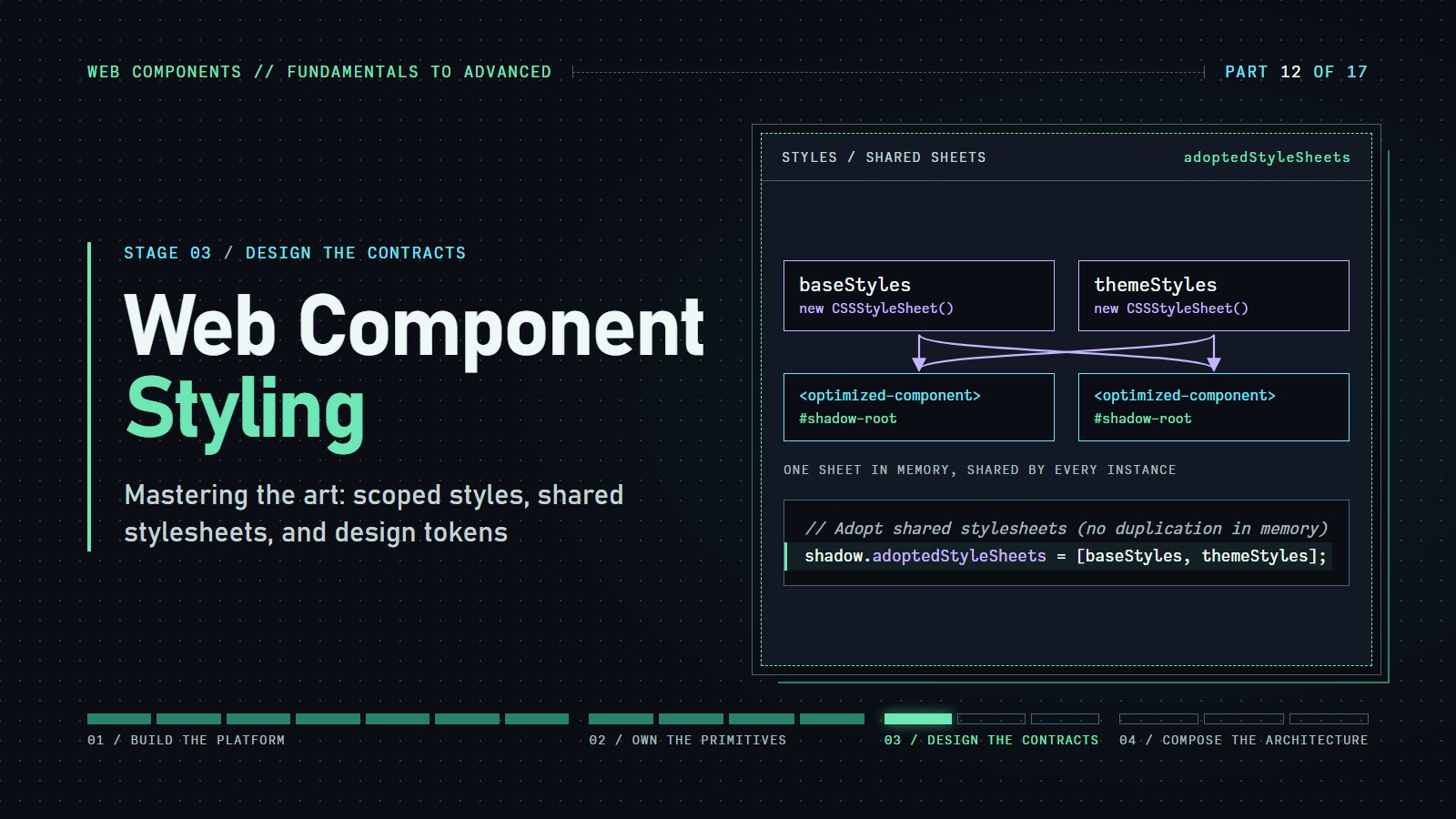
So far each component has carried its own <style> tag, so a hundred cards means a hundred copies of the same CSS. A constructable stylesheet is a stylesheet you create in JavaScript once and share. new CSSStyleSheet() makes an empty one, replaceSync(cssText) fills it with CSS immediately (no network, no waiting), and shadow.adoptedStyleSheets = [sheet] lets a shadow root use it. Many components can adopt the same sheet object. This is an optimization, not something you need on day one:
// Create module-scoped stylesheets
const baseStyles = new CSSStyleSheet();
baseStyles.replaceSync(`
  :host {
    display: block;
    font-family: var(--font-family, system-ui);
  }
  .base {
    box-sizing: border-box;
    width: 100%;
  }
`);

const themeStyles = new CSSStyleSheet();
themeStyles.replaceSync(`
  .themed {
    color: var(--text-color, #212121);
    background: var(--background-color, #ffffff);
  }
`);

// Component implementation with shared stylesheets
class OptimizedComponent extends HTMLElement {
  constructor() {
    super();
    const shadow = this.attachShadow({ mode: 'open' });

    // Adopt shared stylesheets (no duplication in memory)
    shadow.adoptedStyleSheets = [baseStyles, themeStyles];

    // Create component structure
    shadow.innerHTML = `
      <div class="base themed">
        <slot></slot>
      </div>
    `;
  }
}

customElements.define('optimized-component', OptimizedComponent);
The technical advantages of this approach include:
-
Sheet objects are parsed once but used by multiple component instances
-
Memory usage is significantly reduced compared to duplicated inline styles
-
Browser rendering optimizations can be applied to shared stylesheets
-
Updates to shared stylesheets automatically propagate to all components
Creating a Component Design System with CSS Custom Properties#
To implement a cohesive design system through Web Components, a systematic approach to CSS custom properties creates a powerful styling API:
// design-system.js
const designSystem = {
  // Define all design tokens at the :root level
  installGlobalTokens() {
    const tokens = document.createElement('style');
    tokens.textContent = `
      :root {
        /* Color system */
        --color-primary-50: #e3f2fd;
        --color-primary-100: #bbdefb;
        --color-primary-500: #2196f3;
        --color-primary-900: #0d47a1;

        /* Typography */
        --font-size-xs: 12px;
        --font-size-sm: 14px;
        --font-size-md: 16px;
        --font-size-lg: 18px;
        --font-size-xl: 20px;

        /* Spacing system */
        --spacing-unit: 4px;
        --spacing-xs: calc(var(--spacing-unit) * 1);
        --spacing-sm: calc(var(--spacing-unit) * 2);
        --spacing-md: calc(var(--spacing-unit) * 4);
        --spacing-lg: calc(var(--spacing-unit) * 6);
        --spacing-xl: calc(var(--spacing-unit) * 10);

        /* Elevation */
        --shadow-1: 0 1px 3px rgba(0,0,0,0.12), 0 1px 2px rgba(0,0,0,0.24);
        --shadow-2: 0 3px 6px rgba(0,0,0,0.15), 0 2px 4px rgba(0,0,0,0.12);
        --shadow-3: 0 10px 20px rgba(0,0,0,0.15), 0 3px 6px rgba(0,0,0,0.10);

        /* Border radius */
        --radius-sm: 2px;
        --radius-md: 4px;
        --radius-lg: 8px;
        --radius-full: 999px;

        /* Animation */
        --duration-fast: 150ms;
        --duration-normal: 300ms;
        --duration-slow: 500ms;
        --easing-standard: cubic-bezier(0.4, 0.0, 0.2, 1);
      }
    `;
    document.head.appendChild(tokens);
  },

  // Component tokens derived from global tokens
  getComponentTokens(name) {
    const style = document.createElement('style');

    // Component-specific custom properties derived from global tokens
    const componentTokens = {
      'ds-button': `
        --button-bg: var(--color-primary-500);
        --button-color: white;
        --button-padding: var(--spacing-sm) var(--spacing-md);
        --button-radius: var(--radius-md);
        --button-shadow: var(--shadow-1);
      `,
      'ds-card': `
        --card-bg: white;
        --card-border: 1px solid rgba(0,0,0,0.1);
        --card-padding: var(--spacing-md);
        --card-radius: var(--radius-md);
        --card-shadow: var(--shadow-1);
      `
    };

    style.textContent = `
      ${name} {
        ${componentTokens[name] || ''}
      }
    `;

    return style;
  }
};

// Install design system tokens
document.addEventListener('DOMContentLoaded', () => {
  designSystem.installGlobalTokens();
});
This approach enables several advanced styling capabilities:
-
Centralized design token management
-
Hierarchical theming with cascading defaults
-
Component-specific styling APIs that respect the global design system
-
Runtime theming capabilities without component modification
Try a design system built with CSS custom properties. This interactive example showcases how design tokens cascade through your component hierarchy, creating a consistent visual language. The design system automatically adapts between light and dark modes while maintaining component-specific styling APIs. Explore the color tokens, typography scale, and spacing system that form the foundation of the design system, then see how they're applied to create cohesive components that respond to their environment.
---html
<div class="container">
	<div class="toolbar">
		<h1>Design System with CSS Custom Properties</h1>
		<button id="theme-toggle">
			<span id="theme-icon">🌓</span>
			<span id="theme-text">Toggle Theme</span>
		</button>
	</div>

	<p>
		This demo shows how Web Components can use CSS Custom Properties to create a consistent
		design system that responds to light/dark mode preferences and supports theming.
	</p>

	<div class="demo-section">
		<h2>Color Tokens</h2>
		<p>The foundation of our design system starts with color tokens:</p>

		<div class="token-grid">
			<div class="token-item">
				<div class="color-preview" style="background-color: var(--theme-primary);"></div>
				<div class="token-name">--theme-primary</div>
				<div class="token-value">#4361ee</div>
			</div>
			<div class="token-item">
				<div class="color-preview" style="background-color: var(--theme-secondary);"></div>
				<div class="token-name">--theme-secondary</div>
				<div class="token-value">#3f37c9</div>
			</div>
			<div class="token-item">
				<div class="color-preview" style="background-color: var(--theme-accent);"></div>
				<div class="token-name">--theme-accent</div>
				<div class="token-value">#4cc9f0</div>
			</div>
			<div class="token-item">
				<div class="color-preview" style="background-color: var(--theme-success);"></div>
				<div class="token-name">--theme-success</div>
				<div class="token-value">#4caf50</div>
			</div>
			<div class="token-item">
				<div class="color-preview" style="background-color: var(--theme-warning);"></div>
				<div class="token-name">--theme-warning</div>
				<div class="token-value">#ff9800</div>
			</div>
			<div class="token-item">
				<div class="color-preview" style="background-color: var(--theme-danger);"></div>
				<div class="token-name">--theme-danger</div>
				<div class="token-value">#f72585</div>
			</div>
		</div>

		<h3>Semantic Colors</h3>
		<p>These adapt automatically between light and dark mode:</p>

		<div class="token-grid">
			<div class="token-item">
				<div class="color-preview" style="background-color: var(--surface-bg);"></div>
				<div class="token-name">--surface-bg</div>
				<div class="token-value">(dynamic)</div>
			</div>
			<div class="token-item">
				<div class="color-preview" style="background-color: var(--surface-card);"></div>
				<div class="token-name">--surface-card</div>
				<div class="token-value">(dynamic)</div>
			</div>
			<div class="token-item">
				<div class="color-preview" style="background-color: var(--text-primary);"></div>
				<div class="token-name">--text-primary</div>
				<div class="token-value">(dynamic)</div>
			</div>
			<div class="token-item">
				<div class="color-preview" style="background-color: var(--border-color);"></div>
				<div class="token-name">--border-color</div>
				<div class="token-value">(dynamic)</div>
			</div>
		</div>
	</div>

	<div class="demo-section">
		<h2>Component Examples</h2>
		<p>These web components use our design system tokens to maintain consistency:</p>

		<div class="component-grid">
			<ds-card>
				<h3 slot="title">Design System Card</h3>
				<p slot="content">This card component automatically adapts to light/dark mode and uses our spacing, typography, and color tokens.</p>
				<div slot="footer">
					<ds-button variant="primary">Primary Action</ds-button>
					<ds-button variant="secondary">Secondary</ds-button>
				</div>
			</ds-card>

			<ds-card>
				<h3 slot="title">Interactive Controls</h3>
				<div slot="content">
					<p>Try these buttons that follow our design system:</p>
					<div style="display: flex; gap: var(--spacing-sm); flex-wrap: wrap; margin-bottom: var(--spacing-md);">
						<ds-button variant="primary">Primary</ds-button>
						<ds-button variant="secondary">Secondary</ds-button>
						<ds-button variant="accent">Accent</ds-button>
						<ds-button variant="success">Success</ds-button>
						<ds-button variant="warning">Warning</ds-button>
						<ds-button variant="danger">Danger</ds-button>
					</div>
					<p>Size variants:</p>
					<div style="display: flex; gap: var(--spacing-sm); align-items: center;">
						<ds-button variant="primary" size="small">Small</ds-button>
						<ds-button variant="primary" size="medium">Medium</ds-button>
						<ds-button variant="primary" size="large">Large</ds-button>
					</div>
				</div>
			</ds-card>
		</div>
	</div>
</div>
---css
/* Design System Tokens */
:root {
	/* Theme Colors */
	--theme-primary: #4361ee;
	--theme-secondary: #3f37c9;
	--theme-accent: #4cc9f0;
	--theme-success: #4caf50;
	--theme-warning: #ff9800;
	--theme-danger: #f72585;

	/* Neutral Colors - Light Mode Default */
	--neutral-50: #f8f9fa;
	--neutral-100: #f0f0f0;
	--neutral-200: #e9ecef;
	--neutral-300: #dee2e6;
	--neutral-400: #ced4da;
	--neutral-500: #adb5bd;
	--neutral-600: #6c757d;
	--neutral-700: #495057;
	--neutral-800: #343a40;
	--neutral-900: #212529;

	/* Semantic Mappings - Light Mode */
	--surface-bg: var(--neutral-50);
	--surface-card: white;
	--text-primary: var(--neutral-900);
	--text-secondary: var(--neutral-700);
	--text-tertiary: var(--neutral-600);
	--border-color: var(--neutral-300);

	/* Spacing System */
	--spacing-unit: 4px;
	--spacing-xs: calc(var(--spacing-unit) * 1); /* 4px */
	--spacing-sm: calc(var(--spacing-unit) * 2); /* 8px */
	--spacing-md: calc(var(--spacing-unit) * 4); /* 16px */
	--spacing-lg: calc(var(--spacing-unit) * 6); /* 24px */
	--spacing-xl: calc(var(--spacing-unit) * 10); /* 40px */

	/* Typography */
	--font-family: system-ui, -apple-system, sans-serif;
	--font-size-xs: 12px;
	--font-size-sm: 14px;
	--font-size-md: 16px;
	--font-size-lg: 20px;
	--font-size-xl: 24px;
	--font-size-2xl: 32px;

	/* Border Radius */
	--radius-sm: 4px;
	--radius-md: 8px;
	--radius-lg: 16px;
	--radius-xl: 24px;
	--radius-full: 9999px;

	/* Shadows */
	--shadow-sm: 0 1px 2px rgba(0, 0, 0, 0.05);
	--shadow-md: 0 4px 6px rgba(0, 0, 0, 0.1);
	--shadow-lg: 0 10px 15px rgba(0, 0, 0, 0.1);

	/* Animation */
	--duration-fast: 150ms;
	--duration-normal: 300ms;
	--duration-slow: 500ms;
	--easing-standard: cubic-bezier(0.4, 0, 0.2, 1);

	/* Component Specific - Button */
	--button-padding-x: var(--spacing-md);
	--button-padding-y: var(--spacing-sm);
	--button-radius: var(--radius-md);
	--button-font-size: var(--font-size-md);

	/* Component Specific - Card */
	--card-padding: var(--spacing-md);
	--card-radius: var(--radius-md);
	--card-shadow: var(--shadow-md);
	--card-border: 1px solid var(--border-color);

	color-scheme: light dark;
}

/* Dark Mode Overrides */
@media (prefers-color-scheme: dark) {
	:root {
		/* Semantic Mappings - Dark Mode */
		--surface-bg: var(--neutral-900);
		--surface-card: var(--neutral-800);
		--text-primary: var(--neutral-100);
		--text-secondary: var(--neutral-300);
		--text-tertiary: var(--neutral-400);
		--border-color: var(--neutral-700);
	}
}

/* Base Styles */
body {
	font-family: var(--font-family);
	background-color: var(--surface-bg);
	color: var(--text-primary);
	line-height: 1.5;
	margin: 0;
	padding: var(--spacing-md);
	transition: background-color var(--duration-normal) var(--easing-standard);
}

.container {
	max-width: 1200px;
	margin: 0 auto;
}

h1,
h2,
h3,
h4,
h5,
h6 {
	color: var(--text-primary);
	margin-top: 0;
}

h1 {
	font-size: var(--font-size-2xl);
	margin-bottom: var(--spacing-lg);
}

h2 {
	font-size: var(--font-size-xl);
	margin-bottom: var(--spacing-md);
	margin-top: var(--spacing-xl);
}

h3 {
	font-size: var(--font-size-lg);
	margin-bottom: var(--spacing-sm);
}

p {
	margin-bottom: var(--spacing-md);
	color: var(--text-secondary);
}

button {
	cursor: pointer;
}

.demo-section {
	background-color: var(--surface-card);
	border-radius: var(--radius-md);
	padding: var(--spacing-lg);
	margin-bottom: var(--spacing-xl);
	border: 1px solid var(--border-color);
}

.token-grid {
	display: grid;
	grid-template-columns: repeat(auto-fill, minmax(250px, 1fr));
	gap: var(--spacing-md);
	margin: var(--spacing-lg) 0;
}

.token-item {
	padding: var(--spacing-md);
	border-radius: var(--radius-sm);
	border: 1px solid var(--border-color);
	background-color: var(--surface-card);
}

.token-name {
	font-family: monospace;
	font-size: var(--font-size-sm);
	color: var(--theme-primary);
	margin-bottom: var(--spacing-xs);
}

.token-value {
	font-family: monospace;
	font-size: var(--font-size-sm);
	color: var(--text-tertiary);
}

.color-preview {
	height: 30px;
	border-radius: var(--radius-sm);
	margin-bottom: var(--spacing-xs);
}

.component-grid {
	display: grid;
	grid-template-columns: repeat(auto-fit, minmax(300px, 1fr));
	gap: var(--spacing-xl);
	margin: var(--spacing-lg) 0;
}

.toolbar {
	display: flex;
	justify-content: space-between;
	align-items: center;
	margin-bottom: var(--spacing-lg);
}

#theme-toggle {
	background-color: var(--surface-card);
	color: var(--text-primary);
	border: 1px solid var(--border-color);
	padding: var(--spacing-sm) var(--spacing-md);
	border-radius: var(--radius-full);
	font-size: var(--font-size-sm);
	display: flex;
	align-items: center;
	gap: var(--spacing-xs);
	transition: all var(--duration-fast) var(--easing-standard);
}

#theme-toggle:hover {
	background-color: var(--neutral-200);
}

@media (prefers-color-scheme: dark) {
	#theme-toggle:hover {
		background-color: var(--neutral-700);
	}
}
---js
// Design System Button Component
class DesignSystemButton extends HTMLElement {
  static get observedAttributes() {
    return ["variant", "size", "disabled"];
  }

  constructor() {
    super();
    this.attachShadow({ mode: "open" });
    this.render();
  }

  connectedCallback() {
    this.shadowRoot.querySelector("button").addEventListener("click", e => {
      if (!this.hasAttribute("disabled")) {
        this.dispatchEvent(
        new CustomEvent("click", {
          bubbles: true,
          composed: true,
          detail: { originalEvent: e } }));


      }
    });
  }

  attributeChangedCallback() {
    this.render();
  }

  disconnectedCallback() {
    this.shadowRoot.
    querySelector("button").
    removeEventListener("click", this.handleClick);
  }

  render() {
    const variant = this.getAttribute("variant") || "primary";
    const size = this.getAttribute("size") || "medium";
    const disabled = this.hasAttribute("disabled");

    const buttonSizes = {
      small: {
        "--button-font-size": "var(--font-size-sm)",
        "--button-padding": "var(--spacing-xs) var(--spacing-sm)" },

      medium: {
        "--button-font-size": "var(--font-size-md)",
        "--button-padding": "var(--spacing-sm) var(--spacing-md)" },

      large: {
        "--button-font-size": "var(--font-size-lg)",
        "--button-padding": "var(--spacing-md) var(--spacing-lg)" } };


    const sizeStyle = buttonSizes[size] || buttonSizes.medium;

    this.shadowRoot.innerHTML = `
          <style>
            :host {
              display: inline-block;
            }

            button {
              font-family: var(--font-family);
              font-size: var(--button-font-size);
              padding: var(--button-padding);
              border-radius: var(--button-radius, var(--radius-md));
              border: none;
              cursor: ${disabled ? "not-allowed" : "pointer"};
              opacity: ${disabled ? "0.6" : "1"};
              transition: all var(--duration-fast) var(--easing-standard);
              color: white;
              background-color: var(--theme-${variant}, var(--theme-primary));
            }

            button.secondary {
              background-color: transparent;
              color: var(--theme-${variant}, var(--theme-primary));
              border: 1px solid var(--theme-${variant}, var(--theme-primary));
            }

            button:hover:not(:disabled) {
              filter: brightness(1.1);
              transform: translateY(-1px);
            }

            button:active:not(:disabled) {
              filter: brightness(0.9);
              transform: translateY(0);
            }

            button:focus-visible {
              outline: 2px solid var(--theme-${variant}, var(--theme-primary));
              outline-offset: 2px;
            }
          </style>
          <button
            class="${variant === "secondary" ? "secondary" : ""}"
            ?disabled="${disabled}"
            style="${Object.entries(sizeStyle).
    map(([prop, val]) => `${prop}: ${val}`).
    join(";")}">
            <slot></slot>
          </button>
        `;
  }}


// Design System Card Component
class DesignSystemCard extends HTMLElement {
  constructor() {
    super();
    this.attachShadow({ mode: "open" });
    this.render();
  }

  render() {
    this.shadowRoot.innerHTML = `
          <style>
            :host {
              display: block;
            }

            .card {
              background-color: var(--surface-card);
              border-radius: var(--card-radius);
              box-shadow: var(--card-shadow);
              border: var(--card-border);
              overflow: hidden;
              transition: all var(--duration-normal) var(--easing-standard);
            }

            .card:hover {
              box-shadow: var(--shadow-lg);
              transform: translateY(-2px);
            }

            .card-header {
              padding: var(--card-padding);
              border-bottom: 1px solid var(--border-color);
            }

            .card-body {
              padding: var(--card-padding);
            }

            .card-footer {
              padding: var(--card-padding);
              border-top: 1px solid var(--border-color);
              display: flex;
              gap: var(--spacing-sm);
              flex-wrap: wrap;
            }

            ::slotted(h3) {
              margin-top: 0;
              margin-bottom: 0;
            }
          </style>
          <div class="card">
            <div class="card-header">
              <slot name="title"></slot>
            </div>
            <div class="card-body">
              <slot name="content"></slot>
            </div>
            <div class="card-footer">
              <slot name="footer"></slot>
            </div>
          </div>
        `;
  }}


// Register custom elements
customElements.define("ds-button", DesignSystemButton);
customElements.define("ds-card", DesignSystemCard);

// Theme toggle functionality
document.getElementById("theme-toggle").addEventListener("click", () => {
  const prefersDark = window.matchMedia("(prefers-color-scheme: dark)").matches;
  const rootStyle = document.documentElement.style;

  // If system prefers dark and we're in dark mode OR system prefers light and we're in light mode
  const isUsingSystemTheme = !rootStyle.getPropertyValue("--surface-bg");

  if (isUsingSystemTheme) {
    if (prefersDark) {
      // System prefers dark, switch to light
      rootStyle.setProperty("--surface-bg", "var(--neutral-50)");
      rootStyle.setProperty("--surface-card", "white");
      rootStyle.setProperty("--text-primary", "var(--neutral-900)");
      rootStyle.setProperty("--text-secondary", "var(--neutral-700)");
      rootStyle.setProperty("--text-tertiary", "var(--neutral-600)");
      rootStyle.setProperty("--border-color", "var(--neutral-300)");
      document.getElementById("theme-text").textContent = "Light Mode";
      document.getElementById("theme-icon").textContent = "☀️";
    } else {
      // System prefers light, switch to dark
      rootStyle.setProperty("--surface-bg", "var(--neutral-900)");
      rootStyle.setProperty("--surface-card", "var(--neutral-800)");
      rootStyle.setProperty("--text-primary", "var(--neutral-100)");
      rootStyle.setProperty("--text-secondary", "var(--neutral-300)");
      rootStyle.setProperty("--text-tertiary", "var(--neutral-400)");
      rootStyle.setProperty("--border-color", "var(--neutral-700)");
      document.getElementById("theme-text").textContent = "Dark Mode";
      document.getElementById("theme-icon").textContent = "🌙";
    }
  } else {
    // We're using a manual theme, reset to system preference
    rootStyle.removeProperty("--surface-bg");
    rootStyle.removeProperty("--surface-card");
    rootStyle.removeProperty("--text-primary");
    rootStyle.removeProperty("--text-secondary");
    rootStyle.removeProperty("--text-tertiary");
    rootStyle.removeProperty("--border-color");
    document.getElementById("theme-text").textContent = "System Theme";
    document.getElementById("theme-icon").textContent = "🌓";
  }
});
Challenge: override a token from the page. The card below reads its padding from --spacing-md, falling back to 16px. Run it, then add one rule to the page CSS (the TODO) that sets --spacing-md on my-card. Expected result: the card's padding grows to 40px and the whole card gets visibly roomier. Custom properties are inherited, so they travel from the page into the shadow tree even though ordinary selectors cannot.
---html
<my-card><p>Hello from the light DOM.</p></my-card>
---css
body { font-family: sans-serif; }
/* TODO: add  my-card { --spacing-md: 40px; }  below this line */
---js
class MyCard extends HTMLElement {
  constructor() {
    super();
    this.attachShadow({ mode: 'open' }).innerHTML = `
      <style>
        .box {
          padding: var(--spacing-md, 16px);
          border: 2px solid steelblue;
        }
      </style>
      <div class="box"><slot></slot></div>`;
  }
}
customElements.define('my-card', MyCard);
The Fourth Door: ::part#
Custom properties work only when the component chose to read a variable. ::part is the other direction: the component names an inner element with a part attribute, and the page can then style that element directly.
---html
<my-card><p>Slotted text</p></my-card>
---css
body { font-family: sans-serif; }
my-card::part(action) {
  background: tomato;
  color: white;
}
---js
class MyCard extends HTMLElement {
  constructor() {
    super();
    this.attachShadow({ mode: 'open' }).innerHTML = `
      <slot></slot>
      <button part="action">Save</button>`;
  }
}
customElements.define('my-card', MyCard);
Delete the part="action" attribute and run again: the button goes back to its default look, because the page can only reach what the component exposes. One limit worth knowing: ::part(action) styles that element itself, not its children, so ::part(action) span matches nothing.
Inheritance and Context Adaptation Techniques#
For components that need to adapt to their environment while maintaining encapsulation, sophisticated context-handling techniques can be employed:
class ContextAwareComponent extends HTMLElement {
  constructor() {
    super();
    const shadow = this.attachShadow({ mode: 'open' });

    shadow.innerHTML = `
      <style>
        /* Base responsive container that adapts to context */
        :host {
          display: block;
          /* Inherit typography properties purposefully */
          font-family: inherit;
          font-size: inherit;
          line-height: inherit;
          color: inherit;
          /* Default containment for performance */
          contain: content;
        }

        /* Contextual adaptation */
        :host([data-context="card"]) .content {
          padding: var(--card-inner-spacing, 16px);
        }

        :host([data-context="sidebar"]) .content {
          padding: var(--sidebar-item-spacing, 8px 12px);
        }

        /* Content styles */
        .content {
          background-color: var(--component-bg, transparent);
          border-radius: var(--component-radius, 4px);
          transition: background-color var(--duration-normal, 300ms) ease;
        }

        /* Advanced slotted content styling */
        ::slotted(h1),
        ::slotted(h2),
        ::slotted(h3) {
          margin-top: 0;
          color: var(--heading-color, currentColor);
        }

        ::slotted(p) {
          margin-bottom: var(--paragraph-spacing, 1em);
        }
      </style>
      <div class="content">
        <slot></slot>
      </div>
    `;

    // Context detection for environment-specific styling
    this._detectContext();

    // MutationObserver for dynamic context changes
    this._observer = new MutationObserver(() => this._detectContext());
    this._observer.observe(this, { attributes: true });
  }

  connectedCallback() {
    // Re-evaluate context when the component is inserted into a new location
    this._detectContext();
    this._startContextObservation();
  }

  disconnectedCallback() {
    this._observer.disconnect();
  }

  _startContextObservation() {
    // Walk up the DOM tree to find parent components that might change
    let parent = this.parentElement;
    while (parent) {
      if (parent.tagName?.includes('-')) {
        this._observer.observe(parent, { attributes: true });
      }
      parent = parent.parentElement;
    }
  }

  _detectContext() {
    // Detect where this component is being used
    const parentCard = this.closest('card-component');
    const parentSidebar = this.closest('sidebar-component');

    if (parentCard) {
      this.setAttribute('data-context', 'card');
    } else if (parentSidebar) {
      this.setAttribute('data-context', 'sidebar');
    } else {
      this.removeAttribute('data-context');
    }
  }
}

customElements.define('context-aware-component', ContextAwareComponent);
This implementation demonstrates advanced environment adaptation techniques:
-
Selective inheritance of typography properties
-
Context detection through DOM traversal
-
Dynamic adaptation through attribute-based styling
-
MutationObserver for responding to contextual changes
This demonstration reveals how sophisticated components can intelligently adapt to their surrounding context. The same component automatically adjusts its appearance when placed in different containers (cards vs. sidebars) and responds to theme changes without requiring manual style updates. The implementation uses MutationObserver to detect DOM changes and dynamically updates styling based on the component's environment. Try toggling between container types to see how the component repositions and restyling itself, and switch between light and dark modes to observe theme adaptation in action.
---html
<div class="container">
	<div class="title-section">
		<h1>Context-Aware Web Components</h1>
		<p>Demonstrating how Web Components can adapt to their environment</p>
	</div>

	<div class="demo-section">
		<h2>Component Adaptation to Parent Context</h2>
		<p>The same component adapts its styling based on where it's placed in the UI.</p>

		<div class="card-container">
			<div class="card" id="card-context">
				<div class="card-header">
					<h3>Card Context</h3>
				</div>
				<div class="card-body">
					<p>This panel contains a context-aware component in a card:</p>
					<context-aware-component>
						<h4>Inside a Card</h4>
						<p>This component detects it's inside a card and styles accordingly.</p>
					</context-aware-component>
				</div>
			</div>

			<div class="sidebar" id="sidebar-context">
				<div class="sidebar-header">
					<h3>Sidebar Context</h3>
				</div>
				<div class="sidebar-items">
					<p>The same component in a sidebar:</p>
					<context-aware-component>
						<h4>Inside a Sidebar</h4>
						<p>This component detects it's inside a sidebar and adjusts its appearance.</p>
					</context-aware-component>
				</div>
			</div>
		</div>
	</div>

	<div class="demo-section">
		<h2>Component Adaptation to Theme Changes</h2>
		<p>The component automatically adapts to light/dark mode and react to runtime theme changes.</p>

		<div class="card-container">
			<div class="card">
				<div class="card-header">
					<h3>Default Context</h3>
				</div>
				<div class="card-body">
					<context-aware-component>
						<h4>Default Styling</h4>
						<p>This component is in a standard context and will adapt to light/dark mode.</p>
					</context-aware-component>

					<div class="theme-toggle">
						<button id="theme-toggle">Toggle Light/Dark Mode</button>
					</div>
				</div>
			</div>
		</div>
	</div>

	<div class="demo-section">
		<h2>DOM Hierarchy Observation</h2>
		<p>The component will update its context when parent elements change.</p>

		<div class="card-container">
			<div id="dynamic-container" class="card">
				<div class="card-header">
					<h3>Dynamic Context</h3>
				</div>
				<div class="card-body">
					<context-aware-component>
						<h4>Dynamic Content</h4>
						<p>Watch this component adapt when its container changes.</p>
					</context-aware-component>

					<div class="theme-toggle">
						<button id="toggle-container">Toggle Container Type</button>
					</div>
				</div>
			</div>
		</div>
	</div>
</div>
---css
/* Design System Variables */
:root {
	/* Light Theme (Default) */
	--color-bg: #f8f9fa;
	--color-surface: #ffffff;
	--color-text: #212529;
	--color-text-secondary: #6c757d;
	--color-border: #dee2e6;
	--color-primary: #0d6efd;
	--color-success: #198754;
	--color-danger: #dc3545;
	--shadow-sm: 0 1px 3px rgba(0, 0, 0, 0.1);
	--shadow-md: 0 4px 6px rgba(0, 0, 0, 0.1);

	/* For detecting dark mode in the JavaScript */
	--theme-id: "light";
	color-scheme: light dark;
}

@media (prefers-color-scheme: dark) {
	:root {
		/* Dark Theme */
		--color-bg: #212529;
		--color-surface: #343a40;
		--color-text: #f8f9fa;
		--color-text-secondary: #adb5bd;
		--color-border: #495057;
		--color-primary: #0d6efd;
		--color-success: #198754;
		--color-danger: #dc3545;
		--shadow-sm: 0 1px 3px rgba(0, 0, 0, 0.3);
		--shadow-md: 0 4px 6px rgba(0, 0, 0, 0.3);

		/* For detecting dark mode in the JavaScript */
		--theme-id: "dark";
	}
}

/* Base Styles */
body {
	font-family: system-ui, -apple-system, BlinkMacSystemFont, sans-serif;
	background-color: var(--color-bg);
	color: var(--color-text);
	line-height: 1.5;
	margin: 0;
	padding: 20px;
	transition: background-color 0.3s ease;
}

.container {
	max-width: 1200px;
	margin: 0 auto;
}

h1,
h2,
h3,
h4 {
	color: var(--color-text);
	margin-top: 0;
}

p {
	color: var(--color-text-secondary);
}

.title-section {
	margin-bottom: 40px;
	text-align: center;
}

.demo-section {
	margin-bottom: 40px;
	padding: 20px;
	background-color: var(--color-surface);
	border-radius: 8px;
	box-shadow: var(--shadow-sm);
	border: 1px solid var(--color-border);
}

.card-container {
	margin-top: 20px;
	display: grid;
	grid-template-columns: repeat(auto-fit, minmax(300px, 1fr));
	gap: 20px;
}

/* Card Styling */
.card {
	background-color: var(--color-surface);
	border-radius: 8px;
	border: 1px solid var(--color-border);
	overflow: hidden;
}

.card-header {
	padding: 15px;
	background-color: rgba(0, 0, 0, 0.03);
	border-bottom: 1px solid var(--color-border);
}

.card-body {
	padding: 15px;
}

/* Sidebar Styling */
.sidebar {
	background-color: var(--color-surface);
	border-radius: 8px;
	border: 1px solid var(--color-border);
	padding: 15px;
}

.sidebar-header {
	border-bottom: 1px solid var(--color-border);
	padding-bottom: 10px;
	margin-bottom: 15px;
}

.sidebar-items {
	display: flex;
	flex-direction: column;
	gap: 5px;
}

.theme-toggle {
	margin-top: 20px;
	text-align: center;
}

button {
	background-color: var(--color-primary);
	color: white;
	border: none;
	padding: 8px 16px;
	border-radius: 4px;
	cursor: pointer;
	font-size: 14px;
}
---js
class ContextAwareComponent extends HTMLElement {
  constructor() {
    super();
    this.attachShadow({ mode: "open" });

    // Render initial component
    this.render();

    // Initialize MutationObserver
    this._observer = new MutationObserver(() => this._detectContext());
  }

  connectedCallback() {
    // Detect context when added to DOM
    this._detectContext();
    this._startContextObservation();

    // Listen for theme changes
    window.addEventListener("theme-change", () => this._detectContext());
  }

  disconnectedCallback() {
    // Clean up observer
    this._observer.disconnect();
    window.removeEventListener("theme-change", () => this._detectContext());
  }

  _startContextObservation() {
    // Observe this element for attribute changes
    this._observer.observe(this, { attributes: true });

    // Walk up the DOM tree to find parent containers that might change
    let parent = this.parentElement;
    while (parent) {
      // If the parent is a custom element or one of our contexts, observe it
      if (
      parent.tagName?.includes("-") ||
      parent.id === "card-context" ||
      parent.id === "sidebar-context" ||
      parent.id === "dynamic-container")
      {
        this._observer.observe(parent, { attributes: true });
      }
      parent = parent.parentElement;
    }
  }

  _detectContext() {
    // Reset context
    this.removeAttribute("data-context");

    // Detect container context
    if (this.closest("#card-context, .card")) {
      this.setAttribute("data-context", "card");
    } else if (this.closest("#sidebar-context, .sidebar")) {
      this.setAttribute("data-context", "sidebar");
    }

    // Detect theme context
    const computedStyle = getComputedStyle(document.documentElement);
    const themeId = computedStyle.
    getPropertyValue("--theme-id").
    trim().
    replace(/"/g, "");

    this.setAttribute("data-theme", themeId);

    // Re-render with new context
    this.render();
  }

  render() {
    const context = this.getAttribute("data-context") || "default";
    const theme = this.getAttribute("data-theme") || "light";

    // Context-specific styling
    const contextStyles = {
      default: `
            padding: 15px;
            border-radius: 4px;
            background-color: var(--color-surface);
            border: 1px solid var(--color-border);
          `,
      card: `
            padding: 20px;
            border-radius: 8px;
            background-color: rgba(0,0,0,0.03);
            border: 1px solid var(--color-border);
            margin: 10px 0;
          `,
      sidebar: `
            padding: 10px;
            border-left: 3px solid var(--color-primary);
            background-color: transparent;
            margin: 5px 0;
          ` };


    this.shadowRoot.innerHTML = `
          <style>
            :host {
              display: block;
              transition: all 0.3s ease;
            }

            /* Base responsive container that adapts to context */
            .content {
              ${contextStyles[context]}
              color: var(--color-text);
              /* Inherit typography properties purposefully */
              font-family: inherit;
              font-size: inherit;
              line-height: inherit;
            }

            /* Container animations based on context */
            :host([data-context="card"]) .content:hover {
              box-shadow: var(--shadow-md);
              transform: translateY(-2px);
            }

            :host([data-context="sidebar"]) .content:hover {
              background-color: rgba(13, 110, 253, 0.05);
            }

            /* Theme-specific styling */
            :host([data-theme="dark"]) .content {
              box-shadow: 0 2px 8px rgba(0, 0, 0, 0.2);
            }

            :host([data-theme="light"]) .content {
              box-shadow: 0 1px 3px rgba(0, 0, 0, 0.1);
            }

            /* Advanced slotted content styling */
            ::slotted(h4) {
              margin-top: 0;
              color: var(--color-text);
              font-size: ${context === "sidebar" ? "16px" : "18px"};
            }

            ::slotted(p) {
              margin-bottom: 0;
              color: var(--color-text-secondary);
              font-size: ${context === "sidebar" ? "14px" : "16px"};
            }

            .context-label {
              display: inline-block;
              font-size: 12px;
              padding: 2px 6px;
              border-radius: 4px;
              margin-bottom: 8px;
              background-color: var(--color-primary);
              color: white;
            }
          </style>

          <div class="content">
            <div class="context-label">${context} context (${theme} theme)</div>
            <slot></slot>
          </div>
        `;
  }}


// Register custom element
customElements.define("context-aware-component", ContextAwareComponent);

// Theme toggle functionality
document.getElementById("theme-toggle").addEventListener("click", () => {
  const root = document.documentElement;
  const computedStyle = getComputedStyle(root);
  const currentTheme = computedStyle.
  getPropertyValue("--theme-id").
  trim().
  replace(/"/g, "");

  if (currentTheme === "light") {
    root.style.setProperty("--color-bg", "#212529");
    root.style.setProperty("--color-surface", "#343a40");
    root.style.setProperty("--color-text", "#f8f9fa");
    root.style.setProperty("--color-text-secondary", "#adb5bd");
    root.style.setProperty("--color-border", "#495057");
    root.style.setProperty("--theme-id", '"dark"');
  } else {
    root.style.setProperty("--color-bg", "#f8f9fa");
    root.style.setProperty("--color-surface", "#ffffff");
    root.style.setProperty("--color-text", "#212529");
    root.style.setProperty("--color-text-secondary", "#6c757d");
    root.style.setProperty("--color-border", "#dee2e6");
    root.style.setProperty("--theme-id", '"light"');
  }

  // Dispatch custom event for theme change
  window.dispatchEvent(new CustomEvent("theme-change"));
});

// Toggle container type
document.getElementById("toggle-container").addEventListener("click", () => {
  const container = document.getElementById("dynamic-container");

  if (container.classList.contains("card")) {
    container.classList.remove("card");
    container.classList.add("sidebar");
  } else {
    container.classList.remove("sidebar");
    container.classList.add("card");
  }
});
Performance Optimization Strategies#
Optimal Web Component styling requires consideration of rendering performance, particularly when designing systems that may include hundreds of component instances.
Critical Rendering Path Optimization#
class PerformanceOptimizedComponent extends HTMLElement {
  constructor() {
    super();
    this.shadow = this.attachShadow({ mode: 'open' });

    // Prioritize structural rendering
    this._createDOMStructure();

    // Defer non-critical styles
    this._deferNonCriticalStyles();
  }

  _createDOMStructure() {
    // Critical CSS for initial render
    const criticalStyle = document.createElement('style');
    criticalStyle.textContent = `
      :host { display: block; }
      .container { min-height: 20px; }
    `;

    const container = document.createElement('div');
    container.className = 'container';
    container.innerHTML = '<slot></slot>';

    this.shadow.appendChild(criticalStyle);
    this.shadow.appendChild(container);
  }

  _deferNonCriticalStyles() {
    // Use requestIdleCallback for non-critical styling
    requestIdleCallback(() => {
      const enhancedStyle = document.createElement('style');
      enhancedStyle.textContent = `
        .container {
          background-color: var(--bg-color, #f9f9f9);
          border-radius: var(--radius, 4px);
          box-shadow: var(--shadow, 0 2px 4px rgba(0,0,0,0.05));
          padding: var(--padding, 16px);
          transition: transform 150ms ease-out, box-shadow 150ms ease-out;
        }

        .container:hover {
          transform: translateY(-2px);
          box-shadow: var(--shadow-hover, 0 4px 8px rgba(0,0,0,0.1));
        }

        ::slotted(*) {
          margin-bottom: var(--item-spacing, 8px);
        }

        ::slotted(*:last-child) {
          margin-bottom: 0;
        }
      `;
      this.shadow.appendChild(enhancedStyle);
    });
  }
}

customElements.define('performance-optimized-component', PerformanceOptimizedComponent);
This architecture demonstrates several performance optimization techniques:
-
Prioritization of critical rendering path styles
-
Deferred loading of non-critical styles
-
Use of requestIdleCallback for low-priority style enhancements
-
Minimal initial render footprint
Performance matters when building production-grade Web Components. This demo visualizes the impact of critical rendering path optimization by showing how components can prioritize structural content while deferring non-critical styles. Watch as the component first renders with minimal styling for immediate user interaction, then progressively enhances with advanced styling features. The timeline visualization shows how the component minimizes initial render time while providing a rich interactive experience. Toggle between optimized and unoptimized versions to see the difference in rendering performance.
---html
<div class="container">
	<div class="title-section">
		<h1>Performance Optimization in Web Components</h1>
		<p>Demonstrating critical rendering path optimization techniques for production-ready components</p>
	</div>

	<div class="demo-section">
		<h2>Critical Rendering Path Optimization</h2>
		<p>
			Compare optimized vs. unoptimized components to see how prioritizing critical styles
			and deferring non-essential rendering can dramatically improve perceived performance.
		</p>

		<div class="control-panel">
			<button id="load-both">Load Both Components</button>
			<button id="reset-demo" class="secondary">Reset Demo</button>
			<button id="toggle-theme" class="secondary">Toggle Light/Dark Mode</button>
		</div>

		<div class="component-row">
			<div class="component-container">
				<div class="component-label">Optimized Component</div>
				<div id="optimized-container">
					<p><i>Click "Load Both Components" to begin the demo...</i></p>
				</div>
			</div>

			<div class="component-container">
				<div class="component-label">Unoptimized Component</div>
				<div id="unoptimized-container">
					<p><i>Click "Load Both Components" to begin the demo...</i></p>
				</div>
			</div>
		</div>

		<div class="timeline">
			<h3>Rendering Timeline</h3>
			<p>Visualizing critical rendering events to demonstrate performance differences</p>

			<div class="timeline-container">
				<div class="timeline-track" id="timeline-track">
					<!-- Timeline markers will be added here -->
				</div>
				<div class="timeline-labels">
					<span>0ms</span>
					<span>500ms</span>
					<span>1000ms</span>
					<span>1500ms</span>
					<span>2000ms</span>
				</div>
			</div>

			<div class="stats-panel">
				<h4>Performance Metrics</h4>
				<div class="stats-row">
					<span>Initial Load (Critical CSS):</span>
					<span id="critical-timing">-</span>
				</div>
				<div class="stats-row">
					<span>Optimized Component Fully Rendered:</span>
					<span id="optimized-timing">-</span>
				</div>
				<div class="stats-row">
					<span>Unoptimized Component Fully Rendered:</span>
					<span id="unoptimized-timing">-</span>
				</div>
			</div>
		</div>
	</div>
</div>
---css
/* Design System Variables */
:root {
	/* Light Theme (Default) */
	--color-bg: #f8f9fa;
	--color-surface: #ffffff;
	--color-text: #212529;
	--color-text-secondary: #6c757d;
	--color-border: #dee2e6;
	--color-primary: #0d6efd;
	--color-success: #198754;
	--color-warning: #ffc107;
	--color-danger: #dc3545;
	--shadow-sm: 0 1px 3px rgba(0, 0, 0, 0.1);
	--shadow-md: 0 4px 6px rgba(0, 0, 0, 0.1);
	color-scheme: light dark;
}

@media (prefers-color-scheme: dark) {
	:root {
		/* Dark Theme */
		--color-bg: #212529;
		--color-surface: #343a40;
		--color-text: #f8f9fa;
		--color-text-secondary: #adb5bd;
		--color-border: #495057;
		--color-primary: #0d6efd;
		--color-success: #198754;
		--color-warning: #ffc107;
		--color-danger: #dc3545;
		--shadow-sm: 0 1px 3px rgba(0, 0, 0, 0.3);
		--shadow-md: 0 4px 6px rgba(0, 0, 0, 0.3);
	}
}

/* Base Styles */
body {
	font-family: system-ui, -apple-system, BlinkMacSystemFont, sans-serif;
	background-color: var(--color-bg);
	color: var(--color-text);
	line-height: 1.5;
	margin: 0;
	padding: 20px;
	transition: background-color 0.3s ease;
}

.container {
	max-width: 1200px;
	margin: 0 auto;
}

h1,
h2,
h3,
h4 {
	color: var(--color-text);
	margin-top: 0;
}

p {
	color: var(--color-text-secondary);
}

.title-section {
	margin-bottom: 40px;
	text-align: center;
}

.demo-section {
	margin-bottom: 40px;
	padding: 20px;
	background-color: var(--color-surface);
	border-radius: 8px;
	box-shadow: var(--shadow-sm);
	border: 1px solid var(--color-border);
}

.control-panel {
	display: flex;
	flex-wrap: wrap;
	gap: 10px;
	margin-bottom: 20px;
	padding: 15px;
	background-color: rgba(0, 0, 0, 0.03);
	border-radius: 4px;
}

.component-row {
	display: grid;
	grid-template-columns: 1fr 1fr;
	gap: 20px;
	margin-top: 20px;
}

@media (max-width: 768px) {
	.component-row {
		grid-template-columns: 1fr;
	}
}

.component-container {
	padding: 20px;
	border-radius: 8px;
	border: 1px solid var(--color-border);
}

.timeline {
	margin-top: 30px;
	padding: 20px;
	background-color: var(--color-surface);
	border-radius: 8px;
	box-shadow: var(--shadow-sm);
	border: 1px solid var(--color-border);
}

.timeline-container {
	position: relative;
	height: 120px;
	margin-top: 20px;
	overflow: hidden;
}

.timeline-track {
	position: relative;
	height: 80px;
	background-color: rgba(0, 0, 0, 0.05);
	border-radius: 4px;
}

.timeline-marker {
	position: absolute;
	height: 100%;
	background-color: rgba(13, 110, 253, 0.2);
	border-left: 2px solid var(--color-primary);
	padding-left: 5px;
	display: flex;
	align-items: center;
	font-size: 14px;
	color: var(--color-primary);
}

.timeline-labels {
	display: flex;
	justify-content: space-between;
	margin-top: 5px;
	font-size: 12px;
	color: var(--color-text-secondary);
}

.timeline-tick {
	position: absolute;
	width: 1px;
	height: 5px;
	background-color: var(--color-text-secondary);
	bottom: -5px;
}

button {
	background-color: var(--color-primary);
	color: white;
	border: none;
	padding: 8px 16px;
	border-radius: 4px;
	cursor: pointer;
	font-size: 14px;
	transition: background-color 0.2s;
}

button:hover {
	background-color: #0b5ed7;
}

button.secondary {
	background-color: var(--color-surface);
	color: var(--color-text);
	border: 1px solid var(--color-border);
}

button.secondary:hover {
	background-color: rgba(0, 0, 0, 0.05);
}

.stats-panel {
	margin-top: 20px;
	padding: 15px;
	background-color: rgba(0, 0, 0, 0.03);
	border-radius: 4px;
	font-size: 14px;
}

.stats-row {
	display: flex;
	justify-content: space-between;
	margin-bottom: 5px;
}

.theme-toggle {
	margin-top: 20px;
	text-align: center;
}

.component-label {
	font-size: 12px;
	padding: 4px 8px;
	background-color: rgba(13, 110, 253, 0.1);
	color: var(--color-primary);
	border-radius: 4px;
	margin-bottom: 10px;
	display: inline-block;
}

.spinner {
	display: inline-block;
	width: 16px;
	height: 16px;
	border: 2px solid rgba(0, 0, 0, 0.1);
	border-radius: 50%;
	border-top-color: var(--color-primary);
	animation: spin 1s linear infinite;
	margin-right: 10px;
}

@keyframes spin {
	to {
		transform: rotate(360deg);
	}
}

@keyframes fadeIn {
	from {
		opacity: 0;
	}
	to {
		opacity: 1;
	}
}

@keyframes slideIn {
	from {
		transform: translateY(20px);
		opacity: 0;
	}
	to {
		transform: translateY(0);
		opacity: 1;
	}
}
---js
// Performance Optimized Component
class OptimizedComponent extends HTMLElement {
  constructor() {
    super();
    this.shadow = this.attachShadow({ mode: "open" });

    // Track timing
    this.initialRenderTime = null;
    this.fullRenderTime = null;

    // Log the construction start time
    this.constructorStartTime = performance.now();

    // STEP 1: Critical Path Rendering - Minimal structural styles
    this._createCriticalStructure();

    // Record the time for critical path rendering
    this.initialRenderTime = performance.now() - this.constructorStartTime;

    // STEP 2: Defer non-critical styles
    this._scheduleDeferredStyles();
  }

  connectedCallback() {
    // Start the content loading simulation
    this._simulateContentLoading();
  }

  _createCriticalStructure() {
    // Create and apply only critical CSS for initial render
    const criticalStyle = document.createElement("style");
    criticalStyle.textContent = `
          :host {
            display: block;
          }

          .card {
            min-height: 300px;
            border: 1px solid var(--color-border, #dee2e6);
            border-radius: 8px;
            overflow: hidden;
          }

          .card-header {
            padding: 16px;
            background-color: rgba(0,0,0,0.03);
            border-bottom: 1px solid var(--color-border, #dee2e6);
          }

          .card-body {
            padding: 16px;
          }

          .card-title {
            margin: 0;
            font-size: 18px;
          }

          .loading {
            display: flex;
            align-items: center;
            font-size: 14px;
            color: var(--color-text-secondary, #6c757d);
          }
        `;

    // Create minimal structure with content placeholders
    const card = document.createElement("div");
    card.className = "card";

    const header = document.createElement("div");
    header.className = "card-header";

    const title = document.createElement("h3");
    title.className = "card-title";
    title.textContent = "Optimized Component";

    const body = document.createElement("div");
    body.className = "card-body";

    const loading = document.createElement("div");
    loading.className = "loading";
    loading.innerHTML =
    '<div class="spinner"></div> Loading component content...';

    // Assemble the structure
    header.appendChild(title);
    body.appendChild(loading);
    card.appendChild(header);
    card.appendChild(body);

    // Add to shadow DOM
    this.shadow.appendChild(criticalStyle);
    this.shadow.appendChild(card);

    // Store reference to body for content updates
    this.cardBody = body;
  }

  _scheduleDeferredStyles() {
    // Use requestIdleCallback (or fallback to setTimeout) for non-critical styling
    const scheduleDeferred =
    window.requestIdleCallback || (cb => setTimeout(cb, 200));

    scheduleDeferred(() => {
      this._applyDeferredStyles();
    });
  }

  _applyDeferredStyles() {
    // Create enhanced styling for the component
    const enhancedStyle = document.createElement("style");
    enhancedStyle.textContent = `
          .card {
            box-shadow: var(--shadow-md, 0 4px 6px rgba(0,0,0,0.1));
            transition: transform 0.3s ease, box-shadow 0.3s ease;
            background-color: var(--color-surface, #ffffff);
          }

          .card:hover {
            transform: translateY(-4px);
            box-shadow: var(--shadow-lg, 0 10px 15px rgba(0,0,0,0.1));
          }

          .card-header {
            display: flex;
            justify-content: space-between;
            align-items: center;
            transition: background-color 0.3s ease;
          }

          .card-title {
            color: var(--color-primary, #0d6efd);
            font-weight: 600;
            transition: color 0.3s ease;
          }

          .card-body {
            color: var(--color-text, #212529);
            transition: color 0.3s ease;
          }

          .card-content {
            animation: fadeIn 0.5s ease forwards;
          }

          .feature-list {
            padding: 0;
            list-style-position: inside;
          }

          .feature-item {
            padding: 8px 0;
            border-bottom: 1px solid var(--color-border, #dee2e6);
            transition: background-color 0.3s ease;
          }

          .feature-item:last-child {
            border-bottom: none;
          }

          .card-footer {
            padding: 16px;
            background-color: rgba(0,0,0,0.02);
            border-top: 1px solid var(--color-border, #dee2e6);
            text-align: center;
          }

          .btn {
            display: inline-block;
            padding: 8px 16px;
            background-color: var(--color-primary, #0d6efd);
            color: white;
            border-radius: 4px;
            text-decoration: none;
            transition: background-color 0.3s ease;
          }

          .btn:hover {
            background-color: #0b5ed7;
          }

          .badge {
            display: inline-block;
            padding: 4px 8px;
            background-color: rgba(13, 110, 253, 0.2);
            color: var(--color-primary, #0d6efd);
            border-radius: 20px;
            font-size: 12px;
          }

          @keyframes fadeIn {
            from { opacity: 0; }
            to { opacity: 1; }
          }
        `;

    this.shadow.appendChild(enhancedStyle);
  }

  _simulateContentLoading() {
    // Simulate content loading delay
    setTimeout(() => {
      // Replace loading indicator with actual content
      const content = document.createElement("div");
      content.className = "card-content";

      content.innerHTML = `
            <h4>Performance Optimized Component</h4>
            <p>This component prioritizes the critical rendering path:</p>
            <ul class="feature-list">
              <li class="feature-item">Minimal initial CSS for faster painting</li>
              <li class="feature-item">Deferred non-critical styles using requestIdleCallback</li>
              <li class="feature-item">Progressive enhancement approach</li>
              <li class="feature-item">Optimized animation and transition performance</li>
            </ul>
            <div class="card-footer">
              <span class="badge">Optimized</span>
              <a href="#" class="btn">Learn More</a>
            </div>
          `;

      // Replace loading state with content
      this.cardBody.innerHTML = "";
      this.cardBody.appendChild(content);

      // Record the time for full rendering
      this.fullRenderTime = performance.now() - this.constructorStartTime;

      // Dispatch event when component is fully rendered
      this.dispatchEvent(
      new CustomEvent("component-rendered", {
        bubbles: true,
        composed: true,
        detail: {
          type: "optimized",
          initialRender: this.initialRenderTime,
          fullRender: this.fullRenderTime } }));


    }, 800); // Simulate a network delay of 800ms
  }}


// Unoptimized Component (monolithic approach, loads everything at once)
class UnoptimizedComponent extends HTMLElement {
  constructor() {
    super();
    this.shadow = this.attachShadow({ mode: "open" });

    // Track timing
    this.constructorStartTime = performance.now();

    // Apply all styles and structure immediately (unoptimized approach)
    this._createFullComponent();
  }

  connectedCallback() {
    // Start the content loading simulation
    this._simulateContentLoading();
  }

  _createFullComponent() {
    // Create ALL styles upfront - this blocks the initial render
    const style = document.createElement("style");
    style.textContent = `
          :host {
            display: block;
          }

          .card {
            min-height: 300px;
            border: 1px solid var(--color-border, #dee2e6);
            border-radius: 8px;
            overflow: hidden;
            box-shadow: var(--shadow-md, 0 4px 6px rgba(0,0,0,0.1));
            transition: transform 0.3s ease, box-shadow 0.3s ease;
            background-color: var(--color-surface, #ffffff);
          }

          .card:hover {
            transform: translateY(-4px);
            box-shadow: var(--shadow-lg, 0 10px 15px rgba(0,0,0,0.1));
          }

          .card-header {
            padding: 16px;
            background-color: rgba(0,0,0,0.03);
            border-bottom: 1px solid var(--color-border, #dee2e6);
            display: flex;
            justify-content: space-between;
            align-items: center;
            transition: background-color 0.3s ease;
          }

          .card-title {
            margin: 0;
            font-size: 18px;
            color: var(--color-primary, #0d6efd);
            font-weight: 600;
            transition: color 0.3s ease;
          }

          .card-body {
            padding: 16px;
            color: var(--color-text, #212529);
            transition: color 0.3s ease;
          }

          .loading {
            display: flex;
            align-items: center;
            font-size: 14px;
            color: var(--color-text-secondary, #6c757d);
          }

          .card-content {
            animation: fadeIn 0.5s ease forwards;
          }

          .feature-list {
            padding: 0;
            list-style-position: inside;
          }

          .feature-item {
            padding: 8px 0;
            border-bottom: 1px solid var(--color-border, #dee2e6);
            transition: background-color 0.3s ease;
          }

          .feature-item:last-child {
            border-bottom: none;
          }

          .card-footer {
            padding: 16px;
            background-color: rgba(0,0,0,0.02);
            border-top: 1px solid var(--color-border, #dee2e6);
            text-align: center;
          }

          .btn {
            display: inline-block;
            padding: 8px 16px;
            background-color: var(--color-primary, #0d6efd);
            color: white;
            border-radius: 4px;
            text-decoration: none;
            transition: background-color 0.3s ease;
          }

          .btn:hover {
            background-color: #0b5ed7;
          }

          .badge {
            display: inline-block;
            padding: 4px 8px;
            background-color: rgba(13, 110, 253, 0.2);
            color: var(--color-primary, #0d6efd);
            border-radius: 20px;
            font-size: 12px;
          }

          @keyframes fadeIn {
            from { opacity: 0; }
            to { opacity: 1; }
          }

          /* Extra unnecessary styles to simulate bloat */
          .unused-1 { color: red; }
          .unused-2 { background-color: green; }
          .unused-3 { border: 1px solid blue; }
          .unused-4 { margin: 10px; }
          .unused-5 { padding: 15px; }
          .unused-6 { font-size: 24px; }
          .unused-7 { text-align: center; }
          .unused-8 { display: flex; }
          .unused-9 { position: relative; }
          .unused-10 { width: 100%; }
        `;

    // Create the full structure
    const card = document.createElement("div");
    card.className = "card";

    const header = document.createElement("div");
    header.className = "card-header";

    const title = document.createElement("h3");
    title.className = "card-title";
    title.textContent = "Unoptimized Component";

    const body = document.createElement("div");
    body.className = "card-body";

    const loading = document.createElement("div");
    loading.className = "loading";
    loading.innerHTML =
    '<div class="spinner"></div> Loading component content...';

    // Assemble the structure
    header.appendChild(title);
    body.appendChild(loading);
    card.appendChild(header);
    card.appendChild(body);

    // Add to shadow DOM (all at once, blocking rendering)
    this.shadow.appendChild(style);
    this.shadow.appendChild(card);

    // Store reference to body for content updates
    this.cardBody = body;

    // Simulate parsing delay with some dummy operations
    this._simulateHeavyParsing();

    // Record initial render time (which is already delayed due to heavy parsing)
    this.initialRenderTime = performance.now() - this.constructorStartTime;
  }

  _simulateHeavyParsing() {
    // Simulate intensive parsing of a large component
    const dummyArray = [];
    for (let i = 0; i < 10000; i++) {
      dummyArray.push({ id: i, value: `item-${i}` });
    }

    // Sort the array to simulate processing
dummyArray.sort((a, b) => b.id - a.id);

    // More dummy operations
    let result = 0;
    for (let i = 0; i < 5000; i++) {
      result += Math.sin(i) * Math.cos(i);
    }
  }

  _simulateContentLoading() {
    // Simulate content loading delay (longer than optimized)
    setTimeout(() => {
      // Replace loading indicator with actual content
      const content = document.createElement("div");
      content.className = "card-content";

      content.innerHTML = `
            <h4>Unoptimized Component</h4>
            <p>This component loads everything at once:</p>
            <ul class="feature-list">
              <li class="feature-item">All CSS loaded upfront, blocking render</li>
              <li class="feature-item">No prioritization of critical styles</li>
              <li class="feature-item">Contains unused CSS that must be parsed</li>
              <li class="feature-item">No deferred loading strategy</li>
            </ul>
            <div class="card-footer">
              <span class="badge">Unoptimized</span>
              <a href="#" class="btn">Learn More</a>
            </div>
          `;

      // Replace loading state with content
      this.cardBody.innerHTML = "";
      this.cardBody.appendChild(content);

      // Record the time for full rendering
      this.fullRenderTime = performance.now() - this.constructorStartTime;

      // Dispatch event when component is fully rendered
      this.dispatchEvent(
      new CustomEvent("component-rendered", {
        bubbles: true,
        composed: true,
        detail: {
          type: "unoptimized",
          initialRender: this.initialRenderTime,
          fullRender: this.fullRenderTime } }));


    }, 1200); // Simulate a longer network delay of 1200ms
  }}


// Register components
customElements.define("optimized-component", OptimizedComponent);
customElements.define("unoptimized-component", UnoptimizedComponent);

// Demo Controller
class DemoController {
  constructor() {
    this.optimizedContainer = document.getElementById("optimized-container");
    this.unoptimizedContainer = document.getElementById("unoptimized-container");
    this.timelineTrack = document.getElementById("timeline-track");

    this.criticalTimingElement = document.getElementById("critical-timing");
    this.optimizedTimingElement = document.getElementById("optimized-timing");
    this.unoptimizedTimingElement = document.getElementById("unoptimized-timing");

    this.startTime = null;
    this.events = [];

    this.setupEventListeners();
  }

  setupEventListeners() {
    document.
    getElementById("load-both").
    addEventListener("click", () => this.loadComponents());
    document.
    getElementById("reset-demo").
    addEventListener("click", () => this.resetDemo());
    document.
    getElementById("toggle-theme").
    addEventListener("click", () => this.toggleTheme());

    // Listen for component render events
    document.addEventListener("component-rendered", e => {
      this.handleComponentRendered(e);
    });
  }

  loadComponents() {
    // Reset the demo first
    this.resetDemo();

    // Record start time
    this.startTime = performance.now();

    // Add a "start" event to the timeline
    this.addTimelineEvent("Demo Started", 0, "#198754");

    // Create and add the components
    const optimizedComponent = document.createElement("optimized-component");
    const unoptimizedComponent = document.createElement("unoptimized-component");

    this.optimizedContainer.innerHTML = "";
    this.unoptimizedContainer.innerHTML = "";

    this.optimizedContainer.appendChild(optimizedComponent);
    this.unoptimizedContainer.appendChild(unoptimizedComponent);

    // Disable the load button
    document.getElementById("load-both").disabled = true;
  }

  handleComponentRendered(event) {
    const { type, initialRender, fullRender } = event.detail;
    const elapsedTime = performance.now() - this.startTime;

    if (type === "optimized") {
      // Add timeline events for optimized component
      this.addTimelineEvent("Optimized Critical Render", initialRender, "#0d6efd");
      this.addTimelineEvent("Optimized Full Render", fullRender, "#0d6efd");

      // Update timing display
      this.criticalTimingElement.textContent = `${initialRender.toFixed(1)}ms`;
      this.optimizedTimingElement.textContent = `${fullRender.toFixed(1)}ms`;
    } else if (type === "unoptimized") {
      // Add timeline events for unoptimized component
      this.addTimelineEvent(
      "Unoptimized Initial Render",
      initialRender,
      "#dc3545");

      this.addTimelineEvent("Unoptimized Full Render", fullRender, "#dc3545");

      // Update timing display
      this.unoptimizedTimingElement.textContent = `${fullRender.toFixed(1)}ms`;

      // Re-enable the load button
      setTimeout(() => {
        document.getElementById("load-both").disabled = false;
      }, 500);
    }
  }

  addTimelineEvent(name, time, color) {
    // Calculate position on timeline (scaled to 2000ms max)
    const position = Math.min(time / 2000, 1) * 100;

    // Create marker element
    const marker = document.createElement("div");
    marker.className = "timeline-marker";
    marker.style.left = `${position}%`;
    marker.style.borderLeftColor = color;
    marker.style.color = color;
    marker.textContent = `${name}: ${time.toFixed(1)}ms`;

    // Add to timeline
    this.timelineTrack.appendChild(marker);

    // Store event
    this.events.push({
      name,
      time,
      element: marker });

  }

  resetDemo() {
    // Clear containers
    this.optimizedContainer.innerHTML =
    '<p><i>Click "Load Both Components" to begin the demo...</i></p>';
    this.unoptimizedContainer.innerHTML =
    '<p><i>Click "Load Both Components" to begin the demo...</i></p>';

    // Clear timeline
    this.timelineTrack.innerHTML = "";

    // Reset timing display
    this.criticalTimingElement.textContent = "-";
    this.optimizedTimingElement.textContent = "-";
    this.unoptimizedTimingElement.textContent = "-";

    // Clear events
    this.events = [];

    // Re-enable the load button
    document.getElementById("load-both").disabled = false;
  }

  toggleTheme() {
    const root = document.documentElement;
    const computedStyle = getComputedStyle(root);
    const currentBg = computedStyle.getPropertyValue("--color-bg").trim();

    // Check if we're in dark mode
    const isDark = currentBg === "#212529" || currentBg === "rgb(33, 37, 41)";

    if (isDark) {
      // Switch to light mode
      root.style.setProperty("--color-bg", "#f8f9fa");
      root.style.setProperty("--color-surface", "#ffffff");
      root.style.setProperty("--color-text", "#212529");
      root.style.setProperty("--color-text-secondary", "#6c757d");
      root.style.setProperty("--color-border", "#dee2e6");
    } else {
      // Switch to dark mode
      root.style.setProperty("--color-bg", "#212529");
      root.style.setProperty("--color-surface", "#343a40");
      root.style.setProperty("--color-text", "#f8f9fa");
      root.style.setProperty("--color-text-secondary", "#adb5bd");
      root.style.setProperty("--color-border", "#495057");
    }
  }}


// Initialize the demo when the DOM is ready
document.addEventListener("DOMContentLoaded", () => {
  new DemoController();
});
Integration with Design Systems and Component Libraries#
Advanced Web Component styling often requires integration with existing design systems. This approach demonstrates a technique for adapting to popular frameworks:
class AdaptiveComponent extends HTMLElement {
  static get observedAttributes() {
    return ['design-system'];
  }

  constructor() {
    super();
    this.shadow = this.attachShadow({ mode: 'open' });

    // Base structure
    this.shadow.innerHTML = `
      <div class="adaptive-container">
        <slot></slot>
      </div>
    `;

    // Initialize with default styling
    this._applyDesignSystem();
  }

  attributeChangedCallback(name, oldValue, newValue) {
    if (name === 'design-system' && oldValue !== newValue) {
      this._applyDesignSystem();
    }
  }

  _applyDesignSystem() {
    const system = this.getAttribute('design-system') || 'default';

    // Remove previous design system styles
    const previousStyle = this.shadow.querySelector('.design-system-styles');
    if (previousStyle) {
      previousStyle.remove();
    }

    // Apply appropriate design system mapping
    const styleElement = document.createElement('style');
    styleElement.className = 'design-system-styles';

    // Design system adaptations
    const designSystemMappings = {
      'default': `
        .adaptive-container {
          font-family: system-ui, sans-serif;
          background-color: #ffffff;
          padding: 16px;
          border-radius: 4px;
          box-shadow: 0 2px 4px rgba(0,0,0,0.1);
        }
      `,
      'material': `
        .adaptive-container {
          font-family: Roboto, sans-serif;
          background-color: #ffffff;
          padding: 16px;
          border-radius: 4px;
          box-shadow: 0 1px 3px rgba(0,0,0,0.12), 0 1px 2px rgba(0,0,0,0.24);
        }
      `,
      'tailwind': `
        .adaptive-container {
          font-family: Inter, system-ui, sans-serif;
          background-color: #ffffff;
          padding: 1rem;
          border-radius: 0.25rem;
          box-shadow: 0 1px 3px 0 rgba(0, 0, 0, 0.1), 0 1px 2px 0 rgba(0, 0, 0, 0.06);
        }
      `
    };

    styleElement.textContent = designSystemMappings[system] || designSystemMappings.default;
    this.shadow.prepend(styleElement);
  }
}

customElements.define('adaptive-component', AdaptiveComponent);
This implementation showcases:
-
Adaptive styling based on design system context
-
Dynamic style switching without component reconstruction
-
Preservation of component functionality across styling changes
Best Practices for Production-Grade Web Component Styling#
1. Optimize for Render Performance#
-
Use CSS containment to isolate rendering paths:
contain: content; -
Apply critical CSS first, defer non-critical styles
-
Minimize style recalculations by batching DOM operations
-
Use constructable stylesheets for shared styles
-
Avoid deep DOM trees within the shadow root
2. Design a Clear Styling API#
-
Create a consistent naming convention for CSS custom properties
-
Document all customization points in component documentation
-
Provide sensible defaults for all custom properties
-
Use logical property groups (spacing, colors, typography)
-
Consider component variants as entry points for design system integration
3. Test Across Styling Contexts#
-
Verify component appearance in light and dark themes
-
Test inherited properties like font-family and text color
-
Ensure responsive behavior across viewports
-
Validate that CSS custom properties fall back gracefully
-
Verify that component styling doesn't break when nested
4. Use Preprocessing for Development Experience#
-
Consider using SASS/LESS for maintainable component styles
-
Build time CSS custom property optimization
-
Generate documentation from component style definitions
-
Integrate linting tools for consistent styling patterns
-
Implement style regression testing for component libraries
The Intersection of Styling and Component Lifecycle#
Throughout this article, we've explored sophisticated styling techniques for Web Components, but it's important to recognize that styling doesn't exist in isolation. The component's lifecycle has profound implications for when and how styles are applied, updated, and removed.
Key lifecycle-related styling considerations include:
-
Style Initialization Timing: Styles defined in the constructor are applied before the component is connected to the DOM, which can impact initial rendering performance.
-
Dynamic Style Updates: Many components need to update their styles in response to attribute changes, props, or state changes—operations that typically occur during lifecycle events.
-
Style Cleanup: When components are removed from the DOM, any associated stylesheets or external resources should be properly cleaned up to prevent memory leaks.
Here's how component lifecycle methods relate to styling. In one line each: connectedCallback runs when the element is added to the page, disconnectedCallback when it is removed, and attributeChangedCallback when a watched attribute changes (the lifecycle post covers all three in depth):
class LifecycleAwareStyledComponent extends HTMLElement {
  static get observedAttributes() {
    return ['theme', 'size', 'disabled'];
  }

  constructor() {
    super();
    this.shadow = this.attachShadow({ mode: 'open' });

    // Initial styles applied during construction
    this._createBaseStyles();
  }

  connectedCallback() {
    // Apply context-dependent styles when added to DOM
    this._applyContextualStyles();

    // Initialize theme from current document context
    this._synchronizeWithGlobalTheme();

    // Add event listeners for theme changes
    document.addEventListener('theme-changed', this._handleThemeChange);
  }

  attributeChangedCallback(name, oldValue, newValue) {
    if (oldValue === newValue) return;

    // Update styles based on attribute changes
    switch(name) {
      case 'theme':
        this._updateThemeStyles(newValue);
        break;
      case 'size':
        this._updateSizeStyles(newValue);
        break;
      case 'disabled':
        this._updateDisabledState(newValue !== null);
        break;
    }
  }

  disconnectedCallback() {
    // Clean up any theme listeners
    document.removeEventListener('theme-changed', this._handleThemeChange);

    // Remove any dynamically added stylesheets
    // (important for preventing memory leaks)
    if (this._adoptedStyleSheet) {
      this.shadow.adoptedStyleSheets =
        this.shadow.adoptedStyleSheets.filter(sheet => sheet !== this._adoptedStyleSheet);
    }
  }

  // Component-specific implementation of style methods...
}
Styling and lifecycle are tied together, so it helps to understand both. The lifecycle methods and component communication are covered in their own post.
Conclusion: Building a Cohesive Component Ecosystem#
Page CSS stops at the shadow boundary, and you choose the doors: :host for the element itself, ::slotted for content the page supplies, custom properties for values the component reads, and ::part for named inner pieces. Everything else here (constructable stylesheets, containment, design tokens) is a way to do those four things at scale.
The demo project for this post is on GitHub if you want the full source: Demonstration GitHub Repository and Demonstration Deployment.
Styling decides how a component looks. The next question is whether everyone can use it: with a keyboard, with a screen reader, with focus where they expect it.
Comments require JavaScript.